
Clustering Is Not Rocket Science
The rocket science involved with designing and developing supersonic combustion ramjets (scramjets) is a tricky business. High-performance Linux clusters are used to aid the study of scramjets by facilitating detailed computations of the gas flow through the scramjet engine. The computational requirements for this and other real-world problems go beyond a few PCs under a desk. Prior to the Linux-cluster age, researchers often had to scale down the problem or simplify the mechanisms being studied to the detriment of the solution accuracy. Now, for instance, entire scramjet engines can be studied at quite high resolution.
In this article, we try to serve two purposes: we describe our experiences as a research group operating a large-scale cluster, and we demonstrate how Linux and companion software has made that possible without requiring specialist HPC expertise. As HPC Linux clustering has matured, it has become an aid to rocket science, without needing to be rocket science itself.
That last statement probably requires some clarification. When clusters were first built, they were heralded for offering unbeatable performance per dollar or “bang for buck”, as the phrase goes. However, as you tried to scale up to large numbers of nodes, the operation of a large-scale cluster started to become quite complex. For a number of reasons, including lack of clustering software tools, large clusters required a full-time system administrator. We argue that this situation has changed now thanks to simple effective tools written for Linux that are aimed at cluster operation and management.
In June 2004, two research groups at the University of Queensland, the Centre for Hypersonics and the Centre for Computational Molecular Science, teamed up to purchase a cluster of 66 dual-Opteron nodes from Sun Microsystems. The people at Sun were generous enough to sponsor two-thirds of the cost of the machine. A grant from the Queensland Smart State Research Facilities Fund covered the remaining third of the machine cost. Additionally, the University of Queensland provided the infrastructure, such as the air conditioning and specially designed machine room. We suddenly faced the challenge, albeit a pleasant one, of operating a 66-node cluster that was an order of magnitude larger than our previous cluster of five or six desktops. We didn't have the resources to obtain expensive proprietary cluster control kits, nor did we have the experience or expertise in large-scale cluster management. We were, however, highly aware of the advantages Linux offered in terms of cost, scalability, flexibility and reliability.
We emphasise that the setup we arrived at is a simple but effective Linux cluster that allowed the group to get on with the business of research. In what follows, we discuss the challenges we faced as a research group scaling up to a large-scale cluster and how we leveraged open-source solutions to our advantage. What we have done is only one solution to cluster operation, but one that we feel offers flexibility and is easy for research groups to implement. We should point out that expensive cluster control kits with all the bells and whistles weren't an option for us with our limited budget. Additionally, at the time of initial deployment, the open-source Rocks cluster toolkit wasn't ready for our 64-bit Opteron hardware, so we needed to find a way of using the newest kernel that was 64-bit ready. The attraction of packaged cluster deployment kits is that they hide some of the behind-the-scene details. The disadvantages can be that the cluster builder is locked in to a very specific way of using and managing the cluster, and it can be hard to diagnose problems when things go wrong. In setting up our cluster, we've held to the UNIX maxim of “simple tools working together”, and this has given us a setup that is highly configurable, easily maintained and has a transparency of operation.
When building a cluster of five nodes, our IT administrator had given us five IP addresses on the network. That was easy—our machines had an IP, and we left the details of security and firewalling to our network administrator. Now with 66 nodes plus front-end file servers and another 66 service processors each requiring an IP address, it was clear we'd have to use a private network. Basically, our IT administrator didn't want to know us and mumbled something vague about us trying a network address translation (NAT) firewall. So that's what we did; we grabbed an old PC and installed Firestarter and created a firewall for our cluster in about half an hour. Firestarter provides an intuitive interface to Linux's iptables. We created our NAT firewall and were able to forward a few ports through to the front ends allowing SSH access.
With the network topology sorted, the next challenge was installing the operating system on all 66 of the servers. Previously, we had been happy to spend a morning swapping CDs in and out of drives in order to install the OS on a handful of machines. We quickly realised we would require some kind of automated process to deal with 66 nodes. We found that the SystemImager software suite did exactly what we were looking for. Using the SystemImager suite, we needed to install the OS only on one node. After toying with the configuration of that node, we had our golden client, as they call it in SystemImager parlance, ready to go. The SystemImager tools allowed us to take an image and push out the image when required. We also required a mechanism to do OS installs over the network so that we could avoid CD swapping. One of the SystemImager scripts helped us to set up a Pre-boot Execution Environment (PXE) server. This execution environment is handed out to nodes during bootup and allows the nodes to proceed with a network install. With this minimal environment, the nodes partition their disks and then transfer the files that comprise the OS from the front-end server. For the record, we use Fedora Core 3 on the cluster. The choice was motivated by our own familiarity with that distribution and the fact that it is close enough to Red Hat Enterprise Linux that we are able to run the few commercial scientific applications that are installed on the cluster.
As we are interested in massively parallel computations, we needed to configure the servers to communicate with each other. We installed lam-mpi to use as a message-passing interface, and we configured the SSH service on each node to allow passwordless access between nodes by using host-based authentication. Note that lam-mpi doesn't do all the work of parallelizing your application; you still need to write or have available an MPI-aware code.
We configured an NFS (Network File System) server to provide a shared filesystem for all of the cluster compute nodes. We share the home directories of users across all nodes and some of the specialist applications we use for scientific computing. User accounts are managed by the Network Information Service (NIS) that comes standard with most Linux distributions.
Previously, our computational group was about four people sharing time on five nodes. We had an extremely reliable job-scheduling system that involved a whiteboard and some marker pens. Clearly, this method of job scheduling would not scale as we expanded to a user base of about 40 users. We chose the Sun Grid Engine scheduling and batch processing software to install on the cluster.
The other challenge with the expanded user base was that the majority of users had limited experience with an HPC facility and little or no experience using Linux. We decided that one of the best ways to share information about using the cluster was through the use of a wiki page. We set up a wiki page with the MediaWiki package. The wiki page has all manner of information about the cluster—from basic newbie-type information about copying files onto the cluster to advanced usage information about various compilers. The wiki page has been useful in bridging the knowledge gap between the sysadmins and the newbie users. The wiki allows for inexperienced cluster users to modify the documentation to make it simpler for other new players and also add neat tricks they may have devised themselves. The dynamic nature of a wiki page is a clear advantage when it comes to keeping documentation about the cluster facility up to date.
The second purpose of the wiki is to maintain an administrator's log of work on the cluster. As we sit in separate buildings, it was not practical to keep a traditional (physical) logbook. Instead, we use the wiki page to keep each other abreast of changes to the cluster. We actually keep this part of the Web page password-protected to ensure against any wiki vandalism.
Sometimes it is necessary to issue commands on every node of the cluster or copy some files onto all nodes. Again, this wasn't a problem with five or six machines—we'd simply log in to the machines individually and do whatever was necessary. But with 66 machines, logging in to each machine individually becomes both tedious and error-prone. Our solution here was to use the C3 package developed by the group at the Oak Ridge National Laboratory. C3 stands for cluster command and control. It provides a set of Python scripts that allows for remote execution of commands across the cluster. There is also a tool to allow for copying files to groups of compute nodes. This is a Python script that uses rsync to do the transfer.
Speaking of Python scripts, we have found Python to be a useful all-purpose scripting language for cluster work. The particular attraction to Python is its sophisticated support for string manipulation. This allows us to take the text-based output from a number of standalone programs and parse it into more meaningful information. For example, the queuing system provides some detailed information about the status of the cluster, such as available processors on each node and queue availability on each node. Using Python, we can take the detailed output from such a command and provide some summary statistics that give us an indication of cluster load at a glance. Another example of Python scripts in action is our monitoring of temperatures on the compute nodes. This script is displayed in Listing 1. Python's ease of string handling and access to system services come in handy for many scripting tasks on the cluster.
Listing 1. Temperature Monitoring with Python Scripting
---- monitor_temp.py ----
SHUTOFF_TEMP = 50.0
mail_list = ['fake.email@fakedomain.com']

import os, re, smtplib

def send_mail(toaddrs, msg):

    fromaddr = 'sysadmin@fakedomain.com'
    server = smtplib.SMTP('smtp.uq.edu.au')
    server.sendmail(fromaddr, toaddrs, msg)
    server.quit()

f = os.popen('hostname', "r")
hostname = f.readline().split()[0]
svc_proc = hostname[:4] + 'sp' + hostname[4:]
f.close()

f = os.popen("ipmitool -I lan -P password -H %s sensor | grep
'cpu[0-1].memtemp'" % svc_proc, "r")

mail_sent = False

for line in f.readlines():
    if mail_sent:
        break
    tokens = line.split()
    str = tokens[2]

    if str == 'NA':
        temp = 1.0
    else:
        temp = float(str)

    if temp >= SHUTOFF_TEMP:
        msg = 'Re: hot temperature initiated shutdown for %s\n' %
hostname
        msg += 'The CPU memtemp for %s exceeded %.1f.\n' % (hostname,
SHUTOFF_TEMP)
        msg += 'This node has been shutdown.\n'
        for address in mail_list:
            send_mail(address, msg)
        # Clean up scratch and power down
        os.system('rm -rf /scratch/*')
        os.system('/sbin/shutdown now -h')
        mail_sent = True
The temperature monitoring script makes use of the intelligent platform management interface (IPMI). By using the IPMI specification, we had an implementation of a monitoring subsystem that permitted fully remote and customizable management of the compute nodes. Each compute node came equipped with a PowerPC service processor that communicated on a separate network from the main cluster. By combining the power of the open-source tools of Python and IPMItool, we created a totally autonomous thermal monitoring system. The system can shut down individual compute nodes if they exceed a predetermined temperature or cut the power if the server doesn't respond to a shutdown command. An e-mail is also sent, using the Python smtplib, to the admin team to advise of the situation.
About 12 months after receiving our first 66 nodes, we had the opportunity to purchase 60 more dual-Opteron nodes, thanks to funding from the University of Queensland. Applying the same tools and techniques just described, we were able to integrate the additional 60 nodes into our cluster with minimal time and effort. The main technical difficulty we faced as we scaled up the compute resources was the additional load on the file server. It is well known that the present NFS version (v3) that is bundled with Linux does not scale well with increasing nodes. We have circumvented this situation by employing two file servers to share the load. The ideal situation would have been to invest in a dedicated storage area network (SAN). With 66 nodes, this would have been overkill, and due to the capricious nature of research funding in a university environment, we could never predict that we would have the money to buy an additional 60 nodes.
Although there is a little more detail involved with the cluster setup, such as setting common time across the cluster with NTP, the collection of tools just described forms the basis of cluster operation and administration. This leaves time for research and the chance to use the cluster for some interesting science and engineering.
At the Centre for Hypersonics at the University of Queensland, there are two primary areas of research: planetary-entry vehicles and scramjets. Planetary-entry vehicles experience enormous heat loads during atmospheric entry, and this is a primary design concern for the aerospace engineer. Using the cluster, we can do large-scale parallel computations of the high-temperature gaseous flow around typical spacecraft. So far, we have studied spacecraft re-entering Earth, entering Mars and Titan, the largest moon of Saturn. In addition to computations of realistic spacecraft configurations, we also study simplified geometries like spheres and cylinders in order to better understand the fundamental flow physics at these high temperatures.
The other main focus of research at the Centre for Hypersonics is the study, design and optimization of scramjet engines. When traveling at speeds many times faster than the Concorde, scramjets suffer from large amounts of aerodynamic drag. The drag forces experienced play a leading role in determining the performance capabilities of these engines. The cluster allows for theories of drag reduction, such as near wall hydrogen combustion, to be examined in very fine detail. Using complex three-dimensional turbulence models, we can study the very fine scales of the flow that govern the amount of drag.
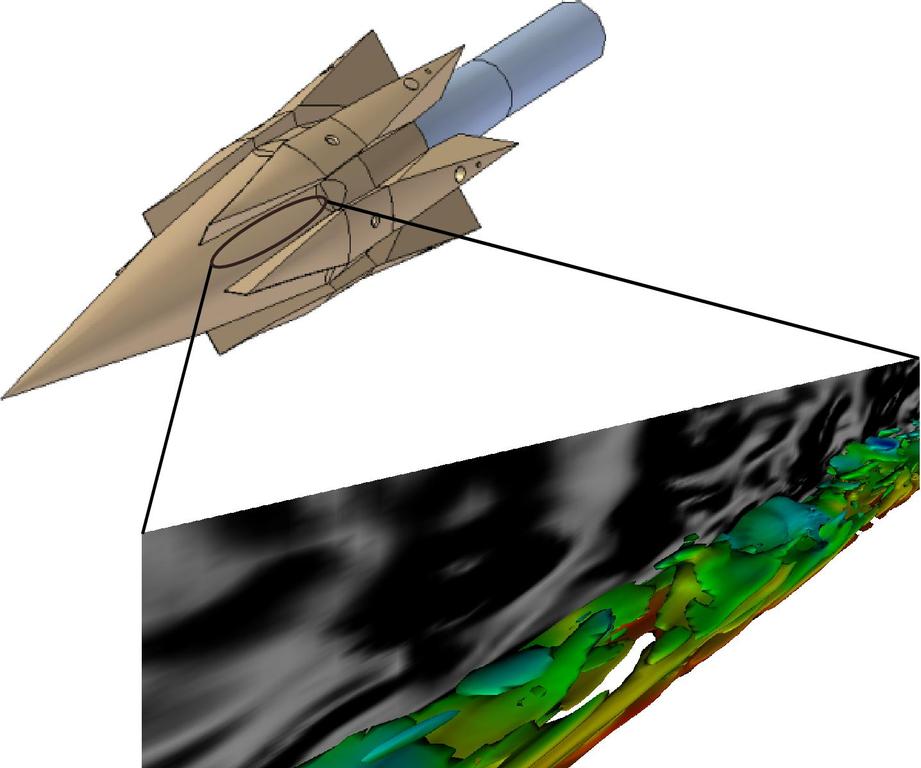
Figure 1. Computations of Turbulent Flow
Figure 1 shows an example of the results of computations inside a scramjet combustion chamber. The colored contours represent vorticity, which is an indication of mixing, and the shaded pattern shows flow density variations.
The Centre for Computational Molecular Science (CCMS) engages in interdisciplinary research in areas where molecular scale computations are involved. The areas of research are diverse and include studies of electronic structure, quantum and molecular dynamics, computational nanotechnology and biomolecular modelling. Among the current projects is the computational modelling of red fluorescent proteins found in coral reefs that have application in deep-tissue biomedical imaging. Another project is investigating materials for hydrogen storage in future fuel cell technologies.
The quantum and molecular dynamics group conducts research into the detailed dynamics and mechanisms of gas phase reactions. These reactions involving only a few atoms often play the key role in atmospheric or combustion cycles. The detailed quantum-level calculations are parallel in nature and are impractical to do serially as the memory requirements far exceed the average desktop. Of current interest is the study of the reaction of hydrogen with molecular oxygen. It is one of the most important reactions in the combustion of hydrocarbon fuels.
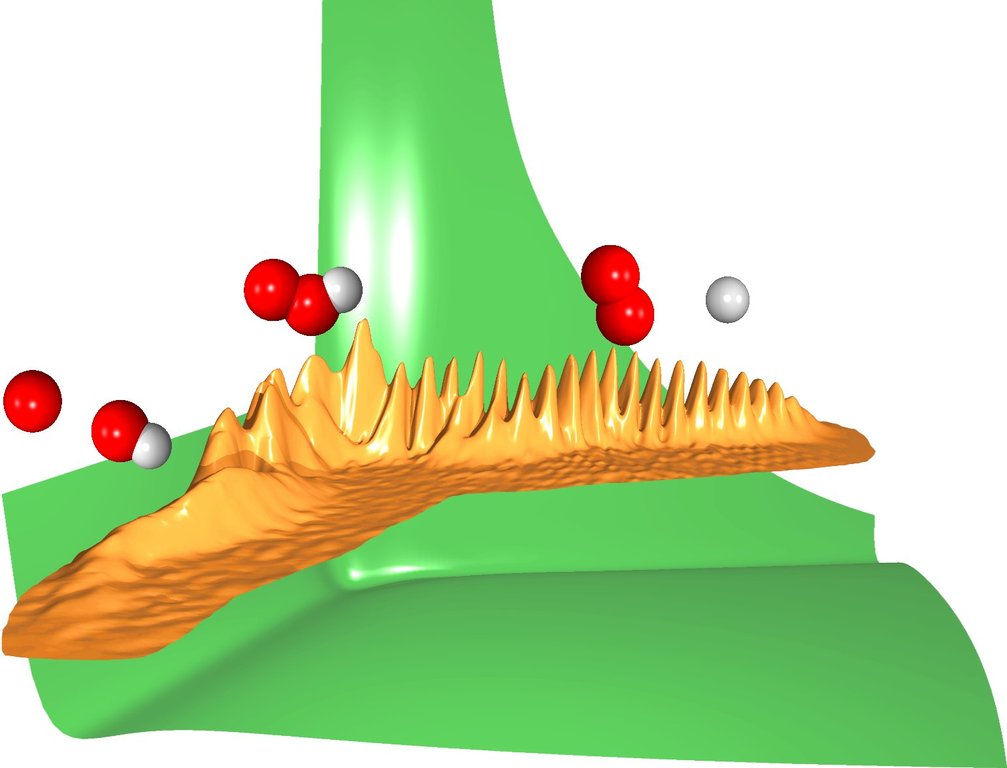
Figure 2. Quantum Dynamic Collision
Figure 2 provides a graphical representation of quantum dynamic collision of an hydrogen atom and an oxygen molecule. The figure shows the wavefunction and the potential energy for the HOO system. From right to left: the hydrogen atom approaches the oxygen molecule, the HOO complex is formed (a deep well can be seen in the potential energy surface), the complex breaks apart and the products O and OH (hydroxyl radical) are formed.
In this article, we have given an oversight of the Opteron cluster setup at the University of Queensland. We have described how effective large-scale cluster computing can be managed by a few sysadmins looking over the cluster a couple of hours per week. The success of the cluster deployment has been in part due to the quality open-source Linux tools available for cluster operation, such as the SystemImager imaging suite and the C3 package for remote command execution. We believe there are significant advantages by using these simple tools rather than cluster deployment kits. Those advantages are a highly configurable and easily upgradable system. Our cluster has been extremely reliable, and the biggest source of downtime is the power interruptions we get due to storms typical of a Queensland summer.
As for the future, we may be approaching the time when we need to consider seriously the use of some type of parallel filesystem. We have been lucky so far with our NFS file server, but we had to educate our users about file staging and ask them to treat the file server with a little bit of respect. But for now, it's all systems go.
Resources for this article: /article/9133.
Rowan Gollan is a PhD student at the Centre for Hypersonics, the University of Queensland, Australia. When not researching radiating flows about planetary-entry vehicles, his duties include part-time supervision of the cluster and a few departmental Linux servers.
Andrew Denman is also a PhD student at the Centre for Hypersonics. Andrew's doctorate is about the computation of turbulent compressible flows. He is also the ultimate authority for all happenings on the cluster.
Marlies Hankel is a Postdoctoral Researcher at the Centre for Computational Molecular Science. Marlies represents the interests of the computational scientists and prevents them from being bullied by the engineers. Marlies' current research focus is on quantum dynamics of reactive scattering processes relevant to combustion and atmospheric chemistry.


