
Add Web Porn Filtering and Other Content Filtering to Linux Desktops
Microsoft users continue to adopt the Linux operating system and naturally expect to find content filters like the ones they used with Windows XP. Often, new Linux converts experiment on their standalone personal computers at home. Because many people object to some information and images readily found on the Internet, a content filtering system is top priority—especially because parents often share computers with kids, and constant adult supervision is not always possible.
Using DansGuardian with Tinyproxy is one way parents can supervise Internet content when they are away from the family computer. A versatile content filter, DansGuardian is open-source software for use in a noncommercial setting. If you want to use DansGuardian in a commercial setting, you can buy a license or buy SmoothGuardian. Working with DansGuardian is Tinyproxy, a small open-source program that understands and evaluates the information passing through the computer. Together they provide administrative controls to block objectionable content from the Internet.
DansGuardian is a collection of pass-through filters used to stop Internet Web pages with words, phrases and pictures you don't like or want others to see. The filters within DansGuardian act as an intermediary program between a client browser, like Firefox, and the Internet. Firefox makes the information request to DansGuardian. Then, DansGuardian passes the information to Tinyproxy, which communicates with the Internet.
Information coming back from the Internet passes through Tinyproxy and DansGuardian before it gets to the client browser. Only approved information gets through the filter and appears in the browser window. DansGuardian blocks restricted Web pages and replaces the unwanted content with an “access denied” security screen displayed in the browser window.
This has not been a high-level description of the filtering procedure. In fact, the way Tinyproxy and DansGuardian work together is complex and interesting. If you want to explore how this works, check out the DansGuardian “Flow of Events” page (see the on-line Resources). Here, you can find a more thorough discussion of filtering and how data passes between each program and the Internet.
What's important to know is you can define many words, phrases and specific locations you want DansGuardian to block. In addition to Web pages with text, DansGuardian also can filter pictures and prevent the downloading of certain files. This combination of filtering is superior to other methods that block access only to a list of banned sites.
With more than 20 different configuration files, setup of DansGuardian can appear complicated to new Linux users. However, the configuration files contain clear instructions on how to edit them for your needs. In my tests, I didn't need to make a lot of changes, because the default filtering arrangement is almost ideal for family use.
First, you need to install and configure DansGuardian and Tinyproxy. Second, it's important to adjust your desktop settings to prevent users from easily turning off content filtering.
Before installing, look through the package repository of your distribution to make sure it includes DansGuardian and Tinyproxy. The most simple way to install the programs is with a GUI package manager like Novel SUSE's YaST or Synaptic. For Debian, root users enter apt-get install dansguardian tinyproxy.
If you don't have these applications in your package repository, you can download DansGuardian and Tinyproxy from their respective Web pages (see Resources). After downloading, you will find generic installation instructions in the file named INSTALL.
The next task is to customize configuration files for both Tinyproxy and DansGuardian. I use Ubuntu Dapper Drake for testing purposes, and so the directory and file illustrations are likely specific to this distribution. Other distributions organize files in a similar way; you just may need to look a little more to find the installation directory. For customizing features, the only tool necessary is a simple text editor, such as GNOME's gedit.
Using your text editor, as root user, open /etc/dansguardian/dansguardian.conf. Review the file and change filterport, proxyip and proxyport to match that shown below. Depending on your distribution, it also may be necessary to comment out the line starting with UNCONFIGURED:
# the port that DansGuardian listens to.
filterport = 8080

# the ip of the proxy—default is the loopback (this server)
proxyip = 127.0.0.1

# the port DansGuardian connects to proxy on
proxyport = 3128
DansGuardian generally connects to port 3128 by default, because that is the port used by the popular proxy called Squid. We can change this to the default port used by Tinyproxy (8888), or we can change the Tinyproxy port. In this case, we do the latter and change the port Tinyproxy uses to match the default Squid port.
For Tinyproxy, edit the file /etc/tinyproxy/tinyproxy.conf as root user. Look through this file, and make sure to change User, Group, Port and ViaProxyName, if necessary. The important thing to change is the port that Tinyproxy will use to match the DansGuardian connect port, which is 3128:
# Port to listen on.
#
Port 3128
Once you've finished with these changes, issue the command tinyproxy in your terminal, or if Ubuntu-based, type sudo /etc/init.d/tinyproxy start. This starts the proxy, and you're now ready to finish off the installation by adjusting your browser preferences. If you want to learn more, look at the DansGuardian documentation links (see Resources) for a description of this process.
Ubuntu comes with Firefox as the preferred client browser, so the instructions here are specific to Firefox. Other client browsers will likely have similar capabilities and documentation to show how to mimic these instructions.
This last installation step points the browser at port 8080, so it sends data only through DansGuardian and Tinyproxy. With Firefox, go to Edit→Preferences→General tab→Connection Settings to see the screen shown in Figure 1. As shown, select manual proxy configuration, enter localhost and port 8080. This assumes you are going to install and use DansGuardian and Tinyproxy on every workstation. If you set up DansGuardian and Tinyproxy on a separate server, then you need to enter the name or IP address of the server machine that runs DansGuardian and Tinyproxy instead of the word localhost in the HTTP Proxy: line.
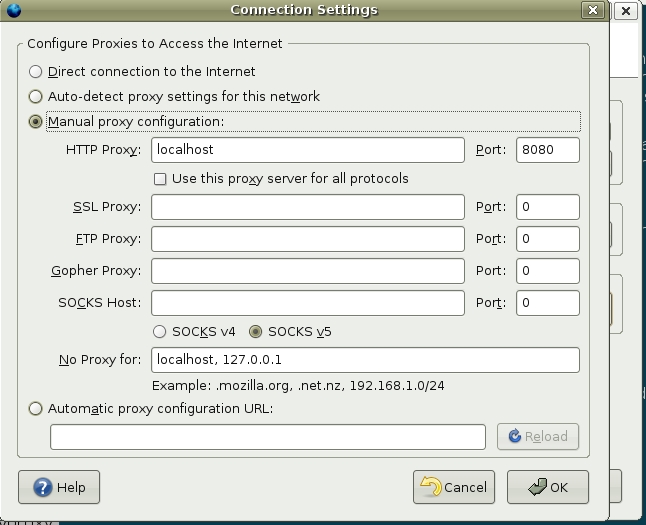
Figure 1. Set up your browser to use the proxy.
Restart your browser and test how well the filter works.
When testing the new filter, you should see an access denied screen similar to the one shown in Figure 2. Before going any further, it's a good idea to look for problems you may find with the default filter settings. For example, I often download .tar and other executable files. The default configuration file stops these files from download. To fix this problem, you need to edit the bannedextensionlist.txt file, and place a # to comment out the file extensions you want to let through the filter.
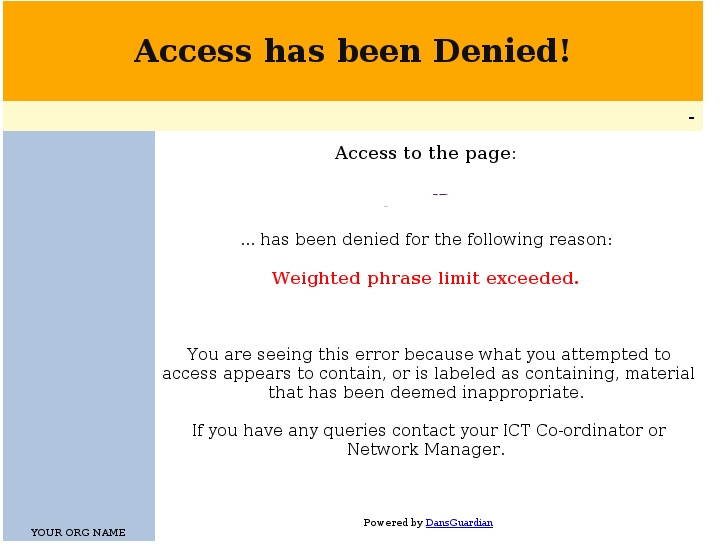
Figure 2. A Typical DansGuardian Access Denied Page
To be thorough, you should look through all default configuration .txt files with DansGuardian to tailor how you want the filters to react. You won't know all the situations you'll run into at first, but this is a good opportunity to gain an understanding of this application's powerful features.
No system is perfect, and there are several obvious ways to defeat DansGuardian and Tinyproxy. The most noteworthy is how easily users can bypass the proxy and filters. Without further protection, a user can restore Firefox's preferences back to Direct Connection, which bypasses DansGuardian and Tinyproxy. Once reversed, users have unrestricted access to the Internet.
However, there are more ways to secure the DansGuardian filters further by forcing all communication with the Internet through port 8080. A link on the DansGuardian documentation Web page explains a well-thought-out method of using FireHol to force this condition on all Internet thoroughfares (see Resources).
For the novice user, an easier approach is to set up a filtering plan that includes restricted user privileges, locked browser preferences and making sure the proxy filters start each time the computer reboots.
For test purposes, I created a new user account on Ubuntu Dapper Drake (Figure 3). Using the checklist features, I severely limited the capability of the user test. Although these privileges could be just right for anyone who has no computer experience or who is plainly not trustworthy. Utilities like update-rc.d and fcconf define certain programs to start at the system boot. I used a bootup manager called BUM to make DansGuardian and Tinyproxy start at each boot.
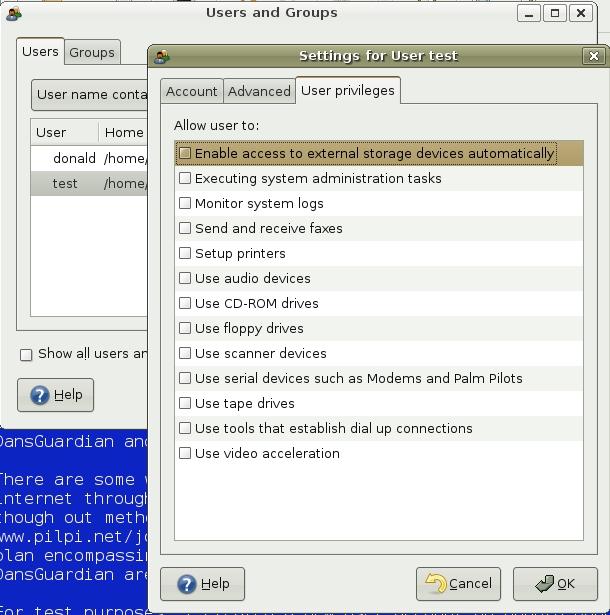
Figure 3. Ubuntu Dapper Drake User Privilege Settings
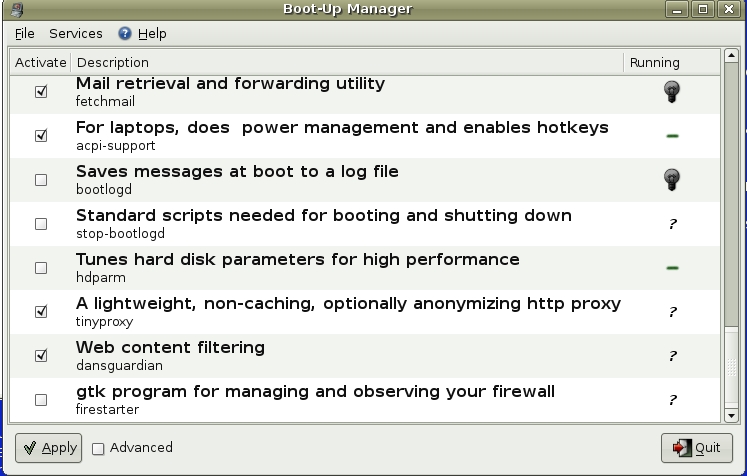
Figure 4. Set up DansGuardian and Tinyproxy to run every time you boot Linux.
Finally, I decided to lock down the preferences of Firefox. Restricting Firefox's preferences is not as difficult as it may sound. An older copyrighted article titled “HOWTO Lock Down Mozilla Preferences for LTSP” by Warren Togami (see Resources) describes how to carry this out in great detail. Although, I didn't want to mess with byte shift coding to achieve similar results.
After rummaging through Mozilla.org's Web site, I chose to add lockPref statements to my Firefox configuration file to keep users from changing connection settings. I edited the file /usr/lib/firefox/firefox.cfg to appear as the one shown in Figure 5. The last three lines force a manual proxy selection on localhost, port 8080. After saving this file and restarting Firefox, you can't reset the connection settings. Further, other users without administrative privileges could not quickly change the settings and bypass the filters.

Figure 5. Lock down Firefox settings so they can't be changed without administrative privileges.
After customizing the filters to your liking, it's important to realize that some settings become stale. Blacklisted sites and new phrases are likely to go out of date sooner than others. New Web sites you will want to block come on-line often, and new word combinations can make past phrases obsolete. Looking through the Extras link on the DansGuardian site, you will find more information on blacklists. In addition, several users have contributed scripts to automate blacklist generation and update.
As an alternative, URLblacklist.com allows new users to download their first file free. Afterwards, you can sign up for a periodic subscription for access to the latest-and-greatest information. Instructions for applying the new data for DansGuardian are on the Web site.
Another consideration is whether the proxy and filter will slow down Internet surfing and page loading. Some users will suffer a small impact on Web surfing performance when using Tinyproxy. In my own testing, I noticed a slight delay, plus a couple of issues with my browser cache. Clearing the Firefox cache with Ctrl-Shift-Del fixed the cache problems right away. Occasionally, it has been necessary to restart Tinyproxy, After doing so, my Internet performance improved. Although annoying at times, these small issues are acceptable trade-offs.
Both DansGuardian and Tinyproxy make log files for administrators to review. Within /var/log, you should find directories for DansGuardian and Tinyproxy. Using an editor, open the files and search through the data to find out what's been happening on the computer. Sequentially stored data and clear comment fields make the file easier to understand. For DansGuardian, there is a user-contributed add-on script for searching and displaying the results in a more user-friendly format.
One feature not found in DansGuardian is the capacity to e-mail the log files to a third party for review. This can be a real deterrent for some people if they know they have an accountability partner watching their actions on the Internet.
Before settling on this solution for content filtering, consider what your overall requirements are in the upcoming months. If you have only one computer to deal with and you don't mind tinkering with configuration files, DansGuardian is probably a good choice. Alternatively, SmoothGuardian looks like a great buy for $90 US. Plus, the software includes a user-friendly Web-based interface and nontechnical installation.
Nevertheless, setup of DansGuardian and Tinyproxy is well within the scope of new Linux users, and the free price fits most budgets nicely. Using this article and its references as a guide, you shouldn't have too much difficulty getting up and running. Even if you do battle a few problems, using Google to search for answers is easy. Plus, there is also a Web content filtering portal linked to the DansGuardian home page (see Resources) and an IRC chat location.
Overall, DansGuardian and Tinyproxy are frontrunners in the Open Source world and help ease the transition from the Microsoft Windows environment. I think you'll find flexible filtering and lightweight proxy overhead make this a good combination for small networking environments.
Resources for this article: /article/9291.
Donald Emmack is Managing Partner of The IntelliGents & Co. He works extensively as a writer and business consultant in North America. You can reach him at donald@theintelligents.com or by cruising the 2 meter amateur RF bands in the Midwest.
