
X Window System Programming with Tcl and Tk
Anyone who has ever programmed X applications through the Xlib interface, or the arcane X Toolkit Intrinsics, or even Motif, knows that it is an experience that cannot be fully appreciated without beating one's head against the desk several times an hour. X programming at the C level can often be quite complex, forcing the programmer to concentrate on messy technical issues instead of simply building an interface. (Of course, the tradeoff for this complexity is power and flexibility.) That's why we have Tcl and Tk.
Tcl (Tool Command Language) is an interpreted script language not unlike C Shell or Perl. It provides all of the basic facilities that you'd expect in such a language: variables, procedures, loops, file I/O, and so forth; nothing too flashy or bizarre. If you've ever written shell scripts you'll find Tcl quite easy to pick up.
What makes Tcl special is that it can be embedded in other applications. That is, the Tcl interpreter is a library of C routines which you can call from your own program. For example; let's say that you're writing a debugger, similar in nature to gdb.You need routines to allow the user to enter commands (such as “step 10” or “breakpoint foot c:23”) at a prompt. You'd also like to allow the user to customize the debugging environment by writing new command procedures or modifying state variables. A good way tohandle the user interface would be with Tcl. You can link the Tcl interpreter to your application, and all of the features of that language will be available. The user's commands, entered at the debugger prompt, would be executed by the Tcl interpreter, which could call C functions that you have written. If the user needs to customize aspects of the application, they can write Tcl scripts to implement new commands, and so forth.
Tcl itself may not be very exciting, but coupled with Tk it certainly is. Tk is a set of extensions to Tcl which implement commands for writing X Window System applications. These commands allow you to create buttons, scrollbars, text entry widgets, menus, and much more; permitting you to write X applications as simple Tcl scripts. With Tcl and Tk, there's little need to learn the C library interface for X programming; Tcl and Tk provide access to many X Window System facilities. In addition, you can embed Tcl and Tk in your own applications, written in C, to greatly enhance the power of this system.
This article is the first in a series on Tcl and Tk. In this article, I'm going to describe how to write simple X programs as Tcl/Tk scripts. Next month, I'm going to describe how to use the Tcl/Tk interpreter in conjunction with programs written in C or Perl.
The syntax of the Tcl language itself is relatively straightforward and will be obvious to anyone who has programmed, say, shell or Perl scripts. For this reason, I'm not going to spend much time describing the syntax of the Tcl language itself; I'm going to concentrate on the X- specific features of the Tk toolkit. See the sidebar, “Getting Tcl and Tk”, for other sources of information on Tcl.
Let's dive right in with a simple Tcl/Tk program. The Tcl/Tk interpreter is named wish (“window shell”). Assuming that you have Tcl/Tk installed on your system, and X running, you should be able to execute wish. You will be presented with a blank, rectangular window, and a wish prompt.
You can type Tcl/Tk commands at this prompt, and the results will be displayed in the wish window. For example, if you type: button .b -text “Hello, world!” -command { exit } pack .b
the wish window should reduce to a single button containing the string “Hello, world!”. (See Figure 1. next page ) Pressing this button will cause the wish process to exit.
What did we just do? Every Tcl command begins with a command name, followed by any arguments. button is a Tk command which creates a button. In this case, we want the button to contain the text “Hello, world!”, and we wish it to execute the Tcl exit command when it is pressed. The first argument to button,“.b”, is the name that we wish to give to the button widget.

Figure 1
(A widget is simply a graphical object, such as a button, scrollbar, etc., which has certain visual and functional properties. Tk supports many types of widgets, as we'll see.) We can later refer to the button with this name.
The pack command is a geometry manager; it controls how widgets are placed within the wish window. pack is a simple geometry manager which “packs” (hence the name) widgets one at a time next to each other. The widget is not made visible until it is given a position with pack.
In this case, we wish to pack the button widget into the wish window. pack can take a number of arguments to specify the position of the widget relative to other widgets. However, here we have but one widget, so the default behavior is acceptable.
Instead of typing commands to the wish process, you can write scripts to be executed via wish. Here's a simple program which will prompt you for a filename, and then start an xterm running vi to edit the file.
#!/usr/local/bin/wish -f
label .1 -text "Filename:"
entry .e -relief sunken -width 30 -textvariable\
  fname
pack .1 -side left
pack .e -side left -padx
lm -pady lm
bind .e <Return> {
exec xterm -e vi $fname
If you save the above in a file named edit.tcl, and then run it, you should be presented with a window as in Figure 2. (This assumes, of course, that you have wish installed in /usr/local/bin. Edit the pathname on the first line of the script if not.) Just as with shell scripts, you will need to make the file executable before running it.
Let's walk through this script. The first line is a label command, which (as you might guess) creates a label widget. A label contains only a static text string. We name this widget .1 (more on widget naming conventions later), and give it the text value “Filename:”.
The second line creates an entry widget, named .e. An entry widget is like a label, except that it allows the user to edit the text. The -relief sunken option indicates that the widget should appear as though it is “recessed” in the window, as you can see in Figure 2. The -width option sets the width of the entry widget in characters, and the -textvariable option indicates that the value of the entry text should be stored in the variable fname.
The next two lines pack the label widget, followed by the entry widget, into the wish window. In both cases we specify -side left, which indicates that the widgets should be packed into the left side of the window, one after the other. When packing the entry widget, we use the -padx and -pady options to leave a bit of “paddingH (here, one millimeter) around the sides of the widget. The Tcl pack man page describes these options in detail.
The last three lines of our script use the bind command to create an event binding for our entry widget. A binding allows you to execute a series of commands when a certain event occurs in a widget; for example, a mouse button click or a keypress. In this case, we wish to execute a command whenever the RETURN key is pressed in the entry widget. The command:
exec xterm -e vi $fname
will start up an xterm running vi on the filename entered by the user. Note the use of the fname variable,

Figure 2
which we associated with the entry widget on the second line of the script. The variable name is prefixed with a dollar sign, to refer to the value of fname itself. This is similar to the variable syntax used in shell scripts.
One short note about Tcl syntax: Braces ( { ... }) are used to group a set of Tcl commands together as a ”sub-script“. The commands contained within the braces are passed to the Td interpreter without performing variable substitution. This is an important concept to understand. Without the braces, the Tcl interpreter would have attempted to substitute the value of the variable fname while interpreting the bind command in the script. That is, when the bind command is first executed, the variable fname has no value. Without braces, the Tcl interpreter would complain that fname is an unknown variable. Using braces, however, we delay the interpretation of $fname until the event binding is actually executed; in this case, when Return is pressed in the entry widget.
Tk is a set of extensions to Tcl which implement commands... permitting you to write X applications as simple Tcl scripts.
Note that Tcl has several odd rules with respect to line breaks. Tcl expects each command to consist of a single line; the end of a line indicates the end of a command, unless the line ends with a backslash, the same as in shell scripts. However, if a line ends in an opening brace, Tcl understands that you are beginning a sub-script, to be contained within braces, and continues to read the script until a closing brace. For this reason, you can't say:
bind .e <Return>
{
exec xterm -e vi $fname
{
Tcl will think that the bind command ends after the first line, and complain that it needs a script to execute for the event binding. Therefore, when using braces to encapsulate a sub-script, be sure that the opening brace is at the end of the line beginning the script.
In Tk, widgets are named in a hierarchial fashion. The topmost ”shellH widget (that is, the main wish window) is named “ . ” (dot). All widgets which are direct childIen of . are given names beginning with ., such as .b,.entry,.leftscroll, and so forth. The widget name can be any alphanumeric string beginning with a dot; you choose the widget name when you create the widget, using commands such as button and label. Further subwidgets are given names such as .foo.bar.bar, where each level is separated with a dot.
For example, you might have a menu bar widget named .mbar. It is a child, of course, of ., the main window. Menu buttons contained within the menu bar might be named .mbar.file,.mbar.options, and so forth. That is, the menu bar is a child of the main application window, and the individual menu buttons are children of the menu bar. Arranging widgets into a hierarchy allows you to group them together for logical and visual purposes. I'll cover this in more detail later.
In order to demonstrate the power of Tcl/Tk, I'm going to present an actual application, written entirely as a Tcl/Tk script. As I go along I will describe the syntax used and the features available. You can use the Tcl/Tk man pages to fill in the gaps.
This program is a simple drawing application, utilizing the Tk canvas widget. The canvas is a simple graphics display widget which will display various kinds of objects: rectangles, lines, text, ovals, and so forth. What we're going to do is combine the canvas widget with the user interface capabilities of Tk to allow the user to draw objects using the mouse.

Figure 3
Figure 3 demonstrates what our application looks like when used. The Color menu has been pulled down so that you can see the various selections available.
The entire script, draw.tcl, is given here. Note that it's less than 200 lines long. This is amazingly short for such a complicated X application involving menus, colors, mouse input, and so forth. If you don't feel like entering this entire script, the code is available via ftp from sunsite.unc.edu, in the directory /pub/Linux/docs/LJ.
At first glance, this script might appear to be complicated. There are a few rough spots, but the overall concepts presented here are quite simple. Let's take a closer look at this program, but let's start near the middle of the script, where we create the frame widget:
frame .mbar -relief groove -bd
pack .mbar -side top -expand yes -fill x
The frame command creates a frame widget, which is used to group widgets together. The frame itself is usually invisible, unless you specify that a border should be drawn around it.
Here we create a frame named .mbar, and specify that it should use the groove relief type. The “relief” of a widget indicates what kind of 3D border should appear around the widget. (Many options, such as -relief, bd, -foreground, and -background are supported by all widget types.) The valid types for -relief are:
raised: Makes widget appear to be raised on display.
sunken: Makes widget appear to sink into display.
ridge: Draw raised ridge around widget border.
groove: Draw sunken groove around widget border.
flat: No relief; appear as if flat.
The -ted option specifies the border width to use for the widget (in this case, the width of the groove). Here, we set the border width to 3 pixels.
Next, we pack .mbar into the wish window. (By default, widgets are packed into their direct parent. In this case, the parent of .mbar is ., the topmost window). The -side argument to pack indicates which side of the parent we should pack .mbar into. The -expand yes option indicates that the widget should be given all of the extra space around it. Because we are packing the widget into the top edge of the window, the -expand option gives the widget any extra horizontal space to its left and right. The -fill x command causes the widget to grow until it fills this space. Using -expand yes without -fill would give the widget the extra horizontal space, but the widget wouldn't grow to fill that space. (If you're interested in how this works, experiment with the pack command in various forms. Also, see the pack man page or Ousterhout's book for more details.)
Having created and packed our menu bar, we create three menu items, using the menubutton command:
menubutton .mbar.file -text "File" -underline 0 \
        -menu .mbar.file.menu
menubutton .mbar.obj -text "Object" -underline 0 \
        -menu .mbar.obj.menu
menubutton .mbar.color -text "Color" -underline 0 \
        -menu .mbar.color.menu
pack .mbar.file .mbar.obj .mbar.color -side left
A menubutton widget is simply a button which, when pressed, causes a menu to appear below it. First, note that the menu buttons are child widgets of the .mbar widget. The -text option specifies the text to be displayed within the menubutton, and the -underline option specifies the index of the letter in the menubutton text to underline for keyboard shortcuts. In each case, we underline the first letter of the string (see: Figure 3).
The -menu option specifies the name of the menu widget which should appear when the button is pressed. We haven't created these widgets (.mbar.file.menu, and so on) yet, but do so immediately thereafter.
First, we create the File men
menu .mbar.file.menu
        .mbar.file.menu add command -label \
                "Save PostScript..." -command { get_ps
        .mbar.file.menu add command -label "Quit"
                -command { exit }
The menu command creates a menu widget with the given name. (Note that the menu .mbar.file.menu is a child widget of the menubutton .mbar.file). We then add menu entries to this widget using the add menu widget command.
Note that widget names themselves are commands. In general, if we want to perform a function on a specific widget, we invoke it as a command and use various widget subcommands. For example, to modify the appearance of a widget, we can use the widget subcommand configure:
<widget name> configure [ <options> ... ]
For example,
.mbar configure -background blue
would change the .mbar widget background color to blue. The widget man pages included with Tcl/Tk describe which subcommands are available with each widget type.
In the example above, we use the menu subcommand add to add entries to a menu. The syntax is
<widget name> add <entry type> [ <options> ... ]
where <entry type> is one of:
command-: Like a button widget, invokes a Tcl command when selected. radictutton- A group of radicLutton entries controls the value of a named variable. One radiobutton in the group (that is, only one radiobutton associated with a given variable) may be activated at any given time.
checkbutton: Similar to radicLutton. Will toggle the value of a variable to either 0 (off) or 1 (on). Unlike radiobuttons, how“ ever, checkbuttons are not mutually exclusive with one another.
cascade: Allows you to ”cascade“ sub-menus within the current menu.
separator: A nonfunctional menu separator, used to visually divide menu entries.
The menu man page describes these in more detail. Within the File menu, we create two command entries. When selected, each entry executes the command given by the -command argument. The -label argument, as you can guess, assigns a text label to the menu entry.
The Object menu is similar in nature to the File menu, except that it uses radiobutton entries. These entries are linked to the variable object_type. When we select the Ovals option from the menu, object_type is set to oval. Likewise, when selecting Rectangles, the variable is set to rect. Because these are radiobuttons, only one may be selected at a time. Later, we'll see how the object_type variable affects object drawing within the canvas widget.
The Color menu is like the Object menu: We have four radiobutton entries linked to the variable thecolor. We use the -background option with these entries to visually depict the color being selected.
After creating the menus, we use the tk_menubar command to tell Tk that this is the primary menu bar for our application. This enables keyboard shortcuts for the menu bar. If you press Alt along with one of the underlined letters in a menu title, that menu will be activated. For example, pressing Alt-F will activate the File menu. The -underline argument to the menubutton command controls which letter activates which menu. Pressing F10 activates the leftmost menu, and you can use the arrow keys to move around.
The focus command is used to cause all keyboard events in the application window to be received by the menu bar. Otherwise, the mouse pointer would have to be within the menu bar for the keyboard shortcut events to be received. This is yet another fine point about X programming which you shouldn't concern yourself with at this point.
The first menu entry on the File menu, ”Save PostScript...“, executes the command get_ps, which is a procedure which we have defined earlier in the script. The proc command is used to define procedures; the syntax is:
proc <procedure name> <arguments> <body>
where <procedure name> is, of couse, the name of the procedure to define, <arguments> is a bracketed list of arguments to the procedure, and <body> is the script to execute when the procedure is called.
Take a look at the get_ps procedure. It uses the canvas widget postscript subcommand, which saves a PostScript image of the canvas widget to a file. This is a very handy feature, which we can use to ”save“ our drawing (possibly to print out or view with Ghostview).
The get_ps command displays a dialog box asking for the name of the file to save, and two buttons, Okay and Cancel (see Figure 4, page 28).
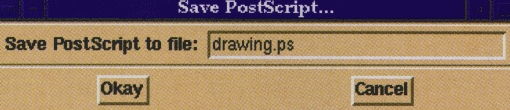
Figure 4
The dialog box, which is a separate window, is actually a toplevel widget. We use the -class option to toplevel to change the window class; this has to do with the X resource database settings for the new window (not an important detail here). We name our new toplevel widget .ask, and use the wm (window manager) command to set the title for the window.
Within the toplevel widget, we create two frames, .ask.top and .ask.bottom. These will serve to group widgets together. We wish to have a label and a text entry widget in the top frame, and the two buttons in the bottom frame. (This is for visual effect only: using frames is a very good way to group widgets together when using pack). Therefore, we create the frames using the frame command and pack them into the toplevel task. Nothing new here.
Within the top frame, we create a label and an entry. This is equivalent to our first example script, edit.tcl. Note that the label (.ask.top.l) and the entry (.ask.top.e) are children of the frame widget, which is in turn a child of .ask. Also, we bind the Return key in the entry widget to execute the postscript subcommand of the canvas widget, .c (which we will create later in the script), and destroy the .ask widget. This has the effect of ”popping down“ the dialog box.
In the lower frame, we create two button widgets and bind similar commands to them. This should be selfexplanatory. Finally, we use the grab command. This causes mouse and keyboard events to be confined to the dialog box window. Otherwise, you would be able to continue drawing within the main application window while the Save PostScnpt dialog box was active; we certainly wouldn't want that.
Having dealt with the menus, we are ready to tackle the canvas widget, which will be used for drawing. First, we create the widget and pack it into the application window. Next, we create two event bindings within the canvas: one for <ButtonPress-1> (executed when mouse button 1 is depressed) and one for <B1-Motion> (executed when the mouse is moved while button 1 is pressed).
The event names used with bind are the standard X11 event specifiers. These are described in any book on X11 programming (as well as good X user guides). There are too many types of X events to enumerate here; see the header file /usr/include/X11/X.h for a list of event names.
When button 1 is depressed in the canvas widget, we wish to start drawing an object of the type specified by the object_type variable, in the color thecolor. First, we set the global variables orig_x and orig_y to the original position of the mouse click; this defines the upper-left-hand comer of the object to draw. As the comments say, the pseudo-variables sx and sy refer to the %x and %y coordinates of the event.
Next, we use the canvas create subcommand to create an object. The syntax is:
<canvas name> create `(type> <xl> <yl> <x2> <y2>: \ [ <options> ... ]
This will create an object of type <type> with upper-lefthand comer at <xl> ,<yl> and lower-right-hand corner at <x2>, <y27gt;. The valid object types are arc, bitmap, line, oval, polygon, rectangle, text, and window. The Tk canvas man page describes them all.
The canvas create subcommand returns a unique identifier (just an integer) for the object just created. A Tcl/Tk command contained within square brackets ( [ . . . ]) is used to run a sub-script, the retum value of which will be substituted in its place. We assign the retum value of the create subcommand to the variable theitem. We will use this value, later, to resize the object when the mouse is dragged.
The binding for <B1-Motion> is very similar. First, we delete the item with the identifier given by the variable theitem, and then re-create the item with the new lower-right-hand comer defined by the current position of the mouse. The original upper-left-hand corner has
been saved in the variables orig_x and orig_y, and we re-use them here. We save the new object identifier back in the theitem variable. What we have essentially done is deleted the current object, and re-created it with a new size based on the mouse position during the drag. The visual effect of this is that the item is resized while we drag the mouse.
The last few lines of our script invoke the first entries in the Object and Color menus. This enables the oval object type, and the color of red, just as if we had selected these menu items with the mouse. If we did not do this, no object type or color would be selected when the application started. Of course, we could have set the variables object_type and thecolorby hand; however, the radiobutton entries in the menu would not be highlighted to correspond with those variable settings. Using the menu item invoke subcommand solves both problems at once.
There you have it! A complete X drawing application, complete with colors, menus, and PostScript capabilities, all in a few hundred lines of interpreted Tcl/Tk script.
Along with the man pages and the information in this article, you should be ready to explore Tcl and Tk on your own.
As you can see, Tcl/Tk programming is easy; it's an ideal way to write simple X applications, or add X frontends to your favorite utilities. There's a complete text edit widget which will allow you to interface with other textbased applications, as well. And Tcl/Tk is extremely customizable; everything from the keyboard and mouse widget bindings to the fonts and highlight colors can be modified.
Writing entire applications as Tcl/Tk scripts may not suit your needs, however. In next month's article, I'm going to descibe how to use the Tcl/Tk interpreter, wish, as a ”server" for X interface requests from a C or Perl program. (You can even draw directly to Tk windows using lower-level Xlib function calls from C.) This will allow you to write complicated X-based programs without having to dabble in the Xt Intrinsics or Motif.
Happy hacking.
Matt Welsh (mdw@sunsite.unc.edu) is a writer and code grunt working with the Linux Documentation Project and the Debian development team. The author welcomes questions and comments.

