
Building and Integrating a Small Office Intranet
Intranets have been around for a long time. They were one of the first alternate uses for World Wide Web technology back in the early 1990s. The idea of bringing a little bit of the Web experience in-house was very attractive, but integration with existing systems was difficult. Thus, a lot of intranets were nothing more than glorified bulletin boards with some user-publishing features thrown in. The landscape is different now, with open-source software ready to take most of the cost and some of the complexity away from a good intranet setup. The so-called LAMP stack provides the perfect neutral platform for integrating many different pieces of software into a single point of interaction for users. That's what we have tried to do at our company.
Our intranet started off in 1999 as a Web-based bulletin board and company calendar on a Red Hat 6.0 server running Apache. It was a static HTML site that was designed and kept current by our marketing manager. After she left the company in 2002, we needed to make the intranet more dynamic so that it didn't depend on one person to keep it up to date. As is usually the case, we added more and more features over the years and now have a very useful, user-friendly intranet site without a lot of unnecessary or static content that needs to be maintained. In this article, I use our intranet as an example of how to solve four of the more common integration tasks that small business admins may run into when setting up a LAMP-based intranet.
Our intranet currently serves about 70 employees and runs on an IBM x335 server running Fedora Core 4. We use a normal LAMP stack (Linux, Apache 1.3x, MySQL and Perl) with mod_perl to improve performance. Apache currently shares the server with our e-mail scanner, internal DNS, Jabber, Samba and some other services. It's nice having all of this running on a single Linux server, because it reduces the need for NFS mounts and cuts down on network traffic. Some sites will be too large for this approach, but nothing in our design would preclude it from working in a multiserver setup. All of our users run Windows XP and authenticate through Active Directory. We use GroupWise as our e-mail software running on a NetWare 6 server, and all of its information is handled by Novell's eDirectory. We also have a time and billing system that runs on a Windows NT 4.0 server and stores its data in a Microsoft SQL Server database. You can see a layout of how everything links together in Figure 1.
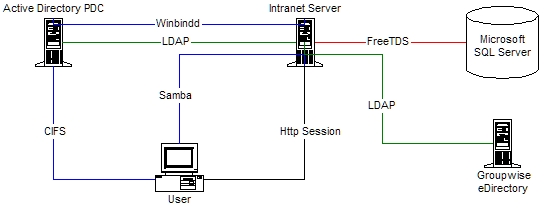
Figure 1. How Our Enterprise Services Are Connected
We decided early on that our users shouldn't have to authenticate in any way to our intranet. The site should automatically “know” who they are based on their IP address and information gleaned from the network about who is currently logged in from that address. We call this technique server-side credentialing (SSC). We accomplished this originally by using a piece of custom-written client-side software that was contacted by a CGI script any time the server needed to check a user's identity. This works, but it places too much trust on the client side. A sniffer and a Perl script could fake a user's identity nicely from any client computer. We now use Samba and winbindd for this task.
Because our intranet server resides on a trusted internal network, it is privy to the current state of affairs on the network, including who is logged in from where. Every computer in the office maps a drive letter to the Samba server during login, so any time the server needs the current user's identity, it simply looks up his or her IP address in the Samba connection list. The mapped drive is just a dummy drive explicitly for the SSC mechanism. I think this is an important feature, because it lowers the complexity of the site from a programming standpoint and allows users to browse freely without having to worry about registering or logging in. Users have enough user names and passwords to keep track of already without us adding to their burden.
The way you set up SSC depends on how your users authenticate on your network. We use Active Directory, so that is what I demonstrate here. Active Directory is annoying (surprise, surprise), because it doesn't store connection status information in its directory. You must use traditional RPC calls with Samba's net command to get reliable results. Our SSC script is called smbconn.sh, and it looks like this:
#!/bin/sh

net status sessions parseable              \
| grep -i "\\\\$1\\\\"                     \
| sed 's/^.*\\\(.*\)\\.*\\.*\\.*$/\1/g'    \
| sed 's/DOMAIN+//g' | tr -d ' '
Pretty simple, eh? Just remember to change DOMAIN to whatever your Active Directory's domain name is. This script returns the name of the user object that is logged in to Samba from the IP address we pass to it on the command line. The name it returns corresponds to Active Directory's sAMAccountName property. Armed with this information, we now can run an LDAP lookup to get the user's full name or any other data we might need. The script we use to do this is found in Listing 1. It will take the user's sAMAccountName as its first argument and an optional attribute whose value you want returned as the second argument. If you don't provide the optional attribute, the script returns the user's full name. You could do all of this in a custom mod_perl handler so that its information always would be available, but this seems like overkill for most sites. Our site has only a handful of restricted sections where this information comes into play, so we just let each CGI script run it as needed. Here is a typical SSC call from one of our CGI scripts:
##: Get this connection's user credentials
my $remoteip=$ENV{'REMOTE_ADDR'};

open(SMBCONN,"smbconn.sh $remoteip |");
my $cn=<SMBCONN>;
$cn=~s/\s+//g;    ##: Strip whitespace
close(SMBCONN);

open(GETEMPINFO,"getempinfo.pl $cn |");
my $username=<GETEMPINFO>;
close(GETEMPINFO);
if($username eq "") {
  $username="Guest";
}
This section of code leaves us with the user's sAMAccountName in the $cn variable and the user's full name in the $username variable. If the $username variable contains Guest, either the lookup failed or the computer accessing this CGI script doesn't have a logged-in user operating it. We now can use this critical information to decide whether the user has access to the information this CGI script is meant to provide. We also can use this information to return a page customized for this particular user. I demonstrate this with a section of code from the index.cgi file that serves up our home page:
##: My Intranet section
my $mint="";
if(($username eq "Guest") || ($username eq "")) {
  open(EMPSNAP,"./random-employee.pl 2>&1 |");
  my @snap=<EMPSNAP>;
  close(EMPSNAP);
  $mint.=join("\n",@snap);
  chop($mint);
} else {
  $mint.=&get_emp_card($cn);
  $mint.="<b>E-Mail Controls:</b><br>\n";
  $mint.="<a href='selfserv.cgi'>My Mail</a>\n";
  ...
}
...
print STDOUT $mint;
You can see here that we check to see if the person viewing the home page is actually a credentialed user. If he or she is not, we serve up a random employee's picture and profile in this section of the home page. If the person is a credentialed user, we grab the appropriate personal information from the LDAP directory and proceed to assemble a My Intranet area in this section of the home page where the user can edit his or her employee profile, control mail preferences and so forth. The get_emp_card($cn) routine simply looks up the user's current info in Active Directory and returns a nicely formatted HTML section to display it (Figure 2).
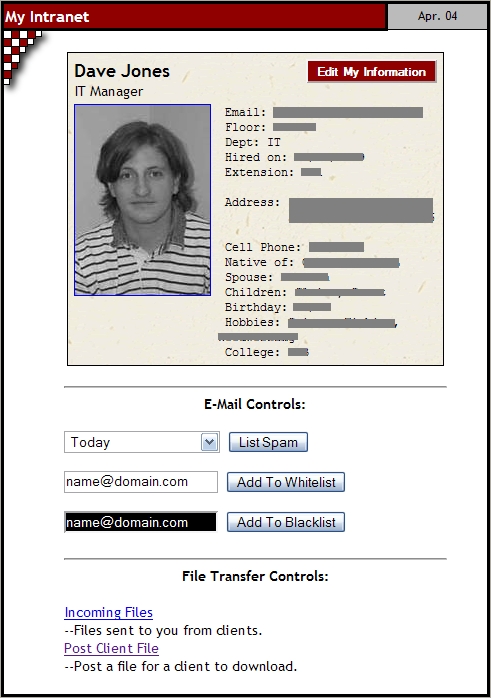
Figure 2. A Sample User Profile on the Intranet
Listing 1. getempinfo.pl
#!/usr/bin/perl -w
use Net::LDAP;
use strict;

my $cn=$ARGV[0] || "none";
my $attr=$ARGV[1] || "none";

##: If nothing was given on command line then return
if($cn eq "none") {
  print STDERR "ERROR: No LDAP cn given\n";
  exit(1);
}

##: Bind anonymously to the ldap database
my $ldap=Net::LDAP->new('directory.domain.com',timeout=>5)
  or die "Couldn't connect to directory server.\n";
my $mesg=$ldap->bind('proxyuser@domain.com',password=>'proxyuser')
  or die "Couldn't connect to directory server.\n";

##: Query LDAP to get a list of employees
if($attr ne "none") {
  $mesg=$ldap->search( base=> "ou=Domain Users,dc=domain,dc=com",
                       filter=> "(sAMAccountName=$cn)",
                       attrs=> ['givenName','sn',"$attr"] );
} else {
  $mesg=$ldap->search( base=> "ou=Domain Users,dc=domain,dc=com",
                       filter=> "(sAMAccountName=$cn)",
                       attrs=> ['givenName','sn'] );
}

my $count=$mesg->count();
($count==1) or die "Error: LDAP enumeration error.";

my $entry=$mesg->entry();
my $value;
my @values;
if($attr ne "none") {
  $value="";
  @values=$entry->get_value("$attr");
  my $i=1;
  for(@values) {
    if($i>1) {
      $value.="/$_";
    } else {
      $value.=$_;
    }
    $i++;
  }
} else {
  $value=($entry->get_value('givenName')." ";
  $value.=$entry->get_value('sn'));
}

##: See if that attribute was defined for the given cn
if(!(defined($value))) {
  print STDERR "ERROR: That attribute was not defined.\n";
  exit(1);
}

$mesg=$ldap->unbind;
print("$value\n");
Another valuable addition to our intranet was integrating it with our Active Directory user database via LDAP. We use this to provide a company directory that lists all of our employees. The directory is built in real time whenever it is accessed, and that is a major time-saver for administrators. Whenever new users are added using the normal Active Directory tools, they instantly show up in the intranet directory. We also allow our users to edit their own personal information, and those edits are put into the Active Directory by the CGI script. The process is relatively straightforward, although there are some things to take into consideration. Let me walk you through the process of how we set this up.
The first thing we do is create a proxy user called proxyuser in Active Directory. This is the user name our scripts use to authenticate with LDAP. The proxy user is granted rights to read and write information on user objects within the ou=Domain Users container. That's all that needs to be done within Active Directory. We use Perl for our CGI, so that means using Net::LDAP. Here is how we connect to Active Directory from within a CGI script:
##: Active Directory connection
use Net::LDAP;

my $ldap=Net::LDAP->new('adserver.domain.com');
my $mesg=$ldap->bind('proxyuser@domain.com',
                      password=>'proxyuser'  );
Notice the syntax that Active Directory requires for the user name field. It's one of the unique requirements of Active Directory's LDAP interface. Now that we are connected to the directory, we do a query to find all the user objects in the ou=Domain Users container:
##: Query LDAP to get a list of employees
my $basedn="ou=Domain Users,dc=domain,dc=com";
my $filter="(objectClass=user)";
$mesg=$ldap->search(
  base=> $basedn,
  filter=> $filter,
  attrs=> ['givenName','sn','mail',
           'telephoneNumber','streetAddress',
           'l','st','department','postalCode',
           'employeeNumber','homePhone',
           'title','sAMAccountName' ]
  );
This returns all of the user objects in that container, along with all of the pertinent attributes you would expect to find in a company directory. We now can refine our search filter to limit our search to only those users whose last name starts with a letter passed to the CGI script in its URL. This allows us to follow an address-book format, so we don't have to display all 70 users at once. We fall back to the letter a if no letter was asked for in the URL:
##: Get letter requested in the URL
my $letter;
$letter=param('letter') || "a";
...
my $filter="(&(objectClass=user) (sn=$letter*))";
If you aren't familiar with the syntax used by LDAP search filters, I suggest you look over RFC-2254. At this point, we can iterate over our query results and prettify them as needed. Because we also looked up this user's SSC information, we can check each employee's sAMAccountName as we go through the loop. When we find the employee that corresponds to the person SSC says is viewing the page, we add a link by the employee's name that allows him or her to go to an area to edit the directory information. It looks like this:
##: Display the directory
foreach my $entry ($mesg->sorted('sn')) {

  my $san=$entry->get_value('sAMAccountName');
  $empdir.="<div class='empcard'>";
  if(lc($cn) eq lc($san)) {
    ##: This is our man.  Add a button.
    $empdir.="<a href='empedit.cgi'>Edit</a>";
  }
  $empdir.="<span id='name'>";
  $empdir.=$entry->get_value('givenName')." ";
  $empdir.=$entry->get_value('sn');
  $empdir.="</span><br>";
  $empdir.="<span id='title'>";
  $empdir.=$entry->get_value('title').";
  $empdir.="</span><br>";
  ...
  $empdir.="</div>";

}
print STDOUT $empdir;
$mesg=$ldap->unbind();
I designed an e-mail gateway for our company back in 2001, and it's still the system we use today. I wrote about it in a previous Linux Journal article in the December 2001 issue. The system has been modified tremendously since then, but it still operates in the same basic way. It's simply a store, scan and forward agent. Because this all takes place on our Linux server, our Windows users were unable to see or retrieve false positives or have any control over their SpamAssassin whitelists. We solved this by building a set of CGI scripts to let our users modify their SpamAssassin preferences file and release their false positives from the spam trap on their own, using the intranet as the interface.
Users launch the mail management scripts from their My Intranet section on our home page (Figure 2). They choose which day's mail they want to view from a drop-down box and click a button to activate the selfserv.cgi script. There is no user identity information passed to the script, because it will obtain that information from an SSC lookup. After we do the initial SSC lookup, we call the getempinfo.pl script again to get the current user's e-mail address, like this:
##: Get this user's email address
open(GETEMPINFO,"-|","getempinfo.pl",$cn,"mail");
my $searchstring=<GETEMPINFO>;
close(GETEMPINFO);
The $searchstring variable then becomes the base of the regular expression we use to search the /spam directory for spam belonging to this user. As the mail attribute coming from Active Directory is something typed in by human hands, we must do another check to make sure we aren't falling victim to typos:
##: Make sure this email address is valid
unless($searchstring=~/^[a-z]*\@domain\.com$/) {
  print STDOUT "Content-Type: text/plain\n\n";
  print STDOUT "Access Denied: Your identity on \
    the network can't be verified.\n";
  return(0);
}
If these checks are successful, the script responds by showing users the requested day's spam in a table format with a list of option links on the side of each item (Figure 3). Users then can use the option links to have the script release the spam, whitelist its sender, blacklist its sender, produce a SpamAssasin report or simply display it as plain text. The script looks up the user's SSC information each time it's called and before any action is performed so that it knows whether or not to allow that action. I won't get into more detail here, because the functions of this script consist mostly of just moving files around in response to users' requests. I do want to mention the whitelist and blacklist options though.
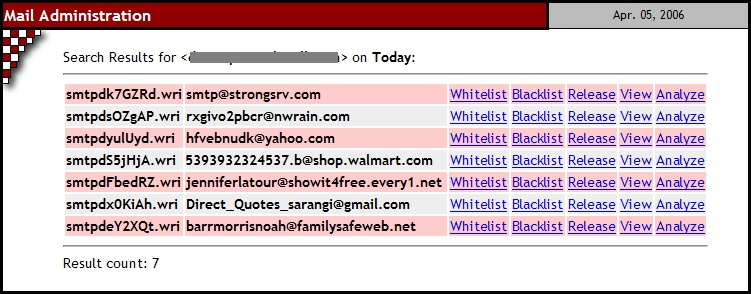
Figure 3. Options for Handling Trapped Spam
SpamAssassin holds its per-user configuration data in a file named .spamassassin/user_prefs.cf in each user's home directory. In a normal setup, where Linux is your main mail server, this is fine, but in our case, it won't work. Our Linux server is merely a scanning gateway that relays mail in and out, so it has no awareness of our users or their e-mail accounts. To solve this, we have to cheat a little. SpamAssassin's main configuration file is named /etc/mail/spamassassin/local.cf, and it reads this file every time it's started. It doesn't read only that file though. It actually reads all files in the /etc/mail/spamassasssin directory that have a .cf extension. We can use this to our advantage and have our CGI script create files in this directory for each user's whitelist in a $cn_prefs.cf format. We have a cron job that restarts spamd every hour anyway to free memory, so this works out fine. The most important thing to remember if you use this method is that you have to do strict syntax checking to make sure users aren't whitelisting things like *@hotmail.com or using any other SpamAssassin directives. Even though these files have the appearance of private preference files to users, they actually are global to SpamAssassin, because they reside in the main config directory.
Our firm uses a time and billing system called CPAS. This software package holds all of our client and billing information as well as information used by our marketing manager to assemble mass mail-outs to our clients. We wanted to give our users access to this information to do some rudimentary data mining without having to contact administration every time. Because CPAS stores its information in a Microsoft SQL Server database, we had to use a piece of software called FreeTDS and the DBD::Sybase package from CPAN to interface to it from our Perl CGI scripts.
Four steps are involved in setting this up. The first thing to do is grab the latest FreeTDS package from the Internet and unpack the tarball. Next, cd into the unpacked directory, and execute the following commands:
> ./configure --prefix=/usr/local/freetds
> make
> su -c 'make install'
This sets up FreeTDS in its own directory, so it's easier for the Sybase module to find later. Next, we go into CPAN and get the DBD::Sybase package. Become root and execute the following commands:
> perl -MCPAN -e shell
> install DBD::Sybase
Feel free to force the install if some of the tests fail—that is pretty common according to the package's author. At this point, the software is installed, but we have to set up the FreeTDS configuration file. This file holds information about the databases to which you will be connecting. The configuration file is well documented, and you should be able to figure out the syntax easily. Here is a sample server entry:
[JACKSON5]
    host = jackson5.domain.com
    port = 1433
    tds version = 4.2
Once FreeTDS is configured, you can access your database from your CGI scripts through the familiar DBI interface in Perl. Here is an example connection to a database called concerts running on a Windows server named JACKSON5:
#!/usr/bin/perl -w
use DBI; $ENV{'SYBASE'} = '/usr/local/freetds';
$dbh = DBI->connect('dbi:Sybase:server=JACKSON5', 'username', 'password')
    or die 'connect';
$dbh->do("use concerts");
Notice that you have to put the location of your FreeTDS installation in an environment variable before you attempt a connection. The environment variable tells DBD::Sybase where to find the FreeTDS libraries. After that, you simply perform your queries as usual using DBI. If you are used to working with MySQL, I suggest you study up on the syntax used by Microsoft SQL Server. Some of it is very different from what you are used to.
I hope this article gives you some ideas and practical knowledge on how to better integrate your intranet with some of the more common systems found in a small business. An intranet shouldn't be only a news portal or electronic bulletin board. It should be an interactive tool for users and a time-saver for administrators. Users feel a level of comfort in a browser environment that they don't feel when searching through a filesystem or staring at a command line. Take advantage of that and your intranet will become a valuable asset to your business.
FreeTDS: www.freetds.org
RFC-2254: ftp.rfc-editor.org/in-notes/rfc2254.txt
Building an E-mail Virus Detection System for Your Network: /article/4882
CPAS: www.cpasoftware.com
Pearce, Bevill, Leesburg & Moore P.C.: www.pearcebevill.com
Dave Jones is the IT Manager at Pearce, Bevill, Leesburg & Moore in Birmingham, Alabama. He has been a network administrator for eight years. He spends his time blogging and writing software at www.sector62.com.

