
Is Linux Voice over IP Ready?
What is Voice over IP really? What do you need for Voice over IP? What do you mean, I can't call my girlfriend? What's all that buzz about open and proprietary protocols? Can I start my own telecom service? This article addresses these questions and compares the most popular Linux applications for calling and conferencing.
Internet or digital telephony, or Voice over IP, often abbreviated as VoIP, allows parties to exchange voice data streams over the network. The big difference is that with VoIP the data flows over a general-purpose network, the Internet, whereas conventional telephony uses a dedicated network of voice transmission lines.
Under special circumstances, a VoIP network can be connected with the conventional telephone network. However, at the time of this writing, that is certainly not the standard. In other words, it is likely you will not be able to call people who are using a conventional telephone. Although currently various applications are available, both free and proprietary, telephony over the Internet has some major drawbacks. Most noticeably, the system is unreliable, it can be slow, or there can be a lot of noise on the connection. Therefore, it cannot be used to replace conventional telephony. Think about emergency calls, for instance. Although some providers take some precautions, there is no guarantee you will be able to reach the party you want to call. This is worsened, because in VoIP, there is no agreement yet on a standard for assigning numbers, like the E.164 standard we have for assigning and identifying traditional land lines and mobile phone numbers.
Even if there is some form of integration between VoIP and conventional telephony networks, this is still different for mobile networks. The major problem is that wireless network coverage is not as well developed as cellular network coverage. Additionally, there is the issue of costs when accessing the Internet from your mobile phone. For me, it would amount to 0.50 EUR (+/- $.60 US) per 100K of traffic. It is possible that integration of VoIP in the third-generation telephony network will ease these troubles.
You also should be aware that there is no encryption in VoIP. So, it is fairly easy for anyone to eavesdrop on conversations.
The bottom line is although VoIP is useful, it is not a replacement for land-line telephony (yet).
Let's look at what you'll need to get VoIP up and running.
First of all, you need a provider offering the service. Some popular providers offer the service for free, and some require a subscription fee. Among the free ones are the following: SIPphone, Skype, SIP Broker and Google.
Most free services, however, do not allow you to connect with the conventional telephone network. This so-called full phone service is usually not free. Among the most popular full phone service providers are the following: Vonage, Lingo, AOL TotalTalk and SIPphone.
These lists are certainly not exhaustive, as new local and global providers join the pool on a near-daily basis. Also, many SMEs are currently setting up a VoIP network for internal use within companies. If you want to set up your own VoIP network, you might want to look into Asterisk server software or sipX, which are open-source PBX implementations.
Alternatively, if you want to use only the soft phone, meaning the audio system of your computer (audio boxes and microphone or headset) and accompanying software, check out Ekiga, formerly GnomeMeeting, as announced January 8, 2006, in the GnomeMeeting blog. Although Ekiga supports a range of hardware, it is usually set up to support (video) conferencing features implemented on the software level. Like sipX and Asterisk, it is open-source software.
Note: PBX stands for Private Branch eXchange, the system that centralizes all of a business' telephone sets.

Figure 1. A Typical VoIP Solution (image courtesy of BroadVoice)
Depending on your network architecture, some applications might work better than others, due to the protocols they use. Most standards-based solutions use either the H.323 or Session Initiation Protocol (SIP). Apart from these two standards, there are a lot of proprietary protocols, such as Skype (from the company with the same name) and SCCP from Cisco. The main difference between them is that SIP stores the client IP address in its packages, resulting in difficulties when you are behind a firewall.
Microsoft NetMeeting and GnomeMeeting use H.323; Microsoft's Messenger and Apple's iChat and SIPphone uses SIP. Server software usually implements several different protocols.
Apart from your network architecture, available bandwidth also might be a limiting factor, as some applications are optimized for low bandwidth, and others expect to be on a broadband connection. This depends on the codecs the VoIP systems use for handling sound.
As far as client hardware is concerned, use a headset. Although your PC, especially if it is a laptop, might have a microphone and speakers built in, you will be far more comfortable using a headset, as it will suppress echo and noise from your environment. If you have the choice, opt for a USB headset. A USB headset is a separate audio device to your system. It functions independently from existing audio hardware, so it avoids any conflicts that might occur between VoIP and normal sound processing.
If the applications you use provide the features, you can redirect audio streams as desired. For instance, you can make the ring tone for alerting you that you have a call come through the normal speakers. When you pick up the call, the voice of the calling party is redirected to your headset.
Prior to experimenting with VoIP applications, you probably will have to use a bit of trial and error to find settings that are comfortable for you. Make sure that you can record and play a sample of your own voice before you start, as the VoIP programs also will use the recording function of your hardware. Activate it in the volume control application that comes with your distribution.
Linux generally has two types of sound architecture: the older Open Sound System or OSS, which works with every UNIX-like system, and the newer Advanced Linux Sound Architecture or ALSA, which has better support for Linux, as the name indicates. One application may support OSS and another, ALSA. When you have a choice, we advise you to select the use ALSA option in VoIP programs. Select ALSA or OSS settings for sound and recording levels accordingly in your distribution's volume control panel.
We tested four applications, based on popularity. We tested all of them on Fedora Linux.
Installation: use the package manager from Fedora. Alternatively, download Debian, Mandrake or Red Hat packages. Ekiga requires the pwlib, OpenH323 and libavc1394 packages.
Getting started—registration: the application shows up in the menus as Video Conferencing. We experienced GConf errors the first time we used it. The solution to that problem is described in the GnomeMeeting FAQ. Once we solved that problem, we could get started with the First Time Configuration Druid.
You can register in the general GnomeMeeting users directory (a telephone book on a central server) or skip this step. My audio devices were recognized automatically, and it was easy to select the headset. You don't need to know the device names of your hardware. For beginning users, it is a great relief not having to worry about /dev/dsp1 and those sorts of names. As shown in Figure 2, all applicable devices can be neatly selected from a list.
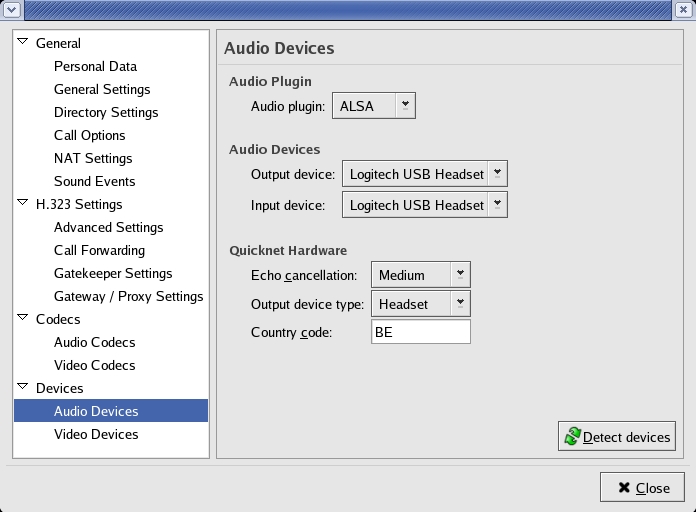
Figure 2. GnomeMeeting—Configuration
Presumably, your machine needs to be configured as an LDAP client (Lightweight Directory Access Protocol, or Active Directory on MS Windows) in order to be able to contact the central GnomeMeeting directory. Lacking that, you need to know the hostname or host IP address and user names of the people you want to call. If you don't use LDAP, you will receive error messages when you try to call someone, even if you can make a successful call.
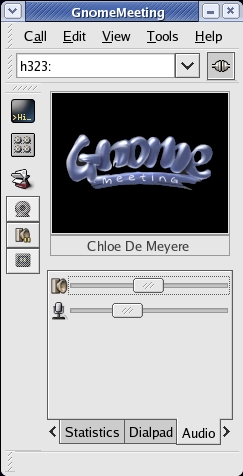
Figure 3. GnomeMeeting—Interface
Impressions: at first there was quite some noise on the connection, even when calling another host in the same subnet, but we could minimize the noise by adjusting the audio volume. There is a mute button for suspending and resuming audio transmission. Luckily, the system with URLs to contact people is well documented in the help files. The application itself doesn't make it easy to use.
Download using your favorite system tool, such as Synaptics on Ubuntu.
Installation: the package manager does the installation for you. You also can download RPM packages and install them using your distribution's tools. After the installation is finished, the KPhone selection turns up in the application menus.

Figure 4. KPhone—Minimalistic Interface
Getting started: your own address is displayed in the little KPhone window, which makes it easy to exchange with other users. It also serves as an example for connecting with other users.
The phone book in this application is easy to use. In the most basic case, simply let others call you, and received and missed caller IDs will show up in the phone book automatically.

Figure 5. KPhone—Accepting a Call
Impressions: KPhone has a very sober interface, which makes it easy to use and configure the program.
At one time, I obviously must have configured the wrong audio device while trying to configure KPhone to use my USB headset instead of the built-in speakers and microphone on my laptop. There is no list from which to choose audio devices; this was rather frustrating. KPhone also segfaulted on me a couple of times, even after it had worked fine earlier. I could not get my USB headset to work. Admittedly, I did not use the latest version. Newer versions, which need to be compiled from source on many systems, at the time of this writing, are reported to work better and have much improved sound quality. KPhone has matured a lot in the newest releases and probably will become even more popular than it is already as binary packages are made available.
Download from the Skype site (see the on-line Resources); packages are available for SUSE, Fedora, Mandriva and Debian.
Installation: I opened the downloaded file directly in the system installer. It shows up in the Internet menu in GNOME after the installation is finished.

Figure 6. Skype—Connection Established
Getting started—registration: register from inside the client. Choose a user name and password. Enter your e-mail address if you want to be reminded of your password later on. In the contact list, select or search for the person whom you want to call. You can ask permission to be notified when that person is on-line.
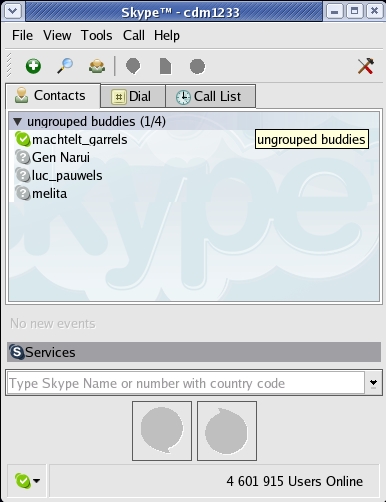
Figure 7. Skype—Contact List
Impressions: Skype is easy to search by name, city and country. When you start it up, you will see a list of missed calls and contacts that are currently on-line, which is quite handy.
Skype can be configured to use PC speakers for incoming call alerts and a headset for actual communication.
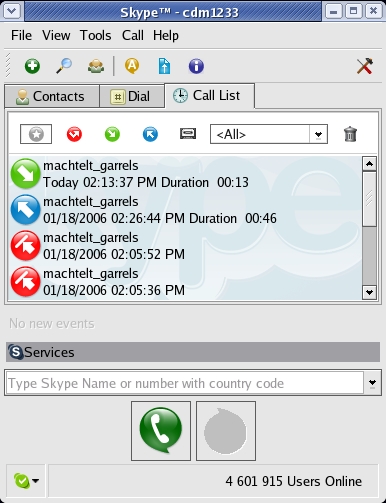
Figure 8. Skype—Call List
In the call list, contacts can be displayed by name, or you can sort by incoming, outgoing and failed calls.
On the downside, the application does not seem to be very clean. After a while, I could not log in anymore, and it turned out that five instances of Skype had been running simultaneously on my computer, even though I used the buttons and menus to quit Skype. Also, it does not seem to be very stable on Linux. I had what appeared to be remote sound problems, but the problem was local and could be solved by stopping and starting Skype.
Download from the CounterPath Web site (see Resources).
Installation: extract the archive to a folder in your home directory; the default name is xten-lite. In this folder, you will find the executable file, xtensoftphone.
Getting started—registration: right-click on the soft-phone image that appears at startup. This starts the Audio Tuning Wizard, which allows you to select audio devices. Select /dev/dsp1 when using a headset. Adjust the speaker volume and voice recording volume according to your needs.
You can register at support.xten.net to join the CounterPath community, or your system administrator might have set up a private service. I used the X-Lite interface for testing with the Asterisk service at work. In both cases, you need to provide a login name and password, which you get either from the CounterPath registration on the Web site or from your administrator.

Figure 9. X-Lite Controls
Impressions: X-Lite is the only application on this list that actually tries to look like a cell phone. You can select a codec according to your needs. For instance, choose the GSM codec for low-bandwidth usage or when you are in a conference call. Select the g711a or g711u codec when you are in a one-on-one call, and bandwidth is not really an issue.
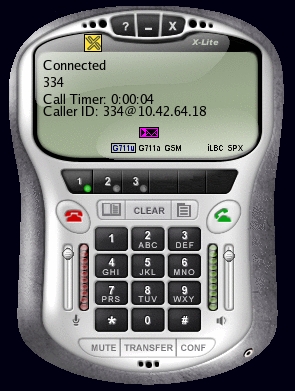
Figure 10. X-Lite during a Call
In Table 1, several aspects of the four applications are compared. For readability, features are restricted to those affecting telephone capabilities. All applications have many more features. I list only those that are different among applications.
Table 1. Comparison
| GnomeMeeting | KPhone | Skype | X-Lite | |
|---|---|---|---|---|
| Maintainer(s) | Damien Sandras | Wirlab Research Center | Skype Technologies S.A. | CounterPath Solutions, Inc. |
| Licence | GPL | GPL | proprietary freeware | proprietary freeware |
| Platforms | GNOME, KDE | Linux (Qt) | MS Windows, Linux, BSD, Mac (Qt) | MS Windows, Pocket PC, Mac, Linux |
| Protocol | H.323, SIP | SIP | proprietary | SIP |
| Behind firewall/proxy | yes | possible | possible | possible |
| PC-to-phone calls | possible | no | non-free | non-free |
| Video conferencing | yes | limited | no | in Pro version (non-free) |
| Rating from 1-10 | 9 | 8 | 7 | 8 |
Overall, the experience was quite positive. Although the open-source programs KPhone and GnomeMeeting are somewhat more difficult to use, because you need to know about URLs and such, it is easier to get documentation on exactly what you need and to get that documentation directly from the makers of the program, instead of having to be satisfied with a general help page and some vague complaints or tips from users.
For Skype and X-Lite, you need to connect to a server. The nice thing about GnomeMeeting and KPhone is that you can use them directly from client to client, even if you do not register on a server, be it one that you set up on your own network or an external one. Maybe I am a bit paranoid, but I don't trust Skype. The company says that its service will remain free, but it says nothing about its software. As it uses a proprietary, poorly documented protocol, I worry about vendor lock-in. For the time being, I'll stick with GnomeMeeting. Why? It worked from my first attempt, it is stable, it does everything it promises to do, and it's Belgian, like me.
Resources for this article: /article/8887.
Machtelt Garrels has published two books for Linux beginners, which are also available as guides in the Linux Documentation Project (LDP) collection. Currently, she works as a freelancer in the UNIX Competence Center of the Belgian Railways and has a part-time assignment as Translation and Vendor Coordinator for the Linux Professional Institute (LPI). Her spare time goes to—don't laugh—knitting and stitching for friends and family, because you can't sit in front of a computer all your life.

