
Running Sound Applications under Wine
Open any of the popular music trade magazines such as Keyboard or Sound On Sound, and you can't miss the plethora of colorful advertisements for sound and music software, all of it for Windows and Mac. Much of this software is of truly outstanding quality; some of it has set industry standards for features and performance, and not a bit of it is available for any platform other than Windows and Mac.
The open-source audio development community has made great strides toward providing musicians with a freely available alternative to the Win/Mac hegemony, and they deserve great praise. Nevertheless, it also must be admitted that our community is still relatively small. Potential converts to Linux often ask whether they can run their familiar programs successfully under Linux, and that criterion alone can determine whether they make the change to Linux. For all of Linux's vaunted technical superiority, it's a no-show if you need an application that simply doesn't exist for it.
This article describes how to set up and use the Wine Windows emulation environment for sound and music applications. I test a few programs, and I indicate the quality of performance you can reasonably expect from running Windows music and sound software under Wine.
System emulators come in two basic flavors, machine architecture emulators and operating system emulators. Wine is a complete package that emulates the Windows operating system. Windows itself is not required. Wine includes its own versions of the Windows system DLLs, but you can use the native Windows versions if you prefer. Depending on the intended use, the system may require other native support software expected by your applications.
Wine's sound capabilities have developed largely in response to users who want to play their favorite games without leaving their favorite operating system. As a result, Wine has become a good candidate for running Windows audio and MIDI applications. However, before installing the emulator, you should check its documentation for the most current sound system status reports. If you intend to run a particular sound or MIDI application under emulation, your success will depend on a variety of factors, including support for the original file formats, audio sampling rates and required drivers.
The tests in this article were performed on an 800MHz machine with an M-Audio Delta 66 digital audio I/O system and an SBLive Value sound card. The software base included ALSA 1.0.4, JACK 0.99 and a rock-solid 2.4.26 Linux kernel patched for low latency. As always, your mileage may vary.
Wine is an acronym for either WINdows Emulator or Wine Is Not an Emulator. Curiously, both interpretations are correct. Wine is the wine executable, a Linux program that runs Windows programs, and it is equally libwine, a library designed to assist Windows/Linux cross-platform development.
After 12 years at the alpha-release level, Wine is now officially a beta-stage project. Hopefully, this event signals a more consistently stable environment, but some programs still may behave erratically. The Wine documentation gives detailed instructions for submitting useful bug reports, so if you find that your favorite Windows program doesn't work well (or at all) under Wine, you can help yourself and the project by submitting a report.
Wine's support for basic sound and MIDI is good, and support for audio extensions such as Microsoft's DirectX is improving, but you won't be able to use Wine to run large, integrated multimedia applications, such as Cubase or SONAR. However, Wine can run a variety of sound and music programs, even some fairly big packages. Check the Wine Web site (see the on-line Resources) for links to lists that rate the compatibility of various Windows applications.
The WineHQ Web site provides Wine in a variety of package formats, including the common RPM and DEB formats and full source tarball. Use your package manager of choice to install the latest version. If you decide to build Wine from the source package, simply open an xterm, enter your new wine-x.x.x directory and run ./tools/wineinstall (as a normal user). Answer the prompts, then relax and let the Wine installer do its stuff.
After installation, run the notepad.exe file included with the distribution:
wine $HOME/c/windows/notepad.exe
If the familiar editor appears, Wine is ready for use. Now you can try to run some Windows music and sound applications.
System requirements and build procedures may change from version to version, so if you decide to build Wine yourself, be sure to read the README and follow the recommended installation instructions included with the package. The version used in this article is Wine 0.9.6, released on January 20, 2006.
Linux-based musicians have two good reasons to take an interest in Wine's sound support. The first reason is applications. Some Windows sound programs have no equivalent in native Linux versions, and the possibility of running those programs under Wine is very attractive. The second reason involves libwine. That library is a key component in projects that provide support for running Windows VST/VSTi audio synthesis/processing plugins under Linux. In this article, I focus only on running applications under Wine, but readers interested in learning more about the Linux + VST connection should check out the Web page (see Resources) for details regarding the FST (FreeST) Project.
At the user level, the heart of Wine's audio support can be found in the ~/.wine/config file. Here's the relevant section of that file as it appears in my Wine configuration:
[WinMM]
; Uncomment the "Drivers" line matching your sound setting.

"Drivers" = "winealsa.drv"    ; for ALSA users
;"Drivers" = "wineoss.drv"     ; default for most common configurations
;"Drivers" = "winearts.drv"    ; for KDE
;"Drivers" = "winejack.drv"    ; for the JACK sound server
;"Drivers" = "winenas.drv"     ; for the NAS sound system
;"Drivers" = "wineaudioio.drv" ; for Solaris machines
;"Drivers" = ""                ; disables sound
"WaveMapper" = "msacm.drv"	 ; do not change !
"MidiMapper" = "midimap.drv"	 ; do not change !
The WaveMapper and MidiMapper are required; they emulate the native Windows MCI (Media Control Interface) drivers that provide the standard commands for controlling multimedia devices and playing and recording multimedia data files.
Wine provides audio interface drivers for OSS/Free (the default), ALSA, aRts, JACK and NAS (a network audio system). You can select a new driver at any time, but you will need to restart Wine. Your choice of sound driver may be determined by the application. In my experiences, some programs worked only with the OSS/Free driver, others worked only with ALSA, and some worked well with either one. I was especially excited to see a JACK driver listed, but as far as I could tell, the JACK driver is broken in this release—a reminder that Wine is still beta-stage software.
Due to space considerations, it is not possible to describe the installation and configuration details fully for the programs I've reviewed here. I wanted to test Wine's audio performance without going to heroic measures, employing only its default settings as far as possible and doing little more than selecting an appropriate sound driver as described above. I provide a brief description of each tested program, and then I relate my experience with running the program under Wine. Note that these tests were made mainly with the demos and examples packaged with the programs, and my conclusions are necessarily provisional and incomplete.
Ross Bencina's AudioMulch is a sound synthesis and music composition environment with a unique interface and a strong emphasis on real-time performance capabilities.
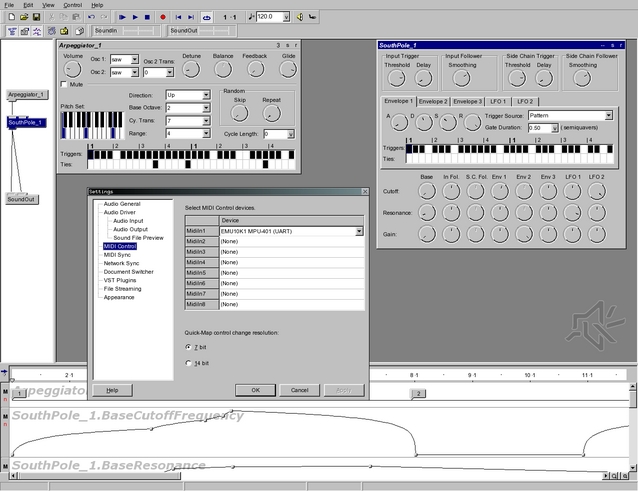
Figure 1. AudioMulch
AudioMulch divides itself into three main panels (Figure 1). The left-most panel is a graphic instrument design and connections center—a canvas upon which you place and connect AudioMulch's various synthesis and processing modules. Next to this panel, we see the controls for the parameters of your selected modules. Underneath it all are the automation controls—a stack of breakpoint displays that control module parameter changes in real time.
Everything in AudioMulch is designed for real-time updates. I verified this assertion by loading an example file and randomly altering its controls and breakpoint displays at random. AudioMulch easily kept up with my changes, and Wine's audio never broke or stuttered. Very impressive!
I tested AudioMulch version 1.0rc2. It installed easily and was ready for immediate use. I loaded and ran every example included with the package, and each one performed perfectly with Wine's OSS/Free and ALSA drivers. Potential users should note that AudioMulch is shareware, not freeware, and the registration fee is $50 US. If you want to test-drive the release candidate, be aware that it will expire on the date indicated at the AudioMulch Web site.
Band-in-a-Box is an automatic accompaniment generator. The program creates a virtual backing band that interprets a series of user-defined chord changes according to a selected “style”. A Band-in-a-Box style is a set of rules governing quantifiable aspects of a particular music performance style, such as country swing, rhumba, waltz time, blues shuffle and so forth. When the user clicks the Play control, the program processes the chord changes by the style rules, generates a real-time performance stream and plays it with your preferred MIDI synthesizer. Voilà, you have your dream rehearsal band.
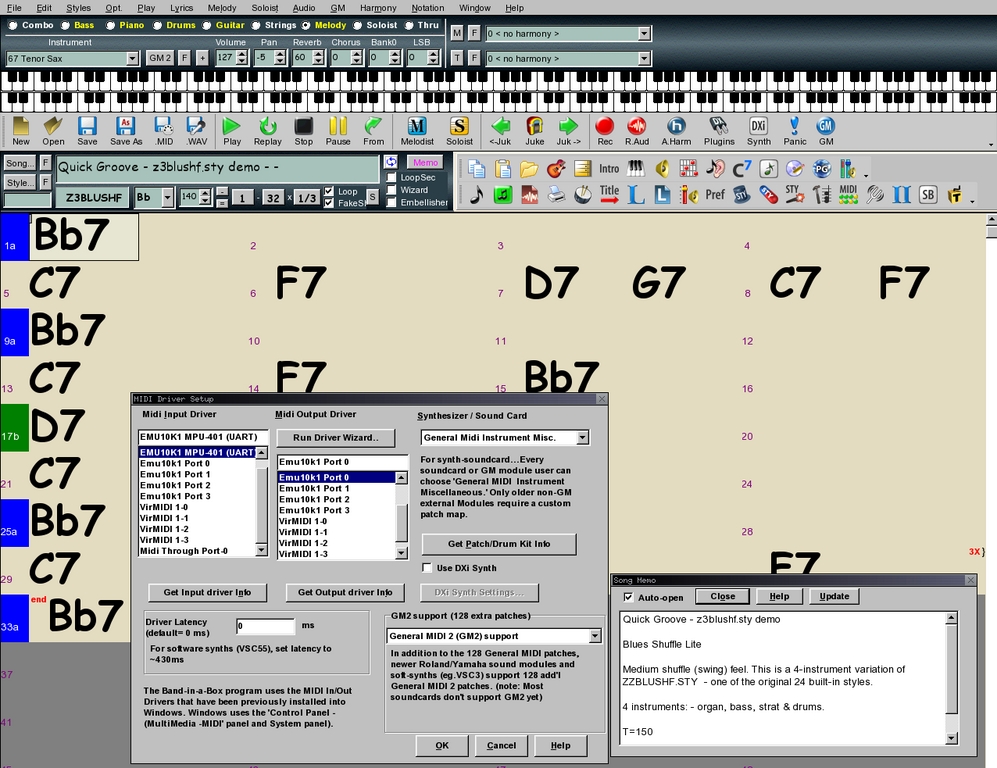
Figure 2. Band-in-a-Box
Band-in-a-Box is the reigning king of the auto-accompaniment software domain. Need to play those changes more slowly? No problem, Band-in-a-Box is a MIDI-based program, so you can adjust the tempo to whatever speed is most comfortable. Want those chords played in a different meter or rhythm? Still no problem, Band-in-a-Box supplies hundreds of styles to choose from, and if you don't like what's included with the base package, you can design your own or access literally thousands of styles and arrangements created and freely distributed by the program's vast base of users and style developers. Don't like the instrumentation for a particular style? Change it on the fly, add or subtract players from the band, or mute parts at will.
I downloaded the most recent Band-in-a-Box demo from the program's Web site and installed it with wine bbw2004demo.exe at an xterm prompt. I entered my new ~/c/bbdemo directory and ran wine bbwdemo to start Band-in-a-Box. I loaded an example style from the File/BB Song dialog, pressed the Play control and watched as the program apparently played the loaded style. Alas, there was no sound. I reconfigured the default MIDI output to go to the Emu10k1 synthesizer on my SBLive Value sound card, pressed Play, and behold, I had sound. I tested other built-in styles, all perfectly happy to perform as though they were playing under Windows itself.
I discovered only one potentially serious difficulty with the demo version. I configured the MIDI input device to the hardware port on the SBLive, but Band-in-a-Box would not record what I played on my MIDI keyboard. The program's virtual keyboard display worked perfectly, but I prefer to record directly from the hardware interface, so perhaps it's time to fire up the Wine debugging tools.
Band-in-a-Box is strictly commercial software, with a list price of $88 US for the Pro Edition. The demo is, of course, free.
Band-in-a-Box has the honor of a place in the Wine AppDB Gold 10, a selection of Windows applications that has demonstrated consistently excellent performance under Wine. By the measure of my simple tests, I must concur with that rating. Band-in-a-Box is an excellent music application that runs beautifully under emulation. Consider it double-plus recommended.
Buzz combines tracker-style pattern and sequence editors with a powerful audio synthesis/processing environment to form an all-in-one package for sound design and music composition. No other music software is quite like Buzz.
I had tried installing Buzz unsuccessfully by following the normal instructions for Windows users, but reading over the comments on the Wine AppDB, I discovered that I needed an installation package different from the one available on the official Buzz Web site. Here's what I did to install and run Buzz successfully under Wine:
Downloaded the package found at buzzdistro.cjb.net.
Ran wine buzz_base.exe to install the program.
Changed directory to ~/c/Program Files/Buzz.
Ran wine buzz. (Honest!)
And indeed, as shown in Figure 3, Buzz runs under Linux.
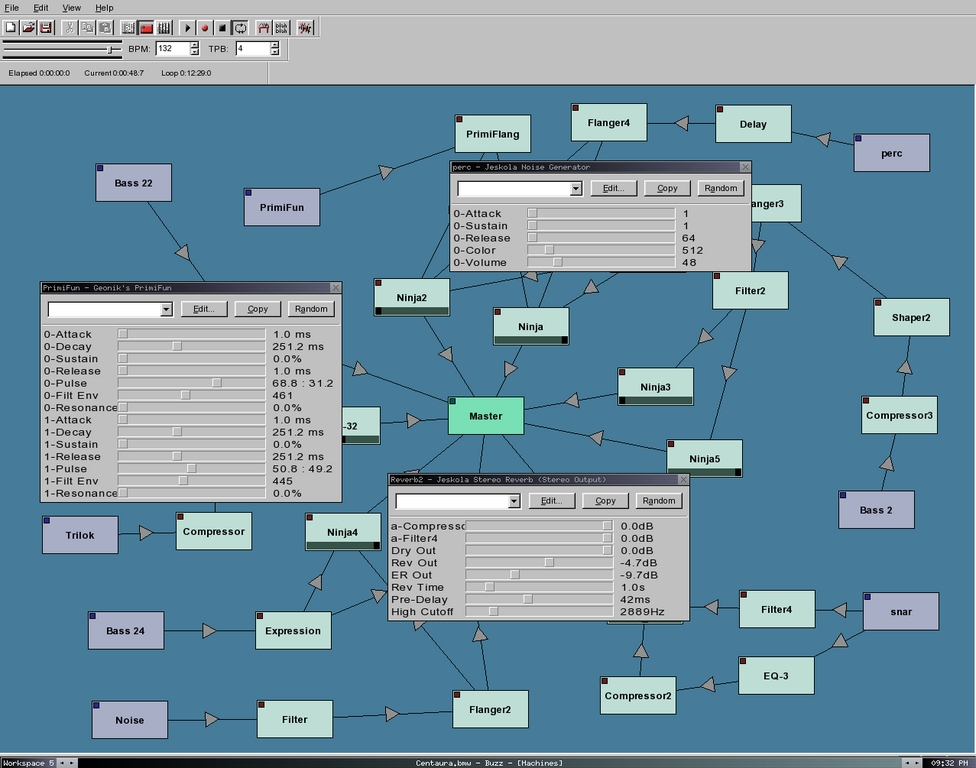
Figure 3. The Wine Buzz
Buzz synthesis and processing modules are known as machines in Buzz-speak. The default package includes dozens of immediately useful machines, and hundreds more are available from the Buzz community. Like many other synthesis applications, Buzz uses a “patching” metaphor to roll your own audio processing network—that is, you link machines together with virtual patching cables to create a data-flow diagram representing your network.
Figure 3 displays some opened machines. Whenever you want to manipulate a machine's parameters, simply double-click on the machine box, and its control panel appears. You can control all parameters in real time with the mouse or with MIDI controllers.
Buzz's composition interface closely resembles a typical tracker interface (Figure 4). A scrolling display represents beats within a selected pattern length. Audio events (typically sampled sounds) are entered on the desired beat lines anywhere within the pattern. Completed patterns are then linked together to form a song sequence.
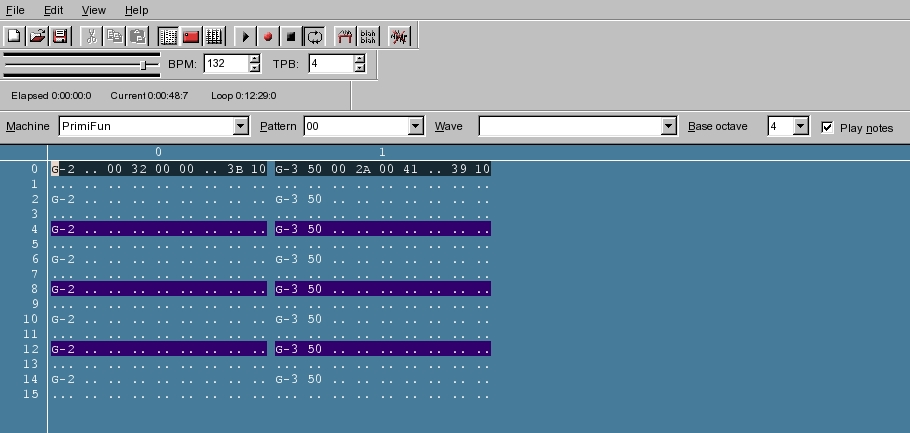
Figure 4. Buzz Tracker Interface
By the way, the package available from the link above is not the only Buzz-for-Linux package available. If that one doesn't work for you, try the bundle available from Flavor8 (see Resources). Peruse the hints and tips while you're there, and be sure to check out the demos made with Buzz on Linux.
Buzz is much too rich an application to treat in any depth here, so I simply recommend playing and studying some of the demo files included with the distribution. The package includes extensive documentation, and a very active community of users can be reached through the main Buzz site. Buzz is freeware, and though it's a shame that no native Linux version of Buzz exists (or ever will—the source code has been lost), in lieu of a native version, you can still enjoy a pleasant Buzz with Wine. Sorry, I just had to say it.
In the course of writing this article, I also tried to run many sound and music programs that failed in various ways. Native Instruments' very cool FM7 loaded and appeared to work (it received MIDI input from my keyboard), but no sound came from it. NI's Tracktion installed and ran, but its audio output was terribly distorted. The latest Finale demo wouldn't install at all, and the Reaktor 5 demo installed but crashed when started. Of course, all these programs run perfectly well in their native Windows environment, which is simply to say that Wine is still in development.
I also solicited the Linux Audio Users mail list regarding opinions of and experiences with the use of Wine with Windows audio applications. As might be expected, input varied. Reports included whole or partial success with applications such as Native Instruments' Battery and Kontakt, the Renoise tracker and the demo for Guitar Pro 3. I plan to put up a Web page that will list Windows audio/MIDI applications that have been tested with Wine, so if you have any notable successes or failures to report, please contact me at dlphilp@linux-sound.org.
Hopefully, Wine's JACK driver will work again in a stable version of Wine by the time this article is printed. JACK is the present and future of Linux audio, and it would be a definite Good Thing for the Wine Project. A virtual ASIO driver might be a helpful addition too.
Ideally, native Linux applications would replace their Windows counterparts, but until that happy time, Wine may prove to be a viable alternative to dual-booting or setting up secondary machines. It may lend a new lease on life to your software investment, and hopefully, it will work well enough to let you run those needed music and sound applications that still have no Linux equivalents.
Resources for this article: /article/8886.
Dave Phillips is a musician, teacher and writer living in Findlay, Ohio. He has been an active member of the Linux audio community since his first contact with Linux in 1995. He is the author of The Book of Linux Music & Sound, as well as numerous articles in Linux Journal. He can be reached at dlphilp@linux-sound.org.
