
VMware Workstation 5.5 for Linux Hosts
Few virtual computer environments are as stable, popular and rich in features as VMware. I've been a fan and user of VMware Workstation since version 2.0. I use it for testing network applications, illicitly running Linux in Windows-only environments and, most recently, for testing the sample code in my book Linux Server Security, 2nd ed., across different Linux distributions. (I also wrote most of that edition using MS Word running on a virtual Windows XP machine!) [Do you really want to admit that? —Ed.]
VMware has some serious competition nowadays in the Open Source community. Xen, FAUmachine and user-mode Linux are promising and 100%-free PC virtualization environments. Nevertheless, VMware Workstation 5.5 remains a compelling purchase in the face of all this competition.
VMware Workstation is a user-space application (aided by a couple of proprietary kernel modules) that creates virtual x86-based computers on top of your physical 32-bit or 64-bit x86-based “host” computer.
Terms
In VMware parlance, host refers to the system running VMware software. Guest systems are virtual machines running on the VMware host. For the remainder of this review, I use the terms guest system and virtual machine interchangeably.
VMware Workstation 5.5 runs on the following host operating systems:
Mandrake Linux 10 and 9.0.
Red Hat Enterprise Linux AS/ES/WS 4.0, 3.0 and 2.1, 32- and 64-bit.
Red Hat Linux 9.0, 8.0, 7.3 and 7.2.
SUSE Linux 10.0 and 9.3, 32- and 64-bit.
SUSE Linux 9.2, 9.1, 9.0, 8.2, 8.1, 8.0 and 7.3.
SUSE Linux Enterprise Server 9 SP3 (beta, experimental support).
SUSE Linux Enterprise Server 9.0, 32-bit and 64-bit.
SUSE Linux Enterprise Server 8.
Novell Linux Desktop 9 SP2 (beta).
Ubuntu Linux 5.10 and 5.04, 32-bit and 64-bit (experimental support).
Windows XP Professional and XP Home Edition.
Windows XP Professional x64 Edition.
Windows 2000 Professional.
Windows 2000 Server, Windows 2000 Advanced Server.
Windows Server 2003.
Windows Server 2003 x64 Edition.
Practically any reasonably modern x-86-compatible or x-86-64-compatible PC works as a host platform. VMware supports most Intel processors since Pentium II, and AMD processors (Athlon or better), provided they run at least 400MHz (500MHz or faster is recommended). VMware also supports multiprocessor systems. VMware Workstation 5.5 lets you create virtual machines that use Two-Way Virtual Symmetric Multiprocessing, an experimental feature.
If you need a virtual machine with more than two virtual processors, this is supported in VMware ESX Server, but if you create one and copy it to a VMware Workstation 5.5 host, it won't run unless you change its Number of CPUs setting to 2. You also can create virtual machines with the Two-Way Virtual Symmetric Multiprocessing feature on a uniprocessor host system, if it has either a dual-core CPU or hyperthreading enabled. However, according to the VMware Workstation User Manual, virtual machine performance will be subpar. And, while I'm still on the subject of CPUs, although you can't have more than two CPUs in a virtual (guest) machine, the underlying host can have as many as you like.
Besides a fast CPU (or CPUs), you need plenty of RAM. This is a simple enough equation. You need enough RAM for your host OS, for VMware itself and enough RAM for as many host OSes you intend to run concurrently. For example, my laptop has 1GB of RAM, of which SUSE 9.3 running KDE, a few Konsole shells, the usual assortment of panel applets and VMware itself use a total of about 200MB. That leaves me 800MB for virtual machines. I can comfortably (that is, without hitting swap too much) run three virtual machines that each has 256MB of RAM and so forth.
Officially, VMware requires your host system to have a minimum of 128MB of RAM (256MB is recommended), with no maximum per se, but only a total of 4GB can be used between all guest VMs.
You also need enough hard disk space both for VMware itself and for as many virtual machines as you anticipate maintaining. Both IDE and SCSI disks are supported, both on the underlying host OS and on virtual hosts.
As with RAM, the more disk space on your host system, the better. As a general rule of thumb, you need 172MB for VMware and at least 2GB per virtual machine. By using VMware shared volumes (actually Samba shares), you can share data volumes between virtual machines. This allows you to use the minimum necessary disk space for virtual machines' guest OS software and one big shared volume for application data. This is also a handy means of sharing data between virtual machines and the underlying host OS.
VMware Workstation 5.5 supports a long list of operating systems for guest/virtual machines. These include:
Most versions of MS Windows (fully supported), including Vista (experimental support).
Mandrake Linux, versions since 8.2.
Red Hat Linux, versions since 7.0.
SUSE Linux, versions since 7.3.
Solaris x86 (experimental support), versions 9 and 10.
In practice, non-officially supported x86 operating systems often work fine as guest OSes. For example, in researching my article “Security Features in Debian GNU/Linux 3.1” (see page 36), I successfully installed Debian 3.1 on a virtual machine, despite the fact that it's not officially supported (the X Window System didn't work, but everything else I tried did, including networking).
Installing VMware Workstation on a supported Linux system is a breeze. You install the RPM version either by executing a single command or by unpacking the .tgz version and manually running the installer script vmware-install.pl (which is executed automatically if you install the RPM). Then, you run the configuration script vmware-config.pl. That's it! The installer scripts and the configuration script do all the work for you.
For example, to install the RPM version of VMware, I executed the commands:
rpm -Uvh ./VMware-workstation-5.5.1-19175.i386.rpm
and:
vmware-config.pl
The configuration script asks you a number of questions, regarding things like how to set up networking. For most users, the default values are fine; otherwise, the Workstation 5 User Manual provides clear and comprehensive descriptions of the various options presented by the installer script.
Speaking of which, the user manual is, in my opinion, a model of effective technical writing—everything you need to know about VMware is included, explained in plain English and organized in a logical manner. It's accessible from within VMware's Help menu in HTML format, and it also can be downloaded as one big (490-page) PDF file from vmware.com.
Once VMware Workstation is installed and configured, you can run the vmware executable in the X Window System to start creating and using virtual machines. Figure 1 shows the New Virtual Machine Wizard.
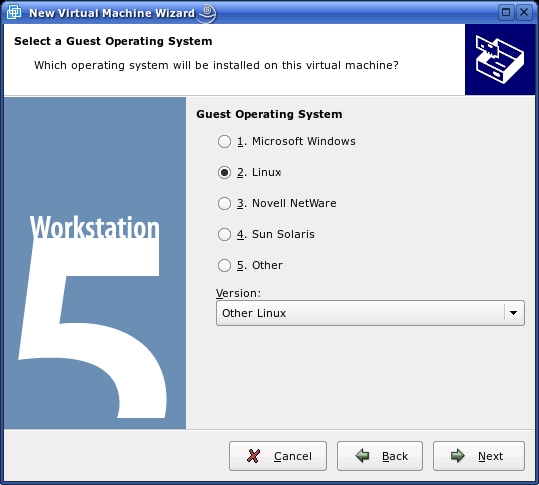
Figure 1. New Virtual Machine Wizard
To create a Typical virtual machine with this wizard (as opposed to a Custom virtual system), you need to make only four decisions:
In which OS will the guest machine run?
Where on your host machine's filesystem will the virtual machine's files go?
Which flavor of VMware networking will the guest machine use?
What type and size of virtual disk to use?
Because this article is a review and not a how-to, I forego explaining all the different options available at this point. A few words about virtual machine hard disks and networking options, however, might help illustrate VMware's flexibility and power.
A virtual machine's hard drive is usually a virtual disk—that is, a regular file that essentially is mounted by VMware as a loopback filesystem. The beauty of this approach is that the virtual disk file doesn't need to reflect its capacity; if you install only 300MB worth of system software, applications and files on your virtual machine, its disk file will be only 300MB or so. The size you specify when setting up the virtual machine therefore will be its maximum size, not its actual size (unless you check the Allocate all disk space now option).
If you run the New Virtual Machine Wizard in Custom rather than Typical mode, you additionally can choose whether to create a virtual SCSI disk (the default) or a virtual IDE disk. You also can choose whether to use a virtual disk at all. If you prefer, and if your intended guest OS is supported in this mode, you alternatively can designate a physical disk partition on your host system as the virtual machine's root. This is handy if you have a dual-boot system on which you'd like to run both (or more) local OSes simultaneously, but support for this feature is limited and comes with some caveats. Tread lightly with this feature, and be sure to read the user manual carefully before you attempt to use it.
You can network your virtual machines using one of three methods. In bridged networking, the default, your virtual machine is given a virtual Ethernet interface connected to the same LAN as your host machine's physical network card (or wireless card—in VMware 5 you can now bridge WLAN interfaces on Linux hosts). In other words, your virtual machine appears on your local LAN as though it were sitting side by side with your host machine.
With Network Address Translation (NAT), your host system acts like a NAT firewall. Your virtual machine is given a fake IP address, and when it connects to other resources on your LAN or beyond, VMware translates the source IP address on all its packets to that of the host system's physical network interface. In other words, your virtual machine is hidden from the rest of your LAN by your host system. This is handled strictly by VMware; you don't need to configure iptables on your host OS to achieve this.
The third option is host-only networking. This is similar to the NAT mode in that your virtual machine is assigned a fake IP address on a virtual LAN separated from your physical/actual LAN by your VMware host system. The difference is that none of the virtual machines on your host-only (virtual) LAN will be able to interact with the real LAN unless you explicitly configure the underlying host OS to forward and route those packets. In other words, with host-only networking, you will need to configure your host OS to route or bridge your virtual machines' packets. This mode, therefore, is most useful when you don't want to connect your virtual and physical LANs—for example, if you're testing potentially dangerous network applications on your virtual LAN.
Besides virtual CPU, RAM, hard disks and network interfaces, virtual machines also can have virtual floppy disks, CD-ROM/DVD-ROM drives (data only, not movies), USB controllers, SCSI controllers, parallel ports, serial ports, sound cards and mice. Both floppy and CD/DVD drives can use either your host system's actual hardware, or disk-image or ISO files, respectively. In all cases, VMware mounts the real or virtual media for you; you don't need to run the mount command separately.
VMware's SCSI and USB support is similarly transparent. By default, if you plug in a SCSI or USB device to your host system while a virtual machine is running in the foreground (has focus), the virtual machine responds as though you plugged the device in to it. Whether this will actually work in a given situation depends both on VMware—the virtual USB controller supports only USB 1.1—and on the capabilities of the guest system. (Does it support USB? Have you installed the correct drivers for your device onto your virtual machine?)
Once you've created a virtual machine and installed its operating system, actually using the virtual machine is very, very similar to the real thing. Figure 2 shows the Debian 3.1 installer running on a virtual machine.
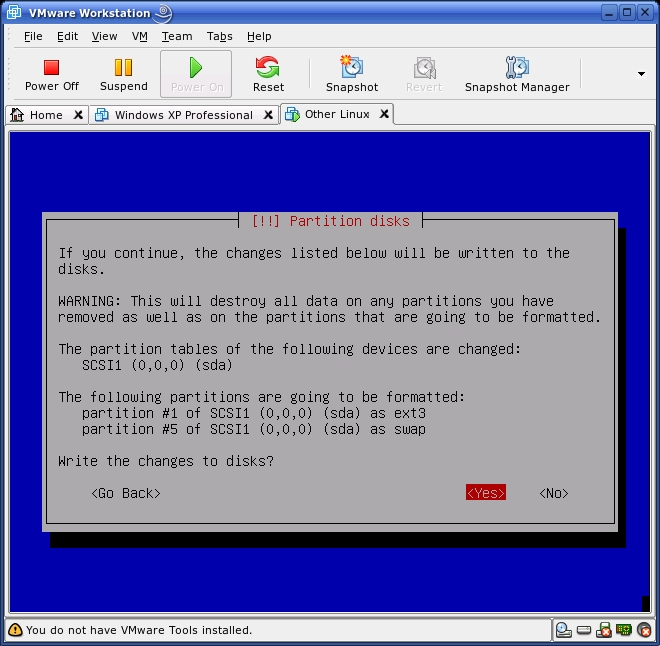
Figure 2. A Virtual Debian Machine
You can even, if you like, run the virtual machine in full-screen mode rather than within the VMware window. Installing the VMware Tools package on the guest system adds additional features, such as enhanced virtual-display-adapter support for your guest system and the ability to move your mouse pointer in and out of the VM window without having to click in and escape out.
A number of VMware features make the virtual machine experience better than using a real machine, especially for research/test scenarios. One is the ability to take snapshots of virtual machines. A snapshot captures a virtual machine's memory state, disk state and virtual machine settings at a given point, allowing you to roll back to that point later—for example, after losing control of a virus you were examining on the guest system.
Another feature is the ability to create teams of virtual machines. A team is a group of virtual machines with shared networking and startup characteristics. This lets you create, for example, a farm of database servers all connected to the same virtual LANs that all can be started simultaneously with a single-mouse click or command (VMware now has a command-line utility, vmrun, for operating virtual machines and teams).
As you'd probably expect, given that a virtual machine is nothing more than files in a directory, VMware also makes it easy to clone virtual machines. A full clone is simply a copy of the parent VM, identical to it except for having a new MAC address and UUID. A full clone, therefore, is highly portable, and it easily can be copied to other host systems.
Another option is to create a linked clone, which actually is made from a snapshot of the parent. Changes to the parent don't affect the clone, and vice versa, but the clone must have access to the parent's files at all times.
So, what are the downsides to VMware? Honestly, I've been a very happy user of this product over the years. I have no laundry list of gripes or bugs to share with you, other than one hardware-specific problem with VMware 4.0 on a ThinkPad T42 running Windows XP (which I solved by switching to the Linux version). VMware Workstation 5.5 is a stable, well-documented and easy-to-use product with a rich set of features that is particularly useful to information systems professionals and researchers.
None of that comes for free, of course. The downloadable version of VMware Workstation 5.5 for Linux costs $189 US, and the boxed version is $199 US. I think you'd be hard pressed though to assemble a very good physical computer for that little money, let alone an entire LAN's worth. If in doubt, you can download the full version for a 30-day evaluation (after which you must purchase and install a license to continue using VMware).
Or, you can opt for VMware Server, which is now completely free. Formerly known as VMware GSX Server, the current version of VMware Server was still in beta at the time of this writing, but it will remain a free product even when it reaches production status. Presumably, VMware Server lacks many of VMware Workstation's developer/researcher-oriented features—the server versions of VMware are targeted more for production server applications. Compare and decide for yourself. More information about all VMware products is available at www.vmware.com.
Mick Bauer (darth.elmo@wiremonkeys.org) is Network Security Architect for one of the US's largest banks. He is the author of the O'Reilly book Linux Server Security, 2nd edition (formerly called Building Secure Servers With Linux), an occasional presenter at information security conferences and composer of the “Network Engineering Polka”.

