
Paranoid Penguin - Security Features in SUSE 10.0
Over the years, we've seen more and better security features incorporated into our favorite Linux distributions. Distribution-specific security awareness manifests itself in many ways, including:
Availability of security-enhancing applications.
“Hardening” functionality in setup/installation scripts.
The way patches are handled.
Default settings of network applications.
This month, I begin a series of three articles on distribution-specific security in SUSE Linux, Debian GNU/Linux and Red Hat Enterprise Linux. These are the three distributions with which I've had the most experience, and they are arguably the three most popular. (But as with anything, if you want to contribute an article about your own favorite distribution, go for it! See our author's guide at www.linuxjournal.com/xstatic/author/authguide.)
I'll start with SUSE 10.0. SUSE is a general-purpose, commercially produced Linux distribution developed for Intel 32- and 64-bit platforms. Originally based in Germany and still primarily developed there, SUSE is now owned by Novell. There are a number of different SUSE products, including SUSE Linux, a “personal” version available from numerous retail outlets; SUSE Linux Enterprise Server, an “enterprise-grade” version available directly from Novell; and OpenSUSE, which is essentially the same as SUSE Linux but without installation media (it's installable only over the Internet), printed manuals or installation support.
The basis of this article is SUSE Linux 10.0, that is, the commercial “personal use” version. Everything I say here should be equally applicable to OpenLinux 10.0, and mostly relevant to the Enterprise versions of SUSE. Presumably, the Enterprise versions include additional security-related packages and features.
System security begins with installation. This is your first opportunity to make crucial decisions concerning what role the system will play, which software the system will run and how the system will be configured. Therefore, it's useful to begin our discussion of SUSE security with the installation process.
All versions of SUSE use YaST (Yet Another Setup Tool) both for initial system installation and for ongoing system administration. Over the years, YaST has evolved from a simple RPM front end to a modular, comprehensive administration tool that can be used to configure not only low-level system software but also complex server applications such as Apache and Postfix.
We'll talk more about YaST shortly. Your immediate problem during initial OS installation, however, is deciding which software packages to install. And if you're security-focused, this is a happy problem. SUSE Linux 10.0 offers a wide variety of security applications from which to choose.
In my view, these applications fall into two categories: system security applications and security-scanning applications. The former include both general-purpose applications with strong security features—Postfix springs instantly to mind—and applications whose sole purpose is providing security controls to other applications or to the underlying operating system, of which tcpwrappers is a classic example. Table 1 lists the packages in SUSE Linux 10.0 that enhance system security.
Table 1. Some Security-Enhancing Packages in SUSE Linux 10.0
| Package Name | Description |
|---|---|
| aide, fam | File integrity checkers, both similar to Tripwire. |
| bind-chrootenv | Automatically creates a chroot environment in which to run BIND (the DNS daemon) more securely. |
| clamav, antivir | Antivirus packages—clamav is completely free, but antivir is commercial (free for personal use). |
| cracklib | Library and utilities to prevent users from choosing easily guessed passwords. |
| gpg, gpg2, gpa | GNU Privacy Guard (gpg), a versatile and ubiquitous e-mail- and file-encryption utility. |
| ipsectools, openswan | Tools for building IPsec-based virtual private networks. |
| openldap, freeradius | Open-source authentication daemons. |
| proxy-suite | An FTP security proxy developed by SUSE. |
| seccheck | SUSE-customized cron scripts that perform various security checks against logs, system state and so on, and send e-mail reports to you. |
| subdomain-utils, subdomain-profiles, mod-change-hat and so on | AppArmor, a mandatory access control (MAC) system that restricts the behavior of specific binaries. SUSE uses this instead of SELinux, which it closely resembles. |
| squid, SquidGuard | Squid is a popular HTTP/HTTPS proxy. SquidGuard adds access controls and other security features. |
| SUSEfirewall | SUSE's handy front end for Linux's netfilter/iptables. |
| syslog-ng | Advanced system logger, much more powerful than syslogd. syslog-ng is SUSE's default logger. |
| tinyca2 | Front end to OpenSSL for managing Certificate Authorities. |
| yast2-firewall | Firewall functionality. |
| vsftpd | The Very Secure FTP Daemon. |
| xen, FAUmachine, uml-utilities, bochs | The Xen, FAUmachine, User Mode Linux and BOCHS virtual machine environments. |
Actually, the lengthy list of packages in Table 1 represents only particular favorites of mine and SUSE-specific selections. SUSE includes many, many more system security tools, including tcpd (tcpwrappers), openssl, chkrootkit, sudo and wipe. You can view the full list of packages included in SUSE Linux 10.0 at www.novell.com/products/linuxpackages/professional/index_all.html.
Besides securing the system on which you install SUSE, you may be interested in using a SUSE system to validate the security of other systems or of entire networks. SUSE is a good choice for this. Table 2 shows some SUSE Linux 10.0 packages that can be used for security scanning. Note that you should never install these packages (except perhaps Snort) on any Internet-connected server. Each is of much greater use to an attacker than it is to you in that context. Scanning software should be performed from systems that are normally kept out of harm's way.
Table 2. Security Scanners in SUSE Linux 10.0
| Package Name | Description |
|---|---|
| ethereal, tcpdump | Excellent packet sniffers. |
| fping | Flood ping (multiple-target ping). |
| john | John the Ripper, a password-cracking tool (legitimately used for identifying weak passwords). |
| kismet | Wireless LAN sniffer. |
| nessus-core, nessus-libraries | The Nessus general-purpose security scanner. |
| nmap | Undisputed king of port scanners. |
| snort | Outstanding packet sniffer, packet logger and intrusion detection system. |
If you're new to SUSE, you should be aware that by default, YaST uses a Selections filter (view) for selecting packages, in which only a small subset of all available packages is offered to you. If you don't see something you need in this view, for example, nessus-core, use the Package Groups filter to see a more complete set of categories. If you want to see a single list of all packages in alphabetical order, simply set the filter to Package Groups and click on the group zzz All (Figure 1).
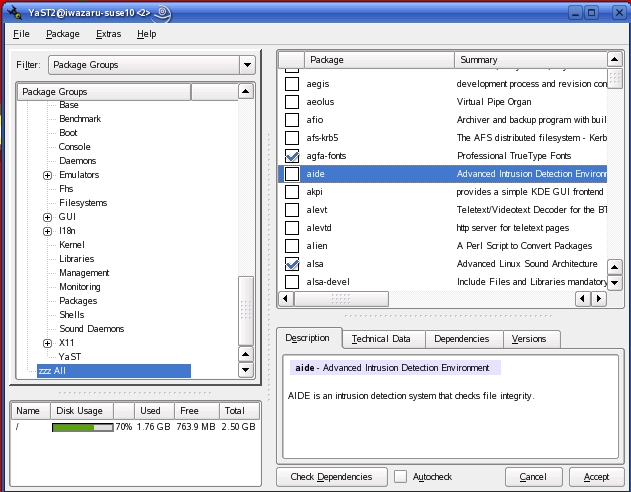
Figure 1. Viewing All Available Packages in YaST
You also can set the filter to Search to search for packages by name or keyword.
After you've selected and installed all software packages, YaST allows you to set the root password and create the first (nonroot) user account. By default, SUSE uses Blowfish for password encryption, and YaST checks the password you type for complexity. (Too-simple a password can be easily guessed or brute-force cracked by an attacker.)
You're also given the opportunity to enable local firewall scripts (enabled by default), and the SSH and VNC remote-shell daemons (both disabled by default). Note that of the latter two, SSH is the best choice for administering bastion hosts (hardened Internet servers)--among other reasons, you shouldn't be using the X Window System on bastion hosts unless you've got a very specific, very compelling reason. YaST, it should be noted, runs perfectly well in text (ncurses) mode, with exactly the same modules and options as the X version. Also, tightvnc, the version of the VNC remote-desktop tool shipped with SUSE, doesn't encrypt session data, only authentication data.
Note also that at installation time, you aren't given the opportunity to customize your local firewall settings. Initially, a default script is used that provides a simple “allow all outbound transactions, allow nothing inbound that wasn't initiated locally” policy. In other words, the default SUSEfirewall script is perfectly appropriate for most desktop systems, but it is inadequate for server use. You can change this later on by running YaST's Firewall module.
YaST then lets you choose from the following methods for authenticating nonroot users:
local /etc/passwd file (default).
LDAP.
NIS.
Samba (Windows NT Domains).
Active Directory authentication is also supported in SUSE Linux 10.0, via Kerberos.
Once you've selected an authentication method, you can create your first nonroot user account. Be sure to leave Automatic Logon disabled unless your system has very low security requirements indeed—enabling this causes the machine to log in your nonroot user automatically at boot time. (About the only situation in which this is a good idea, I think, is for kiosk-type systems!)
And that's it—SUSE installation is now finished! Your job as a security-conscious system administrator, however, is not.
After the first time you boot your newly minted SUSE Linux system, you immediately should log in as your unprivileged user and invoke YaST. If you do this from within KDE or GNOME, you'll be prompted for the root password automatically, but in a text-console session, you need to use su -c to invoke /sbin/yast.
As I mentioned earlier, YaST has a lot of security functionality built in. YaST modules particularly relevant to system security are listed in Table 3.
Table 3. Security-Related YaST Modules
| YaST Section | Module Name | Description |
|---|---|---|
| Software | Online Update | Sets up manual and automatic software updates. |
| Software Management | For installing and removing packages. | |
| Virtual Machine Installation (XEN) | Creates virtual machines for the Xen 3 virtual machine environment. | |
| System | /etc/sysconfig Editor | Edits daemon startup parameters. |
| System Services (Runlevel) | Manages startup scripts. | |
| Powertweak | Sets advanced kernel parameters, such as TCP timewait sockets. | |
| Network Services | DNS Server | Configures BIND. |
| HTTP Server | Configures Apache. | |
| LDAP Client | Sets up LDAP authentication and lookups. | |
| Mail Transfer Agent | Configures Postfix or Sendmail. | |
| Kerberos Client | Sets up Kerberos authentication, including Active Directory. | |
| Remote Administration | Configures TightVNC. | |
| Novell AppArmor | Various | For managing AppArmor mandatory access controls on specific binaries. |
| Security and Users | Firewall | For managing netfilter/iptables settings. |
| Local Security | Determines password complexity and length, password aging, file-permission schemes and various other system security parameters. | |
| Group Management | Used to create, edit and delete group accounts. | |
| User Management | Used to create, edit and delete user accounts (actually the same module as Group Management, which is dual-purpose). |
Of these YaST modules, Online Update is one of the most important. You immediately should use it to configure automatic patch downloads and, unless your system is under a change-control process, automatic patch installation as well. YaST Online Update was one of the first automatic patch utilities offered in a major Linux distribution, and it's still one of the best. Use it to take advantage of SUSE's excellent record of providing prompt, well-tested security patches.
The Firewall module (Figure 2) is also extremely useful, especially if you're uncomfortable creating and managing your own firewall scripts (I acknowledge that people like me, who find this fascinating and fun, are rare). Similarly, Group/User Management eliminates the need for you ever to edit /etc/group or /etc/passwd manually.
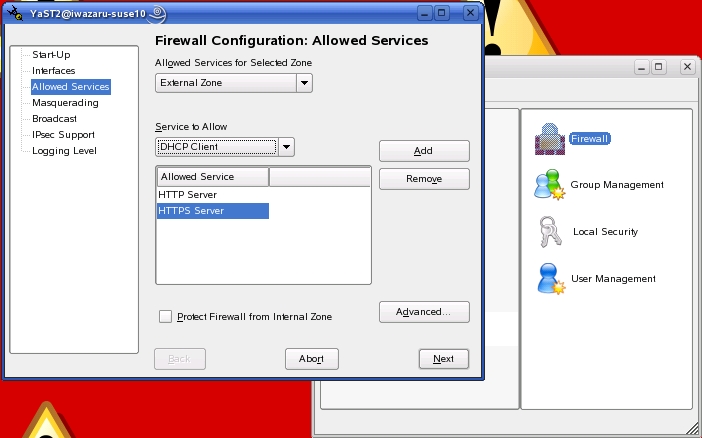
Figure 2. YaST's Firewall Module
The Virtual Machine Installation module and Novell AppArmor section are also especially noteworthy. So much so, in fact, that I should spend some time talking about SUSE's virtual machine and mandatory access control systems, respectively, in a little more depth.
You may recall my article “The Future of Linux Security” [LJ, August 2005], in which I touted virtual machine environments and hypervisors (aka security monitors) as being an important new direction in system security. If you don't recall this, the gist of it is that it's because MAC schemes such as SELinux are viewed by many people as too complex. A simpler approach instead is to run each major application or service on its own virtual machine. That way, if for example a virtual machine in which Sendmail is running gets compromised, a virtual machine running Apache2 on the same physical hardware won't be in immediate or direct danger.
Virtual machines, therefore, provide a powerful and easy-to-understand means of isolating complex applications from each other. And, SUSE Linux 10.0 includes no fewer than three different virtual machine technologies.
The Xen 3 environment, which originated at Cambridge University, is provided by SUSE as a “technology preview”. To the best of my determination, this simply means that because Xen 3 is an immature and potentially unstable application, SUSE is simply trying to lower people's expectations of its usability—the version of Xen 3 in SUSE Linux 10.0 isn't a special preview or evaluation version or anything like that. Xen 3 supports Linux, FreeBSD, NetBSD and Plan9 “guest” (virtual) systems.
Alternatively, the FAUmachine virtualization environment includes RPM packages that enable support for SUSE 9, Debian 3.0, OpenBSD 3.5/3.6 and Red Hat 9 guest systems. One advantage of FAUmachine over Xen 3 is that in FAUmachine, the guest systems' kernels run on the host system with nonroot (unprivileged-user) permissions.
User Mode Linux is another virtualization environment offered in SUSE Linux 10.0 via the uml-utilities package. Like FAUmachine, its guest kernels run without root privileges.
However, not everyone has given up on MAC-based system security, and SUSE has covered this area handsomely by acquiring and repackaging Immunix's AppArmor (aka Subdomain). AppArmor is similar to SELinux, in that it allows you to restrict the behavior of specific processes, with an effect similar to but more effective than running them in chroot jails.
(Note that although SUSE provides the libselinux package and includes SELinux functionality in its default kernel, SELinux isn't officially supported in SUSE Linux. You need the packages available at www.cip.ifi.lmu.de/~bleher/selinux to run SELinux in SUSE Linux.)
The document /usr/share/doc/packages/subdomain-docs/ug_apparmor.pdf, included in the subdomain-docs package, is the AppArmor User's Guide, and it tells you everything you need to know about configuring and using AppArmor. Suffice it to say for now that if you simply run the YaST AppArmor Control Panel module and enable AppArmor, a default profile is loaded that includes settings for many common daemons and commands, including netstat, ping, traceroute, firefox, evolution, gaim, syslogd, acroread, ethereal, appropos, procmail, postfix (smtpd, and so on), Apache2 (httpd2-prefork), nscd, identd, ntpd, sshd and squid.
This is a limited-feature version of AppArmor, so apparently it provides only a subset of features available in the full $1,250 US version. Personally, I'm not clear as to precisely what the difference is, though—everything I tried to do with the version in SUSE Linux 10.0 seemed to work fine, so this would not appear to be a too significantly crippled edition. Perhaps the full version includes a longer list of preconfigured applications.
These aren't SUSE Linux 10.0's only security features. I haven't talked about how secure many applications' default settings are (in general they're quite secure, with daemons running with nonroot privileges whenever possible, network listeners such as sshd typically disabled by default and so on).
This is a very security-friendly version of SUSE Linux indeed. Remember, though, that real security begins with you—little of SUSE's security potential is realized until you configure or at least enable it yourself! Hopefully, this article has helped you get a feel for what that potential is.
Next month, it's on to Debian 3.1. Until then, be safe!
Mick Bauer (darth.elmo@wiremonkeys.org) is Network Security Architect for one of the US's largest banks. He is the author of the O'Reilly book Linux Server Security, 2nd edition (formerly called Building Secure Servers With Linux), an occasional presenter at information security conferences and composer of the “Network Engineering Polka”.
