
How to Set Up and Use Tripwire
Tripwire is an intrusion detection system (IDS), which, constantly and automatically, keeps your critical system files and reports under control if they have been destroyed or modified by a cracker (or by mistake). It allows the system administrator to know immediately what was compromised and fix it.
The first time Tripwire is run it stores checksums, exact sizes and other data of all the selected files in a database. The successive runs check whether every file still matches the information in the database and report all changes. Tripwire initially was released in 1992. Today, several programs share this name, one is GPLed and two are proprietary. The rest of this article discusses only the GPL version 2.3.1.
IDS tools are particular beasts, and Tripwire is no exception. Even if you don't need to be an expert programmer to use this package, actually taking advantage of it requires some patience, attention and manual work.
First, using Tripwire is one of those cases in which blindly pressing Enter at every prompt really isn't a smart thing to do. Do yourself a favor and check at least the relevant parts of the good documentation provided with the Tripwire programs (more on this later).
Second, using Tripwire for real makes sense only if it is installed, fully configured and initialized at the very first boot after an installation from scratch, before ever connecting to the Internet or doing anything else. It takes only one attack to install a back door. All you would accomplish by installing and using Tripwire after such an event would be to guarantee that the back door remains just as open as the day a cracker installed it! Of course, even if you don't want to or can't re-install everything now, nothing prevents you from downloading the package anyway and becoming familiar with it.
Here is how to explain to Tripwire what's important to you. The Tripwire distribution includes several binaries, the corresponding man pages and two files that regulate the program's behavior, which we will call, for brevity, the Tripwire system files. The first one (/etc/tripwire/twcfg.txt), where several variables are defined, is for general configuration and even may be the same for all the computers on the same LAN. Its contents go from the location of the Tripwire database to instructions on minimizing the amount of time the passphrases are kept in memory or the number of redundant reports.
Other important parameters are the editor (the default is vi) for interactive usage and how reports should be sent by e-mail. The complete syntax and meaning of all possible variables is described in the twconfig man page.
The other system file (/etc/tripwire/twpol.txt) contains the policy that declares all the objects that must be monitored and what to do when one of them is lost or altered. Unlike the configuration file, the policy could (and almost certainly will) vary across the several computers on the same network. For example, the packages installed on a firewall will be different from those on a development workstation or an office laptop, even if the same GNU/Linux distribution is used.
The first thing to do to create a good Tripwire policy (and, in general, have a less stressful sysadmin life) is to remove as many unneeded programs as possible before starting. Next, to make your usage of Tripwire as quick and effective as possible, your policy must cover everything you really need to monitor and nothing else. This includes, at least, all the system binary and library directories (that is, the contents of /bin, /sbin, /usr/bin, /lib and so on) and the corresponding configuration files in /etc/. The example twpol.txt files distributed with Tripwire contains anything that could be on a UNIX system, so it is guaranteed to complain about programs that you never installed or placed in a different location. This is an example of what you might see:
### Warning: File system error.
### Filename: /dev/cua0
### No such file or directory
### Continuing...
There is a safe and easy way, even if potentially long and boring, to remove such bogus warnings. Simply run the initial configuration procedure described below several times. Scan the report each time, and comment out the checks that generated false alarms until they all disappear. Of course, before starting, do what should be done before configuring any new package—that is, make a copy of the originals:
cp -p twcfg.txt twcfg.txt.orig
cp -p twpol.txt twpol.txt.orig
A Tripwire policy is a sequence of two kind of rules. Normal ones define which properties of a file or directory tree must be checked, in this format:
object_name -> property_mask (rule attribute = value);
The property_mask specifies which properties must be examine or ignored. Attributes provide additional, rule-specific information like the rule severity or who should be informed by e-mail if that rule is violated. The other kind of rules are stop points, which tell Tripwire not to scan a particular file or directory. Tripwire also understands several directives for conditional interpretation of the policy, diagnostics and debugging. To know all the gory details, print out and study the twpolicy man page.
After everything has been placed in the proper directories, either from a binary package or compiling the sources, the first action to take as root is to generate two robust—that is, hard to guess—passphrases. The first one (site passphrase) is used to encrypt and sign the Tripwire system files. The second one (local passphrase) is necessary to launch the Tripwire binaries.
Theoretically, the Tripwire distribution should include an /etc/tripwire/twinstall.sh script that should prompt the user for passphrases and other information and then perform all the steps below. At the time of this writing, both the Tripwire 2.3.1 RPM package for Fedora Core 4 tested for this article and several on-line tutorials still say to use that script, but it just wasn't there after the installation. In any case, the utility that performs these tasks is twadmin. Because it has a complete man page, and it should be used anyway if you want to change keys after installation, we just show how it works. The actions described above are executed with the following commands:
twadmin --generate-keys --site-keyfile my_home_key
 ↪--site-passphrase 'Hello LJ readers'
twadmin --generate-keys --local-keyfile my_local_key
 ↪--local-passphrase 'Penguins are cool'
This leaves the two keys encoded in the my_home_key and, respectively, my_local_key files. Remember to copy these two names in the twcfg.txt file before running twadmin:
SITEKEYFILE	=/etc/tripwire/my_home_key
LOCALKEYFILE	=/etc/tripwire/my_local_key
Once the passphrases have been stored, the configuration file must be encrypted in this way:
twadmin --create-cfgfile --cfgfile twcfg.enc
 ↪--site-keyfile my_home_key twcfg.txt
Please enter your site passphrase:
Wrote configuration file: /etc/tripwire/twcfg.enc
The procedure to create a binary version of the policy is similar:
twadmin --create-polfile --cfgfile twcfg.enc --polfile
 ↪twpol.enc --site-keyfile my_home_key twpol.txt
The difference, with respect to the former command, is that now the encrypted configuration file must be passed to twadmin. The reason why the two files must be encrypted is that Tripwire will discover if they are corrupted much more easily than if they were in plain-text format. In order to directly read such files, you need (besides the passphrases, obviously) the -print-cfgfile or --print-polfile options of twadmin.
Once the passphrases and system files are all set, it's time to go into what the documentation calls Database Initialization Mode:
tripwire --init --cfgfile twcfg.enc --polfile tw.pol
 ↪--site-keyfile my_home_key --local-keyfile my_local_key
By default, the result is stored in /var/lib/tripwire/YOURHOSTNAME.twd. Path and name can be changed in twcfg.txt or given as a command-line option. Eventually, if everything goes fine, you'll be greeted by this message:
Wrote database file: /var/lib/tripwire/YOURHOSTNAME.twd
The database was successfully generated
As soon as encrypted system files, passphrases and a complete snapshot of your system are available, Tripwire finally can do the only thing we really care about—that is, to check the integrity of our computers periodically. This is normally accomplished by running the program as a cron job with this switch:
tripwire --check
Note that, just to allow secure, automatic usage the program doesn't need passphrases when launched in this way. Consequently, there is no need to write them in plain text anywhere. The integrity report is printed both to STDOUT (so it can be e-mailed to the system administrator) and saved in the location specified by the REPORTFILE variable in the configuration file. How often this operation should be performed depends on how critical the system is and how often it is exposed to external attacks. Although a corporate firewall should be checked daily, a weekly check may be enough for a department print server behind it or a regular desktop.
Figure 1 shows an example of what a Tripwire report looks like. It tells you, for every rule defined in the policy, which of the corresponding files were added, changed or modified. Command-line options are available to check only specific sections of the policy file, or just some files. This could be useful, for example, when nothing was modified in the system, but there is the suspicion that some particular disc or partition was damaged.
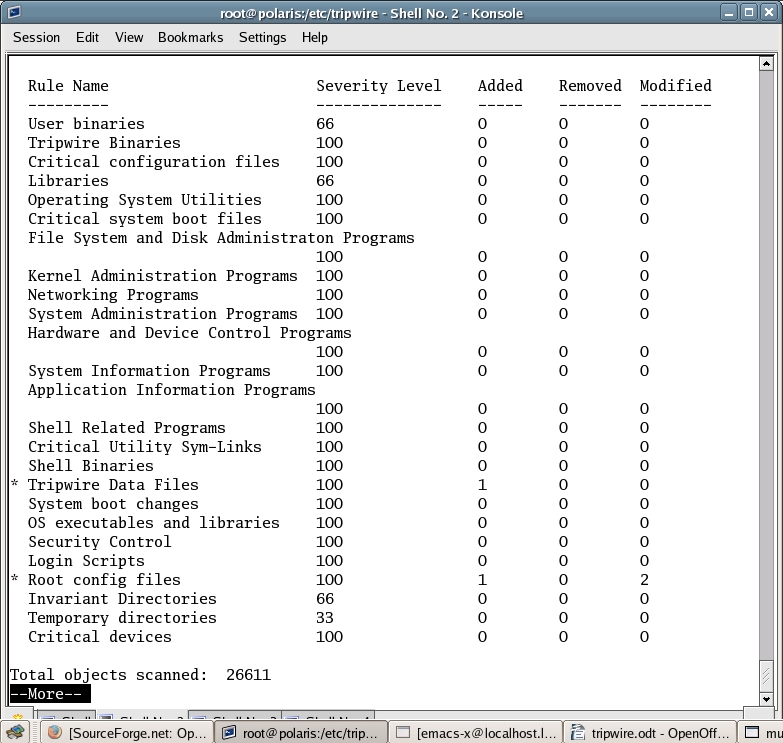
Figure 1. Sample Tripwire Report
The integrity checking procedure also can be interactive. Adding the -interactive switch causes Tripwire to open an editor, after the check, to allow the user to declare which files should be permanently updated in the Tripwire database. This is a manual alternative to the update mode described below.
Immediately after any system change, be it due to installation, update or removal of software or configuration files, it is mandatory to update the plain-text policy file and regenerate the binary database. Any successive Tripwire check would be meaningless otherwise. Therefore, run this command whenever it's necessary:
tripwire -update-policy -twrfile
 ↪a_previous_integrity_report.twr
Because it is so critical, this operation requires both your local and site passphrases. When launched in this way, Tripwire detects as violations any changes that happened after the specified integrity check. In such a case, an actual update of the policy, ignoring such violations, is possible only if the user explicitly tells the program to run in low security mode. The corresponding option is -Z low and is explained in detail in the Tripwire man page.
Reading the twfiles and twintro man pages, which contain short and up-to-date overviews of all the files and programs that compose the Tripwire suite, is highly recommended before starting the installation. The actual Tripwire binary, if called with the -help option, lists all the available options. Like many FOSS programs, all the utilities of this package accept both short and long forms of their command-line options.
For example, tripwire -check also can be written as tripwire -m c. The second form is faster when one already knows Tripwire and has to use it interactively, but the explicit command is recommended in scripts, for documentation or didactical purposes. The -v option puts any Tripwire command in verbose mode. Common wisdom also suggests that both the binary and text versions of the Tripwire system files be stored on a separate computer, write-protected floppy disk or USB drive.
Remember that one of the first things a determined cracker will do is to replace just those files with her own copies, to hide any trace of attack. The periodical reports placed by Tripwire in /var/lib/tripwire are in binary, optionally signed format. Consequently, they can't be read straight from the prompt, and they also can't even be processed directly by a shell script for automatic comparison or other purposes. The solution is to use the twprint command, which comes with its own complete man page, as in this example (note that you must pass the binary configuration file for it to work):
twprint --print-report --cfgfile twcfg.enc --twrfile
 ↪/var/lib/tripwire/report/my_tripwire_report
The digital signatures of each binary file can be checked directly with the siggen utility, which also has its own man page:
/usr/sbin/siggen /etc/tripwire/twcfg.enc
---------------------------------------------
Signatures for file: /etc/tripwire/twcfg.enc

CRC32               Dmjk1z
MD5                 DTn311w6Wx3+7TXv7SHPjA
SHA                 D5N1Pv4biCnd14igf/anGM3pvVH
HAVAL               BEJmfzpcA/Txq5nf9kgsVb
Tripwire Competitors
Tripwire certainly isn't the only IDS solution for GNU/Linux systems. Its more popular competitors are briefly described below. Other similar packages in the same category are listed on a Purdue University Web page (see the on-line Resources).
AIDE: the Advanced Intrusion Detection Environment is proposed as a free software replacement for everything Tripwire does and then some. The integrity database is defined by writing regular expressions in the configuration file. Besides MD5, several other algorithms can be added to verify file the integrity. Today, AIDE already supports sha1, tormd160, tiger, haval and some others.
Tripwire for Servers: this is a proprietary product by Tripwire, Inc., the company created by the original Tripwire developers. It is targeted at centralized monitoring of groups of Linux, UNIX or Windows servers.
Tripwire Enterprise: the flagship product of Tripwire, Inc., is for automated monitoring of mixed networks of up to thousands of servers, desktops, directory servers and network devices. Starting with version 5.2, Tripwire Enterprise includes centralized management through a Web interface, as well as customizable reporting and control.
The Open Source Tripwire Project had been quiescent for some time. Luckily, just a few days before the deadline of this article, version 2.4.0.1 was released on SourceForge, and it is the one you'll likely find packaged for your distribution by the time you read this. Besides the source tarball, it is also possible to download x86 static binaries built on a Gentoo 2005 distribution. There are no remarkable changes in functionality, so everything explained in this article should still apply as is. The other good news is that this is the first release in which the old build system has been replaced by a standard autoconf/configure environment. Unfortunately, due to some gcc 4 compatibility problems on Fedora Core 4, it wasn't possible to test this version in time. However, as soon as this porting is completed, it should be much easier to add new features and package Open Source Tripwire for all modern GNU/Linux distributions. You're welcome to join the effort and report bugs on the developers mailing list (see Resources). Thanks to Paul Herman and Ron Forrester for releasing this new version and the time they spent to answer my questions.
Resources for this article: /article/8950.
Marco Fioretti is a hardware systems engineer interested in free software both as an EDA platform and, as the current leader of the RULE Project, as an efficient desktop. Marco lives with his family in Rome, Italy.

