
Stealth E-Mail to the Rescue
Since the early days of e-mail, maintaining my own e-mail server was a sort of indication of being in charge and staying technically fit. The technology involved in a project like this usually includes components that can be reused elsewhere and force one to stay abreast with commonly used communications media.
In the beginning, it was a simple task of connecting a modem, finding a community UUCP server, configuring modem dial-up, uucico and Sendmail. This was sort of the Model T of e-mail. And, it usually included configuration of a Usenet feed with C-News to collect the UUCP addresses of all computers on the relatively small Internet at that time.
With the advent of the real Internet, the scenario is becoming more complex. You have to overcome a number of obstacles created by people trying to break in to your server, snoop the transmission of e-mail packets on the wire and deal with those who want to send you tons of unwanted e-mail. As if this were not enough, workplaces have become so secure that it is sometimes impossible to access your personal e-mail server over the Internet from work during the day.
I used to maintain a Linux server with a static IP on a DSL line running DNS, a firewall (netfilter) with my MTA of choice (Postfix) and the addition of SpamAssassin for spam filtering. I read e-mail on my laptop using IMAP with Netscape Communicator. I use Communicator filters to sort all my incoming mail into various IMAP folders.
This simplistic architecture became history this summer after moving out of the San Francisco Bay Area to Denver, Colorado. The luxury of a static-IP DSL vendor disappeared, and a Nazi-style ISP with a monopoly in the area became a reality. Static IP is not available here (at least for me), and the ISP uses aggressive filtering of the commonly used IP ports. My new workplace is so secure that I had forgotten about carrying my laptop with me or using my work Internet connection to get to my e-mail server. All this is understandable, as ISPs protect themselves from spammers and employers need better security. But, I still want to read my e-mail during the day.
I took it as a personal challenge to overcome these obstacles. The direction I went was to use the smart phone Treo 650 as a personal e-mail reader to bypass the workplace security. I configured my home e-mail server to use new stealth-mode ISPs that allow for dynamic DNS and mail relays to ports of choice.
Here is a summary of the configuration components that I cover in step-by-step configuration details below:
The e-mail server is running stable Gentoo Linux connected to the Internet via VDSL (very high-speed DSL from Qwest), using DHCP-assigned dynamic-IP address. My DNS domain registrar is No-IP.com. This registrar uses a custom dynamic DNS setup that detects IP address changes on my side. This is done by running a custom client program on my server—noip2 client connects to the No-IP.com registrar DNS server and updates my DNS records in as often as one-minute intervals. This is called Plus Managed DNS.
Because my ISP blocks incoming IP port 25, I use the Mail Reflector No-IP.com service that sets an MX record for my domain to its own server and delivers the mail to a custom port on my server.
My ISP also lists my DHCP addresses with the Internet spam blacklists, so any attempt to deliver e-mail directly from my server is doomed to failure. To overcome this, I use the No-IP.com service called Alternate-Port SMTP, which acts as an outgoing mail relay. I punt all mail to a No-IP.com server using SSL authentication and also a custom port in case my ISP blocks outgoing SMTP.
My MTA is Postfix, which is quite handy for the stealth configuration with alternate incoming and outgoing ports.
I use SpamAssassin to filter spam. It is easy to configure and works very well. In brief, its function is limited to processing mail messages and attaching a custom mail header field—an X-Spam-Level rating to each message as spam candidates. The level of spam likelihood is measured by the number of asterisks this field contains. A single * is usually a good indication of spam.
I could not count on storing e-mail on my smart phone and filtering it there. The phone couldn't handle that much e-mail. So I replaced the client-side Netscape Communicator filter function (to sort incoming mail into IMAP folders) with Procmail. I created a .procmailrc file implementing all spam and mailing-list rules to file messages in the folder hierarchy on the server. This proved to be quite useful and opened the access to my archived e-mail from any location.
The IMAP server was quite a problem for me. I prefer traditional mailboxes where multiple messages are stored in a single file per folder. Most modern IMAP servers, like Courier or Cyrus, use modern maildir or MH formats, which store each message in its own file. This consumes an insane amount of i-nodes. Unfortunately, the only open-source IMAP server I could find that uses traditional folders is the uw-imap. (CommuniGate Pro uses single files, but it's a commercial server.) The uw-imap server has a number of drawbacks, especially when it comes to SSL-protocol implementation. My tests of uw-imap with the SSL IMAP client that I had in mind for this project (PalmOS VersaMail) showed failed connections or flat failures to connect. To get what I want—the single file mail folders and working SSL—I split the function of IMAP and SSL over two separate servers: stunnel and uw-imap. Stunnel proved to be quite sophisticated in the SSL configuration and level of logging and diagnostic messages.
The client side of my e-mail configuration originally included stock PalmOS VersaMail shipped with the Treo 650 and part of a Sprint plan. The key factor in this decision was availability of unlimited use of Internet connectivity for a flat $15 US per month fee. The VersaMail IMAP support is quite good, and integration with the Blazer Web browser made the sale for me. Unfortunately, a more-intense use of the VersaMail uncovered problems with its operation. The whole setup depends on a reliable mail server polling for new mail. Unfortunately, VersaMail has a bug that impacts scheduling of the polling, and this makes it rather ineffective. I ended up using the SnapperMail mail client for PalmOS, which is a good example of how nine guys in New Zealand can outrun a big corporation like Palm Software. SnapperMail is one of the best PalmOS applications I have used so far.
There are quite a number of moving parts here, and a diagram is in order (Figure 1).
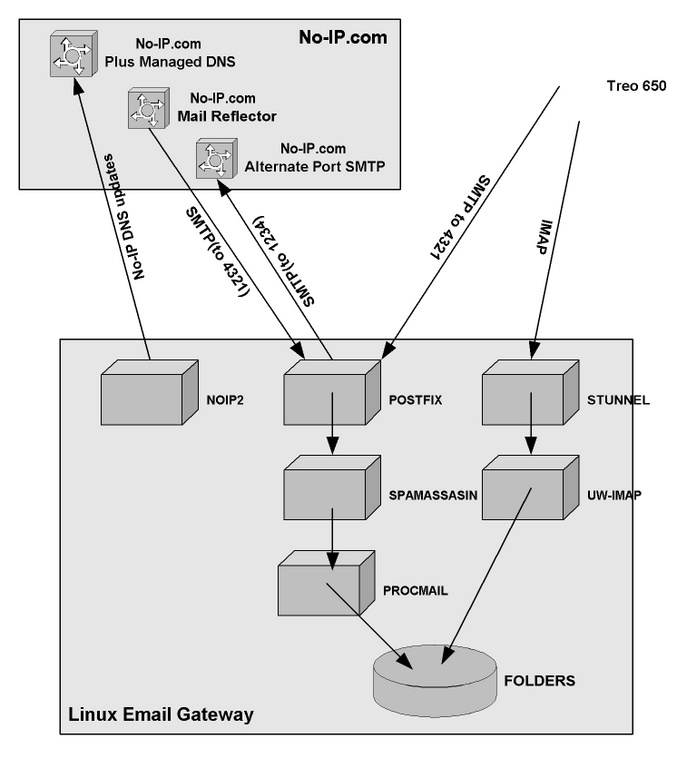
Figure 1. The Layout of the Complete E-Mail Solution
As you can see from Figure 1, there are three main areas of configuration: Linux server, No-IP.com services and the Treo 650 mail client.
My selection of the Gentoo Linux distribution for the project was dictated by the very convenient Portage package management. Portage completely frees the user from hunting down required packages. In operation, it resembles Perl CPAN or Debian apt-get. For installation of Gentoo itself, refer to the gentoo.org Web site. The installation of the OS is mostly manual, and it can be a rather lengthy process (some installations even can take days, because you compile everything yourself), but this investment will pay itself back during server management and application configuration.
You also need to get the DNS and SMTP services from No-IP.com, mentioned above. The No-IP.com Web site provides documentation for all services they provide.
The instructions that follow are Gentoo-specific, but it should be fairly easy to adapt this project to a different distribution. You simply need to make sure that the applications you install have the capabilities (like SASL) used for this solution.
We begin installation with the core component, Postfix. Standard Gentoo installation comes with a simple MTA ssmtp that needs to be removed before Postfix installation. Also, Postfix needs to be installed (compiled) with SASL support. This is needed for authenticated mail delivery to the No-IP.com relay host (Alternate-Port SMTP service).
The SASL option is turned on with the sasl keyword added to the Gentoo USE configuration variable. In /etc/make.conf, add:
/etc/make.conf:

USE="sasl"
Install SASL libraries:
# emerge dev-libs/cyrus-sasl
Now remove and add MTAs:
# emerge -C ssmtp
# emerge postfix
Add init rc script startup:
# rc-update add postfix default
Postfix configuration is relatively simple—two configuration files in /etc/postfix need attention: main.cf and master.cf.
Change the information describing your gateway host by editing the main.cf file for Postfix. Here, the hostname of your gateway is mygateway, and the domain name is foobar.net. The relay host that you will send all your mail to is relayhost.no-ip.com, receiving SMTP on port 1234. Both will be provided by No-IP.com as part of the Alternate-Port SMTP service:
myhostname = mygateway
mydomain = foobar.net
myorigin = $mydomain
mydestination = $myhostname, localhost.$mydomain $mydomain
#home_mailbox = .maildir/
relayhost = relayhost.no-ip.com:1234
smtp_sasl_auth_enable = yes
smtp_sasl_password_maps = hash:/etc/postfix/saslpass
smtp_sasl_security_options =
Add an extra port (4321) beside 25 to the Postfix master.cf file. This will be used to receive SMTP from the Mail Reflector No-IP.com service and also your Treo 650:
4321 inet n - n - - smtpd
Create an SASL password file /etc/postfix/saslpass for host relayhost.no-ip.com and user foobar.net@noip-smtp using password ????—all provided by No-IP.com:
/etc/postfix/saslpass:

relayhost.no-ip.com     foobar.net@noip-smtp:????
Next, generate a dbm map:
# cd /etc/postfix
# postmap saslpass
As a final touch, you need to enable e-mail relaying from your Treo 650. We use Sprint here, and you will have to find out what Sprint switch IP range will be connecting to your server. The Postfix main.cf parameter mynetworks will have to include the network address of the switch. I use 70.0.0.0/8 beside my home network and a local loop network. It is always best to narrow the range of addresses as much as possible, for security reasons:
mynetworks = 192.168.1.0/24 127.0.0.0/8 70.0.0.0/8
You need to install two packages: spamassassin and procmail. The steps (for Gentoo) are as follows.
Install Procmail:
# emerge procmail
Install SpamAssassin:
# emerge spamassassin
Update the init rc scripts to start the SpamAssassin server (this is probably done for you if you use a different package manager):
# rc-update add spamd default
Adjust your Postfix configuration to deliver all mail using Procmail. Add this to /etc/postfix/main.cf:
mailbox_command = /usr/bin/procmail
Create the main Procmail configuration file /etc/procmailrc, and add this recipe to make e-mail pass through SpamAssassin:
DEFAULT=/var/spool/mail/$LOGNAME
:0fw: spamassassin.lock
* < 256000
| /usr/bin/spamc
Start the spamd server:
# /etc/init.d/spamd start
Establish an IMAP folder hierarchy and Procmail configuration file to file mail in those folders. If you have multiple users, you have to do this for each user. The following configuration uses ~/.m for the folder root directory. The per-user Procmail configuration file is located in ~/.prcmailrc. I use the following .procmailrc file template that implements the essential functionality of separating spam from mail and filing mailing lists. For details, refer to procmailrc(5):
PATH=/bin:/usr/bin:/usr/sbin
MAILDIR=$HOME/.m
DEFAULT=$MAILDIR/Mbox
LOGFILE=$HOME/.procmail.log
VERBOSE=yes

# File gentoo-user mailing list into ~/.m/lst/gentoo
:O:
* (^To.*|^Cc.*)gentoo-user@lists.gentoo.org
lst/gentoo

# File jobserve mail into ~/.m/lst/jobserve
:O:
* ^From.*jobserve.com
lst/jobserve

# File SPAM into ~/.m/Spam with some exceptions:
:O:
* ^X-Spam-Level:.*\*
 * !^From.*netflix
 * !^From.*vail
 * !^From.*ebay member
 * !^From.*cnet
Spam

# File SPAM that escaped spamassassin:
:O
* ^From.*eversave.com
Spam
:O:
* ^From.*sears.com
Spam
Now that the mail processing facilities are in place, you can start Postfix and let the mail start flowing in; I can almost guarantee that the first folder with mail will be your ~/.m/Spam:
# /etc/init.d/postfix start
The IMAP configuration includes a stunnel SSL front end and the uw-imap back end. The installation for uw-imap is a bit nonstandard, because the default Gentoo configuration does not allow you to build uw-imap with clear-text authentication over an unencrypted channel. The only default uw-imap configuration that works is the one with SSL support. This is not what we need as a server behind stunnel. Gentoo lets you remedy this with a special USE setting to disable SSL and enable clear-text passwords.
The installation command for Gentoo is:
# USE="-ssl clearpasswd" emerge uw-imap
Next, the stunnel configuration file stunnel.conf needs to include an IMAP section. Edit /etc/stunnel/stunnel.conf:
pid = /var/run/stunnel/stunnel.pid
socket = l:TCP_NODELAY=1
socket = r:TCP_NODELAY=1
cert = /etc/ssl/certs/foobar.net.pem
[imaps]
accept  = 993
exec = /usr/sbin/imapd
execargs = imapd
You can generate a self-signed SSL certificate for foobar.net.pem with the following commands:
# cd /etc/ssl/certs
# openssl req -new -x509 -nodes -out cacert.pem -keyout cakey.pem -days 5000
        Country Name (2 letter code) [AU]:US
        State or Province Name (full name) [Some-State]:CO
        Locality Name (eg, city) []:Highlands Ranch
        Organization Name (eg, company) [Internet Widgits Pty Ltd]:
        Organizational Unit Name (eg, section) []:home
        Common Name (eg, YOUR name) []:foobar.net
        Email Address []:me@foobar.net

# cat cakey.pem cacert.pem > foobar.net.pem
With Gentoo, you must now configure the init rc scripts to start stunnel:
# rc-update add stunnel default
As I mentioned, there are two good IMAP clients available for PalmOS. One is the standard application included with the Treo, VersaMail. The other is a commercial application, SnapperMail. My choice was the latter, even in spite of its relatively high cost (approximately $60 US).
Both applications allow for subscribing to a hierarchy of IMAP folders on the server and handling e-mail attachments. SnapperMail is definitely better tested and has a number of features that justify its additional cost.
To install PalmOS applications and generally manage my Treo 650 using Linux, I use pilot-link software. On Gentoo, install it with:
# emerge pilot-link
I use pilot-link to back up and restore my Treo to a directory on Linux as well as to install applications like SnapperMail.
I use Bluetooth and PPP to connect my Treo to a Linux notebook. You also can use a USB connection. The connection channel for pilot-link tools is conveniently defined with a PILOTPORT environment variable. Use the following for a USB cable:
# export PILOTPORT=/dev/tts/USB1
or for Bluetooth, use:
# export PILOTPORT=net:any
I create a directory named treo in my home directory, and run this command to back up my Treo before installing any software:
# pilot-xfer -b treo
I use the following command to synchronize (incrementally) the Treo with this backup directory:
# pilot-xfer -s treo
To restore a backup, use the following:
# pilot-xfer -r treo
Download SME231.zip from www.snappermail.com to install the SnapperMail application. Unzip the file and run this command:
# pilot-xfer -i SnapperMail-ent.prc
The configuration of the Treo 650 with the Sprint network is best done by ordering the Sprint PCS Vision Professional Pack and letting Sprint support walk you through the setup.
SnapperMail also comes with a good 60-page PDF manual, and its setup is really quite intuitive.
Peter Ziobrzynski is an Independent Consultant based in Toronto, Canada, providing UNIX and Linux consulting services to clients in San Francisco, California, and recently in Denver, Colorado. Peter holds a Master's degree in Engineering from Cracow University of Technology, Poland. He immigrated to Canada in the early 1980s and has been using UNIX since then for work and pleasure. His recent focus is on Linux, and he holds Red Hat RHCE.
