
Getting Started with Qtopia
Trolltech's Qtopia is an embedded application framework designed to give vendors maximum customization and third-party developers the choice of developing commercial applications or free GPL applications. Qtopia is available under dual licenses. Developing for Qtopia is as easy as any Qt/KDE desktop development, except for a few extra steps and tools needed.
I started developing my program Gutenbrowser, which is a reader/downloader for the thousands of free etexts available from Project Gutenberg. It started out as a Linux-only application and soon made its way to Windows, Qtopia and then to the Open Palmtop Integrated Environment (Opie). Opie is based on Qtopia GPL and is community developed.
Qtopia is built on Qt Embedded, so an application that is created with Qt easily can be made to run in the Qtopia environment. It took about two weeks part-time/open-source-developer time to get Gutenbrowser running on the Sharp Zaurus, and that includes learning Qtopia API and cross-platform compilation as well!
If you want to port a Qt 4 application to Qtopia, it would be best to wait for Qtopia 4 to be released, as there are significant changes between Qt Embedded 2.3 and Qt Embedded 4. Qt 3, KDE and even Gtk+ applications have been ported to Qtopia versions 1 and 2 but require back-porting, class substitution and the use of microkde sources for the KDE programs.
To get started developing for Qtopia, you need a few tools. Qtopia is Linux-only currently, so you need a Linux desktop on which to develop. You also obviously need an editor, such as emacs or vi. For this project, I chose KDevelop as it comes with a simple Qtopia application template.
If you are developing for a device, you need a cross-compiler. Our target device, the Archos PMA430 uses arm-linux-gcc version 2.95 for Qtopia. Although gcc 3 produces better optimized code, we want to run on and be compatible with software currently existing on hardware, so 2.95, as old as it is, will do. You can get ARM cross-toolchains from various sites on the Internet. In this case, Archos has a toolchain available at www.archos.com/products/overview/pma_400_sdk.html and links are also available from qtopia.net.
Of course, you also need Qtopia, but you have the choice of downloading the source code or using a ready-made Qtopia SDK. The SDK for the PMA430 is available in commercial and GPL versions, just like Qtopia itself. The commercial SDK can be purchased for a reasonable sum from www.trolltech.com/products/qtopia/pricing.html, and the free, GPL version can be downloaded from ftp.trolltech.com/qtopia/sdk. These install to /opt/Qtopia. Then from a command prompt do:
# ln -s /opt/Qtopia/sharp /opt/Qtopia/arm
Start KDevelop, and from the Project menu choose New Project. Open the C++ directory icon, under the directory Embedded. Click the file called Qtopia Application to start a new Qtopia project. I could name this anything, like hippopotamus, but instead I will name my project skizzy. See Figure 1 for an example dialog for creating this project.
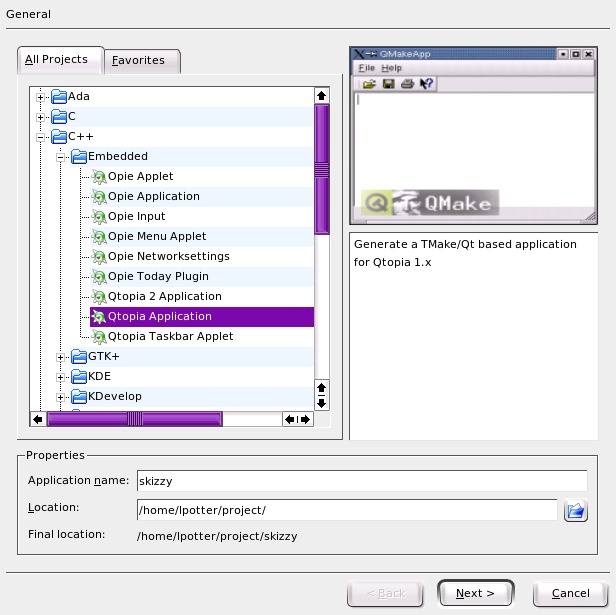
Figure 1. Creating the skizzy Project
Once you have a project, you can start editing it to suit your needs. You need to be sure to use Designer from Qt 2 when you edit .ui (user interface) files for Qtopia, as .ui files generated from later versions of Qt are not compatible. I do this by setting up a custom external tool and then opening my .ui file from within Designer 2.
Note: do not open by clicking on the .ui file, because Designer 3 will open up within KDevelop, and you can mangle your .ui file. Because of this, you have to run KDevelop from a command line, after exporting a few variables:
export PATH=/opt/Qtopia/bin:$PATH
export LD_LIBRARY_PATH=/opt/Qtopia/lib:$LD_LIBRARY_PATH
You also want to set up the Qt Virtual framebuffer tool by the name of QVFb, pointing to /opt/Qtopia/bin/qvfb, in which the application will run on the desktop. Qtopia displays directly to the framebuffer, and therefore it does not need the overhead of the X-11 display server.
We need to set some environmental variables for our KDevelop project. Run KDevelop, and then click on Project→Project Options→Run Options. Add these variables:
Name: QTDIR Value: /opt/Qtopia
Name: QPEDIR Value: /opt/Qtopia
Name PATH Value: /opt/Qtopia/bin:$PATH
Name LD_LIBRARY_PATH Value: /opt/Qtopia/lib:$LD_LIBRARY_PATH
Similarly, add to the Make Options, for desktop development:
Name: QTDIR Value: /opt/Qtopia
Name: QPEDIR Value: /opt/Qtopia
Name PATH Value: /opt/Qtopia/bin:/opt/Qtopia/tmake/bin:$PATH
Name LD_LIBRARY_PATH Value: /opt/Qtopia/lib:$LD_LIBRARY_PATH
Name TMAKEPATH Value:/opt/Qtopia/tmake/lib/qws/linux-generic-g++
Add -lqtopia to the LIBS line in skizzy.pro, as Qtopia 1.7 adds a new library.
At this point, you need to generate a Makefile manually, as KDevelop does not use tmake correctly:
# export TMAKEPATH=/opt/Qtopia/tmake/lib/qws/linux-generic-g++
# tmake -o Makefile skizzy.pro
Then you can build the project (F8) from within KDevelop. This little glitch will be resolved in newer versions of Qtopia that use qmake to generate Makefiles.
Let's add some functionality to skizzy.
Start the Designer 2 application and open skizzybase.ui, and delete the QLabel. Add a QTabWidget with a QComboBox on the first tab, a QListBox on the second tab and a QMultiLineEdit on the third tab, for example (Figure 2).

Figure 2. If you use QLayouts, it allows your application to resize depending on the display resolution or screen rotation.
Save the .ui file.
Open the file skizzy.cpp with KDevelop. You will see our application is derived from skizzyBase:
skizzy::skizzy( QWidget* parent,  const char* name, WFlags fl )
    : skizzyBase( parent, name, fl )
I want to change main.cpp to a better method of constructing the application that was added since the time that the Qtopia templates for KDevelop were created.
We change the usual main() function:
int main( int argc, char ** argv )
{
    QPEApplication a( argc, argv );
    skizzy mw;
    a.showMainWidget( &mw );
    return a.exec();
}
to Qtopia's application macro:
QTOPIA_ADD_APPLICATION("skizzy",skizzy);
QTOPIA_MAIN
This allows us to create a quicklaunch application, which helps speed up startup time, by using the common application constructor that is already in memory.
My application skizzy doesn't do anything yet, so include:
#include <qpe/fontdatabase.h>
Add a private member:
FontDatabase fdb;
and some functions as private slots:
private slots:
void fillCombo();
void comboSelected(const QString &);
void showFont( QListBoxItem *);
We need to add a few lines in skizzy.cpp here for things we will use:
#include <qstringlist.h>
#include <qcombobox.h>
#include <qtabwidget.h>
#include <qlistbox.h>
#include <qmultilineedit.h>
#include <qfont.h>
#include <qfontinfo.h>

#include <qpe/fontdatabase.h>
and then add the implementations, to which we will connect our widgets signals:
/*
This function uses Qtopia's FontDatabase to
fill the combobox with a list of font names.*/
void skizzy::fillCombo()
{
	QStringList families = fontdb.families();
  	for ( QStringList::Iterator f = families.begin(); f != families.end();++f ) {
      	QString family = *f;
		ComboBox1->insertItem( family);
	}
}

/*
This gets called when the combobox is selected, and
fills the listbox on the second tab with the name,
style and point size for the family of fonts
selected, and raises it. */
void skizzy::comboSelected(const QString &selectedFont)
{
ListBox1->clear();

 QStringList styles = fdb.styles( selectedFont );
  	for ( QStringList::Iterator s = styles.begin(); s != styles.end();++s ) {
              QString style = *s;
              QValueList<int> smoothies = fdb.smoothSizes( selectedFont, style );
               for ( QValueList<int>::Iterator points = smoothies.begin(); points != smoothies.end(); ++points ) {
                   QString pointSize = selectedFont + " "+ style +" "+QString::number( *points ) + " ";
                  ListBox1 ->insertItem( pointSize);
               }
           }
    TabWidget2->showPage(tab2);
}

/*
This shows example text of the selected font in
the QMultiLineWidget on the 3rd tab, and raises it.*/
void skizzy::showFont( QListBoxItem *item)
{
	QStringList fontItemString = QStringList::split(' ',item->text());
	QString family, style, point;

    family = fontItemString[0];
    style = fontItemString[1];
    point = fontItemString[2];
    bool ok;
    int i_size = point.toInt(&ok,10);

    if (!ok) {
        style += " "+fontItemString[2];
        point = fontItemString[3];
        i_size = point.toInt(&ok,10);
    }

    QFont selectedFont( family);
    selectedFont.setPointSize(i_size);

     if(style.find("Italic",0,TRUE) != -1) {
          selectedFont.setItalic(TRUE);
     }

     if(style.find("Bold",0,TRUE) != -1) {
        selectedFont.setWeight(QFont::Bold);
     }

     if(style.find("Light",0,TRUE) != -1) {
        selectedFont.setWeight(QFont::Light);
    }

    MultiLineEdit1->setFont( selectedFont);
    MultiLineEdit1->setText( tr( "The Quick Brown Fox Jumps Over The Lazy Dog" ) );
    MultiLineEdit1->setWordWrap( QMultiLineEdit::WidgetWidth);

	TabWidget2->showPage(tab3);
}
Qt and Qtopia use signals for sending messages between widgets. Every widget has some kind of signal it emits, and we can use the connect macros to link up functionality.
Connect ComboBox1's activated signal, and ListBox1's clicked signal to our slots, like this:
skizzy::skizzy( QWidget* parent,  const char* name, WFlags fl )
    : skizzyBase( parent, name, fl )
{
    connect(bye, SIGNAL(clicked()), this, SLOT(goodBye()));
    connect(ComboBox1, SIGNAL(activated(const QString &)), this, SLOT(comboSelected(const QString &)));
    connect(ListBox1, SIGNAL( clicked ( QListBoxItem * )), this, SLOT(showFont( QListBoxItem*)));
    fillCombo();
}
Notice how the slot function takes an argument of the exact same type as the signal.
In KDevelop, either press F8, or in the menu, select Build→Build Project.
It should now compile, using the native compiler. To run it, start up QVFb, and simply select Build→Execute Main Program. The skizzy application should show up in QVFb.
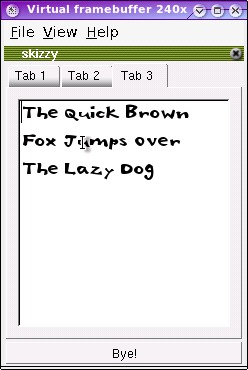
Figure 3. Skizzy with real, if not useful features.
So, now that we have a reasonably working program, we need to cross-compile this for the Archos device. We have to change the project settings to find the proper libraries.
We are now ready to cross-compile, so clean the project by selecting Build→Clean Project from the menu.
You need to change the Make Options, using the Project Options→Make Options dialog:
Name: QTDIR Value: /opt/Qtopia/arm
Name: QPEDIR Value: /opt/Qtopia/arm
Name PATH Value: /usr/local/arm/bin:/opt/Qtopia/tmake/bin:$PATH
Name TMAKEPATH Value:/opt/Qtopia/tmake/lib/qws/linux-arm-g++
Delete the Makefile, and run the following command from the command line to create the Makefile for compiling using the arm-linux compiler:
# export TMAKEPATH=/opt/Qtopia/tmake/lib/qws/linux-arm-g++
# tmake -o Makefile skizzy.pro
Press F8 to build the project. You can now take the resulting binary, transfer it to the Archos device using USB, and run it from there!
If you want to create an installable package, Qtopia uses the Itsy Package Management (ipkg) available from handhelds.org, to install things using the Software Packages application. More information about ipkg and Qtopia development are available from Trolltech's Qtopia.net Web site.
Lorn Potter works for Trolltech as the Qtopia Community Manager. He is an American who lives in sunny Brisbane, Australia, with his Australian wife and son. He is a self-taught open-source programmer who is a core developer for the Opie (Open Palmtop Integrated Environment) Project. He also has worked as a musician, sound engineer and snow ski bum.

