
Let Your Finger Do the Booting
To begin, we need to indulge in a little truth-in-advertising exercise. FingerGear's Computer-On-a-Stick is not, in fact, a computer of any kind. There's nary a processor to be found on the little beastie. What it is, in fact, is a nicely packaged bootable Linux image squeezed onto a USB memory stick along with some NVRAM to let you store content. When you plug it in to a late-model PC that supports booting from USB storage devices and tell the BIOS to boot from it, it fires up a 2.6-based Debian Linux distribution, preconfigured with Firefox, OpenOffice.org, Evolution and Gaim. The processor, system memory, graphics card, networking and display of the host system are used.
The first time you boot off the stick, it sets up a password so that if stolen, people can't get their hands on your data. Beyond that, it's a single-user device, so no multiple desktop environments are going to be happening. The innovating thing (and what sets the FingerGear product apart from a bootable CD) is that your home filesystem and all other system configurations move around with you, stored on up to 1GB of nonvolatile RAM. The 256MB sticks start at $99 US, with the 1GB versions at $179 US. The intended use is for road warriors who may find themselves at a client with time to kill and a PC in front of them. By plugging in the stick, they are instantly set up to read their mail, continue editing documents they have been working on and chat with their friends via IM, without the hassle of configuring the local mail client on the client's PC and so forth.
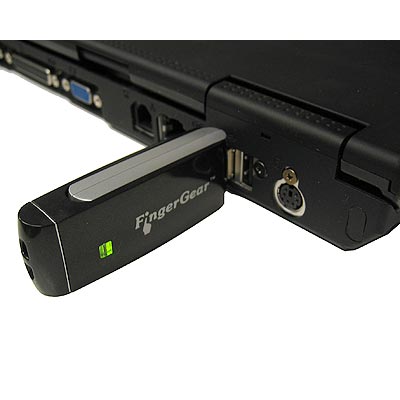
I tested the unit on a Toshiba laptop and the Linux Journal test PC (an AMD 3200+). In the case of the laptop, there is no option to boot from USB devices, so I used the enclosed mini-CD to do the initial boot, after which the FingerGear stick took over. Unfortunately, in spite of the recent 2.6 kernel, it totally failed to recognize my Wi-Fi chipset. Of course, if you've already got a laptop, why are you using the FingerGear product?
Testing on the Linux Journal test system was more fruitful. Although the BIOS supports booting from a USB device, I got the ever-helpful “Boot failed” message when I tried. Again, booting from the mini-CD solved the problem. Once up, DHCP automatically configured the networking and I was off. Firefox worked fine, and I was even able to do things like install the Macromedia Flash plugin. The Office suite performed as expected. Boot time was nearly instantaneous.
The Computer-On-a-Stick is a clever idea, but one has to question the practicality of the intended use. I kept finding myself envisioning attending a typical tradeshow and proposing to the staff running the public press PCs that I be permitted to reboot one of their PCs. The same thought applies to most corporate network admins. You could, of course, apply the “It is better to ask forgiveness than permission” maxim, but it wouldn't be advisable most places I've worked. The “plug it in and it works” networking would probably also have difficulties in any setting with extensive firewalling and proxy configuration required. So I'm not sure how many settings would actually work out practically with the FingerGear concept.
There's also the issue of security. Properly packed with a hacker toolkit, one of these sticks could be the ultimate penetration tool. Boot it up, and own the attached network. Thankfully for the sleep of administrators around the world, the current release of the product doesn't provide any way to access the local disk. However, FingerGear has indicated that a future product will allow just that functionality, which, under friendly conditions, would let an administrator boot up a toasted disk drive and fix things. Under less-sincere circumstances, it would be just the toy to go data-raiding in any physically accessible computer you happened across.
In summary, the Computer-On-a-Stick is a nice idea that may be the right solution for you. Whether it is or not will depend largely on what type of computers you plan to use it with. If you frequently find yourself in locations with generic computers that you will have permission to reboot, it will definitely let you surf, read mail, edit documents and IM without leaving a trace on your hosts' computers. But if the thought of rebooting other people's systems makes you nervous, you might just want to settle for a plain memory stick and other solutions, such as Web mail.
Product Info
Vendor: FingerGear
URL: www.fingergear.com
Price: $99 US for the 256MB stick; $179 US for the 1GB stick
James Turner is Product Review Editor for Linux Journal. He has written two books on Open Source Java development and is a Senior Software Engineer with Axis Technology, LLC.
Realizing the promise of Apache® Hadoop® requires the effective deployment of compute, memory, storage and networking to achieve optimal results. With its flexibility and multitude of options, it is easy to over or under provision the server infrastructure, resulting in poor performance and high TCO. Join us for an in depth, technical discussion with industry experts from leading Hadoop and server companies who will provide insights into the key considerations for designing and deploying an optimal Hadoop cluster.
Sponsored by AMD
Built-in forensics, incident response, and security with Red Hat Enterprise Linux 6
Every security policy provides guidance and requirements for ensuring adequate protection of information and data, as well as high-level technical and administrative security requirements for a system in a given environment. Traditionally, providing security for a system focuses on the confidentiality of the information on it. However, protecting the data integrity and system and data availability is just as important. For example, when processing United States intelligence information, there are three attributes that require protection: confidentiality, integrity, and availability.
Learn more about catching the bad guy in this free white paper.
Sponsored by DLT Solutions
| Designing Electronics with Linux | May 22, 2013 |
| Dynamic DNS—an Object Lesson in Problem Solving | May 21, 2013 |
| Using Salt Stack and Vagrant for Drupal Development | May 20, 2013 |
| Making Linux and Android Get Along (It's Not as Hard as It Sounds) | May 16, 2013 |
| Drupal Is a Framework: Why Everyone Needs to Understand This | May 15, 2013 |
| Home, My Backup Data Center | May 13, 2013 |
- RSS Feeds
- Dynamic DNS—an Object Lesson in Problem Solving
- Making Linux and Android Get Along (It's Not as Hard as It Sounds)
- Designing Electronics with Linux
- Using Salt Stack and Vagrant for Drupal Development
- New Products
- A Topic for Discussion - Open Source Feature-Richness?
- Drupal Is a Framework: Why Everyone Needs to Understand This
- Validate an E-Mail Address with PHP, the Right Way
- What's the tweeting protocol?
- Kernel Problem
9 hours 19 min ago - BASH script to log IPs on public web server
13 hours 46 min ago - DynDNS
17 hours 21 min ago - Reply to comment | Linux Journal
17 hours 54 min ago - All the articles you talked
20 hours 17 min ago - All the articles you talked
20 hours 21 min ago - All the articles you talked
20 hours 22 min ago - myip
1 day 47 min ago - Keeping track of IP address
1 day 2 hours ago - Roll your own dynamic dns
1 day 7 hours ago
Enter to Win an Adafruit Pi Cobbler Breakout Kit for Raspberry Pi

It's Raspberry Pi month at Linux Journal. Each week in May, Adafruit will be giving away a Pi-related prize to a lucky, randomly drawn LJ reader. Winners will be announced weekly.
Fill out the fields below to enter to win this week's prize-- a Pi Cobbler Breakout Kit for Raspberry Pi.
Congratulations to our winners so far:
- 5-8-13, Pi Starter Pack: Jack Davis
- 5-15-13, Pi Model B 512MB RAM: Patrick Dunn
- 5-21-13, Prototyping Pi Plate Kit: Philip Kirby
- Next winner announced on 5-27-13!
Free Webinar: Hadoop
How to Build an Optimal Hadoop Cluster to Store and Maintain Unlimited Amounts of Data Using Microservers
Realizing the promise of Apache® Hadoop® requires the effective deployment of compute, memory, storage and networking to achieve optimal results. With its flexibility and multitude of options, it is easy to over or under provision the server infrastructure, resulting in poor performance and high TCO. Join us for an in depth, technical discussion with industry experts from leading Hadoop and server companies who will provide insights into the key considerations for designing and deploying an optimal Hadoop cluster.
Some of key questions to be discussed are:
- What is the “typical” Hadoop cluster and what should be installed on the different machine types?
- Why should you consider the typical workload patterns when making your hardware decisions?
- Are all microservers created equal for Hadoop deployments?
- How do I plan for expansion if I require more compute, memory, storage or networking?


Comments
LinStick
Hello,
I just enjoyed your article about FingerGear. 4-5 months ago - I got a memory USB stick for my birthday and wanted to put a decent Linux on it with applications I wanted. I also wanted it to be bootable, but most of all I wanted it to run under Windows as well.
Well - I couldn't find something that would work for me so I built my own. I call it LINSTICK
It is based on Gentoo Linux - it is bootable and you can run it directly from windows as well. It is transparently using CoLinux to do that. It has Firefox, AbiWord, Gaim, Gimp, Ethereal, XMMS and a few other goodies like Mahjongg, but basically - I can put anything I want on it.
It is about 200Mb and fits nicely on a FAT USB stick - no reformatting is required and if you don't plan to boot from it - you can just copy the files and run it under windows.
I built little wrapper for windows so you just double click on a launcher and linstick boots in background. After booting it brings up VNC client showing you your desktop.
The performance of the Linux running under CoLinux is almost realtime - meaning almost no penalty for running under windows.
The only issue I have currently is a little slower than normal serial network driver which I use to connect the display automatically, but I guess you would have to try it to know what I mean.
Just a week or so ago I put a site to share it with a few friends www.linstick.com
I had to limit the public download purely for bandwidth purposes.
I would invite James to try it out and let me know what he thinks about it. Let me know and I will send the username/password needed to download the files.
I just think that my LinStick is far superior to FingerGear and I really do not have any plans on comercializing it. All you would need is any cheap USB stick you can find. I would give this for free - I just need to find a host to host this 200Mb file for download.
Please let me know what you think. I would be more than happy to send you the LinStick, answer any questions and help you try it out.
Thanks.
Nebojsa Djogo
Feel free to contact me about this directly at djogon.linux at softwareriver.com
Let your finger do the booting.
I'm sure this is a very good product but.....
Last night I found a 1GB stick with KNOPPIX 4.... on it for $79.00 and ordered it.
I have had several bootable CD's from KNOPPIX and the LINUX SLEUTH. Both are very good products.
I assume the stick will be also.
A nice feature with the KNOPPIX ISO, there are downloadable utilities to modify it before writing it to a CD.
Looks like the "FingerGear" 1GB stick is about $100.00 over priced.
Regards,
Pete Gandy
Pearland, TX
Knoppix bootable stick
I forgot to get back after getting this stick for $79.00.
I have purchased some 1Gb sticks on sale and ran dd to copy the Knoppix stick to an image file on my hard drive. Then ran DD once again to put the Knoppix image on the new stick.
Works perfectly.
I don't have time to go into the many good things about it.
Simply put I've read other ads for sticks that cost more than twice as much. Their own advertising does not tell me that they are better in any way than the one I have.
I have many uses for this stick and carry one copy in my flight bag when I'm fling as a contract pilot. I also have one in my suit case just in case I loose or forget the one in the flight bag.
I have one in my fire proof safe, "the original."
I have the image on several hard disks on several systems.
I'm hooked.
The Knoppix stick is as good as it gets.
The only thing I would like is to see the "Linux Sleuth" version on a stick.
Don't pass this one up as an option to test the concept before you go spend hundreds more. You just might decide you found the right one.
Pete Gandy
Pearland, TX