
The CUPS Printing System
CUPS is what its name says: a common UNIX printing system. It is aimed at providing a common printing interface across a local network, masking differences among the printing systems on each computer. I am not sure that such a system is needed in a pure Linux environment, where the standard Berkely LPD provides this functionality, but CUPS does provide interactivity with SMB and Windows printers. CUPS also allows dynamic printer detection and grouping.
CUPS is licensed under the GPL by a company called Easy Software Products. Besides providing CUPS itself as free software, the company also provides commercial add-ons and support. You can get CUPS from www.cups.org, and it is available as an RPM package for most distributions. I've seen it for Mandrake, Red Hat and SuSE.
CUPS can be seen as a replacement for the LPD printing system. It replaces the lpr command with its own and the LPD printer drivers with its own versions. However, CUPS is similar to LPD in that it uses PostScript as its underlying language for page descriptions. Linux (and UNIX) programs don't know the difference between CUPS and LPD.
CUPS contains a list of printer drivers that include most printers with a parallel port, USB and even serial connections. A note about serial connections: connecting a printer with a null-modem serial line is slow and more difficult to set up than a parallel line. But, it is sufficient for a matrix printer--for bulk printing or multiple copies--and makes an easy way to build a print server from a pile of older hardware. A hint to schools!
CUPS shares a characteristic with Windows systems that is not too common in the UNIX world: it broadcasts the printers available on the local computer to all other computers on the network. In this way, every computer on the local IP segment gets to know in real time which printers are available and what the status is for each one. Naturally, this characteristic is configurable. You can tell CUPS, in the cupsd.conf configuration file, if it should broadcast, where to broadcast to and how often the information should be refreshed.
A printer group, called a "class" in CUPS, is a group of printers that appears as a single printer to user programs. For example, you could create a group called ColorPrinters that included all your color printers. A user then could tell his program to print on printer ColorPrinters, and the output would be on one of these printers. Which printer would depend on user rights or which printer currently is available.
The fact that a printer is a member of a group does not mean, in itself, that users cannot use that printer directly. At CUPS access control level, however, you can make individual printers reject jobs while groups accept them. The end result is users can use printer groups, not printers. It depends a bit on the policy on printer use you intend to implement.
I have a workshop with five computers running Linux, all running CUPS. When changing a printer on one of them, I take the old printer off of CUPS and put in the new printer by using the CUPS Web interface, all in under 30 seconds. That is all the configuration required; the other computers get their default printing routes updated in another 30 seconds. It takes less than one minute for the whole change--less time than a laser printer takes to warm up.
For my school network, I like to provide:
A laser B/W printer class that anybody can print on.
A draft Color class that anybody can print on, but with restrictions on volume.
A precision Color class that is unblocked only under my supervision.
Most of these printers hang off Windows boxes and would be available directly for other computers under Windows. However, by providing them through CUPS on a central bridge/router, I:
provide a means of centralizing printers; users only have to look for a printer in a single place
provide a means of printing on another Ethernet segment without allowing normal Windows broadcast traffic to get across and clutter up network bandwidth
make sure that the teacher printing from his classroom up there on the third floor of the other building doesn't get stuck because the departmental printer on the ground floor of this building has run out of paper; his print job got redirected to the standby printer
To use a Windows printer under Linux or the other way round, you need to have a Samba server working. Set it up and test it before going on. As a normal user, try viewing your home directory on the Linux computer from a Windows box. Remember to turn password encryption on in /etc/samba/smb.conf if you are using Windows 98 or a more recent version.
CUPS can use printers shared from computers under Windows and network printers using the SMB protocol. You configure a "Windows printer using Samba". Basically, all you have to tell CUPS is the address of the printer, as in smb://server/printer.
Windows can use a CUPS printer shared by Samba. Proceed in the normal way to share your printers with Samba; that is, do not do anything. Your printers generally are shared by default. If this is not the case, edit smb.conf to create the necessary share. All the Samba share options are applicable, because Samba treats a CUPS printer in the same manner as it does an LPD printer.
Network printers, a printer with a network interface that doesn't need a host computer to be made available to the network, can use any of a variety of protocols:
SMB protocol - you can see it in your Windows network environment browsing screen
LPD protocol - several models of Epson printers integrate a TPC/IP stack and the LPD protocol. You then can access them on port 515, just like a Linux box. Try using default queue lp
A proprietary protocol - not good
In the first two cases, proceed as with a printer hosted by a computer. In the third case, you probably are at a dead end. This happened to me with a Lexmark: I ended up sharing it from a Windows box.
There are two ways to configure CUPS. One is to edit the configuration file /etc/cups/cupsd.conf. The other is to sue a classic Web-based interface that you can access on port 631. This method is similar to the Web-based configuration of many network-capable printers and should be intuitive for all.
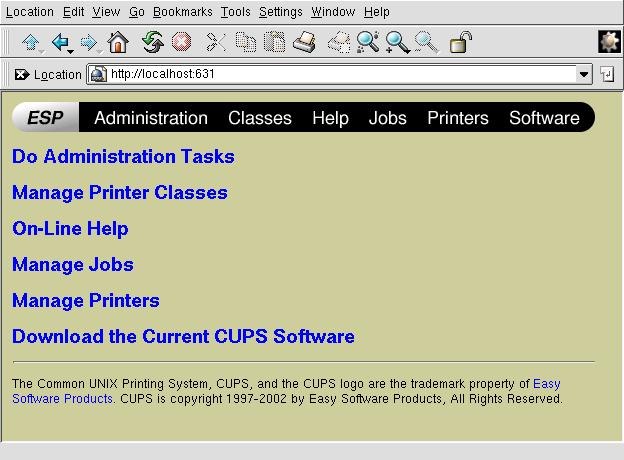
Generally, you can access the Web interface only from the localhost interface, not from other computers. However, you can change this by changing the following lines in the configuration file cupsd.conf and restarting CUPS:
<Location /> # this location is the main screen
Order Deny, Allow
Deny From All
Allow From 127.0.0.1 # allow configuration from local host
Allow From 192.168.1.* # allow configuration from any machine
# on the 192.168.1.0/24 subnet
Allow From mybox.mydomain # this is my desktop on another segment
</Location>
You also can specify one by one which menu items, called Locations in CUPS terms, are accessible from any particular IP address. This doesn't mean that other computers will not be able to connect to the server; they simply won't be able to access contents.
If your Linux box is acting both as a print server and a bridge between two or more IP segments, you also can specify on which network interfaces it will listen for requests:
Listen 127.0.0.1:631 # Should already be there Listen servename:631 # Add your server name here Listen 192.168.1.1:631 # You can also use your IP address
In the above example, the Web interface is visible through my eth0 interface with IP address 192.168.1.1, but not through the eth1 interface with IP address 172.16.0.1 .
Although user identification is required through basic login/password authentication, note that you can use SSL to connect to the Web interface using HTTPS. This also is relatively easy to configure in the cupsd.conf file.
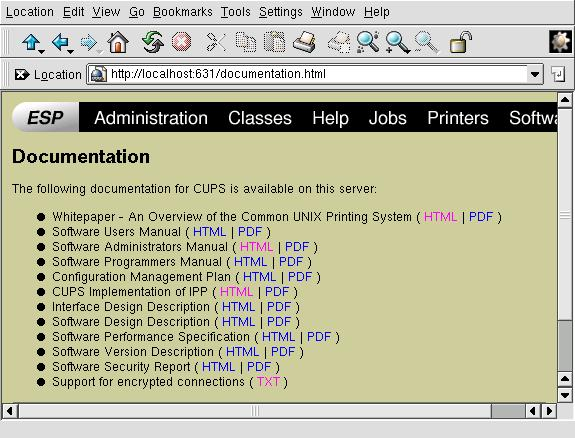
The Web interface comes with a comprehensive help system with plenty of documentation about what CUPS is and how to configure it.
Copyright (c) 2003, Alan Ward. Originally published in Linux Gazette issue 90. Copyright (c) 2003, Specialized Systems Consultants, Inc.
Alan teaches CS in Andorra at high-school and university levels. His hobbies include science photography, both digital and traditional; trekking; and rock and processor collecting.
Today’s modular x86 servers are compute-centric, designed as a least common denominator to support a wide range of IT workloads. Those generic, virtualized IT workloads have much different resource optimization requirements than hyperscale and cloud applications. They have resulted in a “one size fits all” enterprise IT architecture that is not optimized for a specific set of IT workloads, and especially not emerging hyperscale workloads, such as web applications, big data, and object storage. In this report, you will learn how shifting the focus from traditional compute-centric IT architectures to an innovative disaggregated fabric-based architecture can optimize and scale your data center.
Sponsored by AMD
Built-in forensics, incident response, and security with Red Hat Enterprise Linux 6
Every security policy provides guidance and requirements for ensuring adequate protection of information and data, as well as high-level technical and administrative security requirements for a system in a given environment. Traditionally, providing security for a system focuses on the confidentiality of the information on it. However, protecting the data integrity and system and data availability is just as important. For example, when processing United States intelligence information, there are three attributes that require protection: confidentiality, integrity, and availability.
Learn more about catching the bad guy in this free white paper.
Sponsored by DLT Solutions
| Making Linux and Android Get Along (It's Not as Hard as It Sounds) | May 16, 2013 |
| Drupal Is a Framework: Why Everyone Needs to Understand This | May 15, 2013 |
| Home, My Backup Data Center | May 13, 2013 |
| Non-Linux FOSS: Seashore | May 10, 2013 |
| Trying to Tame the Tablet | May 08, 2013 |
| Dart: a New Web Programming Experience | May 07, 2013 |
- RSS Feeds
- Making Linux and Android Get Along (It's Not as Hard as It Sounds)
- New Products
- Drupal Is a Framework: Why Everyone Needs to Understand This
- A Topic for Discussion - Open Source Feature-Richness?
- Home, My Backup Data Center
- Validate an E-Mail Address with PHP, the Right Way
- New Products
- Developer Poll
- Trying to Tame the Tablet
- not living upto the mobile revolution
1 hour 24 min ago - Deceptive Advertising and
2 hours 5 sec ago - Let\'s declare that you have
2 hours 1 min ago - Alterations in Contest Due
2 hours 2 min ago - At a numbers mindset, your
2 hours 3 min ago - Do not get Just Almost any
2 hours 6 min ago - A fantastic rule-of-thumb to
2 hours 8 min ago - Keren mastah..
Penting,
3 hours 5 min ago - mini tablet compare
4 hours 24 min ago - Looking Good
7 hours 57 min ago
Enter to Win an Adafruit Prototyping Pi Plate Kit for Raspberry Pi

It's Raspberry Pi month at Linux Journal. Each week in May, Adafruit will be giving away a Pi-related prize to a lucky, randomly drawn LJ reader. Winners will be announced weekly.
Fill out the fields below to enter to win this week's prize-- a Prototyping Pi Plate Kit for Raspberry Pi.
Congratulations to our winners so far:
- 5-8-13, Pi Starter Pack: Jack Davis
- 5-15-13, Pi Model B 512MB RAM: Patrick Dunn
- Next winner announced on 5-21-13!
Free Webinar: Linux Backup and Recovery
Most companies incorporate backup procedures for critical data, which can be restored quickly if a loss occurs. However, fewer companies are prepared for catastrophic system failures, in which they lose all data, the entire operating system, applications, settings, patches and more, reducing their system(s) to “bare metal.” After all, before data can be restored to a system, there must be a system to restore it to.
In this one hour webinar, learn how to enhance your existing backup strategies for better disaster recovery preparedness using Storix System Backup Administrator (SBAdmin), a highly flexible bare-metal recovery solution for UNIX and Linux systems.


Comments
linux printing
how do config dot matrix ptinters
Old News - Keep up to date
Recycled articles don't work. The facts get old because of this thing called progress. Linux Journal please take pride in Linux and your magazine. Don't hinder your readers, help them.
Regarding this article. Go to the CUPS site if you need help with CUPS, they have articles, reference guides, a friendly forum for questions, etc...:
http://www.cups.org/
IPP and Windows
You don't need to set up a Samba Server to use printers on the server from Windows 2000 and Windows XP clients. These can use the IPP protocol, you basically need to use an address like http://server:631/Printername and it works.
RE: IPP and Windows
This is what i am looking for, thx. Saves me a lot of time.
i tried: http://server:631/HP-Laser it works,
thx,
cu, ps
CUPS Printer Access to Foreign Domain Win XP client
If Samba is not configured then can a Win XP client access a foreign subnet CUPS printer?
e.g: CUPS printer location is a.b.c.d:631
Win XP IP is a.b.x.y (the difference here is only .x.y)
Please mail me a solution for this at navnew@linuxmail.org.
-Thanks
"Old" may still be good -- but it is *wrong* on many details
I dont take objections about the perceived age of this piece -- but unfortunately, no-one seems to have looked at it before publication. It was wrong on many points in 2001 -- and it is wrong on the same points now.
Looking at their function as print *spoolers*, LPD doesnt care for PostScript, nor does CUPS. They'll both spool any data you send them -- PCL, raw, ASCII, PostScript, PDF.... even mp3, if configured to do so.
CUPS on top of being a spooler is also a print data *processor*. It can convert many file formats into printable streams -- and adapt those printable streams to the target printer (be it a PS one or a LJ or Inkjet or Matrix or whatever printer). {And of course, it can also *reject* certain data types...}
Unforch, the article doesnt even attempt to explain the crucial difference between mere spooling and job filtering to the reader. But for anyone with a slight practical experience in troubleshooting print problems, or training admins to do so it should be very clear that this is one of the first topics to teach in a printing primer.
Another thing of wrongness in this article is the configuration example shown: it is plain false to claim that the "<Location />...</Location>" allows *configuration*. It doesnt. It only allows *viewing* of the page. For allowing or disallowing of configuration, use the "<Location /admin>...</Location>" section of cupsd.conf.
I could go on and on and on.... but who is going to pay my time if I wrote a complete new article from scratch?
Another great primer
I agree!! This is NOT old news for newbies like me.. and the best news is the newbie population is growing everyday as more and more people are discovering Linux. Please keep up with similar type articles because there is heaps of people like me out here who are really hungry for information aimed at the introduction/primer level.
Thanks for the info
With all due respect to the previous commenter (and copyright issues aside), a joke is only old if you haven't heard it before. As Linux has become more newbie-friendly lately, there are scores of new users (like myself) trying out Linux who are eager for this kind of material.
Thanks.
Kind of old, isn't it?
CUPS has been standard on Linux distributions for dog's years now. Why is LJ recycling old Linux Gazette articles, anyway? This is at least the third one. Can't you afford new material?
It's a good article- it's just old. One nit- it should be made clear that you must edit cupsd.conf for any kind of network printing. You cannnot configure it from the CUPS web interface.
You'll be able to be in CUPS
You'll be able to in CUPS 1.2:
http://www.cups.org/
Re: Kind of old, isn't it?
I network print and haven't ever touched cupsd.conf at any time. I have a Gigafast router that provides an LPR server for an attached printer. I use the Device URI: lpd:///lp (lp is the LPD printer name) and it works perfectly. I administer my printers from the web interface.
With CUPS and the Gutenprint library I get higher quality print from my aging Lexmark 4039-10R than even Windows XP can provide. CUPS is great technology and much needed. I switched a year ago from lpr-ng with various filters and haven't looked back.
Arcane uri's...
This highlights one of the objections of Eric Raymond's rant of a couple of years ago on CUPS -- it's a nice tool, but for a web based configuration utility, why do they rely on the user to know these magic URI's to use? It'd be nice if they at least had some examples in the web configuration interface, or heck, even some pulldown tabs with the various options listed, along with a button that allows you to test that there's actually a server at the uri.
I love cups, but as Eric wrote, this is typical of the type of expertise that using Linux requires, and is something that keeps great software like this out of the hands of the non-professionals.
<rant>
On LJ "stealing" Linux Gazette's content: Why shouldn't they, they stole the domain, why shouldn't they steal the content?
</rant>
cupsd.conf
If you're using fedora (and possibly other distros) and you want to modify the cupsd.conf file and not use the GUI, remember to comment out the line "cups-config-daemon" in /etc/init.d/cups, or else this daemon will overwrite your changes with a default per your security settings.