
Build a Skype Server for Your Home Phone System
One irritating feature of Skype is that it must be running on a computer for you to make and receive calls. That is, when your computer is off, Skype doesn't work. Moreover, when you run Skype on the computer you use day in and day out, Skype's performance (call quality, reliability and so forth) can suffer if you are doing other things that deprive it of the runtime resources it needs.
My solution was to build a Skype server that provides 24/7 phone service with the minimum of hassle and fuss. By dumping your regular phone company and taking back control of your home phone wiring using a Skype server, you will have not only a phone system with nearly the same capabilities as before—indeed, in some ways better—you will also save a bundle of money! In my case, I save a little less than $700 US each year (this year, next year, and the year after that, and so on), or about 82% off of my old phone bill.
Using a Skype server plugged in to the existing copper phone wiring of your home means that you can lift a receiver anywhere in your home, at any time, and get a regular dial tone. Incoming calls either from Skype users or regular phones ring all handsets throughout your home. Basically, you can make Skype behave like a regular phone line, but at a tiny fraction of the cost.
You have three choices when building a Skype server: buy a new computer, build a new computer or convert an old machine you have conveniently at hand. This article shows you how to build a new computer from scratch to act as a Skype server. However, whichever path you take, the configuration is the same and is covered in this article.
Skype is not an all-or-nothing proposition, as you can mix and match Skype with your existing phone system, and run the new alongside the old in parallel. That way you have the comfort of having a regular land line and, at the same time, reap the benefits of Skype, such as free Skype-to-Skype calls, and long-distance and international calls at very low rates. This is the approach this article takes, and the configuration you should be aiming for should look something like that in Figure 1. Keeping one of your regular phone lines neatly sidesteps issues such as 911, 411, regular fax and alarm system monitoring (make sure the regular phone line you keep is the one used by your home alarm).
The setup shown in Figure 1 also simplifies the configuration of your Skype server a good deal. Indeed, making multiple instances of Skype run under Linux to support multiple phone lines is another article in itself!
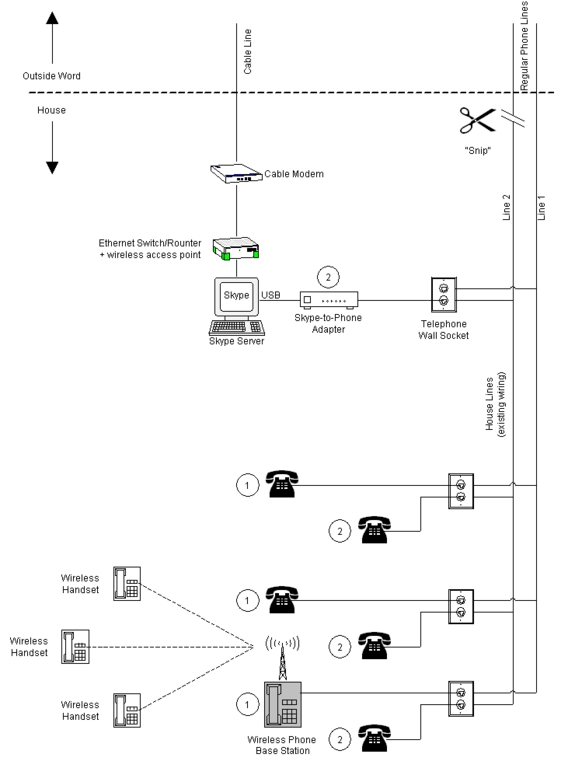
Figure 1. Using a Skype Server to Replace an Existing Regular Phone Line
Whether you buy, build new or piece together a Skype server from computer parts you have at hand, you must first make sure that what you end up with will meet Skype's minimum software and hardware requirements, which are:
Fedora Core 3 (Skype also supports SUSE 9, Mandriva 10.1 and Debian 3 or newer. However, Linux support for Skype add-on hardware is presently extremely limited. In the case of the SkypeMate software used in this article, it is limited to Fedora Core 3 only).
400MHz processor.
128MB of RAM.
10MB of disk space
OSS-compatible sound device (or ALSA with OSS-compatibility layer enabled).
Broadband Internet connection.
Pay particular attention to the fact that these are minimum hardware requirements for a single phone line. If you scale these requirements in proportion to the number of phone lines you want your Skype server to support in the long run, you won't go far wrong. You might even want to build in some margin for future expansion. Skype is advancing at a phenomenal rate, with each new release bringing new features and improvements to existing features. All of this new functionality must surely come at the cost of increased hardware resources.
For my Skype server, I decided to build a new machine that would be small, both in terms of its physical size and its power consumption (as it runs 24 hours a day, 365 days a year). The specification, and cost, of my Skype server is shown in Table 1. Remember, a Skype server needs no mouse, keyboard, monitor, CD-ROM or floppy drive—other than at the time of its configuration.
Table 1. Typical Cost of Building a New Skype Server from Scratch
| Component | Cost (US) |
|---|---|
| IN-WIN BT610P.180BFU2 Black steel MicroATX computer case, 180W power supply | $39.99 |
| BIOSTAR M7VIG400 MicroATX motherboard with AMD Duron 800 mobile CPU | $69.00 |
| OCZ value series 512MB (2 x 256MB) 184-pin unbuffered PC 2700 DDR SDRAM | $43.75 |
| 10GB Hard disk drive (used—salvaged from an old system) | Free |
| Skype-to-Phone USB adapter (Figure 2) | $43.90 |
| Linux operating system | Free |
| Total cost | $196.64 |
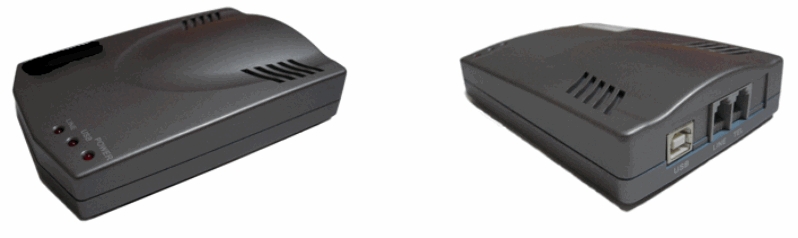
Figure 2. A Typical USB Skype-to-Phone Adapter
Building your Skype server requires that you assemble it from the parts. I won't cover the nitty-gritty details as there are plenty of on-line resources to help you in this task; for example, there's a step-by-step guide to building your own PC at PCMechanic.
I'll assume that because you're a Linux Journal reader, getting Fedora Core 3 up and running on your Skype server is a no-brainer. The only important thing to remember is that Skype is a Qt application (though it's also available in a version with Qt statically linked), and the Skype API uses D-BUS. Also, disable the screensaver (after all, there won't be any screen to “save”) and power standby features as these may interfere with Skype.
Here's a step-by-step guide to setting up Linux to work with Skype (it assumes you have set up a Linux user account named skype for the purpose):
With your Skype server powered off, plug your Skype-to-Phone adapter in to your server using a USB cable and, for test purposes, connect its TEL socket to a regular phone handset.
Power up the server and log in to Linux as skype.
Download and install Skype for Linux. If you don't install from an RPM, you will have to add this file by hand, /etc/dbus-1/system.d/skype.conf:
<!DOCTYPE busconfig PUBLIC "-//freedesktop//DTD D-BUS Bus Configuration 1.0//EN"
 "http://www.freedesktop.org/standards/dbus/1.0/busconfig.dtd">
<busconfig>
  <!- skype.conf -->
  <policy context="default">
    <allow own="com.Skype.API"/>
    <allow send_destination="com.Skype.API"/>
    <allow receive_sender="com.Skype.API"/>
    <allow send_path="/com/Skype"/>
  </policy>
</busconfig>
Start Skype and then log in. Next (steps 5 and 6) configure Skype.
Make sure Skype starts automatically at login (select Skype→Tools→Options→Privacy, and then check the box opposite Remember my password).
As you want your Skype server to provide 24/7 phone service, you will want other Skype users to see your on-line status as always Online. Select Skype→Tools→Options→General, and then set Show me as “Away” when inactive to 0 instead of 5 minutes. Set Show me as “Not Available” when inactive to 0 instead of 20 minutes. Zero, in this case, means infinity or never.
Switch to superuser mode by entering the command su and the root password.
Download install-SkypeMate.zip and unzip it to get the file install-SkypeMate (this assumes your Skype-to-Phone adapter is compatible with the SkypeMate software—check before you buy).
Change the permissions for install-SkypeMate to make it executable (skype@fc3:~$ is the command prompt; what follows is the command you should enter):
skype@fc3:~$ chmod +x install-SkypeMate
Run the SkypeMate install program:
skype@fc3:~$ ./install-SkypeMate
Exit superuser mode and reboot the Skype server. Log in again as skype.
Double-click the SkypeMate icon on your desktop (which points to /usr/bin/SkypeMate). Skype will pop up a window asking you to give SkypeMate permission to use its API to control Skype (Figure 3). Check the box Do not ask me again, and then click Yes (that way, you won't be asked to give permission again).
Select your USB Skype-to-Phone adapter as the audio device for calls (select Skype→Tools→Options→Hand/Headsets, and then under Audio Devices select the appropriate device from the pull-down list).
For your convenience when dialing, you may want to set up speed-dial numbers for your contacts list. That way, you can pick up a phone handset and simply dial, say 10#, to call a specific contact.
Test Skype by calling the echo123 call-testing service.
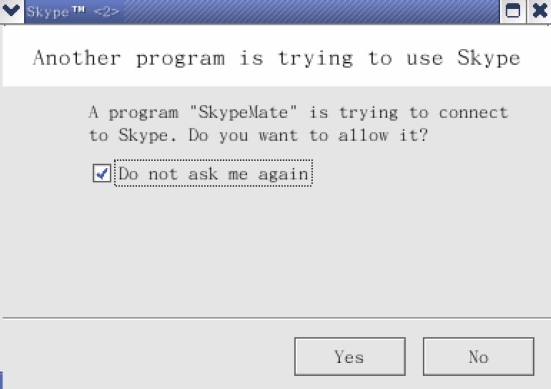
Figure 3. Giving Permission for SkypeMate to Connect to Skype through Its API
If you want to make calls to regular phones, you will have to sign up your Skype server account for SkypeOut, and if you want to receive incoming calls from regular phones, you will have to sign up for SkypeIn. Both services are available at Skype's cheap rates.
Where are you going to locate your Skype server? Ideally, it should be somewhere with access to power, good ventilation, an Internet connection, your regular phone lines (RJ11 sockets) and out of sight. My choice was to install my Skype server in my basement (Figure 4), which is possibly the ideal location, but not necessarily one open to everybody. If your choices are more limited, that's all the more reason to think long and hard about where to put your Skype server once it's built.
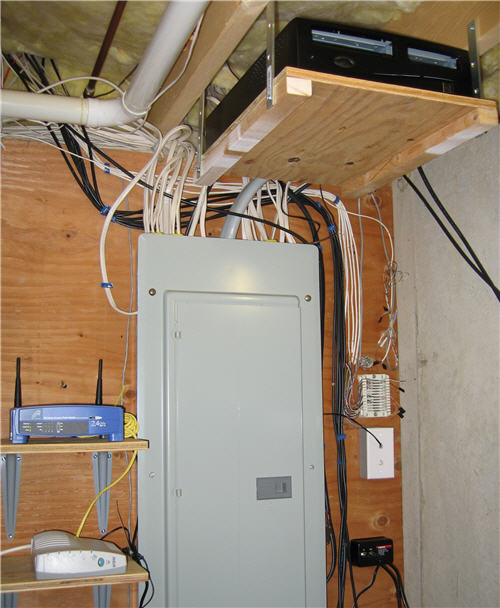
Figure 4. Skype server to provide 24/7 phone service. Server is at the top of the photo, cable modem and wireless router are to the left, and the patch board for household phone wires is to the right. In the center of the picture is the power distribution cabinet for my house.
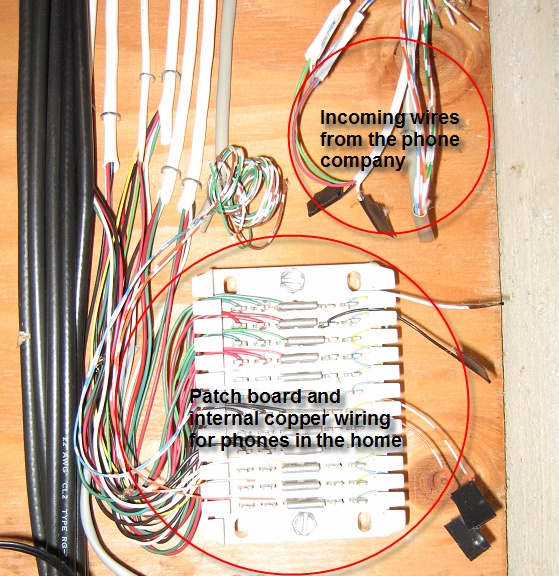
Figure 5. Phone Patch Board
Here's a step-by-step guide to installing your Skype server in your home:
Cancel one of your regular phone lines (not the one that serves your home alarm system).
Cut the incoming phone line that has been canceled where it enters your home (see sidebar).
Connect the Skype-to-Phone adapter to all the handsets of your canceled phone line by connecting its TEL socket to the wall socket of the canceled line using a regular phone cable having RJ11 sockets at both ends.
Test Skype again using the handsets plugged in to the canceled line.
Power down your server and remove any borrowed hardware that was used during its configuration, but that is not needed for its operation, such as a CD-ROM and floppy drive.
Move the server to its new location. Plug in all the cables and connectors, then power it on.
Log in and test Skype once more.
Remove the mouse, keyboard and monitor.
If all has gone well, you now have 24/7 phone service on one phone line provided exclusively by Skype.
Safely Cutting Your Phone Line
To cut your incoming phone wires safely, you need a pair of wire cutters (or sharp scissors) with insulated handles, a roll of electrical insulation tape, and you need to follow a simple procedure to do the cutting (Figure 6).
Your phone wires are powered by the telephone company; that's why your regular telephone works during a power cut. Now, even if you've had the phone company disconnect you, your phone wires may or may not still have electrical power. Consequently, you must be careful not to short the wires when cutting them. Even a momentary short can be bad news. This can happen if you cut two or more wires at the same time (step 1). The solution is simple, cut only one wire at a time (step 2). As you cut wires, you should insulate their exposed ends with electrical tape (step 3).

Figure 6. Steps for cutting your phone lines: step 1) don't cut all the wires at once; step 2) cut wires one by one; step 3) insulate ends of cut wires as you go.
Now, if this activity looks to be beyond your comfort zone, you always have the option of calling the phone company and having them send a technician to do the job for you. Even after paying for this to be done, your Skype savings will most likely recoup the cost in very little time.
For those readers who are security-conscious, and don't trust Skype as an application, building a Skype server has an added advantage. By placing the Skype server on your Internet connection outside your firewall, you gain the peace of mind that should a hacker break in to your server, or compromise Skype somehow, then as the server interfaces with nothing more than a copper phone line into your home beyond the firewall, any damage will necessarily be contained and limited to the Skype server outside the firewall. Worst case is that you'll need to do a reinstall on your Skype server, and perhaps, a better job of locking it down from a security point of view so that it can protect itself. Indeed, if your firewall is sufficiently restrictive that Skype won't work on the inside, then placing your Skype server outside your firewall is the only way in which you can take advantage of Skype's phone services.
Phone bills have a lot in common with taxes. Both are mind numbingly complex, and both take a lot and give little in return! To help work out your potential savings from switching to Skype for your phone services, in whole or in part, I've written a spreadsheet that simplifies the process and can be downloaded from the Elpis Web site (see the on-line Resources).
You should factor in the cost of building and running a Skype server into your savings analysis. Running costs will depend on the machine that you choose to use in order to run Skype 24/7. An old clunker of a machine may consume so much power that it would be worthwhile to build a new machine in the long run. As always, run the numbers and make some decisions.
Let's look at the cost of running a small Skype server 24 hours a day, 365 days a year. Without a monitor and other peripherals to guzzle power, a small modern computer typically consumes between 50W and 100W. If your cost of electricity is $0.10 per kWh, then the annual cost of running your Skype server is between $44 and $88. These are just ballpark numbers and you'll no doubt do your own, but it does show that the cost of running a Skype server 24/7 is not insignificant. (Cost = power consumed in kW x 365 days x 24 hours x cost per kWh, where a power consumption of 50W is 0.05kW and 100W is 0.1kW.)
Resources for this article: /article/8644.
Andrew Sheppard is the author of the book Skype Hacks (ISBN: 05-9610-1899) published by O'Reilly (www.oreilly.com), and the editor of Elpis' Skype Power User Magazine for Elpis Publishing Limited (www.elpispublishing.com). He can be contacted at shep@elpispublishing.com.
