
Linux Video Production: the State of the Art
From the operating system that gave you Lord of the Rings, Spiderman and pretty much every other film that's made these days, comes the Holy Grail of Linux computing: the home and small office video production pipeline. Unlike the object of Monty Python's ill-fated quest, however, this long-sought treasure actually exists and is finally within reach.
The problem has been one of great frustration for many potential adopters: what do I do about my home videos, my hobby films, my presentation videos? These days, even the greenest newbies can bumble their way through assembling a video in the tinkertoy-like Windows Movie Maker, and Mac users are even better off. They have a proper consumer video editing application: iMovie.
Linux has, for years, been growing into a major standard in the Hollywood studio pipeline. A cursory glance at the CinePaint Web site reveals a catalog of films that could not have been produced on time or budget (if at all) without a Linux infrastructure. Without Linux, the Star Wars prequels would have had a different look, and there would have been no Lord of the Rings trilogy. From its early days on the renderfarms to its coming of age in Shrek, Linux has proved time and again its effectiveness, power and stability to the major studios.
None of which does the hobbyist user much good. Typically, filmmaking software for Linux is dearly bought; Eyeon's DFX compositing system, the most reasonably priced of any professional Linux-based compositing systems, weighs in at a hefty $1,295 US per seat, and it's the least capable player in the field. The home producer historically sits in the worst possible spot: atop a free and exceedingly capable operating system that was powering the major motion picture studios, without any way to get in on the fun short of writing a lot of scripts and working from the command line a great deal.
During the last three years, that situation has changed. Although the situation is not yet ideal, the FLOSS end of the Linux universe now allows for a near-complete, end-user-oriented production pipeline. I know, because during the last four years, I've built up a production studio running entirely on Linux—with one gap in the pipeline—and I make my living using it.
Let's say you want to edit your brother's wedding video to produce a short film with an alien sitting in the audience as a guest. In the Windows and Mac worlds, several companies offer end-to-end commercial solutions that take you from acquisition through delivery-format authoring, covering (in no particular order) editing, titling, compositing, color correction, sound/score sequencing and DVD mastering. 3-D graphics applications are easily obtainable from a variety of other companies, and for a variety of prices. However, the companies producing such software will continue ignoring the Linux market until their high-end customers force them to produce Linux versions of their software (as happened in the 1990s with the IRIX version of Photoshop).
Although it would be nice to have such tools, we're not going to get them. And, I can finally say with confidence, the day approaches when we won't need them, either.
To get a home or small-office production studio running, you need most of the pipeline shown in Figure 1.
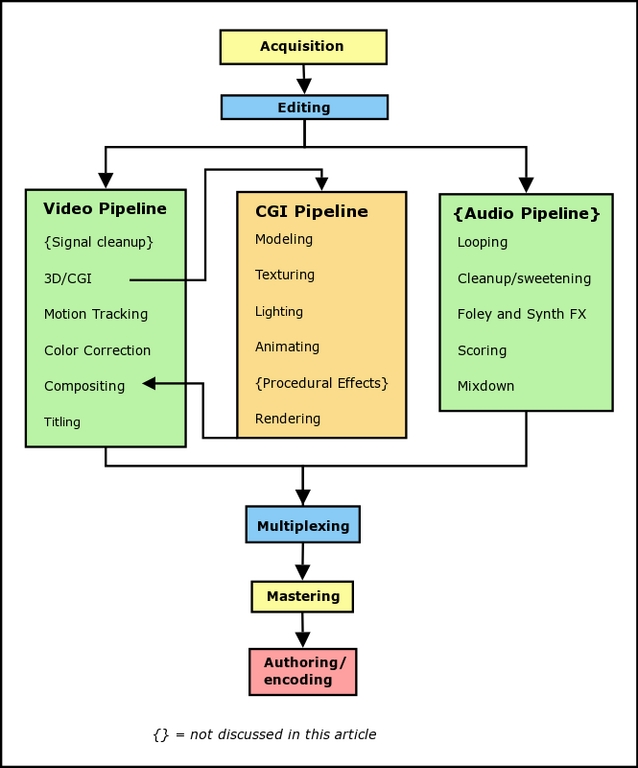
Figure 1. Production Pipeline
Not everything will be needed for every project, and indeed most projects will not approach this level of sophistication. Nevertheless, our Alien Wedding Guest project will give it a thorough workout, enough to show the weaknesses in the Linux pipeline as well as its strengths. To that end, we do an overview of the basic post-production process.
When choosing your acquisition format, your originating medium can be just about any sort of video or film (see the Acquisition Means and Formats sidebar).
Because the focus here is on home and small business, it's safe to assume that the most common format for the next couple of years is going to be MiniDV. Getting the footage into your computer is fairly straightforward—DV comes in over the 1394 (FireWire) port, which is well supported in all modern kernels, and dumps straight to the hard drive. Be sure you have plenty of disk space—DV clocks in at approximately 12.5GB/hr. In either case, either Kino and Cinelerra will capture for you neatly, and variety of command-line tools exist as well.
There is a major technical issue to keep at the front of your mind: video compression. Pretty much any video you import will have undergone a compression pass. Edits don't usually require a second pass, so this isn't much of a problem if your plan is to do a quick-and-dirty edit, perhaps throw in a title, and output your video again. But the moment you start changing the video—effects, transitions, color correction, CGI—it has to be recompressed. Just as happened in the analog world when dubbing tapes from copies of copies, generation loss is a palpable problem. The cardinal rule, then, is to minimize further compression passes on your footage. If your system is properly managed, you can usually get away with only one additional compression pass; the one that you do on final authoring of the project for its delivery format.
You also will need to look to your filesystem. Simply put, video takes a lot of space, and it requires a high level of disk throughput and processing power. The faster your filesystem, the better the performance in your pipeline will be, and the fewer dropped frames you'll have. At the time of this writing, XFS is the fastest for this type of work, although the next generation of ReiserFS promises to give it a run for its money.
Once imported, you'll need to edit your footage. Take heed: there's more to editing than simply setting clips in order. The editing process involves timing decisions and asset management (footage selection, logging and commenting). All these are essential if you want to have a workable setup and tell a coherent story. There's nothing worse than being caught in the middle of a project and not being able to find that one particular shot that'll make or break the scene. Your footage organization (which can be as simple as a well-ordered directory structure) should be obvious, scalable and flexible. It'll need to grow with you, so put a bit of thought into how you want it set up at the outset.
The choice of editor is going to be determined both by the format of the footage you're working with, and by the way you structure your work. Stability, performance, interface and interoperability all need to be weighed.
At the time of this writing, the Linux editing field is in a state of dramatic upheaval, caused in no small part by Google's Summer of Code. By funding the FFmpeg/Blender integration project and the gstreamer-based Diva, they've put major cracks in a dam already fixing to burst. By the time of publication or soon thereafter, there should be five viable FLOSS choices for editing platforms: Kino, Cuisine, Cinelerra, Diva and Blender (Table 1). Of course, if you're really wanting a commercial solution for less than $2,500 US/seat, there is always MainActor, a program that amazes all who use it with its continued success as the Ford Edsel of video editors.
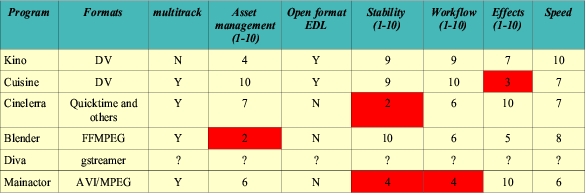
Table 1. Editing Platforms
At the time of this writing, Diva looks promising, but isn't releasing proper packages yet; Blender is in the midst of a major development cycle to bring its editor up to par; Cinelerra is incredibly full-featured but barely usable, due to serious interface design and stability problems (any program that proudly lists, in its version 2.0 changelog, “Fewer lockups when resizing video window” does not make it into my toolbox).
In our imaginary Alien Wedding Guest project, we're going to need some fairly sophisticated CGI: a spaceship hovering in the background and an alien being of some sort sitting in the audience or standing off to one side seems a bare minimum. Constructing these objects in 3-D space (modeling), adding color and bumps (texturing), animating their movement, and rendering out a finished video for blending with the original wedding footage covers the basic 3-D pipeline, as can be seen in our initial flowchart.
There are a variety of FLOSS 3-D programs available for Linux, most of them highly capable, and most of them require a good amount of scripting to get working in a pipeline. One program stands out far and away from the pack in features, interoperability and usability: Blender.
Where programs like POV-Ray are essentially renderers that depend on scripts or external programs for their grist, Blender is an end-to-end 3-D solution that plays nicely with a variety of renderers and file formats. In terms of capabilities, Blender aims to be an open-source Maya, and in the last 18 months, it has made amazing strides to that end with no sign of slowing down.
One of its most significant assets is its user base. Among the video and graphics applications available for Linux, it stands alone—far beyond even The GIMP—in the energy and vitality of its community. Tutorials and helpful forums abound, making its professionally oriented interface quickly accessible for all the basic tasks involved in small projects.
The GIMP also plays an indispensable role in the 3-D process as a texture creation system. Creating bump, reflection, specular and dirt maps from photos or painting texture layers from whole cloth, there isn't anything on Linux that even comes close in terms of versatility and raw power. What's more, by the time this article is published, GIMP modifications should update Blender textures in real time.
Motion tracking is matching the movement of computer-generated elements to your real-world footage. It's also used for stabilizing shaky handheld video. A number of motion trackers have come and gone for Linux, and until an open-source solution is developed, this will likely remain the case, as university research projects are bought up by commercial interests for development and sale to movie studios. At the moment, the best and only player on the field is Voodoo, put out by Digilab at the University of Hanover. It has the added advantage of outputting tracking data to a Blender-readable script. In practice, the export leaves a lot to be desired, but fortunately Ian Gowen has written a conversion utility that translates Voodoo's clumsy export into a very clean script for Blender (www.blenderwars.com/downloads/voodoo_convert.py).
Voodoo is not a perfect solution; it seems particularly to confuse slow zooms and slow rotation, but despite its minor defects, it's still a capable little program that's fairly well documented and licensed for free use by all. I don't doubt that sometime in the future it will be commercialized, but until then we have it to do with as we please (alas, we cannot have the source code).
Once you've edited your footage, nailed your CG and tracked your camera, the time comes to marry them all together. Unfortunately, this is where we hit the major hole in the pipeline. There is, simply put, no straightforward way to do compositing on Linux in any straightforward sense. A well-outfitted, if basic, compositing system would provide for HSV adjustment, level calls, histograms, curve adjustments and brightness/contrast controls for color correcting the footage. A really competent system also supplies rotosplines for animated masking and two or three different keyers operating in different color spaces (essential if you want to do blue screen work with MiniDV). Finally, any compositor needs to do multilayer overlays, and do them well.
Our Alien Wedding Guest certainly requires this; sitting an alien in a chair with his spaceship hovering in the blue sky behind a tree requires taking rendered 3-D animation footage of the alien and his ship, using rotosplines to create a foreground mask for the chairs in front of the alien, and using the color keyer to treat the blue sky as a blue screen, laying the spaceship in behind the tree. You then apply color adjustments to each layer so that they all blend together nicely.

Table 2. Compositing Tools
As you can see, it's possible to cobble together a more-or-less full suite using the various tools, but it's not a pretty sight. However, this is changing.
Blender is slated for a full-compositing system implementation for Project Orange, which requires Blender to become a full-fledged high bit-depth editing and compositing system; but that isn't due until February 2006 or so. Jahshaka is introducing color keying and splines into its RC2 release, in the fall of 2005/winter of 2006. CinePaint Glasgow's first release is scheduled for December 2005. And MatteLab may soon be extended and developed into a CinePaint or Blender plugin, as well as getting even better keying features.
All of these projects display great promise, and some of them will bear fruit this year, but at the moment, there just ain't no way to pull this off without doing a fair bit of coding, linking GIMP with ImageMagick with FFmpeg and working mostly through the command line. This approach is extremely powerful, but it's far from ideal for the hobbyist.
Titling, from the simple to the complex—anything from a quick fade-in/fade-out in Helvetica to a complicated short film of a title sequence—is the final step in the video part of our pipeline. Complicated title sequences of the sort seen in SE7EN are technically the domain of motion graphics software rather than simple titling programs.
If you want to deal with complicated motion graphics without going all the way and just creating your title sequences in Blender (which can be fun, but is rather like swatting a fly with a sledgehammer), Jahshaka is pretty much where it's at.
If simple fade-in/fade-out titles with dropped shadows are more your forté, you'll be perfectly happy dealing with Kino's DV Titler plugin.
Once your effects are all done, and you've gotten your soundtrack mixed and timed the way you want, it's time to mixdown to the tracks that you'll marry back to your video stream. Assuming that you're going back to DV, it'll need to be a stereo mixdown (as indeed one audio track should be even if you're going to a surround-mixed DVD for final output), which can then just be dubbed back in your editor of choice. Once your mixdown is done, you're ready to marry the audio back to the video (multiplexing). This is accomplished in your video editor by lining the track up with the video and overdubbing the original audio.
Full discussion of the sound tools available for Linux can be found in the excellent articles by Dave Phillips in past issues of Linux Journal (there are far too many to enumerate here, but a search at the Linux Journal Web site will yield good results). For our purposes here, remember that close attention needs to be paid to preserving sound sync. Make sure that your finishing dialog track is timed the same way your source track was, and you'll be most of the way there.
Using your editing program, print the video back to the format that will result in the fewest possible compression passes. If your originating medium was DV and you've done everything properly to this point, that should mean you have a total of one recompression on your footage and you can go out to a DV deck with little noticeable generation loss. Even better, take your multiplexed file and back it up, un-recompressed, to a tape or optical backup system.
Once you've multiplexed, you can use QDVDAuthor (see my article in the December 2005 issue) to author a well-tricked-out DVD for delivery to your friends and/or customers. Or, you can use one of the variety of front ends for mencoder, mjpegtools, or FFmpeg to compress your video for Web delivery or storage on your home machine. Kino includes such a front end, and other good ones include kencoder, konverter and Gmencoder. Whether to DVD or VHS or for Web delivery, this is the end point of the pipeline.
So, in short, it is now possible, with a little work, to get a competent and usable end-to-end video production studio working in your home or business, running solely on Linux. The few holes left in the pipeline, particularly in the compositing arena, are quickly being filled in and should be in much better shape by mid-year. We're on the cusp of a breakout year in the media creation field.
During the next few months, I'll be focusing specifically on potential problems in this pipeline, and keep you updated on new developments in both hardware and software. Take heart, fellow producer. There is now a video-production oasis in the open-source desert.
Acquisition Means and Formats
Linux's video pipeline can handle just about anything you throw at it, although some formats will limit your choice of editing software. The available formats include, but are not limited to:
Standard Definition: DV25 (MiniDV and Digital8): the most popular consumer and prosumer format both for its convenience and the quality of its image in the higher-end cameras; its compression makes some compositing work, such as color keying, problematic (though not impossible). MiniDV is captured through the 1394 port.
Beta/Digibeta: common in broadcast, rare everywhere else, this format is the granddaddy of TV video. Beta is captured through an analog tuner card (V4L-compliant with 720x540 capture capability), DigiBeta comes in through SDI and requires specialized capture hardware for optimal signal preservation.
VHS and derivatives: analog consumer mediums, lower resolution than MiniDV, must be captured through a V4L-compliant tuner card.
High Definition (HDV): this is the new consumer hi-def format being sold by Sony and JVC on some of their prosumer cameras. They record to MiniDV tape a highly compressed MPEG-2 signal having roughly the same bitrate as standard-definition DV25. It captures over 1394 or USB 2.0. At this point, it is unclear whether this format will be very useful or have any meaningful advantage over progressive-scan SD miniDV.
Hi-Def: the CineAlta and other high-end motion picture cameras are Hi-Def platforms. Capture is accomplished through Hi-Def capture cards of various sorts, available through Linux Media Arts (lmahd.com) and Specsoft. This format requires special high-speed disk arrays and capture software, both of which are available through Specsoft. Look out though—the price on the cameras begins at $50K for the cheapies.
Film: 8, 16, 35 and 70mm and all their various incarnations. The old-fashioned chemical emulsion is expensive, but can't be beat for charm and (in some cases) for look. Film can be brought into Linux in one of three ways: 1) Telecine: projecting a film for recording by a video camera, after which capture proceeds according to the dictates of the video format. 2) Home-brew film scanning: using a DigitalSLR, the film is recorded frame by frame. Some creative electronics work can automate the process. Time consuming, but it does give you 10-bit or better color depth. 3) Professional film scanning: done with very large machines, at very high prices, in very large buildings, which are usually located quite a long way away.
Distillation
Here, then, are the programs discussed, with the ones that are used regularly in my own studio pipeline in boldface.
Acquisition: Kino, Cuisine, Cinelerra, Diva, MainActor
Editing: Kino, Cuisine, Cinelerra, Diva, Blender, MainActor
3-D Computer-Generated Imagery (CGI), modeling/texturing/animaition/rendering: Blender, The GIMP, YAFRAY
Motion tracking: Voodoo
Color correction and compositing: Jahshaka, Cinelerra, Blender, ImageMagick, GIMP, CinePaint Glasgow, MatteLab
Titling: Jahshaka, Kino, Blender
Looping, cleanup, sweetening and FX editing: Audacity, Ardour, ReZound, Sweep
Music: Rosegarden (scoring) and Ardour (recording)
Authoring: QDVDAuthor, kencoder, konverter, Gmencoder, Kino
A Few Thoughts on Sound
A video pipeline deals with a particular sort of software, but it's not the whole story when it comes to media production. The process of sound design for video is at least as involved as the video side of the equation.
In brief, you'll need a sound effects editor, a synthesizer, a mixer, a recorder and a scoring program. I've found the greatest productivity out of the fewest number of programs using Audacity, Ardour and Rosegarden in tandem, while keeping a handful of synths (like TerminatorX) around for use in a pinch. The process of sound production for a video or motion picture is a story in itself that deserves telling, but not today. In the meantime, a full discussion of the sound tools available for Linux can be found in the excellent article by Dave Phillips in past issues of Linux Journal (the September 2004 issue has a good technical overview of many contenders, and the September 2005 issue has an extensive article on Rosegarden).
Open-Source Blue Screening
Of special note in the open-source compositing field is the newcomer MatteLab (www.nccn.net/~w_rosky/evan/evan/programs/mattelab/index.html), a Java-based one-task utility that is very nicely designed and written by 16-year-old high-school student Evan Rosky. Although, at the moment, it does not support multipass keying, it is the best keyer I've yet seen in the open-source space on Linux. Outputting as it does to transparency-enabled PNGs, it allows for multiple instances of single passes to be run on the footage without quality loss, and when used in conjunction with Blender or Jahshaka for compositing, it is a very powerful tool indeed.
Dan Sawyer is a freelance director/producer running the backbone of his small studio on Linux. He has been an enthusiastic advocate for free and open-source software since the late 1990s, when he founded the Blenderwars filmmaking community (www.blenderwars.com). Current projects include the independent SF feature Hunting Kestral (www.blenderwars.com/kestralmannix) and The Psyche Project, a fine-art photography book centering on strong women in myth.
