
Advanced MythTV Video Processing
Because of its stability and extensibility, Linux is often found at the frontier of computing. Linux has emerged as a promising platform for home theater audio/visual applications. My television viewing is now handled by a special-purpose Linux PC running MythTV. As I set up MythTV, the two major pain points I encountered were both related to video processing. The first challenge is to configure smooth video playback, and the second challenge is to take recorded programs on the road.
To work within the limitations of the electronics of the day, television frames are transmitted as two separate “fields”. A field consists of either the even-numbered or the odd-numbered horizontal lines in the picture. On playback, the even-numbered and odd-numbered fields are weaved together, and viewers far enough away from the display see continuous blended motion.
Two consecutive fields are related, but are not identical. During periods of rapid side-to-side motion of the camera, a field will be slightly ahead of its predecessor, and there may be jagged edges to images sliding across the screen. Figure 1 is a screenshot from a 1080i high-definition broadcast. In the scene, the camera is panning from left to right, causing the objects in the image to slide rapidly across the screen. Each field is in a slightly different position, leading to sawtooth-edge distortion, which is also called combing, serrations or mice teeth. In scenes with a great deal of sideways motion, it may be extremely difficult to follow the content through the distortion.
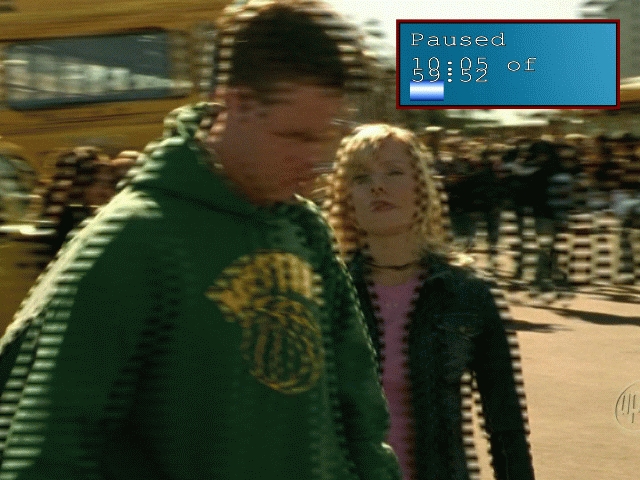
Figure 1. Combing Distortion on Playback
To make a video like Figure 1 watchable, it can be converted into a smooth picture by a process called deinterlacing. MythTV offers users a choice between several deinterlacing methods:
One field—instead of using two fields for one frame, this extremely simple method keeps only one of the two fields. Every other field is displayed as a still image, and the unused fields are discarded.
Linear—this method blends directly adjacent lines, which by definition come from alternate fields, together. A slight ghost image may appear, but the sawtooth distortion will be gone.
Kernel—this method blends several lines together instead of just adjacent lines. Ghost images do not appear, though faint remnants of one field may remain.
Bob—Bob is the most taxing method. Each field is line-doubled to create a frame, and then the reconstructed frames are played at double the frame rate.
Deinterlacing does require significant processing power, but most modern CPUs have multimedia instruction sets that reduce the load of the processing power. If you have an Intel processor with MMX or SSE instructions, or an AMD processor with 3Dnow!, deinterlacing should not be too difficult.
Bob is the best deinterlacing method to use with a synchronous TV output, though it can tax a less-capable machine. My personal MythTV front end is a 2GHz AMD Athlon64, and it has more than enough power to display Bob-deinterlaced high-definition video to an analog TV set. Although the CPU requirement is higher than the other deinterlacing methods, it is still well within the performance capabilities of my system.
Linear deinterlacing and kernel deinterlacing have similar visual effects, with the latter having a slightly larger CPU impact. Both are less taxing than Bob, which may be helpful on underpowered CPUs. Between the two, I prefer kernel deinterlacing because it blends several adjacent lines and eliminates ghosts, which make the resulting picture sharper.
One of the initial reasons for setting up a MythTV system was a desire to take my television programs on the road. Now that “television” means “files on hard disk”, it is much easier to store, transport and watch where it it is convenient for me. Like many mobile professionals, my laptop has practically become an extra appendage, and it is an ideal platform for playing back video while mobile, especially now that many airplanes have added power ports for mobile electronics.
The basic tension in exporting video from MythTV is a trade-off between size and processing time. Digital TV broadcast standards describe how to send an MPEG-2 video stream over a TV channel, so it is natural for MythTV to store digital TV broadcasts in their “natural” MPEG-2 format. Converting the MPEG-2 digital TV stream to another MPEG-2-based video format is relatively easy and can be done without lots of processing time. Converting the digital TV stream to MPEG-4 requires much more processing power, but the resulting video file will be much smaller.
Although digital TV recordings are an MPEG-2 video stream, the NuppelVideo container format used by MythTV is specific to MythTV and is not supported by most video player software. To watch the videos with anything other than a MythTV front end, you must convert them to a format with a wider selection of players.
Exporting video is further complicated by the filenames used by MythTV to store recordings. The first part of the filename is the channel number used by MythTV, and the two long numbers are the start date and end date:
myth:/video$ ls -lh *.nuv
-rw-r--r--  1 mythtv users 2.8G Sep  3 08:00 1000_20050903073000_20050903080000.nuv
-rw-r--r--  1 mythtv users 9.1G Aug 31 23:30 1007_20050831220000_20050831233000.nuv
-rw-r--r--  1 mythtv users 808M Sep  3 01:30 1008_20050903010000_20050903013000.nuv
-rw-r--r--  1 mythtv users 1.8G Sep  1 09:00 1009_20050901080000_20050901090000.nuv
-rw-r--r--  1 mythtv users 3.7G Aug 28 22:00 1019_20050828210000_20050828220000.nuv
Tools to convert the MythTV recordings into more widely supported formats are readily available. mythtranscode, a program that can decode the MythTV NuppelVideo files into a standard video stream supported by many programs, comes as part of the MythTV distribution. By feeding the output of mythtranscode to an encoder program of your choice, you can create any type of video file you want. A common choice of encoder program is FFmpeg, which supports many common video formats. Linking the two programs together to produce an intelligible output file is theoretically possible, but wading through all the command-line options and the recordings on your system is a complicated process.
Enter nuvexport, a Perl script that manages the process for you in an extremely friendly manner. nuvexport assembles the command-line options necessary to run mythtranscode and FFmpeg. It uses a text-based menu interface to guide you through the process of selecting a show for export and then setting up any required parameters of the conversion programs.
Before installing nuvexport, there are a few necessary support tools. FFmpeg is the default program required to re-encode the video into the selected target format. (nuvexport also supports transcode, which is much slower.) MPlayer is used to decode the MythTV files for conversion. Many conversions result in the appearance of noise that needs to be filtered out. nuvexport uses the yuvdenoise program, which is one of the MJPEG tools. All three programs are widely used and are likely to be available as packages for your Linux distribution. nuvexport uses the DateManip module as well, so fetch that from your distribution's package site or favorite CPAN mirror.
The first prompt from nuvexport is to select the format of the exported video file. The basic trade-off is whether to choose an MPEG-4-based export format for minimum file size at the cost of extra processing time to prepare it, or to use one of the larger but easier to prepare formats. The major choices are:
Video CD (VCD) consists of an MPEG-1 video stream at 1,150kbps, with the audio in a separate MPEG layer 2 (MP2) track at 224kbps.
Super Video CD (SVCD) consists of an MPEG-2 video at a variable rate, while retaining the MP2 audio track. Unlike VCD, the audio track can have multiple channels, so 5.1 or 7.1 audio can be stored in this format.
DVD is based on MPEG-2 video, with several options for an audio track. It is higher resolution than either of the video CD formats.
DivX is an MPEG-4-based format, which results in small files. However, it minimizes file size without significant sacrifices in quality. DivX can produce either constant-rate video or variable-rate video.
XviD is an MPEG-4-based format that is an offshoot of the development of DivX. It is based on an open-source development of a DivX codec released in 2001. By default, nuvexport uses variable-rate video encoding for XviD and offers the option of either a single pass or multiple passes. Multiple passes improve video quality at the expense of processing time.
Advanced Streaming Format (ASF) was developed by Microsoft as a generic container for media, and it is commonly used with Windows Media Audio (WMA) and Windows Media Video (WMV) files. WMV is based on Microsoft extensions to MPEG-4.
In my experience, the VCD and SVCD codecs offer good quality with fast processing times, while the DivX and XviD codecs offer the smallest file size but take longer to produce. After selecting a video export format, nuvexport uses a text-based menu system to select the episodes for export and set up parameters for the codec.
After selecting a set of episodes for export, nuvexport presents standard questions, such as where to put the exported file. It offers the option of using the MythTV cutlist, which cuts commercials from the exported video. Noise reduction and deinterlacing are offered as options. Although both default to yes, I usually disable them because of the additional processing time. Many video players can deinterlace on playback, and I have not found excessive noise from conversion.
Some export formats have additional codec-specific questions. Both DivX and XviD will allow adjustment of the bit rates and resolution. The default bit rates of 128kbps for audio and 960kbps for video are sufficient to produce good-quality video on most computer displays. When setting video size, nuvexport prompts for the width first and then proposes a height based on the aspect ratio of the recording. Keep the width less than the recorded width. The default width of 624 usually produces good video, but it can be larger for recordings that are 1920x1080. VCD and SVCD do not prompt for resolution because the formats have fixed resolutions.
Table 1 compares the processing time and space required by each of the different formats, as well as the MythTV native format and my commercial DVR. As a source, I used an hour-long episode of PBS's Nova, which is transmitted at a resolution of 704x480. The “commercial DVR” entry is for the video program as transferred from my commercial DVR to my laptop. As a rule of thumb, MPEG-2 requires approximately 1GB per hour, but MPEG-4 will be only 350–450MB. The encoding time listed in the table does not take into account either deinterlacing or noise reduction; I perform both tasks in the video player on playback.
Table 1. Results of Export (Typical)
| Format | Resolution | File size | Encoding time |
|---|---|---|---|
| Myth native format | 704x480 | 1,756MB | N/A |
| Commercial DVR | N/A | 1,236MB | N/A |
| VCD | 352x240 | 596MB | 15 min. |
| SVCD | 480x480 | 601MB | 25 min. |
| DVD | 720x480 | 899MB | 34 min. |
| DivX | 624x464 | 432MB | 35 min. |
| XviD (1 pass) | 624x464 | 451MB | 1 hour, 39 min. |
| XviD (2 pass) | 624x464 | 472MB | 2 hours, 35 min. |
| ASF | 320x240 | 143MB | 18 min. |
Although ASF has the smallest size, it is also by far the worst looking. There are large compression artifacts in the ASF file that make it very distracting to watch. Although the small size is attractive, the poor picture quality rules it out. DVD video has the best picture quality, but it also requires the most disk space. As a compromise between the two extremes, I use VCD and DivX, depending on priorities. I use the former to create a file quickly, and the latter to create the smallest file possible.
Video transcoding is a CPU-intensive process. By default, nuvexport runs its helper processes at high nice values to prevent them from interfering with other system operations, such as video playback or recording. All recent Linux distributions have software that allows the CPU clock speed to be changed in response to demand for processing power. I use the CPU speed control to keep the clock speed as low as possible while still accomplishing the work I want. Many CPU speed control programs will not take into account niced processes, but they can be configured to do so. My Linux distribution uses the CPUfreq kernel driver, which needs to be configured to monitor niced processes. A small start-up script runs the following two commands:
echo "ondemand" > /sys/devices/system/cpu/cpu0/cpufreq/scaling_governor
echo "1" > /sys/devices/system/cpu/cpu0/cpufreq/ondemand/ignore_nice
The second command instructs CPUfreq driver to count the processing demands from niced processes. Times listed in Table 1 are from a 2.0GHz AMD Athlon64 running at top speed. At the minimum speed of 1.0GHz, processing time is approximately three to four times as long. Exporting the video from MythTV is only the first half of the battle. Once the video is produced, it can be transferred to another location for playback. In addition to the playback applications present on the viewing platform, there are two notable open-source playback applications: MPlayer and Video LAN Client (VLC). I use MPlayer because the built-in deinterlacing capabilities result in a smoother picture than VLC. Both applications are available on both Linux and Windows.
MPlayer's command line is identical on different host operating systems. The goal is to get crisp full-screen video playback. The -fs option plays back the video with the full screen so there is no window around the video. Video filters can be used to change the playback and are activated with the -vf option. I use two -vf options. One creates a small black border around the screen with the expand filter. The expand filter takes multiple arguments. A negative number is interpreted as a border. The filter -vf expand=0:-50 puts a 50-pixel border at the bottom of the screen and leaves the video centered in the border. To get crisp video, deinterlacing is necessary. MPlayer activates deinterlacing with the postprocessing filter, abbreviated pp. As a general rule, I turn on four postprocessing filters: horizontal de-blocking (hb), vertical de-blocking (vb), de-ringing (dr) and brightness/contrast correction (al). The resulting filter is activated with -vf pp=hb/vb/dr/al. Putting it all together, the command line is:
mplayer -fs -vf pp=hb/vb/dr/al -vf expand=0:-50 (filename)
During playback, MPlayer's extensive keyboard commands enable pausing, fast-forwarding and picture adjustment, as well as on-screen display.
Resources for this article: /article/8585.
Matthew Gast is the author of the leading technical book on wireless LANs, 802.11 Wireless Networks: The Definitive Guide (O'Reilly Media). He is currently spending far too much time these days working with MythTV. He can be reached at matthew.gast@gmail.com, but only when he is close to sea level.
