
The Linux for Kids Experiment
When pressed to answer truthfully, most parents agree that raising kids is a big experiment. In the December 2004 issue of LJ, Diego Betancor's letter motivated me to experiment with something I've been meaning to do for some time. Diego wanted to see more content in LJ aimed at kids, and his suggestion was the inspiration for the next phase of my child-rearing experiment: moving the kids to Linux.
My wife Deirdre and I have three young children: Joseph, age nine; Aaron, age seven; and and Aideen, age five—see Figure 1. As shown in the photo, indoctrination starts early in the Barry household: there's a fluffy Tux in the foreground and an electronic Tux on the screen.
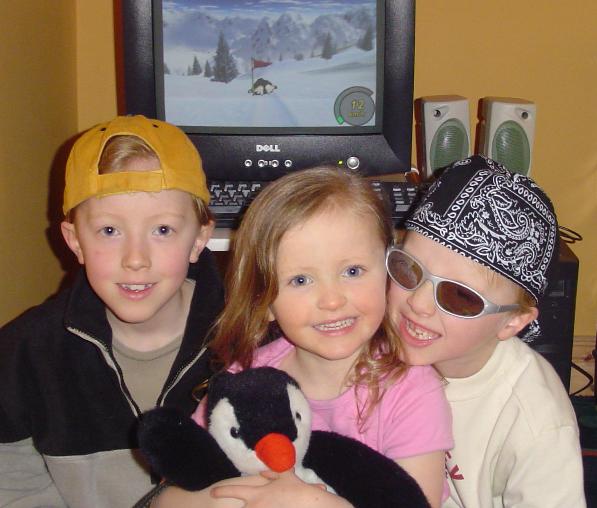
Figure 1. The “Linux for Kids” Kids, (left-to-right) Joseph, Aideen and Aaron
With his dad being a longtime computer geek, it came as no surprise when Joseph took to the computer at a young age. For years, our home computer was a first-generation iMac, running Mac OS. A great 3-D shoot'em-up game came with the iMac, Nanosaur, that Joseph just loves. Despite this, our household software policy always has been to try to ensure that any software brought into the house is classified as educational. Therefore, Joseph also has a bunch of Land Before Time and Zoombini titles, as well as kiddie-strategy games, such as Darby the Dragon. Other software includes the usual encyclopedia, dinosaur and space-exploration titles.
Aaron is the sporty child in the house as well as the artist, and he has been happy to sit and play with the paint application integrated into ClarisWorks, the simple office suite that came with the iMac. Aaron also likes to play with Joseph's software, as well as some of Aideen's titles, which include Green Eggs and Ham, Sammy's Science House and Thinking Things.
As long as there's a lot of bright colors and funny sound effects, Aideen's happy, even though this five-year-old's attention span is not at all lengthy.
As great as it is, the iMac had been showing its age for some time. It also has become increasingly difficult to find original software titles for its effectively discontinued OS version. Trying to upgrade to Mac OS X or any modern version of Linux was not an option for the iMac; it's simply too underpowered. Without new titles, the kids were getting bored with the iMac and had been asking for a new computer. They also constantly bugged both me and their Mum to install various Windows titles on our laptops—especially the demo software that comes free inside various cereal packets. As Deirdre has to run Windows 2000 for work, her laptop was the one infected with a growing collection of these types of titles.
A few months back, a new computer arrived in the form of a Dell Optiplex GX270, with 512MB of RAM, a 40GB hard disk and a flat-panel monitor. As I'd rather eat the new PC than allow the kids to use the factory-installed Windows XP, I looked for a family-friendly Linux distribution to install instead. Having recently experimented with Ubuntu Linux as my office desktop, I downloaded and burned a copy of the Warty Warthog release for use at home.
Like most big kids, I love experiments, and now my experiment had a plan: replace the Dell's factory-installed OS with Ubuntu, pack it full of kid-friendly software, let the kids at it and see how they got on.
I deliberately decided against installing any type of emulation that would have allowed the kids to run any of their existing software titles, even though such technology is well established within the Linux community. My main reason for doing this was to see if the kids would identify any titles that they missed. If they did, I'd try to find native alternatives, install them and see if the yearning subsided.
Ubuntu installed easily on the Dell, taking about one hour from start to finish. Once the base OS was up and running, I installed a bunch of stuff for the kids to use. I created a user ID called kids with a password of dinosaur and then set up a window in Nautilus to mimic the look and feel of the Mac OS Launcher program, as shown in Figure 1. Nautilus hopefully would provide a familiar look and feel for my pint-sized, Mac-loving user community.
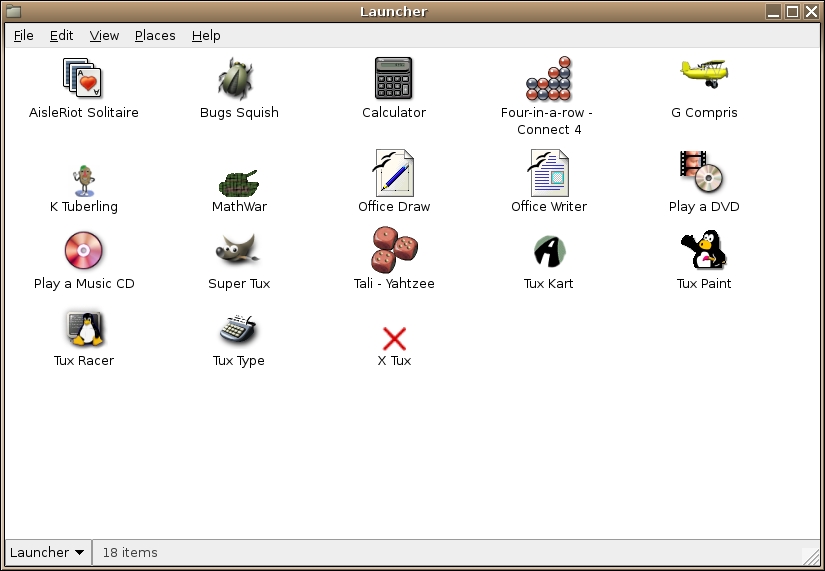
Figure 2. The Linux For Kids Launcher, Courtesy of Nautilus
In an attempt to ease the introduction of a new—and somewhat different—computer into the house, we decided to relax our household software policy and install a few nice Linux games along with the educational software. Here's a quick rundown of the titles we decided to make available on the desktop launcher. Unless stated otherwise, these titles were downloaded into Ubuntu using the included Synaptic Package Manager. It helps to refer to Figure 1 while working through this list.
AisleRiot Solitaire (/usr/games/sol) is a Linux version of the classic solitaire game. It came pre-installed on Ubuntu and was elevated to the Launcher in an attempt to provide a familiar piece of software on the new desktop.
Bug Squish (/usr/games/bugsquish) is a bit mindless but fun all the same. Little bugs drop down and try to land on an arm. Your mission—should you accept it—is to squish as many bugs as you can by clicking your mouse on them. As I said, it's mindless, but it does allow little people to practice their mouse skills while having some fun.
Calculator (/usr/bin/gcalctool) is the GNOME calculator.
Four-in-a-Row/Connect 4 (/usr/games/gnect) is just like the board game. You can play against another human opponent or an increasingly more skillful computer user.
G Compris (/usr/games/gcompris) has to be the real find of the experiment. This is a single program that has many, many parts. It is an entire suite of educational tools packaged together and aimed at 3–8 year olds. Within the suite are—among many other things—word and number games, color-matching and memory exercises and geography quizzes. There's loads of educational functionality in G Compris, and it is graduated, which means the child cannot proceed to a later exercise until they have mastered the earlier ones. G Compris can be installed in one of a number of languages and has a friendly soundtrack and voice-over. I initially thought Aaron and Aideen would spend a lot of time in this program and was surprised to find Joseph enjoying it too. There's so much in G Compris that it really needs to be experienced to be believed.
K Tuberling, The Potato Guy (/usr/games/ktuberling) is a simple little program that provides a blank picture upon which you can place, for example, ears, eyes, noses, spectacles, hats and hair. The default blank picture is a potato, but a blank Tux also is provided. Aideen loves this program, as do the boys. The boys love it so much that they used K Tuberling to create a gallery of Tux and his family. Check out Tux's mother-in-law, as shown in Figure 3.
MathWar (/usr/bin/mathwar) is a simple X-based math-drill program.
Office Draw (/usr/bin/oodraw) and Office Writer (/usr/bin/oowriter), both part of the OpenOffice.org suite, were included primarily for Aaron, who likes to draw with the computer as well as write short stories and poems. I'd recently convinced the kids' school teacher to try OpenOffice.org for Windows in their school, in an effort to fix file format compatibility problems she was having with the school's existing choice of office suite. So, making OpenOffice.org available on the kids' PC made perfect sense.
Play a DVD (/usr/bin/xine) allows the kids to view any of the DVDs that they own. To get DVD playing to work on Ubuntu, I had to search Goggle for the libdvdcss library, which allows for the DVD movie encoding to be deciphered. Once the library was installed, DVD viewing worked. Xine was a big hit, not only because it supports DVD menus and the like but also because it allows viewers to capture snapshots of the currently playing movie. Once he discovered this Xine feature, Joseph wasted no time and created a gallery of snapshots of his current DVD favorite, The Incredibles. An added bonus to being able to view DVDs on the new computer is that the main household TV and DVD player are freed-up for Mum and Dad to use. Xine was chosen over the Ubuntu-installed Totem, which did not work as well as Xine in any of my tests.
Play a Music CD (/usr/bin/gnome-cd) turns the PC into a CD player, with the default GNOME CD player popping up whenever an audio CD is popped into the CD drive.
Super Tux (/usr/games/supertux) is a classic, Mario-style, jump-and-bump-level game that should be familiar to many readers. Saying that the boys love this game would be a complete understatement: they are totally besotted with it. A little animated Penguin jumps and bumps his way through increasingly difficult levels in search of his goal. The soundtrack to this game is great, as are the effects and configurability. If anything, it's a little too addictive and, of all the programs described in this article, Super Tux is the program most likely to be on-screen when I enter the playroom. This has caused Deirdre to worry that the boys are playing it too much. However, as the game allows players to design and use their own levels, and as the boys have started to do just that, I've been happy to let Super Tux survive. I figure that building a level is the first tentative step toward getting the computer to work the way the kids want it to, which isn't a huge leap away from that other popular customization technique: programming. So, highly addictive or not, Super Tux stays for now—unless the boys are cheeky to their Mum, in which case it'll be wiped from the PC faster than they can say “yahtzee!”
Tali - Yahtzee (/usr/games/gtali) is a nice implementation of the classic dice game. The iMac had a great version of this game that the boys always liked to play, and the GNOME version is similar and familiar.
Tux Kart (/usr/games/tuxkart) is an arcade-type racer game. Little Tux sits in a go-kart and races around one of a selection of pre-built tracks. The music is fun, and the game is not too hard to play, which means that even Aideen can play without too much trouble. I've seen some games of this type that take the physics to the extreme, making them incredibly hard to play well. Tux Kart, thankfully, does not fall into this category.
Tux Paint (/usr/bin/tuxpaint) is a great kids-targeted drawing program. The sound is great, the effects are wonderful and it is easy to use. Aideen spends more time in Tux Paint than in all of the other installed programs combined, and Aaron enjoys using it, too. The in-built collection of stamper shapes especially are appreciated by our budding Picassos.
Tux Racer (/usr/games/tuxracer) is the one program that's fired-up and shown-off whenever either of the boys have a friend over to play. Tux Racer is, quiet simply, one very cool program. Watching Tux slide on his belly at 90km/ph in stunning, realistically rendered graphics remains—for me, anyway—one of the best examples of just how far Linux has come as a multimedia platform.
Tux Type (/usr/games/tuxtype) is a fun typing tutor. All three of the kids play it, and Aideen loves the way Tux eats the letters as they drop from the sky and correctly are identified on the keyboard. Aideen especially likes the cartoon-type sound effects and animation that occur when Tux eats a fish at the last possible moment, which usually results in Tux making a mad dash across the screen.
X Tux (/usr/games/xtux) is a 2-D, Pac Man-type game that works well and is fun to play. Although not as popular with the boys as Tux Racer or Super Tux, it still is played quite often.

Figure 3. A Rather Cool-Looking Granny Tux
Thankfully, there are no show-stopper problems to report. The Warty Warthog release of Ubuntu did have some problems with sound. After a restart or a new login, the sound configuration would be lost, resulting in no more sound. Upon investigation, I discovered that the GNOME volume controls were being set automatically to zero. To fix this temporarily, I popped a shortcut to the GNOME Volume Control applet on the desktop and then used it to reset all the volume sliders. This fixed the sound problem, until the next restart or login, of course. I planned to research a permanent fix but then quickly realized that the complaints about the new computer having no sound had stopped. It turned out that Aaron had watched me fiddle with the volume controls, he'd told his siblings what to do, and all three of them had developed the habit of sliding up the volume controls immediately after logging in.
In the last few weeks, I upgraded the PC to the most recent release of Ubuntu, Hoary Hedgehog. This resulted in much merriment, primarily because of the inclusion of a newer release of Super Tux that, I'm told, is much better, has improved graphics, animation and sound. Speaking of sound, this Ubuntu release is better but still has a few problems. Any that surfaced were all fixable, permanently, and all I needed to do was search the Ubuntu support wiki for sound and the name of the program that was misbehaving. The fixes found in the wiki worked, and sound is no longer a problem.
With the upgrade, Joseph asked if the shared login ID could be replaced by individual IDs, which I did. This is less to do with privacy and more to do with his little sister's fondness for pressing the Delete key when viewing Joseph's K Tuberling Tux family collections. By the way, Tux's family has been extended to include cousins, friends and neighbors.
Once the novelty factor started to wear off, I began to get requests for some of their older software titles. Most of these, despite being targeted to Mac OS, did come in dual-install format, in that they can be installed on Windows too. In an effort to see how much work was involved, I decided to play around with Wine in an attempt to install some of the titles the kids were asking for. After a few hours of research on the Internet and some reading, I spent about a day trying to get the latest release of Wine to work on Ubuntu. I managed to run the installers successfully for a lot of the Windows titles that the kids had, but none of the programs would run properly once installed, so I had to abandon the effort. Since giving up—and since the upgrade to the latest Ubuntu—the requests for the older titles have become less frequent; although Aaron misses one of the freebie, cereal-pack soccer games that he used to play on his Mum's laptop. As I finish off this article, I'm in the process of downloading and evaluating a small collection of Linux soccer games from The Linux Game Tome. The Eat The Whistle technology looks the most promising. If this does not satisfy Aaron's craving for a soccer game, I plan to dedicate additional time to configuring Wine.
The answer is yes, of course it is! It's not that Linux is a better platform than the others for kids to use, it's that Linux is as good as any other. Children are happy to sit down and play with most any computer as long as the software titles provided are engaging and fun. This is true of Linux, Windows and Mac OS. Of course, the point to make is that if Linux is as good as the others, there's nothing stopping anyone from using Linux as a primary OS for children. It's not a case of “is Linux ready for kids?” but rather “why not Linux for kids?”
The Barry household has made the move to Linux and won't be turning back. The wealth of software available on the Internet and within Ubuntu's Debian archives has been only scratched. There's loads out there for me to evaluate and install for my kids as they grow out of the programs they currently are enjoying. If you have any suggestions for programs you think they might like, drop me a note and we'll take a look.
Paul Barry (paul.barry@itcarlow.ie) lectures at the Institute of Technology, Carlow, in Ireland. Information on the courses he teaches, in addition to the books and articles he has written, can be found on his Web site, glasnost.itcarlow.ie/~barryp.
