
Developing Eclipse Plugins
This article presents a set of best practices for use when developing Eclipse plugins for application development environments built on the Eclipse platform. The general principles of plugin development outlined in this article can be applied to many other Eclipse-based development environments, in addition to the downloadable version. Several aspects of the Eclipse plugin development process are covered here, including the View versus Editor debate, the inside or outside choice, some standard widget toolkit (SWT) basics and the usefulness of the Eclipse Plugin Wizard. The advantages of using Eclipse for developing Eclipse plugins also are covered. The article also includes a walk-through of a simple application plugin with an eye toward reuse across multiple Eclipse application plugins.
In Eclipse, the two basic ways of presenting any type of information to the user are with a View or an Editor. Both Views and Editors allow the user to select certain actions to be performed by the plugin by single- or double-clicking on an item, by a right-click pop-up menu or by a top-level pull-down menu item.
The Editor class can do almost everything that the View class can do, plus a whole lot more. Allowing all this extra functionality comes at a price, however, in both system and code complexity. In general, the Editor class requires much more effort to develop than a View, so a certain amount of decision making must occur before embarking on an Editor implementation.
Views are sufficient when simply providing information to a user and allowing certain built-in capabilities is required. Users can input data to Views with relative ease usually by using other widgets in the SWT, such as tables and text boxes. But, what if you want more of a free-form interaction with the user? In addition, what if you want to have user inputs that are persistent across multiple launches of Eclipse?
A good general guideline to use in this debate is the issue of persistence. Although it is possible to retain data from a View in some kind of persistent repository, in most cases this requires some level of work to be done in a file or file-like context. If this is the case, it often is easier simply to implement an Editor instead.
The second most common consideration is the actual data being presented. If the user can select multiple data units and perform actions using them or against them on a one-at-a-time basis, it usually is easier to implement the operation or operations as a distinct View.
In this article, we implement a sample Eclipse plugin. This plugin has a simple goal: to provide generic application-level data to the user. This data is going to be represented as strings, although almost any data type could be substituted. The usual left-click, right-click and double-click actions are going to be enabled, but only double-clicking is modified as a reusable example for all other action implementations.
As there is no immediate need for a persistent resource and as there will be multiple instances of data to select on a one-at-a-time basis, the sample plugin capability is going to be implemented as a View, which we simply call the DataView.
When implementing either Views or Editors, another decision must be made. Should the data be presented to the user within the actual Eclipse environment or outside of it somehow? The SWT provides Form classes that allow you to externalize your application data if you choose.
Editors can be implemented either externally or internally, but external Editors lack easy access to the plugin itself. Surprisingly, existing vendor plugins provide exactly this kind of functionality. In most of these cases, this is chosen because of the loss of plugin access as vendors decide to lock out the user from certain levels of Eclipse functionality. In general, the proper choice for plugin Editors—notwithstanding the user debate over openness in tools—is to implement Editors internally in Eclipse. It simply doesn't make much sense to lose access to the rest of the plugin if you don't have to. Now, what about Views?
Similar to Editors, Views can be implemented either externally as a separate Form class or internally as a View with additional SWT widgets. There are no hard and fast rules here, but there are some basic guidelines to follow when dealing with this decision. In general, two things should be considered. First, can the View data be described as unique and discrete entities, with fields or operations specific to that particular data item? Second, are there always less than about nine of these items? If so, the View can be implemented as a View with a Table or perhaps a View with separate Tabs for each discrete unit.
If the actual number of instances of the data and the types of operations on that data is at all dynamic or unknown—for example, the developer does not know a priori exactly how many items there will be or exactly how many distinct operations to design or to allow for in the future—it probably is best to implement the View as an external Form class.
The sample plugin developed in this article is a simple 100-item implementation displaying data with only two distinct fields for each item, a name and a value. Although there are no predefined system requirements for more than nine multiple operations, there also are no explicit multiple operations defined. Therefore, you safely can assume that it will not require a great deal of them either—it is supposed to be simple after all. The DataView plugin therefore should be implemented as an internal View.
To start the actual plugin development, you need to start with an Eclipse installation. For this example, we downloaded the latest Eclipse version at the time of this writing, v3.0.2, from the Eclipse site. As we use the CDT plugin for C and C++ development extensively in our own organization, we then downloaded the CDT v2.1 Project. It can be accessed under the Eclipse Tools Project from the projects link on the main Eclipse page. You can download both of these as .zip files, which extract into a /eclipse directory. Therefore, make sure you install the Eclipse zip file prior to the CDT zip file. In our case, we were building on Red Hat Linux 9.0 using the GTK- version of both the Eclipse framework and the CDT plugin, but the Motif versions work equally as well. We then brought up Eclipse with ./eclipse and selected the Plugin Development Environment (PDE) perspective from Window→Open Perspective.
Many texts on Eclipse plugin development walk users through the Hello World type of project. It is this author's belief that although that might be a good start for novice programmers, it is absolutely the worst way for experienced software developers to begin using Eclipse. It takes too long, and worst of all, much of the work has to be redone once you need to create a real plugin. Instead, we usually recommend creating as nearly complete a plugin project as possible, using as many pre-existing templates as the environment allows. Doing so gives you a considerable amount of functionality immediately. You then can develop your own customizations of the existing functionality without worrying about being properly attached or hooked to the normal plugin-type environment.
In the PDE, the Plugin Wizard allows a developer to create a sample plugin project quickly and easily, simply by selecting File→New→Plug-in Project. When prompted for a name of the plugin, we use a common syntax used by other commercial vendors. That is, we name the plugin with the text com.companyName.productName or in this example, com.mcc.dataView, as shown in Figure 1.
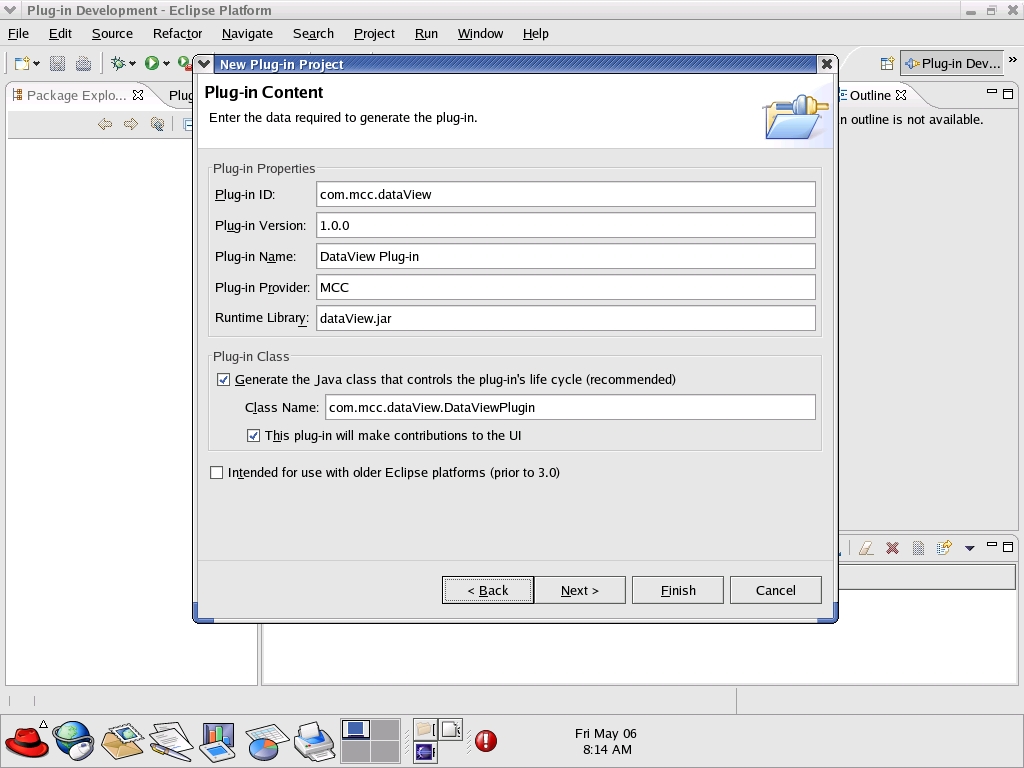
Figure 1. To start a new plugin, select File→New-Plug-in Project to bring up the Plugin Wizard.
It is easy enough to remove functionality from the plugin project once we get started on some actual customizations, so we select Next for two screens until we reach the Templates screen. We then select Create a plugin using one of the template's boxes and choose to use the Custom Plugin Wizard. You then select Next to see the templates to be created.
You could remove specific functionality at this point, but for this exercise, we retain all functionality and simply keep selecting Next until we reach the Main View Settings window. In this window, we rename the Sample View as Data View, as shown in Figure 2. Once you have modified this window appropriately, you can select Finish or cycle through the last of the customization sections, which is View Features. You can move forward and back during this process, so take your time. No changes are made to the environment until the Finish button is selected.
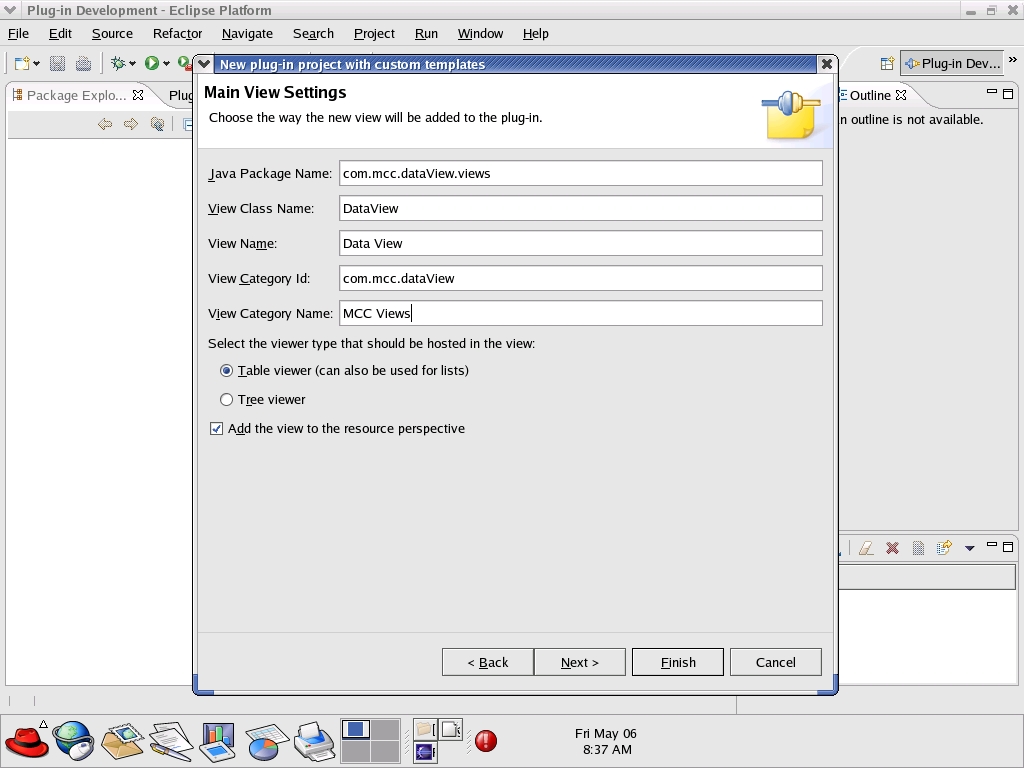
Figure 2. Give your plugin a name in the Main View Settings window.
If you mess it up the first time, as this author did, don't hesitate to delete the entire project including the directory contents and start again until you get it right. Once the plugin has been created to your exact template specifications, you are ready to execute the plugin for the first time. For this we use the run-time workbench.
One of the most attractive features of the Eclipse framework is its own ability to develop, test, debug and execute plugins in the run-time workbench. Few development environments provide exactly this kind of functionality in such an easy-to-use and intuitive fashion. This removes many of the time-wasting impediments to developers stuck in the long compile-build-debug cycle typical of other development environments.
To execute the DataView plugin, simply select Run→Run As→6 Run-time workbench from the PDE perspective. The Eclipse PDE spawns a completely separate user workspace, called the run-time workspace, and executes the DataView plugin. On the first execution of the plugin, you need to select the Window→Show View→Other top-level menu pull-down, and choose the DataView listed under the specific Views heading that you selected during plugin creation.
In future executions, the run-time workbench functions much as the regular workspace functions and retains the appropriate View layout between multiple launches. This greatly simplifies testing, as re-testing is only a matter of running the run-time workbench again.
One of the few drawbacks to the run-time workbench model is its rough doubling of host RAM usage due to executing the equivalent of two Eclipse sessions on a single machine. In systems with limited RAM, such as laptop environments, this can be a bit slow and frustrating. As JVMs improve, though, this problem does get better.
Experiment with the sample plugin menus and pull-downs to get a feel for what functionality you have created. Even though we don't discuss Editor customizations in this article, you also might want to experiment with creating a simple Eclipse project and then creating a new file with a .mpe extension. Doing so allows you to get familiar with the concept of multipage editors similar to the one used for displaying the plugin.xml file now listed under your new plugin project.
The first step in customizing the DataView is to add a new ViewLabelProvider class to the plugin project under the Views folder. This allows you to add data to the table to be displayed in the DataView window when the plugin is executing. The ViewLabelProvider interacts with the ParameterControl class by providing the data stored there, a Name and a Value, to the DataView. A complete listing of this class can be found in the project tar file.
The next step in customizing the DataView is to add the ParameterControl class that is referenced by the ViewLableProvider class to the plugin project under the Views folder. This class maintains the actual parameter names and values to be displayed in the DataView table. Although a relatively simple implementation, it easily can be scaled to a greater number of fields if necessary. A complete listing of this class also can be found in the project tar file.
The third step in customizing the DataView is to add a Table with the appropriate settings to the DataView class (see Listing 1 on the Linux Journal FTP site), modify the Plugin class itself to support the UserParameter variable and customize the DoubleClick action to display the table entry data. Note the addition of a new function called UpdateTheTable that provides the latest data to the Table. This function would be the modification point for new application data by way of the filesystem or network or whatever. For this example only, the first four parameters are modified for new data. The full code for our plugin is available from the Linux Journal FTP site (see the on-line Resources).
The final modification is to add a ParameterControl variable and its initialization to the plugin itself. This is done by adding the variable declaration to the DataViewPlugin.java file, at the first point after the resourceBundle is declared. The variable declaration should be as follows:
//User Parameter functionality
public ParameterControl userParameters[] =
    new ParameterControl[100];
Next the initialization section is added at the end of the Plugin constructor as shown:
// Additions for User Parameter functionality
int index;
for (index = 0; index < 100; index++)
{
    userParameters[index] =
        new ParameterControl("Parameter "
         + (index + 1), "Value " + (index + 1));

}
The final run-time workbench execution of the plugin is shown in Figure 3. In the figure, the user has double-clicked on an item, producing a simple user dialog that displays the actual data for the table selection made.
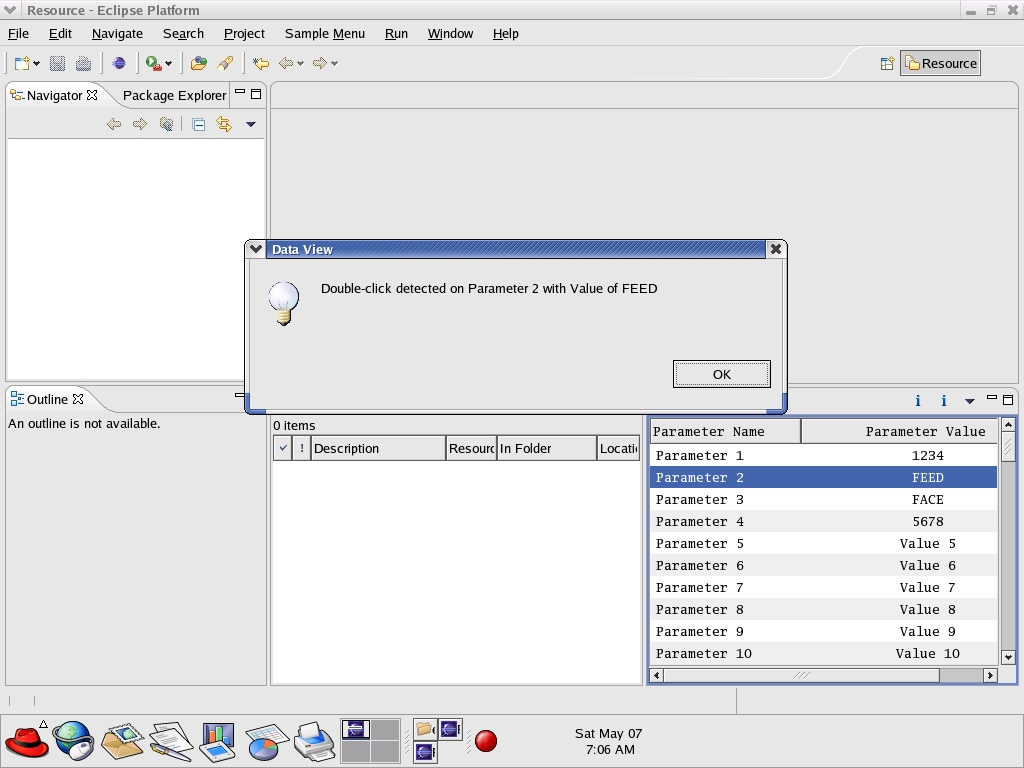
Figure 3. The plugin is finished and responding to user input.
In this article, we discovered some basic rules to follow when making decisions about how an Eclipse plugin should present application data to a user by way of an Eclipse View. We have utilized the Eclipse Plugin Wizard to auto-generate much of the plugin initialization code in a testable and reusable format. We also have reviewed certain usage examples of the SWT, including Tables, Viewers and LabelProviders, and their uses in the context of a User View. Finally, we have seen some of the advantages and disadvantages of using the run-time workbench feature of Eclipse.
Along the way, we created a relatively simple sample plugin that can be used over and over again as a starting point for new Eclipse plugins. The sample plugin easily accommodates future growth in the plugin itself by enabling all typical plugin functionality, such as multipage editors, properties, wizards and reference extensions. This additional plugin functionality now can be implemented in an iterative fashion, allowing not only for future growth of the specific plugin but easier reuse across multiple plugin developments. It also can serve as a starting point for new developers with little or no prior knowledge of Eclipse development. This reusability aspect is one of the most compelling features of the Eclipse framework.
Resources for this article: /article/8789.
Mike McCullough is president and CEO of MCC Systems, Inc. Mike has a BS in Computer Engineering and an MS in Systems Engineering from Boston University. A 20-year electronics veteran, he has held various positions at Wind River Systems, Lockheed Sanders, Stratus Computer and Apollo Computer. MCC Systems is a provider of Eclipse-based software development tools, training and consulting services for the embedded market.
