
A User's Guide to ALSA
Since the public release of the 2.6 Linux stable kernel series, the Advanced Linux Sound Architecture (ALSA) has become the default kernel sound system. This change brings significant improvements to Linux audio and MIDI capabilities, including support for professional audio hardware, 3-D surround sound, advanced MIDI functions and software mixing or audio stream multiplexing. When combined with a kernel patched for low latency, ALSA provides resources for sound and MIDI that compare well with competing platforms and in some respects are superior to them. This is a bold claim, so let's look at ALSA to see what makes it tick.
The ALSA Project began when a young programmer named Jaroslav Kysela became frustrated with the kernel sound system's lack of full support for his Gravis Ultrasound audio/MIDI card. The Gravis card created its sounds by using sampled sounds stored in the card's memory in a file format known as PAT (patch). Banks of PAT sounds could be edited and stored by the user, as long as the user was running Microsoft Windows or Apple Mac OS. Linux, sad to say, did not provide such comprehensive resources, leaving Jaroslav with a sound card that was not fully operational.
At that time, the Linux kernel sound system was the OSS/Free system, a solid and serviceable audio/MIDI subsystem that had been with the kernel sources since the early days of Linux, thanks primarily to the pioneering work of Hannu Savolainen. Alas, OSS/Free had not kept pace with the rapidly evolving world of desktop audio production, and many sound cards either were unsupported or supported only partially, as was the case with the Gravis boards. To be fair, the OSS/Free maintainers were few; there was less organization in the general Linux audio world; and manufacturers then were, as some still are now, too secretive about their driver specifications.
It might have been possible to incorporate greater support for the Gravis cards into OSS/Free, but as Jaroslav Kysela researched the OSS/Free applications programming interface (API), he realized there was a need for a new API that could support more broadly the developments taking place with modern sound cards and digital audio interfaces. Professional and consumer-level expectations had risen, demanding support for features such as high sample rates and bit depths for professional recording, 5.1 and other 3-D/surround sound audio output arrays; multichannel digital audio I/O; and multiple MIDI I/O ports. There simply were too many advances that required fundamental changes in OSS/Free, so Jaroslav did what any truly hard-core Linux coder does: he designed a new audio/MIDI API for Linux, calling it the Advanced Linux Sound Architecture.
Designing and implementing an API that would encompass the requirements of contemporary audio is a non-trivial task, and ALSA needed many years, many programmers and many releases to attain its current status as the kernel sound system. In its earlier stages, normal users had to install the system by hand, normally as a replacement for the OSS/Free system, in order to acquire support for a card or the extended features of a card. This process included uninstalling OSS/Free and recompiling the kernel for ALSA support, at that time a decidedly non-trivial task. Nevertheless, the ranks of dedicated ALSA users grew, development flourished and eventually ALSA was incorporated into the Linux 2.5 kernel development track. Finally, with the public release of the 2.6 kernel series, ALSA became the default kernel sound system.
The ALSA home page gives us the following information:
The Advanced Linux Sound Architecture provides audio and MIDI functionality to the Linux operating system. ALSA has the following significant features:
Efficient support for all types of audio interfaces, from consumer sound cards to professional multichannel audio interfaces.
Fully modularized sound drivers.
SMP and thread-safe design.
User-space library (alsa-lib) to simplify application programming and provide higher level functionality.
Support for the older OSS API, providing binary compatibility for most OSS programs.
ALSA is released under the GPL (GNU General Public license) and the LGPL (GNU Lesser General Public License).
Let's look at each one of these features, restating them in language more comprehensible to a normal user.
Efficient support means that you can manage the basic and advanced features of supported sound cards easily, using ALSA tools such as a sound card configuration utility and mixer programs. Such tools are integral components of the complete ALSA installation.
Modularized sound drivers means that ALSA sound card drivers are easy to install and update. They also provide the means by which the user can control a card's available options in more detail. Later in this article, we show how you can work with a driver module to access and control features of an ALSA-supported sound card.
ALSA supports multiprocessor, or SMP, machines. Thread-safe is a programming term that indicates the services provided by the software can run concurrently in different threads without bothering each other. In a modern audio/MIDI application, thread safety is a Very Good Thing.
ALSA's user-space library provides programmers, and hence their programs, with easy access to ALSA's services, and its significance to the normal user may seem a rather slight matter. However, the ALSA library provides the interface through which applications can reach those functions, helping form a more homogeneous environment at the user level. Your programs can run more harmoniously with one another, with enhanced possibilities for connection and communication between applications.
ALSA evolved during the first phase of Linux sound support when most applications were using the OSS/Free API, so an OSS/Free compatibility layer was an immediate necessity for normal users. A large number of Linux sound applications still need OSS/Free compatibility, so ALSA provides seamless support for the older API. However, programmers should note that the older API now officially is deprecated.
Full details regarding installation are available on the ALSA home page (see the on-line Resources), so I mention here only a few details and clarifications. If you're using a distribution or customized Linux system based on a 2.6 kernel, ALSA already is installed. Distros and systems based on earlier kernels require a manual ALSA installation.
Installing ALSA is not especially difficult, and the way has been cleared at least partially by packages supplied by audio-centric Linux distributions/bundles, such as AGNULA/Demudi for Debian, PlanetCCRMA for Red Hat and Fedora and AudioSlack for SlackWare. Mandrake users can install one of Thac's packages (see Resources). Regardless of your base system, you must uninstall the OSS/Free modules before installing the ALSA package. Normally this task entails little more than moving the older modules into a temporary directory, in case you want or need to put them back, and making sure that the kernel's soundcore.o object file remains in its original place, usually /lib/modules/your-kernel-number-here/kernel/drivers/sound/. After removing OSS/Free you need to install the ALSA packages by way of your package manager of choice.
ALSA configuration has improved greatly over the years, but it still can be a tricky procedure, especially if your system has more than one sound device or if the device is connected to your computer on the USB or PCMCIA bus. Obviously, I can't go into the details regarding every possible configuration, but fortunately the ALSA Web site contains a large number of configuration pages for supported devices, often including tips and tricks from other users.
Basic configuration can be done with the alsaconf utility (Figure 1). alsaconf works well at recognizing single devices, but it might not do so well with systems containing multiple devices. Don't worry; it's still fairly simple to accommodate multiple audio and MIDI devices, and we return to that task in a few moments. For now, let's proceed as though you have only one audio device for your machine.
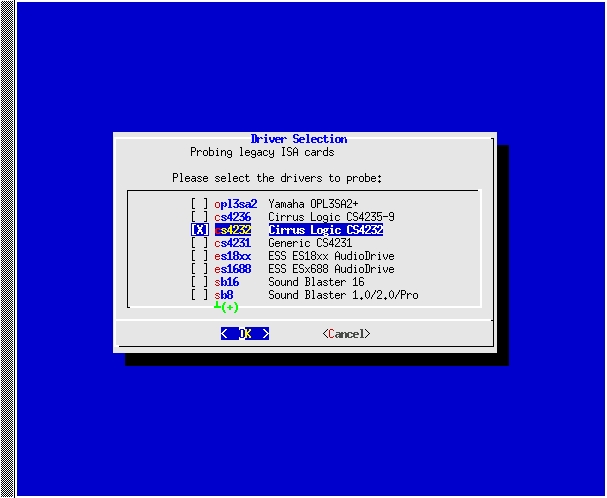
Figure 1. The alsaconf configuration tool is good for finding sound hardware on systems with one sound card installed.
After alsaconf has set up basic support for your sound device, you need to activate its playback and record channels. By default, ALSA started with all channels of your device muted. It may be an annoyance for some users, but it certainly reduces the likelihood of inadvertently blowing up your speakers when you first start your new system. You can set your sound device's channel capabilities with ALSA's alsamixer utility, a character-graphics mixer complete with sliders and switches for each channel of the detected device (Figure 2). Use the arrow keys to select a channel, use the <> keys to unmute/mute channels, and use the spacebar to select a channel as a recording source (capture, in ALSA-speak). When you've set your mixer preferences, run the alsactl utility to save and recall your settings (alsactl store|restore).
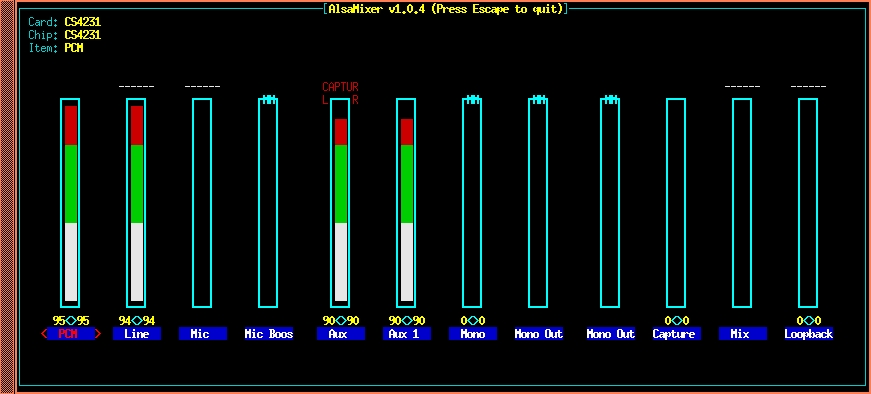
Figure 2. By default, ALSA starts with sound muted, so you need to set audio channel values with alsamixer.
As you already can see, ALSA thoughtfully provides a number of useful tools to help configure the system. If you want to know more details about using those tools, simply run the utility with the -h option or use the man command to see a more detailed description. The following examples display the manual pages for the utilities I've mentioned already:
man alsaconf
man alsamixer
man alsactl
Now that we've considered some of the basic installation and configuration details, let's look at how we might set up a more complicated system. For the following example, I've used the configuration details for my laptop system, a Pentium II 366MHz HP Omnobook 4150 with a combined audio/video chipset manufactured by NeoMagic.
Setting up laptop audio support under Linux can be a complicated task, and it just so happens that my hardware is slightly problematic. Thankfully, ALSA supplies the tools I needed to resolve my difficulties with finding the correct chip and driver identification.
The alsaconf utility tries to identify your system's audio and MIDI capabilities and then it writes a basic configuration file to /etc/modules.conf. However, in the weird world of laptop sound support, things may not always be what they seem. For example, alsaconf correctly identified my laptop audio chip as a NeoMagic NM256. However, the configuration failed, reporting that I should use either the basic SoundBlaster16 driver (sb16) or one of the Crystal Sound drivers (cs423x).
On the advice of ALSA guru Takashi Iwai, I tried using alsaconf to set up the driver for the CS4232 chipset features, selecting the cs4232 module from alsaconf's list of non-PnP ISA chipsets. When I chose to probe for all possible DMA and IRQ settings, my machine locked up, freezing the keyboard and forcing a power-down and cold boot. To be fair, I must mention that alsaconf warned me that might happen. Happily, when I rejected the more aggressive search, alsaconf completed its task gracefully and added the following section to my /etc/modules.conf file:
	# --- BEGIN: Generated by ALSACONF, do not edit. ---
	# --- ALSACONF version 1.0.4 ---
alias char-major-116 snd
alias snd-card-0 snd-cs4232
alias char-major-14 soundcore
alias sound-slot-0 snd-card-0
alias sound-service-0-0 snd-mixer-oss
alias sound-service-0-1 snd-seq-oss
alias sound-service-0-3 snd-pcm-oss
alias sound-service-0-8 snd-seq-oss
alias sound-service-0-12 snd-pcm-oss
alias snd-card-1 snd-virmidi
alias sound-slot-1 snd-card-1
	# --- END: Generated by ALSACONF, do not edit. ---
Alsaconf merely set up a series of aliases for the general and card-specific services ALSA can provide for my machine. For normal use this section should remain as alsaconf generates it. By the way, the entries for the virmidi modules are there because I'm running Red Hat 9 with the ALSA packages from PlanetCCRMA, a suite of components for setting up a low-latency, high-performance Linux audio/MIDI workstation. PlanetCCRMA installs the virtual MIDI modules by default.
Next, I edited the driver options in /etc/modules.conf. In this section, I can customize various features of my sound chip, setting I/O port and IRQ addresses, enabling or disabling onboard synth capability and defining the DMA channels.
I ran alsaconf -P to see a list of the legacy non-PnP modules:
# alsaconf -P
opl3sa2 cs4236 cs4232 cs4231 es18xx es1688 sb16 sb8
Next, I probed the CS4232 driver for its default options settings:
# alsaconf -p cs4232
port=0x534 cport=0x538 isapnp=0 dma1=1 dma2=0 irq=5
I could have accepted these values and had a working audio system, but thanks again to Takashi Iwai, I discovered that I also could enable an onboard synth chip, the Yamaha OPL3, an inexpensive 4-operator FM synthesizer notorious for its ubiquity in inexpensive sound cards and its general cheesiness of sound. Takashi also advised entering and disabling an option for a physical MIDI port, simply to indicate its presence as a chipset feature. Thus, my current options section in /etc/modules.conf now includes this more complete configuration for the CS4232:
options snd-cs4232 port=0x534 cport=0x538 mpu_port=-1
↪fm_port=0x388 irq=5 dma1=1 dma2=0 isapnp=0
With this configuration, I now have working audio I/O and a cheesy onboard FM synthesizer. However, the synthesizer needs a set of sound patches before it can make any sound, and of course ALSA supplies the needed utility (sbiload) to load the patch data into the synth—ALSA even supplies the patches. I use the loader as follows:
sbiload -p 65:0 --opl3 \
/home/dlphilp/soundfiles/sbi-patches/std.o3 \
/home/dlphilp/soundfiles/sbi-patches/drums.o3
The options include the required target port (determined with aconnect -o) and a switch for either OPL2 or OPL3 support; the OPL2 is only a 2-operator FM synth. The example's patches are included with the ALSA tools (see locate *.o3 and locate *.db for locations). A few other patch sets for the OPL3 are available on the Internet, and Patch editors also are available.
At this point, I opened alsamixer to set the channel status for the CS4232. Figure 2 shown above displays the results. I now could play OGG and other music files (PCM), listen to my music CDs (Aux1) and watch and listen to DVDs and other video formats (Aux). I could record analog audio through either a microphone input or line-in jack, and I even could listen to MIDI music files played by the soundchip synth (Aux1). By default, I can do only one of those activities at a time, but ALSA supplies a neat plugin for software mixing, which I describe later.
By the way, on Red Hat or Fedora the entire ALSA system can be started and stopped with these commands:
/etc/init.d/alsasound start
/etc/init.d/alsasound stop
/etc/init.d/alsasound restart
If you have installed the Debian packages, the file is /etc/init.d/alsa. This feature makes it easy to test new configurations. The exact location of the alsasound control can be determined with locate alsasound.
The observant reader might wonder how I can route MIDI data without the benefit of MIDI hardware. Thanks to ALSA's virmidi module, my system has four virtual devices usable as raw MIDI I/O ports for any other ALSA sequencer clients. The sequencer of what is known as the ALSA sequencer API is not a sequencing application such as MusE or Rosegarden. This sequencer manages the merging and timing of freely interconnected MIDI data streams, including multiple connections to single ports. Compliance with the ALSA sequencer API allows each client to interconnect freely to one or more other clients, and it has become an expected capability of modern Linux audio software.
The ALSA aconnect utility tells me what ports are available for connection via the ALSA sequencer:
aconnect -i
client 0: 'System' [type=kernel]
    0 'Timer           '
    1 'Announce        '
client 72: 'Virtual Raw MIDI 1-0' [type=kernel]
    0 'VirMIDI 1-0     '
client 73: 'Virtual Raw MIDI 1-1' [type=kernel]
    0 'VirMIDI 1-1     '
client 74: 'Virtual Raw MIDI 1-2' [type=kernel]
    0 'VirMIDI 1-2     '
client 75: 'Virtual Raw MIDI 1-3' [type=kernel]
    0 'VirMIDI 1-3     '
This report indicates that I have four virtual MIDI ports. Whatever software I assign to those ports then can be connected to any other ALSA sequencer clients:
aconnect -o
client 65: 'OPL3 FM synth' [type=kernel]
    0 'OPL3 FM Port    '
client 72: 'Virtual Raw MIDI 1-0' [type=kernel]
    0 'VirMIDI 1-0     '
client 73: 'Virtual Raw MIDI 1-1' [type=kernel]
    0 'VirMIDI 1-1     '
client 74: 'Virtual Raw MIDI 1-2' [type=kernel]
    0 'VirMIDI 1-2     '
client 75: 'Virtual Raw MIDI 1-3' [type=kernel]
    0 'VirMIDI 1-3     '
This report shows my available receiving ports. Thus, the following command connects the first virmidi port to my onboard FM synth:
aconnect 72:0 65:0
The kconnect, alsa-patch-bay and QJackCtl programs provide graphic interfaces for device identification and connection.
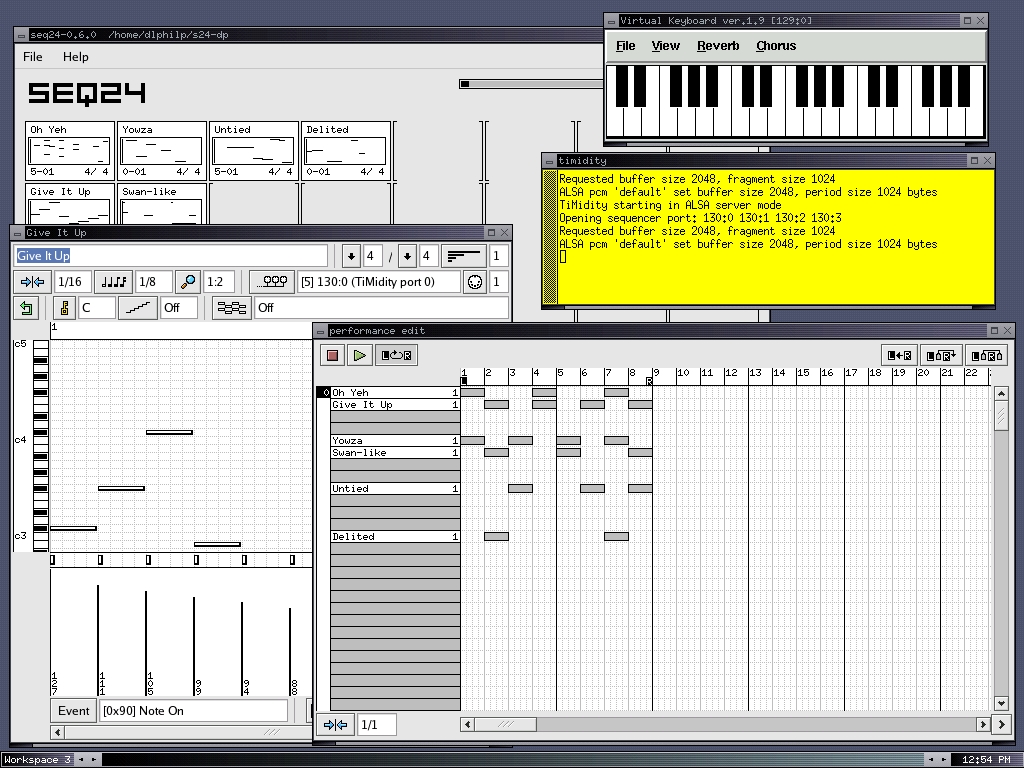
Figure 3. A Basic Linux Laptop MIDI System
Figure 3 shows off a small but powerful MIDI sequencing system. The main program is Rob Buse's seq24, a lightweight looping sequencer designed in the style of the hardware sequencers of the 1980s and 90s. seq24 manages its connections internally, and the figure conceals the connections between the virtual keyboard and seq24 as well as the output targets for the individual sequences. Some of the sequences have been routed to the OPL3 synth; others have been sent to an instance of TiMidity running as a Soundfont server.
Like many other laptop owners, I've hooked up a USB device to my machine, in this case a MIDIman 2x2 MidiSport. The MidiSport provides two independent I/O ports, and yes, ALSA supports multiport MIDI hardware. However, I don't always have my MidiSport with me when I use this machine, so I prefer to load the USB module after setting up my CS4232 and virmidi cards. To defeat the autoloading of my USB MIDI module, I added these lines to /etc/hotplug/blacklist:
# So I can keep my preferred order of sound cards:
snd-usb-audio

# uhci ... usb-uhci handles the same pci class:
usb-uhci
Next, I wrote the following script to configure and activate the MidiSport 2x2:
echo "Loading MidiSport firmware..."
modprobe snd-usb-audio
sfxload -I \
  /usr/share/usb/ezusbmidi/ezusbmidi2x2.ihx \
  -D /proc/bus/usb/001/003
echo "Done !"
The firmware and loader are included with the ALSA installation. You may need to query the /proc/bus/usb filesystem for your available USB identifiers, and you may need to try each identifier to find which one applies to your hardware. Use the cat command to list your identifier numbers:
$ cat /proc/bus/usb/001/
001 003
The system reports an error if you select the wrong identifier, so at least in my case the trial-and-error process didn't last long.
As though I hadn't already stuffed my little system full of ALSA drivers, I also wanted to use the Core Sound PDAudioCF card, a high-quality digital audio input card made for handheld computers, such as the Zaurus, but quite usable with a CF-to-PCMCIA adapter. Again, I want to have my other devices configured before setting up the PDAudioCF, so I simply wait until I have everything else working as desired before inserting the card. The system autodetects the new hardware and loads the appropriate module (snd-pdaudiocf), a procedure totally transparent to the end user.
Using this card is easy. The following example illustrates the use of ALSA's arecord utility to record a 30-second stereo digital audio stream from the S/PDIF digital output of my desktop system's SBLive to the PDAudioCF card:
arecord -f dat -D hw:3,0 -d 30 foo.wav
The -f dat option sets the recording format to include a sample rate of 48kHz, which is the only output sample rate supported by the SBLive. I substituted -f cd for the DAT option and recorded again from the S/PDIF output of my Delta 66, this time with the standard redbook CD audio values, that is, 16-bit stereo audio with a sample rate of 44.1kHz. In both cases, the recording and playback was flawless and had beautiful audio quality, thanks to the PDAudioCD card. For more details regarding ALSA's playback and record utilities, see man aplay and man arecord.
Linux laptop sound support is a weird world, and I spent considerable time getting things working properly. However, my machine now has a sound system supporting stereo analog PCM I/O, a CD audio channel, a MIDI-accessible onboard synthesizer, four virtual MIDI I/O ports, an external 2x2 MIDI interface and a high-quality digital audio input port. Not too shabby a set of capabilities for a PII 366, and, of course, the real thanks go to ALSA.
By the way, if I forget the ordered numbering of my cards, I always can query the proc filesystem for their numbers and status:
$ cat /proc/asound/cards
0 [CS4231         ]: CS4231 - CS4231
        	     CS4231 at 0x534, irq 5, dma 1&0
1 [VirMIDI        ]: VirMIDI - VirMIDI
        	     Virtual MIDI Card 1
2 [M2x2           ]: USB-Audio - Midisport 2x2
                     Midiman Midisport 2x2 at usb-00:07.2-1, full speed
3 [PDAudioCF      ]: PDAudio-CF - Core Sound PDAudio-CF
	             Core Sound PDAudio-CF at 0x100, irq 11
Thus, the specific hardware definitions would be hw:0, hw:1, hw:2 and hw:3. hw:1 and hw:2 are MIDI-only devices and cannot be used for audio purposes. And yes, proc is reporting a CS4231 where I've configured a CS4232, but Takashi Iwai assured me that this behavior is normal for the chipset. I know, it's weird.
My desktop system has been much easier to configure. It still is a fairly complex system, supporting one sound card—a SoundBlaster Live Value, with external MIDI adapter—the virtual MIDI module and an M-Audio Delta 66 multichannel audio interface.
As with the OPL3 synthesizer on my laptop, I must load sound data into the SBLive's EMU10k1 hardware synthesizer, using the ALSA sfxload utility to load soundfonts into the synth. This command configures my SBLive synth with a General MIDI soundfont distributed with the sound card:
sfxload 8mbgmsfx
Recently, developer Lee Revell significantly improved the ALSA driver for the Creative Labs SBLive and Audigy sound cards, unlocking much greater potential than was available through the previous drivers. Lee followed the lead of the kX Project, an open-source Windows-based project intended to open all the capabilities of the SBLive/Audigy cards, including true multichannel I/O, access to the DSP registers and support for x.1 surround sound. Lee's work greatly expands the recording and playback possibilities for inexpensive hardware, bringing even more value to Linux as a desktop music and sound workstation.
Installation and operation of the virtual MIDI driver for my desktop is exactly the same as it was for my laptop. See the appropriate section above for the details.
Channel settings for my SBLive can be made using alsamixer, but setting up my Delta 66 requires the use of the specialized envy24control mixer (Figure 4). This mixer provides access to and control of the advanced features of cards with the ice1712 chipsets, including the M-Audio Delta cards.
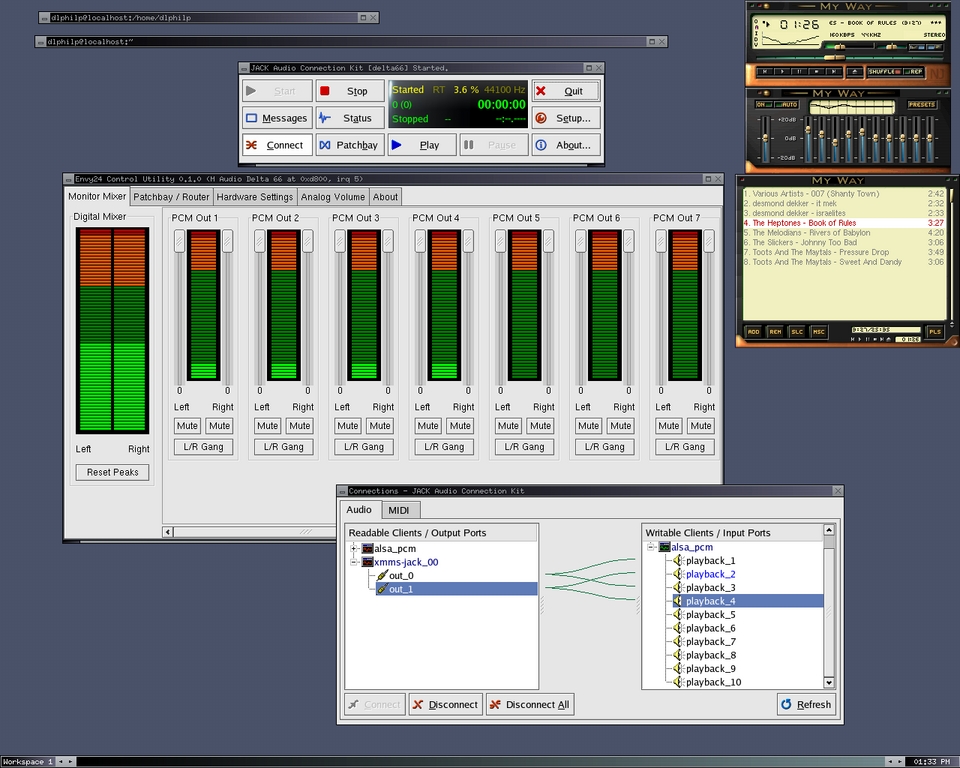
Figure 4. The envy24control Mixer
ALSA easily handles systems with multiple cards. The ALSA utilities usually include an option for specific card selection, as in these examples for my SBLive and Delta cards:
alsactl restore 0
alsactl restore 2
alsamixer -c 0
alsamixer -c 2
In my system, card 1 is the virtual MIDI card, which takes no channel settings and therefore has no associated mixer.
The ALSA plugins are utility services available through a file named .asoundrc, typically placed in your home directory. Plugin services include resampling, channel routing, sample format conversion and software volume control. Please see the ALSA Wiki notes on .asoundrc for detailed information regarding these and other ALSA plugins.
As I mentioned earlier, the default sound capability of my laptop is restricted to only one application at a time. Fortunately, ALSA provides a cool plugin called dmix, and its sole function is to provide a type of audio stream multiplexing called software mixing. Unfortunately, ALSA doesn't autodetect the need for the dmix plugin, so the user must prepare the necessary components.
Here is the .asoundrc for my laptop:
pcm.!default {
        type plug
        slave.pcm "dmixer"
}

pcm.dmixer  {
        type dmix
        ipc_key 1024
        slave {
            pcm "hw:0,0"
            period_time 0
            period_size 1024
            buffer_size 4096
            rate 32000
}
        bindings {
            0 0
            1 1
        }
}

pcm.dsp {
        type plug
        slave.pcm "dmixer"
}

ctl.dmixer {
        type hw
        card 0
}
This file defines a new PCM device named dmixer, of the plugin type dmix, which is slaved to the PCM capabilities of the sound chip. The plugin also lets me tailor the sample rate to the capabilities of my hardware, easing CPU demands.
With the dmix plugin I can run an audio player and a video player at the same time. In case you're wondering why I might want to do such a thing, consider that I often study t'ai chi videos available on DivX discs. The video is usually wonderful, but the background music isn't always to my liking, so it's nice to be able to listen to something more to my taste. The following commands launch Andy Lo A Fo's neat alsaplayer soundfile player and the MPlayer video player:
mplayer -ao alsa9:dmixer -aop list=volume:volume=0 \
  -framedrop foo.avi
alsaplayer -o alsa -d plug:dmixer cool-foo.mp3
The video player's audio output is negated, thanks to MPlayer's software volume control, while the alsaplayer plays my preferred music. Very cool stuff, courtesy of the dmix plugin.
I have no special needs on my desktop system, but I've configured my .asoundrc file for basic accommodations for the SBLive and the Delta 66:
pcm.emu10k1 {
        type hw
        card 0
}

ctl.emu10k1 {
        type hw
        card 0
}

pcm.Delta66 {
        type hw
        card 2
}

ctl.Delta66 {
        type hw
        card 2
}

pcm.DeltaPlug {
        type plug
        card 2
}

ctl.DeltaPlug {
        type plug
        card 2
}

pcm.DeltaPlugHW {
	type plughw
	card 2
}

ctl.DeltaPlugHW {
        type plughw
        card 2
}
The card numbering reflects the ordering list when I query /proc/asound:
$ cat /proc/asound/cards
0 [Live           ]: EMU10K1 - Sound Blaster Live!
                     Sound Blaster Live! (rev.8) at 0xd000, irq 3
1 [VirMIDI        ]: VirMIDI - VirMIDI
	             Virtual MIDI Card 1
2 [M66            ]: ICE1712 - M Audio Delta 66
	             M Audio Delta 66 at 0xd800, irq 5
ALSA does not provide a default .asoundrc file, nor is it an absolute necessity. However, many interesting ALSA features are accessible only through .asoundrc, and the reader is advised to study the example files found on the ALSA Web site.
For an advanced example, see Timo Sivula's El Cheapo HOWTO, a rather amazing hardware/software hack that allows sample-accurate multichannel recording using two or more consumer-grade sound cards (Timo used the Creative Labs PCI128). Under normal circumstances, such an approach would be doomed to fail from inherent instabilities between the clock crystals of the cards, but Timo's hardware modifications and the capabilities of .asoundrc make it possible. The El Cheapo HOWTO is not for the faint of heart, but it does succeed at providing an inexpensive path to high-quality multichannel recording on the Linux desktop.
Figure 4 shows off the envy24control mixer in a JACK environment. JACK is an audio connections manager designed to professional specifications for low-latency communication between the JACK server and its clients. JACK requires a native system audio driver, which for Linux can be a dummy driver, an OSS driver, PortAudio or, most typically, ALSA. I will present the JACK system in detail in a future article.
It is no exaggeration to state that all contemporary major Linux audio software wants ALSA's special services. MIDI programs enjoy the connectivity of the ALSA sequencer, digital audio systems make use of ALSA's drivers for pro-audio hardware and thorough support is provided for common desktop audio/video activities. Figures 5 and 6 represent some screens commonly seen on my desktop, thanks to ALSA.
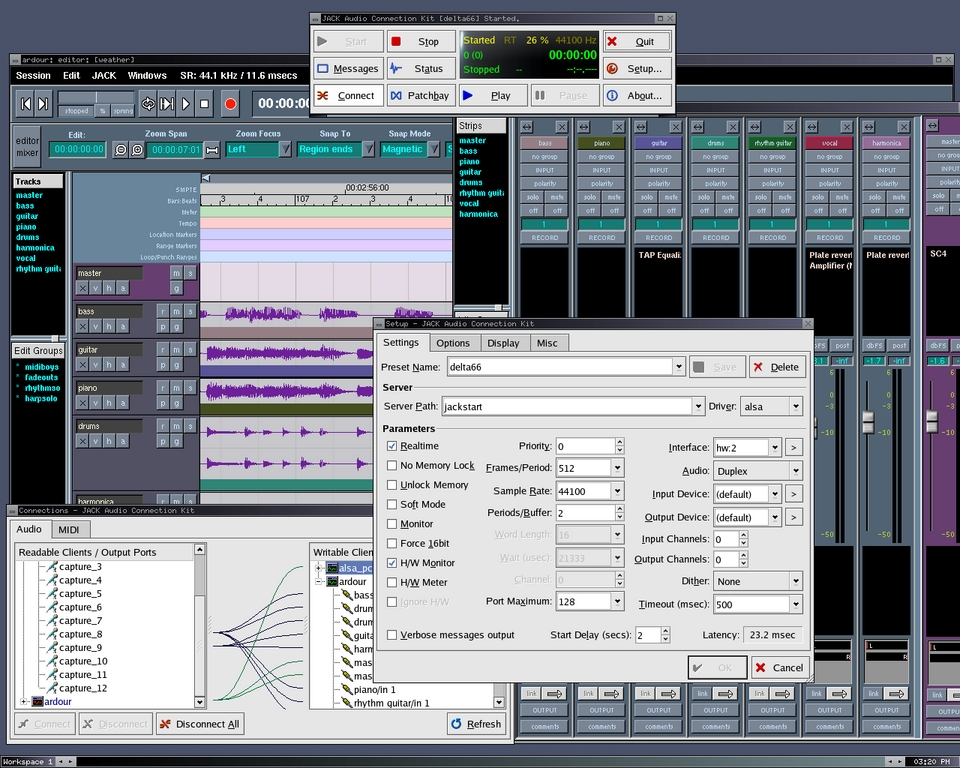
Figure 5. Recording with Ardour
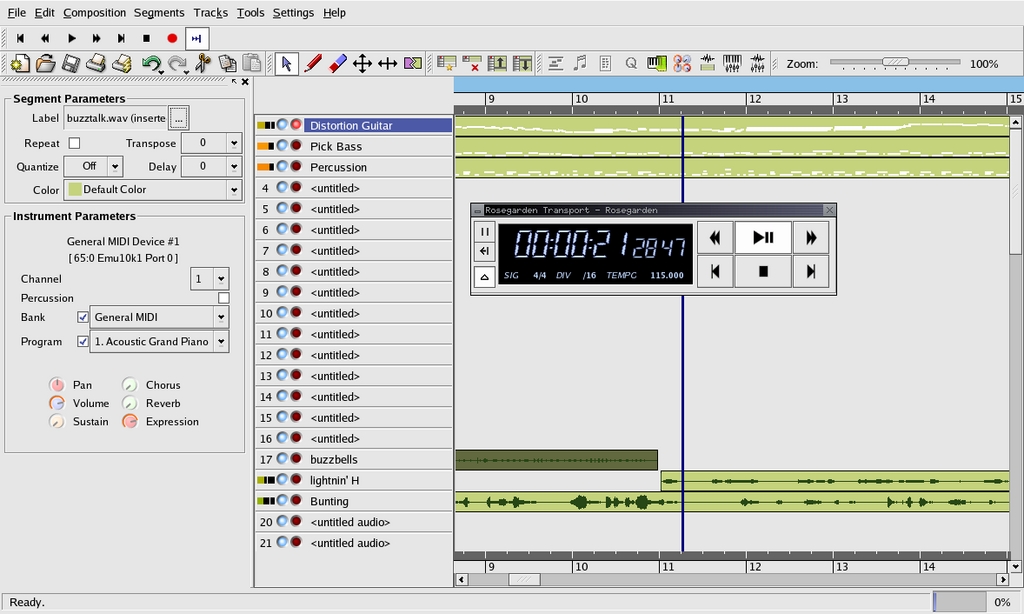
Figure 6. Audio/MIDI Sequencing in Rosegarden
From the normal user's point of view, ALSA's most obvious weakness is in its lack of GUI front ends for the various tools and utilities that make up so much of the system's power: a configuration panel, complete with options for configuring and reordering your installed cards, loading the virtual MIDI driver, selecting plugins for .asoundrc and generating a new file, operating alsactl and so forth. ALSA is indeed feature-rich, but too many of its excellent features are available only to those of us willing to write scripts and resource files.
Fortunately, there is an abundance of ALSA documentation and information for users of all levels. I already mentioned the man pages for the ALSA utilities. The ALSA Web site includes many resources for basic and advanced use of the system. Also,the alsa-user and alsa-devel mail lists are founts of wisdom and assistance, as is the excellent ALSA Wiki.
The project always needs programmers, but it also needs graphics artists, technical writers and beta testers, so even if you can't code, your skills might still be valuable to the project. Donations of hardware and cash also are cheerfully accepted; please see the ALSA Web site for appropriate contact details.
The average user can expect to see more cards supported, with more features available to the user. Hopefully, card configuration will become easier: getting the most from ALSA can be a simple matter or it can be a difficult thing. It is true that what is difficult is not impossible, and the payoff certainly can be worth the effort. Hopefully, though, we also will see some more accessible tools for user-level configuration.
The author thanks Jaroslav Kysela and Takashi Iwai for their vast patience and excellent assistance over the years I've been using ALSA. Thanks also to all members of the ALSA development team, past, present and future, for this great gift to the world of Linux sound. Finally, thanks to Len Moskowitz for the extended loan of his outstanding Core Sound PDAudioCF card.
Resources for this article: /article/8324.
Dave Phillips is a musician, teacher and writer living in Findlay, Ohio. He has been an active member of the Linux Audio community since his first contact with Linux in 1995. He is the author of The Book of Linux Music & Sound, as well as numerous articles in Linux Journal.

