
A System Monitoring Dashboard
For about a year, my company had been struggling to roll out a monitoring solution. False positives and inaccurate after-hours pages were affecting morale and wasting system administrators' time. After speaking to some colleagues about what we really need to monitor, it came down to a few things:
Web servers—by way of HTTP, not only physical servers.
Disk space.
SMTP servers' availability—by way of SMTP, not only physical servers.
A history of these events to diagnose and pinpoint problems.
This article explains the process I developed and how I set up disk, Web and SMTP monitoring both quickly and simply. Keeping the monitoring process simple meant that all the tools used should be available on a recent Linux distribution and should not use advanced protocols, such as SNMP or database technology. As a result, all of my scripts use the Bash shell, basic HTML, some modest Perl and the wget utility. All of these monitoring scripts share the same general skeleton and installation steps, and they are available from the Linux Journal FTP site (see the on-line Resources).
Installing the scripts involves several steps. Start by copying the script to a Web server and making it world-executable with chmod. Then, create a directory under the root of your Web server where the script can write its logs and history. I used webmon for monitor_web.sh. The other scripts are similar: I used smtpmon for monitor_smtp.sh and stats for monitor_stats.pl. monitor_disk.sh is different from the others because it is the only one installed locally on each server you want to monitor.
Next, schedule the scripts in cron. You can run each script with any user capable of running wget, df -k and top. The user also needs to have the ability to write to the script's home. I suggest creating a local user called monitor and scheduling these through that user's crontab. Finally, install wget if it is not already present on your Linux distribution.
My first challenge was to monitor the Web servers by way of HTTP, so I chose wget as the engine and scripted around it. The resulting script is monitor_web.sh. For those unfamiliar with wget, its author describes it as “a free software package for retrieving files using HTTP, HTTPS and FTP, the most widely used Internet protocols” (see Resources).
After installation, monitor_web.sh requires only two choices for the user, e-mail recipient and URLs to monitor, which are labeled clearly. The URLs must conform to HTTP standards and return a valid http 200 OK string to work. They can be HTTP or HTTPS, as wget and monitor_web.sh support both. Once installed and run the first time, the user is able to get to http://localhost/webmon/webmon.html and view the URLs, the last result and the history in a Web browser, as they all are links.
Now, let's break down the script; see monitor_web.sh, available on the LJ FTP site. First, I set all the variables for system utilities and the wget program. These may change on your system. Next, we make sure we are on the network. This ensures that if the server monitoring the URLs goes off-line, a massive number of alerts are not queued up by Sendmail until the server is back on-line.
As I loop through all the URLs, I have wget connect two times with a timeout of five seconds. I do this twice to reduce false positives. If the Web site is down, the script generates an e-mail message for the recipient and updates the Web page. Mail also is sent when the site is back up. The script sends only one message, so we don't overwhelm the recipient. This is achieved with the following code:
wget $URL  2>>   $WLOG

if (( $? != 0 ));then

  echo \<A HREF\="$URL"\>$URL\<\/A\> is down\

          $RTAG $EF.\
          $LINK Last Result $LTAG  >> $WPAGE

  if [[ ! -a down.$ENV ]];then

        touch /tmp/down.$ENV
        mail_alert down

  else
         echo Alert already sent for $ENV \
         - waiting | tee -a $WLOG
  fi

fi
I have included the HTML for green and red text in the script, if you choose not to use graphics. Again, the full script is available from the Linux Journal FTP site.
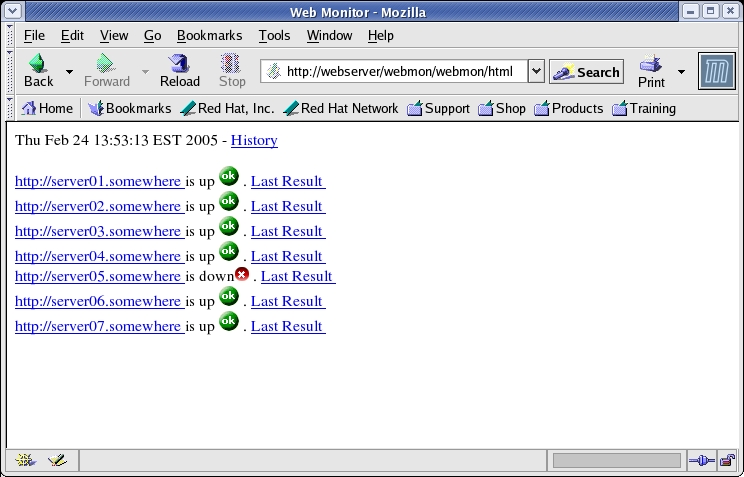
Figure 1. monitor_web.sh in action. Run the script from cron to regenerate this page as often as needed.
With the Web servers taken care of, it was time to tackle disk monitoring. True to our keep-it-simple philosophy, I chose to create a script that would run from cron and alert my team based on the output of df -k. The result was monitor_disk.sh. The first real block of code in the script sets up the filesystems list:
FILESYSTEMS=$(mount | grep -iv proc |\
grep -iv cdrom | awk'{print $3}')
I ignore proc and am careful not to report on the CD-ROM, should my teammates put a disk in the drive. The script then compares the value of Use% to two values, THRESHOLD_MAX and THRESHOLD_WARN. If Use% exceeds either one, the script generates an e-mail to the appropriate recipient, RECIPIENT_MAX or RECIPIENT_WARN. Notice that I made sure the Use% value for each filesystem is interpreted as an integer with this line:
typeset -i  UTILIZED=$(df -k $FS | tail -1 | \
awk '{print $5}' | cut -d"%" -f1)
A mailing list was set up with my team members' e-mail addresses and the e-mail address of the on-call person to receive the critical e-mails and pages. You may need to do the same with your mail server software, or you simply can use your group or pager as both addresses.
Because our filesystems tend to be large, about 72GB–140GB, I have set critical alerts to 95%, so we still have some time to address issues when alerted. You can set your own threshold with the THRESHOLD_MAX and THRESHOLD_WARN variables. Also, our database servers run some disk-intensive jobs and can generate large amounts of archive log files, so I figured every 15 minutes is a good frequency at which to monitor. For servers with less active filesystems, once an hour is enough.
Our third script, monitor_smtp.sh, monitors our SMTP servers' ability to send mail. It is similar to the first two scripts and simply was a matter of finding a way to connect directly to a user-defined SMTP server so I could loop through a server list and send a piece of mail. This is where smtp.pl comes in. It is a Perl script (Listing 1) that uses the NET::SMTP module to send mail to an SMTP address. Most recent distributions have this module installed already (see the Do I Have That Perl Module Installed sidebar). Monitor_smtp.sh updates the defined Web page based on the success of the transmission carried out by smtp.pl. No attempt is made to alert our group, as this is a trouble-shooting tool and ironically cannot rely on SMTP to send mail if a server is down. Future versions of monitor_smtp.sh may include a round-robin feature and be able to send an alert through a known working SMTP server.
Listing 1. smtp.pl tests outgoing mail through the SMTP server.
#!/usr/bin/perl -w
#
# Title  :   smtp.pl
# Author :   John_Ouellette@yahoo.com
# Files  :   smtp.pl
# Pupose :   Send email through SMTP server
#            Called from monitor_smtp.sh
#
# Submit as

use Net::SMTP;

my $rcpt   = $ARGV[2] || 'mygroup@somewhere';
my $sender = $ARGV[1] || 'root@host01';
my $host   = $ARGV[0];


#Start Script

my $smtp =Net::SMTP->new($host, Debug => 1);
my $input="test msg for server $host";

$smtp->mail("$sender");
$smtp->to("$rcpt");
$smtp->data();
$smtp->datasend("To: $rcpt\n") ;
$smtp->datasend("From: $sender\n") ;
$smtp->datasend("Subject: $host test\n") ;
$smtp->datasend("$input");
$smtp->dataend();
$smtp->quit;
Do I Have That Perl Module Installed?
An easy way to check whether you have any Perl module installed is by issuing this from the command line:
$ perl -e "use Net::SMTP";
If nothing prints, you have that module installed. If you're missing the module, you get an error that looks like this:
$perl -e "use Net::OTHER";
Can't locate Net/OTHER.pm in @INC (@INC contains:
/usr/lib/perl5/5.8.3/i386-linux-thread-multi /usr/lib/perl5/5.8.3
/usr/lib/perl5/vendor_perl/5.8.0 /usr/lib/perl5/vendor_perl .) at -e line
1.
BEGIN failed--compilation aborted at -e line 1.
This error indicates a lack of the module in question.
Finally, we come to our stats script, monitor_stats.pl. This script logs in to each host and runs the commands:
df -k
swapon -s
top -n 1 | head -n 20
hostname
uptime
It then displays the results in a browser (Figure 2) and saves the result in a log, again sorted by date on the filesystem. It serves as a simple dashboard to give quick stats on each server.
The benefit of this monitoring design is threefold:
We have a history of CPU, disk and swap usage, and we easily can pinpoint where problems may have occurred.
Tedious typing to extract this information for each server is reduced. This comes in handy before leaving work to resolve potential problems before getting paged at night.
Management quickly can see how well we're doing.
We are using the insecure rsh protocol in this script to show you how to get this set up quickly, but we recommend that you use SSH with properly distributed keys to gain security.
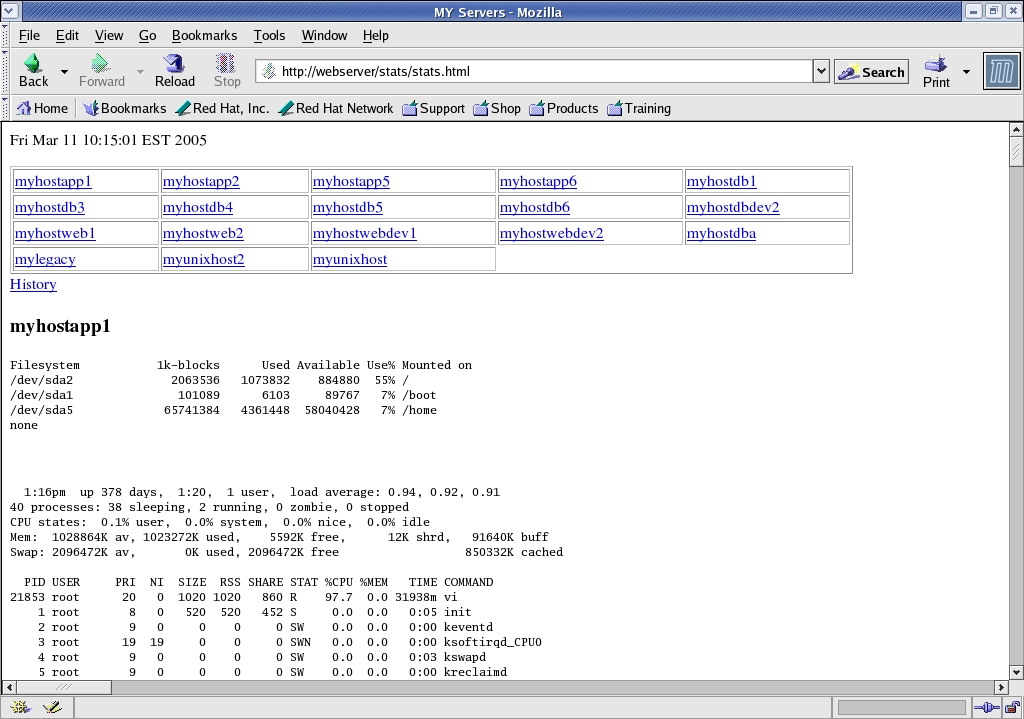
Figure 2. monitor_stats.pl in Action
With the use of this new system monitoring dashboard, my team's productivity has increased and and its confidence in monitoring has soared, because we no longer are wasting time chasing down false positives. A history of system performance has been a real time saver in diagnosing problems. Finally, easy installation allows users with basic skills to conquer a complex system administration problem in one business day.
Resources for this article: /article/8269.
John Ouellette is a system administrator with nine years of experience in Microsoft Windows NT and UNIX. He believes the command line is king and loves chicken parmigiana. He can be reached at john_ouellette@yahoo.com.

