
gEvas: the GTK+2 to Evas Bridge
The Evas library provides a canvas for quickly rendering raster graphics with alpha blending support. Evas is part of the Enlightenment Foundation Libraries (EFL), a suite of libraries originally built to support Enlightenment DR 17. Other libraries in the EFL that complement Evas are the Edje and Embryo combination and the Emotion library. Edje allows you to wrap up fonts, graphics and functionality into portable theme-like files. Embryo is a simple yet Turing complete scripting language that enables simple scripts to be embedded into Edje files. Emotion allows you to have many video streams as first-class canvas objects. This means you can alpha blend video, move video objects around, resize them and layer them in the canvas while playing.
gEvas is a wrapper and glue library built to allow Evas to be used from GTK+2.x applications easily. In order to motivate you to try gEvas, I present here the points that originally motivated me to use Evas and subsequently create gEvas. My major motivations to use Evas were its simple API and great render speed for an alpha-blended canvas.
Making claims of high render speed unfortunately requires a brief trip into the benchmarking world. The evas_bench application from the Evas distribution involves many pixmap canvas items, scaling and blending of pixmap items and text elements. The image scaling is nowhere near as extreme as the above resize benchmarks. I have ported evas_bench to using GNOME Canvas.
Figure 1 shows a screenshot of the GNOME Canvas port of evas_bench. I have also created some simpler tests for the canvas scaling algorithm both with and without forcing alpha blends on each frame. For the non-alpha-blended version, a leaf image is resized from larger than full-canvas width to 0 by 0 and back again in a loop; see Figure 2. For the alpha-blended version, a red rectangle image of the same size as the leaf image was used ranging from 0 alpha in the top left to full alpha in the bottom.

Figure 1. GNOME Canvas port of evas_bench tool. Many images and text are moved and resized around the canvas.
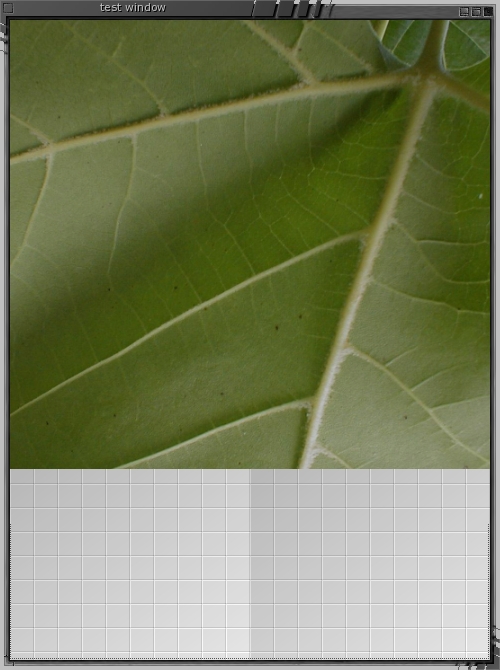
Figure 2. gEvas version of gnome_canvas scaling and compositioning benchmark. The leaf is resized gradually to retract to the top left of the canvas and then return to this original size again.
As stated above, I created gEvas, and some readers may notice that I am a part of the Enlightenment developers team. Although this is true, I have gone to lengths to ensure that the benchmarks are not biased. The benchmark source code is available (see the on-line Resources). Those reading the source, please excuse the excessive use of less-than-optimal coding conventions used in the quick code hack.
For those unfamiliar with GNOME Canvas, it has two rendering back ends. From the GNOME Canvas developer documentation (see Resources): “...It [GNOME Canvas] offers a choice of two rendering back ends, one based on Xlib for extremely fast display, and another based on Libart, a sophisticated, anti-aliased, alpha-compositing engine.” Evas attempts to provide the best of both worlds. I benchmark Evas against both GNOME Canvas rendering engines.
There are also reasons why Evas might not be an appropriate choice. GNOME Canvas supports a Bezier path canvas item that, at present, Evas does not support. In addition, Evas and gEvas are less likely than GNOME Canvas to be preinstalled.
Evas may get beziers in the future. The summary of this point from Raster (aka Carsten Haitzler) was: “If you are after a vector editor suite or something, GNOME Canvas is better. If you want real time fast, alpha-blended object display on all targets, Evas is a good choice.”
Evas itself supports multiple back-end render targets, including the framebuffer, XLib and OpenGL. At present, gEvas uses only the XLib Evas back end. However, as GTK+2 can run on the framebuffer, you should be able to use gEvas on the framebuffer too, but this is untested.
Both GNOME Canvas and Evas share a similar data model. The Qt QCanvas data model is different enough to make clean benchmark comparisons difficult. The first major difference that makes comparisons difficult is how QCanvas handles images. To put an image on the canvas, you create a QCanvasSprite with a single frame. To scale that image, you then use QImage::scale() or QImage::smoothScale(), which gives you back an image that you can use to update your sprite. This puts image scaling and the cache handling for scaled images into the client application. Both Evas and GNOME Canvas allow canvas objects to be resized directly and thus take responsibility for handling the caching of scaled images for you.
The second difference is that Qt gives you control over the update tile size. The Qt documentation recommends: “A good rule of thumb is that the size should be a bit smaller than the average canvas item size. If you have moving objects, the chunk size should be a bit smaller than the average size of the moving items.”
Due to the data model differences, I haven't created a Qt port of evas_bench as yet. I did create a canvas scaling and blending client, although there are some canvas design issues affecting a clean comparison.
With Qt moving the cache policy fully in the client, I have chosen to cache all scaled images in the first iteration of scaling and reset the benchmark start timer for further iterations that will use only the cache.
So keep in mind that the Qt resize benchmark is performed with all resized images pre-cached and many user-specified tile sizes are used for benchmarking. This effectively should give QCanvas a huge speed advantage over Evas and GNOME Canvas.
The results should be similar on a relative basis no matter what hardware is used. For the sake of completeness, my testing CPU was an AMD XP-Mobile running at 2.4GHz with 200MHz FSB, with 1GB of RAM at 400MHz dual-channel cas222 and and NVIDIA 5900 video card. The software that may affect performance includes xorg-x11-6.8.2-1.FC3.13, either GCC 4.0.0 20050308 (Red Hat 4.0.0-0.32) or GCC 3.4.3. X11 was configured with TwinView with one 1024x768 and one 1600x1200 screen, both running 85Hz in 32-bit color. TwinView should not affect runtimes because all canvases are using software render paths that should be more sensitive to CPU/RAM speed.
Using client libraries qt-3.3.4, libgnomecanvas-2.10.0 recompiled with below CFLAGS, Evas CVS checked out on May 28, 2005. Evas was compiled with GCC 3.4.3 with the below CFLAGS. Benchmark compiled code CFLAGS and CXXFLAGS are generally:
-O3 -march=athlon-xp -fomit-frame-pointer
I benchmarked the qt-canvas-resize client separately because of the image caching distinction and chunk-size optimizations mentioned above. Shown in Table 1 are the benchmarks for qt-canvas-resize, where the Qt part of the main loop consists of:
QCanvasSprite* leaf_sprite = ...;
QCanvasPixmapArray* leaf_tiles = ...;
while( running )
{
  while( app->hasPendingEvents() )
    app->processEvents();
  QImage im = ... from cache ...;
  QCanvasPixmap* qpix = new QCanvasPixmap( im );
  leaf_tiles->setImage( 0, qpix );
  leaf_sprite->setFrame(0);
  canvas->update();
}
The client has several command-line options: --alpha-blend-image is used to alpha-blend the red rectangle instead of the leaf, and --chunk-size is used to specify a non-default chunk size. The --alpha-blend-image option is common to qt-canvas-resize, gnome-canvas-resize and (g)evas-resize.
Table 1. qt-canvas-resize Benchmarks with Different Tile Sizes
| Application | Chunk size | Leaf image FPS | Alpha rectangle FPS |
|---|---|---|---|
| qt-canvas-resize | default | 114 | 72 |
| qt-canvas-resize | 32 | 128 | 80 |
| qt-canvas-resize | 64 | 136 | 82 |
| qt-canvas-resize | 128 | 142 | 81 |
Running the default chunk-size leaf image qt-canvas-resize through valgrind's callgrind for a few minutes reveals that QCanvas::update() gets 30% overall runtime, with 59% of runtime used by QCanvasPixmap::init(). So the benchmark could be considerably better if the pre-cached images are stored in a QCanvasPixmapArray for the sprite.
To test this level of pre-caching, I added the -Z option to put all of the cache images into a single QCanvasPixmapArray, which is the backing for the QCanvasSprite. With this optimization, 559 FPS can be achieved with 78% of runtime in QCanvas::update() and 7% in QCanvasSprite::setFrame(). It has to be noted that this level of pre-caching presents a unfair advantage for QCanvas for rendering speed.
The GNOME Canvas client for image scale and blend is gnome-canvas-resize, which has an --aa option to choose the GNOME Canvas alpha-blending back end. evas-resize has no custom options.
Table 2. GNOME Canvas vs. (g)Evas in the Resize Benchmark
| Application | Leaf image FPS | Alpha rectangle FPS |
|---|---|---|
| gnome-canvas-resize | 21 | 21 |
| gnome-canvas-resize --aa | 149 | 127 |
| evas-resize | 190 | 184 |
| gevas-resize | 185 | 177 |
Without the --aa option, gnome-canvas-resize spends 99% of its time inside gtk_widget_send_expose(), which is called one way or another from g_main_context_iteration(). I don't think that the non-aa GTK+2 engine likes being used in a flat-out benchmark manner. Using callgrind on the --aa GNOME Canvas back end finds 96% of its time spent in gtk_widget_send_expose(), although now we can see 66% of the time in gdk_pixbuf_composite() is called indirectly from gtk_widget_send_expose().
evas-resize is spending 99% of its time in evas_render_updates(). Of the functions called from evas_render_updates(), 91% is spent scaling functions.
I also ported the evas-resize to using gEvas and its API calls. Although there is some speed loss due to the GTK+ signal glue and other gEvas trimmings, the loss is not too significant.
This comparison shows that for outright image scaling, GNOME Canvas and QCanvas are similar and both are slower than Evas. Evas gains further ground when the scaled image also needs to be alpha-blended to the background.
I modified the original evas_bench application to remove the use of features not easy to replicate in GNOME Canvas. Other features became optional to measure their impact on overall performance. The setting of clip zones in Evas is not an easy thing to port to GNOME Canvas, so these were disabled in the evas_bench. Smooth scaling also can have a strong impact on performance, so an option to turn that off for the Evas version was added.
Table 3. evas_bench and Its GNOME Canvas Port Head to Head
| Application | FPS | EVAS_BENCH |
|---|---|---|
| gnome-canvas-port-evas-bench --aa | 90 | 1.49 |
| evas_software_x11_main | 164 | 2.75 |
| evas_software_x11_main --smooth-off-for-some | 200 | 3.32 |
| evas_buffer_test | 290 | 4.83 |
It should be noted that Evas doesn't currently implement a cache for scaled images. So every frame in the Evas benchmarks is performing an image scale and blend.
The evas_buffer_test client performs the same work but only renders the output to a 32-bit RGBA image buffer in memory.
At its core, gEvas provides five things: it tells Evas when to repaint itself, assists in gluing Evas events and glib2 signals together, handles Edje timer calls to support animation, helps Evas play nice with GTK+2 widgets and codes to assist in Evas usage. Because Evas also is being targeted at embedded systems, some handy code is left out of the core Evas to make it lean. Because gEvas is desktop-targeted, it adds some handy functionality for desktop applications.
The following code creates a gEvas canvas inside a scrollable area and attaches it to a GTK+2 window. As not every scrollable gEvas will want to allow the middle button to drag the canvas position—as in The GIMP—you have to set this up outside of gevas_new_gtkscrolledwindow():
GtkWidget* window = 0;
GtkWidget* scw    = 0;
GtkWidget* gevas  = 0;

window = gtk_window_new(GTK_WINDOW_TOPLEVEL);
gevas_new_gtkscrolledwindow(
   (GtkgEvas**)(&gevas), &scw );
gtk_container_add(GTK_CONTAINER(window), scw);

gtk_scrolled_window_set_policy(
   GTK_SCROLLED_WINDOW(scw),
   GTK_POLICY_AUTOMATIC, GTK_POLICY_AUTOMATIC);

gevas_set_middleb_scrolls(GTK_GEVAS(gevas), 1,
  gtk_scrolled_window_get_hadjustment(
     GTK_SCROLLED_WINDOW(scw)),
  gtk_scrolled_window_get_vadjustment(
     GTK_SCROLLED_WINDOW(scw)));
The gEvas API for creating objects takes a leaf from standard GTK+ coding, having some methods attached to a general GtkgEvasObj class. Other special classes, such as GtkgEvasImage, are derived from GtkgEvasObj. Unfortunately, this also brings the usual cast-heavy style of ANSI C GTK+ programming.
The following creates an image showing your PNG file at its original width and height. We then move the image and raise its layer in the canvas:
GtkgEvasImage* gi;
GtkgEvasObj* go;

gi = gevasimage_new_from_metadata(
        GTK_GEVAS(gevas), "/my/path/foo.png" );
go = GTK_GEVASOBJ( gi );

int x = 100, y = 50;
gevasobj_move(      go, x, y );
gevasobj_set_layer( go, 1 );
I created a simple client showing how to connect Evas events from the canvas to some GTK+2 widgets outside the gEvas widget. Look in the demo directory of the gEvas package for signalconnect.c. For a more-advanced example, take a look at the testgevas client for the use of both raw Evas callbacks and Evas-triggered callbacks that are marshaled to glib signals. Signalconnect is shown in Figure 3.
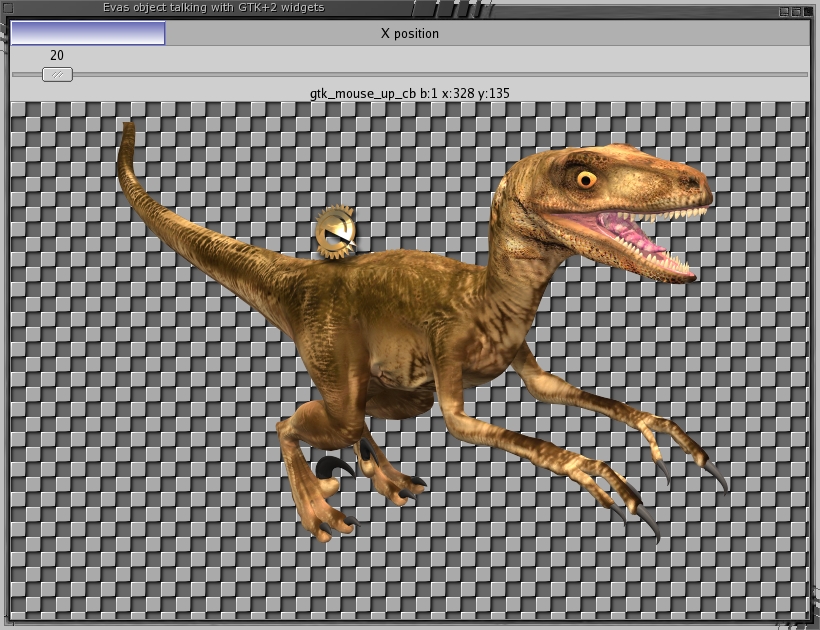
Figure 3. Connecting Evas and GTK+ signals. The dinosaur image can be dragged around either directly or by moving the slider bar.
Connecting to Evas events is handled by way of the GtkgEvasEvHClass subclasses. The below fragment causes evh to marshal Evas' mouse up/down events into glib signals, which then are connected to reporting functions. Also, when the user moves the raptor image, raptor_moved() is called by way of a glib2 signal to update various GTK+2 widgets with the current coordinates of the image:
static gint raptor_moved(
    GtkgEvasObj* o,
    Evas_Coord* x, Evas_Coord* y,
	gpointer user_data )
{
 gtk_progress_bar_set_fraction( x_coord_tracker,
      (1.0 * (*x)) / CANVAS_WIDTH );
 gtk_range_set_value(
      GTK_RANGE(y_coord_tracker), *y );

 return GEVASOBJ_SIG_OK;
}

static gboolean
gtk_mouse_down_cb(GtkObject * object,
 GtkObject * gevasobj, gint _b, gint _x, gint _y,
 gpointer data)
{
 char buffer[1024];
 snprintf(buffer,1000,"mouse_down b:%d x:%d y:%d",
          _b, _x, _y);
 gtk_label_set_text( e_logo_label, buffer );
 return FALSE;
}

...
gi = gevasimage_new();
go = GTK_GEVASOBJ( gi );
gevasimage_set_image_name( gi, "raptor.png" );
...

/** Let the user drag the raptor around **/
GtkObject *evh = gevasevh_drag_new();
gevasobj_add_evhandler( GTK_GEVASOBJ( gi ), evh );

gtk_signal_connect( go, "move_absolute",
   GTK_SIGNAL_FUNC( raptor_moved ), go );

gi = gevasimage_new();
go = GTK_GEVASOBJ( gi );
gevasimage_set_image_name( gi, "e_logo.png" );
...

evh = gevasevh_to_gtk_signal_new();
gevasobj_add_evhandler( GTK_GEVASOBJ( gi ), evh );

gtk_signal_connect(GTK_OBJECT(evh), "mouse_down",
  GTK_SIGNAL_FUNC(gtk_mouse_down_cb), NULL);
gtk_signal_connect(GTK_OBJECT(evh), "mouse_up",
  GTK_SIGNAL_FUNC(gtk_mouse_up_cb), NULL);
The following are some more functional event handlers that can be attached:
/* Standard GTK+ popup menu creation + handling */
static gboolean
gtk_popup_activate_cb(GtkObject * object,
   GtkObject * gevasobj, gint _b, gint _x, gint _y,
   gpointer data)
{
 static GtkMenu *menu = 0;
 ...
}

GtkgEvasObj* go  = ...;
GtkObject*   evh = 0;

/* Make the object throb when mouse is over it */
GtkgEvasEvHThrob* evht = gevasevh_throb_new( go );

/* Allow the user to drag the object around  */
evh = gevasevh_drag_new();
gevasobj_add_evhandler( go, evh );

/* Make a popup menu appear on right mouse click */
evh = gevasevh_popup_new();
gevasobj_add_evhandler( go, evh );

gtk_signal_connect(GTK_OBJECT(evh),"popup_activate",
   GTK_SIGNAL_FUNC(gtk_popup_activate_cb), NULL);
Handling a selection in the canvas is a little trickier than the above event handlers. This is so because more than one object is involved in the selection process. You create a selector event handler object of class GtkgEvasEvHGroupSelector that attaches to the object you want as the background unselectable object. You can think of this object as where the rubber-band rectangle is drawn to indicate which objects should become selected. The rubber band always is drawn at a higher layer than the selectable objects. Each selectable object on the canvas then has a GtkgEvasEvHSelectable object attached to it that communicates with the GtkgEvasEvHGroupSelector object:
GtkWidget*     gevas = ...;
GtkObject*     evh_selector = 0;
GtkgEvasImage* gevas_image;

gevas_image = gevasimage_new();
gevasobj_set_gevas(gevas_image, gevas);
gevasimage_set_image_name(gevas_image,".../bg.png");

/* Make this a group_selector */
evh_selector = gevasevh_group_selector_new();
gevasevh_group_selector_set_object(
  (GtkgEvasEvHGroupSelector*)evh_selector,
  GTK_GEVASOBJ(gevas_image));

GtkgEvasObj* go  = ...;
make_selectable( gevas, go, evh_selector );

...

/* lets make this object also selectable */
void make_selectable( GtkgEvasObj* object,
                      GtkObject* evhsel )
{
 GtkgEvasObj* ct  = 0;
 GtkObject* evh = gevasevh_selectable_new( evhsel );
 gevasevh_selectable_set_confine(
    GTK_GEVASEVH_SELECTABLE(evh), 1 );

 gevasobj_add_evhandler(object, evh);
 gevasevh_selectable_set_normal_gevasobj(
    GTK_GEVASEVH_SELECTABLE(evh),  object);

 ct = (GtkgEvasObj*)gevasgrad_new(
     gevasobj_get_gevas( GTK_OBJECT(object)));

 gevasobj_set_color( ct, 255, 200, 255, 200);

 gevasgrad_add_color(ct, 120, 150, 170, 45, 8);
 gevasgrad_add_color(ct, 200, 170, 90, 150, 16);

 gevasgrad_set_angle(ct, 150);
 gevasobj_resize( ct, 200,100);
 gevasobj_set_layer(ct, 9999);

 gevasevh_selectable_set_selected_gevasobj(evh,ct);
}
You then can easily test if objects are selected or get a collection object to perform operations on all objects selected:
GtkgEvasEvHGroupSelector* ev = ...;
GtkgEvasEvHSelectable*    o  = ...;
GtkgEvasObjCollection*    col = 0;

gboolean yn = gevasevh_group_selector_isinsel(ev,o);
col = gevasevh_group_selector_get_collection( ev );
gevas_obj_collection_move_relative( col, 100, 200 );
In addition, some objects, such as geTransAlphaWipe, were created to perform image transitions before Edje existed. Although Edje is the way of the future, the alphawipe code allows you to perform a common simple transition without involving Edje. This is used in gevasanim to create a sprite-like object that transitions between its frames using alpha blending.
The xxx_from_metadata() functions in gEvas allow you to set up location, image filename, visibility and other attributes for a new object using a single string. Both the from_metadata() and the transition code duplicate functionality now also available in Edje:
sprite = gevas_sprite_new( GTK_GEVAS(gevas) );

for( i=1; i<frame_count; ++i )
{
 gchar* md = g_strdup_printf(
   "cell%ld.png?x=120&y=120&visible=0&fill_size=1"
   ,i);
 gi = gevasimage_new_from_metadata( GTK_GEVAS(gevas), md );
 g_free( md );
 gevas_sprite_add( sprite, GTK_GEVASOBJ( gi ) );
}

gevas_sprite_set_default_frame_delay( sprite,2000 );
gevas_sprite_play_forever( sprite );

/* frame transitions */
geTransAlphaWipe* trans = 0;
trans = gevastrans_alphawipe_new();
for( i=0; i<frame_count; ++i )
 gevas_sprite_set_transition_function(
     sprite, i, trans );
For the grand finale, I put an Edje object onto the gEvas canvas. The client I created to demonstrate for this article is demo/gevasedje in the gEvas distribution. The interesting parts are shown below. The Edje itself has an Enlightenment logo that spins around and one that throbs under mouse clicks:
/* init engines */
ecore_init();
edje_init();
gtk_init(&argc, &argv);

...
gevas = ...;
/* allow edje to update the canvas as well */
gevas_setup_ecore( (GtkgEvas*)gevas );

/* place an edje object */
GtkgEvasEdje* gedje
 = gevasedje_new_with_canvas( gevas );

/* eet files can contain many edje objects */
gevasedje_set_file( gedje, "e_logo.eet", "test" );
go = GTK_GEVASOBJ(gedje);
gevasobj_move(      go, 300, 300 );
gevasobj_resize(    go, 370, 350 );
gevasobj_set_layer( go, 10 );
gevasobj_show(      go );
I have omitted memory consumption figures from the article in order to conserve space, as those figures are less important for modern desktop machines. A future benchmark will pit QTCanvas resizing against an Edje resize program to provide a more fair comparison between those two.
If you are looking for a canvas for a new GTK+2 application, consider both GNOME Canvas and gEvas plus Edje before hacking.
Resources for this article: /article/8647.
Ben Martin spends most of his time working on virtual filesystems and data mining them, although he also is known to play with animating other peoples' image art in two and three dimensions.

