
Development of a User-Space Application for an HID Device, Using libhid
The Matrix is a USB bill validator, sometimes known as a note reader or bill acceptor, made by Validation Technologies International. The bundled software was developed for Microsoft Windows, but fortunately the device comes with low-level technical documentation that defines device-specific aspects, such as flow control, status bytes and local status LEDs.
The device is a Human Interface Device (HID), as identified by an enumeration process upon connection. The Windows device manager reports the device as such, as does usbfs on Linux. This article is specific to this particular HID device, so including all of its code probably is unnecessary, but it should provide help for developing for other HID-class devices.
After some initial research, I decided to develop user-space code using an in-development library called libhid, which provides a cross-platform way to access and interact with USB HID devices. libhid is implemented on top of libusb, so it does not depend directly on the kernel's USB support.
Another option for driving the Matrix is to use libusb directly, but doing so would be re-inventing the libhid wheel. A third option is to implement the Matrix as a kernel module, but it would incur the large overhead of learning kernel particulars. This option also would render the code platform-specific.
USB devices are categorized into device classes. A modem is in the communications class, and a speaker falls into the audio class. The HID class mainly consists of devices that people use to control computers. Examples of HID devices are mice, joysticks and force-feedback game controllers. Also included in the HID class are devices that may not require human interaction but do provide data in a similar format to HID-class devices, such as bar-code readers and, in my case, the Matrix note reader.
Information about a USB device is stored in segments of its ROM called descriptors. A diagram of the descriptor structure is provided in Figure 1, where an overall view of the hierarchy can be seen. When a USB device is attached to a USB bus, an enumeration process takes place that equates to the descriptors on the device being read into memory. Information about an HID-class device is contained in its HID report descriptors.
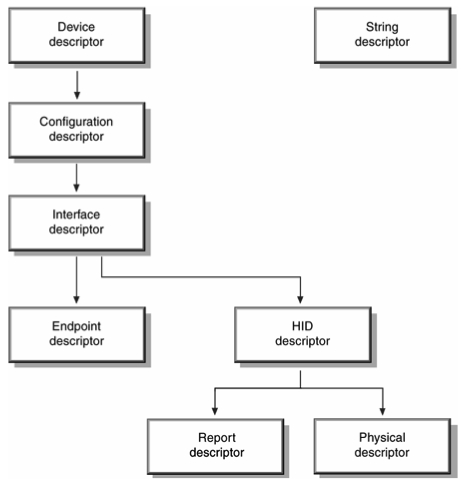
Figure 1. A USB device's descriptors, stored in its ROM, hold information about it.
I plugged the device in to the Linux box in order to read the descriptors and monitor the device, the machine and the communications. I did this to try to get as much information as possible so I could have a better understanding of how to write code for the device.
A key component of these report descriptors is the usage information, which is defined in the USB HID Usage Tables (see the on-line Resources). Usage values describe three basic types of information about the device:
Controls—information about the state of the device such as on/off or enable/disable.
Data—all other information that passes between the device and the host.
Collections—groups of related controls and data.
Taken together, the usage page and usage number define a unique constant that describes a particular type of device or part of that device. For example, on the Generic Desktop usage page (page number 0x01), usage number 0x05 is a game pad, and usage number 0x39 is a hat switch.
Because my device is unique—it isn't a mouse, joystick or something commonly found in the examples of HID-class devices—the usage page is set to 65,440, which is a vendor-defined value. In comparing outputs of lsusb for other HID-class devices, they all had a defined usage page, such as Generic Desktop Controls or Game Controls. Because libhid still is in development, few previous examples of code are available to browse for reference. My work was much like an exploratory investigation.
On Linux, with a standard Debian 2.6.9 kernel and usbutils, I was able to see that Linux recognises the device as a USB HID device, bInterfaceClass = HID, and loads the hiddev kernel module. This module, or piece of kernel code, is a generic driver for HID devices. It is not specific to our needs—it mainly is used for mice, joysticks and the like—so it needs to be detached from the device or disabled (see the Communicating with the Device section).
The device, like all USB devices, is enumerated upon connection to the USB bus. So looking at the output of lsusb -vvv, run as root, for more information is helpful in determining what the device capabilities are. lsusb parses the usbfs filesystem into a more readable format:
[sample lsusb -vvv]

Bus 001 Device 004: ID 0ce5:0003
Device Descriptor:
...
 idVendor           0x0ce5
 idProduct          0x0003
  ...
  Configuration Descriptor:
  ...
   Interface Descriptor:
   ...
     bNumEndpoints        1
     bInterfaceClass      3 Human Interface Devices
     bInterfaceSubClass   0 No Subclass
     bInterfaceProtocol   0 None
     ...
     HID Device Descriptor:
     ...
      Report Descriptor: (length is 32)
       Item(Global):Usage Page,data=[0xa0 0xff]65440
                            (null)
       Item(Local ):Usage, data= [ 0x01 ] 1
                            (null)
       Item(Main  ):Collection, data= [ 0x01 ] 1
                            Application

       Item(Local ):Usage, data= [ 0x03 ] 3
                            (null)
       Item(Global):Logical Minimum,data=[ 0x00 ] 0
       Item(Global):Logical Maximum,data=[ 0xff ]255
       Item(Global): Report Size, data= [ 0x08 ] 8
       Item(Global): Report Count, data= [ 0x05 ] 5
       Item(Main  ): Input, data= [ 0x02 ] 2
        Data Variable Absolute No_Wrap Linear
        Preferred_State No_Null_Position
        Non_Volatile Bitfield

       Item(Local ): Usage, data= [ 0x05 ] 5
                            (null)
       Item(Global):Logical Minimum,data=[ 0x00 ]0
       Item(Global):Logical Maximum,data=[ 0xff ]255
       Item(Global): Report Size, data= [ 0x08 ] 8
       Item(Global): Report Count, data= [ 0x05 ] 5
       Item(Main  ): Output, data= [ 0x02 ] 2
        Data Variable Absolute No_Wrap Linear
        Preferred_State No_Null_Position
        Non_Volatile Bitfield
       Item(Main  ): End Collection, data=none
The above output—some of the information has been omitted—follows the hierarchy depicted in Figure 1. Some values of note are:
idVendor and idProduct—unique identifiers for all USB devices, used for identifying and accessing the device in code.
bNumEndpoints—lists the number of endpoints available in a device. This value actually means the number of endpoints in addition to the default endpoint, endpoint 0, available in every USB device.
bInterfaceClass—the value that determines that a device is an HID-class device.
bInterfaceSubClass—the subclass of a device, in this case, HID. For example, the boot interface subclass of the device must be bootable or available to the BIOS, such as a mouse or keyboard.
bInterfaceProtocol—the protocol used. Possible values are 0 for none, 1 for keyboard or 2 for mouse; additional information is available in the HID spec.
A block diagram depicting the flow of control of data is shown in Figure 2. It may help in picturing where your code fits in with respect to the libraries and the device. From my investigation, I know that control messages periodically are written by way of the control pipe, and interrupt reads are made through endpoint 0.
The control pipe is used for three tasks: receiving and responding to requests for USB control and class data; transmitting data when polled by the HID class driver, using the Get_Report request; and receiving data from the host. The Interrupt pipe is used for two tasks: receiving asynchronous, or unrequested, data from the device and transmitting low-latency data to the device.

Figure 2. The new driver uses libhid, which depends on libusb.
The kernel has a DEBUG feature that can be activated in order to log extra information about what is happening when communicating with the device. To do this, a file in the kernel source needs to be modified. In the /usr/src/linux/drivers/usr/input/hid-core.c file, these two lines need to be changed from:
#undef DEBUG
#undef DEBUG_DATA
to:
#define DEBUG
#define DEBUG_DATA
The module needs to be recompiled and installed. Once this is done, the modules should prove helpful in determining whether your code is working and doing what you expect.
Sample code containing some helpful comments comes with libhid. The file test_libhid.c in the libhid/test directory is a good place to start writing code for the device. Below is a snippet of that code, along with some more explanation of the functions; details are omitted for brevity:
HIDInterface* hid;
hid_return ret;

HIDInterfaceMatcher matcher =
	 { 0x0ce5, 0x0003, NULL, NULL, 0 };
ret = hid_force_open(hid, 0, &matcher, 3);

int const PATH_LEN = 2;
int const PATH_IN[2] = { 0xffa00001, 0xffa00003 };

int const WRITE_PACKET_LEN = 8;
char write_packet[8] =
	 { 0x04,0x7f,0x7f,0x00,0x02,0x00,0x00,0x00 };

int const READ_PACKET_LEN = 5;
char read_packet[5];

ret = hid_set_output_report(hid,
 PATH_IN,
 PATH_LEN,
 write_packet,
 WRITE_PACKET_LEN);

ret = hid_interrupt_read(hid,
 USB_ENDPOINT_IN+1,
 read_packet,
 READ_PACKET_LEN,
 0);
The first thing to do is identify the particular device we want to talk to. This is done with the HIDInterfaceMatcher call simply by entering the vendor ID and the product ID. These two identifiers are all that is required to identify any USB device. If you have more than one identical device, it is possible to separate them by serial number, that is, two matrix note readers would have the same vendor ID and product ID but different serial numbers. The HIDInterfaceMatcher call can do this; see the comments in the test_libhid.c file.
After some variable setup, the next is to detach the kernel driver from the HID device. Upon insertion of the HID device, the kernel usually loads the usbhid module, which we don't want. We do have a few options, however, for unloading it or for not loading it in the first place. One such way is to enter this command:
root@localhost #> modprobe -r usbhid
When the hid_force_open function runs, it attempts, n times, to detach the device before it fails. The device is now free from any control, so our code now “opens” the device. As with any USB device, it is necessary to send control information to the device to activate it. This information must be sent periodically in order for the device to remain active. If the control poll stops, the device deactivates after a certain timeout.
Writing to a device requires the HID usage path and its length, plus a packet and its length. To find this out, we need to parse the usage tree—the output of lsusb -vvv—and obtain the path to the interface we want. As with everything else, there are various methods for determining the path. At this stage, a lot of time was spent determining what path to write to, and a number of tools are helpful here, such as:
The test_libhid.c code: when the correct vendor and product ID are entered in the code, the function hid_dump_tree, which uses the MGE hidparser (see Resources), which parses the HID usage tree and places the available usages at its leaves, outputs the available paths.
A Windows application available from Arnaud, one of the libhid authors, also parses the usage tree and produces a nice GUI output, as shown in Figure 3.
By parsing the output of lsusb -vvv, run as root, it is possible to parse the tree manually to determine the path. This process is explained in the comments of test_libhid.c code.
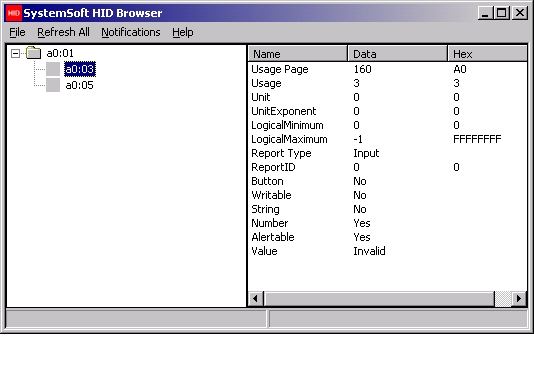
Figure 3. Understanding a device: one way to browse the available nodes of the HID tree is to use the SystemSoft HID Browser.
From the above methods, we now have a path value we can use for the hid_set_output_report. Once we know where to write to, it's a matter of what to send. This information should be in the technical documentation that comes with the device, and it can be verified with the USB-sniffing tools. As with the particular device I was using, verifying the format of a packet with the sniffing tools turned out to be important, as the information in the documentation didn't match what the sniff log reported (see the Snooping section).
Once the control message or output report is sent, we can start to read from the read pipe, endpoint0. The function needed is an interrupt read function. It already exists in libusb, but a corresponding libhid function doesn't. The developers of libhid simply hadn't come across a device that required it yet, so I studied the format of the other functions and implemented it appropriately. I also added a new error code to the existing list. These additions are being considered for inclusion in the latest version of libhid.
At this stage, once the interrupt read value is stored, I then parse this value, as per the Matrix documentation, to display the results to the user. For this device, that equates to information such as, “A ten-euro note has been inserted” or “The cash box is disconnected” and other such device-specific information. The details are unnecessary for the purposes of this article, but if anyone requires this detail, feel free to contact me.
This process is repeated for as long as the driver is running. We must keep polling the device to keep it active. There is a status LED on the device that turns green when the device is active and remains orange when inactive. The goal for quite some time was to make the little light go green.
Snooping can be done with a number of utilities. This is where I learned about the discrepancies between what the Matrix documentation says and what actually happens:
[5037 ms]  <<<  URB 647 coming back  <<<
-- URB_FUNCTION_CONTROL_TRANSFER:
  PipeHandle           = 8180c814
  TransferFlags        = 00000002 (DIRECTION_OUT)
  TransferBufferLength = 00000005
  TransferBuffer       = 92a137ed
  TransferBufferMDL    = fe9876e8
  UrbLink              = 00000000
  SetupPacket          =
    00000000: 21 09 00 02 00 00 05 00

[5038 ms]  <<<  URB 645 coming back  <<<
-- URB_FUNCTION_BULK_OR_INTERRUPT_TRANSFER:
  PipeHandle           = fe9876a0 [endpoint 0x81]
  TransferFlags        = 00000003 (DIRECTION_IN)
  TransferBufferLength = 00000005
  TransferBuffer       = fefeef08
  TransferBufferMDL    = 81a18f48
    00000000: 00 20 00 00 1a
  UrbLink              = 00000000

[5038 ms]  >>>  URB 648 going down  >>>
-- URB_FUNCTION_BULK_OR_INTERRUPT_TRANSFER:
  PipeHandle           = fe9876a0 [endpoint 0x81]
  TransferFlags        = 00000003 (DIRECTION_IN)
  TransferBufferLength = 00000005
  TransferBuffer       = fefeef08
  TransferBufferMDL    = 00000000
  UrbLink              = 00000000
From the snoop log, we see the control message sent to the device at the start, followed by a series of interrupt reads. According to the documentation, “The Host sends [a] poll to request information from Matrix at a periodic rate. Matrix answers to the poll and reports all the happening events.” So, my interpretation of this was to send periodic control write messages to the device and read the responses from the interrupt endpoint. Also according to the documentation, the format of the write message is five bytes in length, so with this information, I used the test_libhid.c file included with libhid to see what happens. I found that functions within libhid give error codes if they fail and that the /var/log/messages file, with the extra DEBUG information from the modified kernel file, reports useful errors.
Upon closer inspection of the snoop log, I saw that the control write was, in fact, eight bytes in length. See SetupPacket in snoop log output. The five bytes described in the documentation seemed to represent the first five bytes of the packet, and the last three bytes seemed to be padding. That is, changing these last three bytes doesn't seem to affect the operation. Subsequent error-free testing, with the packet set to eight bytes, confirmed that the documentation had been misleading.
In terms of where to start with this project, I found the mailing list for libhid to be helpful. The libusb mailing list also provided guidelines. The Linux usbutils are quite useful in determining what interfaces are available on the device and the meaning of the descriptors.
The libhid source code, still in constant development, also is a source of help. Because the code constantly is being developed, it is a good idea to keep an eye on the Subversion repository for changes, including documentation changes such as helpful comments in the code.
Special thanks to Charles Lepple and Arnaud Quette, the original authors of libhid, and also to Martin F. Krafft, who later joined and led the rewrite. They all provided me with a lot of help, and without them I certainly wouldn't have gotten my little light to go green.
Also, thanks to my supervisor, Dr Paul O'Leary, at WIT, for his encouragement and analytical skills. It always is good to have an experienced pair of eyes to guide me in the right direction.
libhid uses the HIDParser framework made available by MGE.
Resources for this article: /article/8275.
Eoin Verling (everling@theverlings.com) qualified in 1998 and has been a sysadmin since. He currently is undertaking a research Master's in parallel computing at Waterford Institute of Technology, Ireland. There's nothing he likes better than a bit of ceol agus craic!

