Cygwin: Changing the Face of Windows
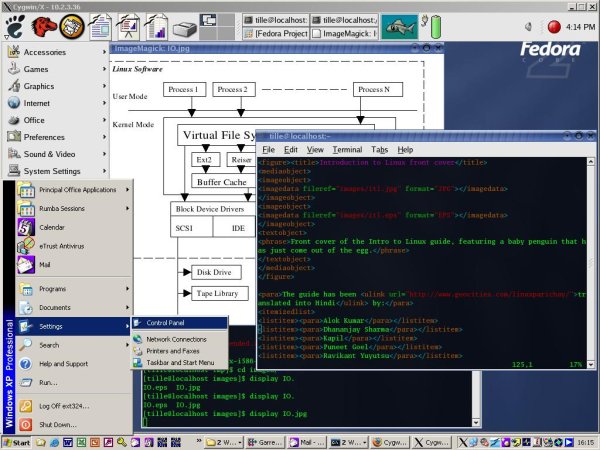
I recently found myself working at a company that uses Windows as the desktop environment. I was used to Linux, however, and wanted to have that on my desktop instead. Should you find yourself, for one reason or another, working in a Windows desktop environment but want to use Linux, Cygwin offers the opportunity to do so. Cygwin is a dynamic link library (DLL) that acts as a Linux API emulation layer. Included with the Cygwin suite are most of the common Linux command-line tools and quite a few graphical applications, giving you the look and feel of a Linux machine on top of your MS Windows box. Cygwin provides substantial Linux functionality on all non-beta, non-Release Candidate, x86, 32-bit versions of Windows, starting with Windows95. The only exception is Windows CE.
Cygwin does not convert your Windows machine into a UNIX-compatible one, however. Cygwin does not enable your computer to understand UNIX signals, pseudo-terminals (PTYs) and such; it only provides mappings of UNIX actions to the Windows platform. It is not a way to make native Linux applications run on Windows. If you want an application to run on your Windows workstation, and it is not yet a part of the Cygwin suite, you will have to compile the source. If the application is a graphical one, another solution is to run the application remotely by using X functionality. We discuss the set up for remote display later in this article.
You can download the Cygwin tools freely from the Cygwin Web site. Click on the Install Cygwin Now icon, and save the setup.exe tool somewhere on your hard disk. Then, double-click to install the Cygwin base configuration. You can either install everything directly or download to a directory on your local system and then install from that directory.
When the installation procedure asks to specify the root install directory, it is best to change the default, C:\cygwin, to some other path. Doing so keeps the Cygwin files separated from your native Windows files. There have been problems of this sort in the past, and even though Cygwin developers are 99% sure that no conflicts can happen anymore, it is wise not to take the risk. I installed Cygwin in D:\cygwin.
You can install the Cygwin programs for your own use or for the entire system. If you are not too deeply involved with development on Windows, select the UNIX text file type. If you need text files from your Windows machine, in some cases it is necessary to use DOS file types. In any case, the CYGWIN variable can be set to specify explicitly the text file type that you want to work with, should you need to switch file types at a later time. Compatibility with DOS text files is built in to Cygwin. Details about this and other UNIX-to-Windows mapping specifics can be found in the user guides on the Cygwin Web site.
Next, specify the package directory that should be used for downloading. With Firefox installed on my machine, my directory was C:\Program Files\Mozilla Firefox by default. To connect to the Internet, I had to pass an MS ISA proxy/firewall server--Internet security and acceleration server--which runs on Windows and does not agree with the normal standards. So I had setup.exe import the MS IE5 settings in order to download through the proxy server. This worked, at least in part; I will explain more about the ISA proxy/firewall troubles later.
Usage of a mirror for this part of the download and installation process is required. If you try to download directly from the Cygwin site you encounter errors, so select a mirror near you.
A minimal installation requires the base packages, which include the DLL, a bash shell, the coreutils, findutils, diffutils, documentation, libraries and a couple of basic UNIX tools, such as tar and grep. Select these basic packages and let the setup.exe tool do the rest.
The X server was the most important component for me, because I wanted to be able to do remote display. Unfortunately, the X server is not included in the base package. I was able to install most packages using the setup.exe tool, but my company's proxy/firewall settings prevented me from downloading bigger packages, such as the 75 dpi fonts, with this method. I tried playing with the proxy settings in the setup tool for a while, but to no avail. In the end, I manually downloaded the necessary packages from the mirror to a local directory, using HTTP in my browser, and instructed setup.exe to use that local repository.
After installing all the packages necessary for running X, you can start the server from the bash shell using one of several methods: an MS-DOS batch file, a shell script, the startx command or a direct call to XWin.exe. Example batch files and scripts are included in the Cygwin package. The batch file works the easiest, because it does a lot of things for you, including starting an X terminal.
When the X server is started successfully, the X logo is displayed in the task bar of your Windows desktop. From this moment on, your Windows workstation can display UNIX graphical applications. To test it, log in to a UNIX or Linux host and run a simple and small program, such as xclock or xlogo. When everything proves to work as it should, you can start the applications you need.
Realizing the promise of Apache® Hadoop® requires the effective deployment of compute, memory, storage and networking to achieve optimal results. With its flexibility and multitude of options, it is easy to over or under provision the server infrastructure, resulting in poor performance and high TCO. Join us for an in depth, technical discussion with industry experts from leading Hadoop and server companies who will provide insights into the key considerations for designing and deploying an optimal Hadoop cluster.
Sponsored by AMD
Built-in forensics, incident response, and security with Red Hat Enterprise Linux 6
Every security policy provides guidance and requirements for ensuring adequate protection of information and data, as well as high-level technical and administrative security requirements for a system in a given environment. Traditionally, providing security for a system focuses on the confidentiality of the information on it. However, protecting the data integrity and system and data availability is just as important. For example, when processing United States intelligence information, there are three attributes that require protection: confidentiality, integrity, and availability.
Learn more about catching the bad guy in this free white paper.
Sponsored by DLT Solutions
| Designing Electronics with Linux | May 22, 2013 |
| Dynamic DNS—an Object Lesson in Problem Solving | May 21, 2013 |
| Using Salt Stack and Vagrant for Drupal Development | May 20, 2013 |
| Making Linux and Android Get Along (It's Not as Hard as It Sounds) | May 16, 2013 |
| Drupal Is a Framework: Why Everyone Needs to Understand This | May 15, 2013 |
| Home, My Backup Data Center | May 13, 2013 |
- New Products
- Linux Systems Administrator
- Senior Perl Developer
- Technical Support Rep
- UX Designer
- Web & UI Developer (JavaScript & j Query)
- Designing Electronics with Linux
- Dynamic DNS—an Object Lesson in Problem Solving
- Making Linux and Android Get Along (It's Not as Hard as It Sounds)
- Using Salt Stack and Vagrant for Drupal Development
- Nice article, thanks for the
8 hours 22 min ago - I once had a better way I
14 hours 8 min ago - Not only you I too assumed
14 hours 26 min ago - another very interesting
16 hours 19 min ago - Reply to comment | Linux Journal
18 hours 12 min ago - Reply to comment | Linux Journal
1 day 1 hour ago - Reply to comment | Linux Journal
1 day 1 hour ago - Favorite (and easily brute-forced) pw's
1 day 3 hours ago - Have you tried Boxen? It's a
1 day 9 hours ago - seo services in india
1 day 13 hours ago
Enter to Win an Adafruit Pi Cobbler Breakout Kit for Raspberry Pi

It's Raspberry Pi month at Linux Journal. Each week in May, Adafruit will be giving away a Pi-related prize to a lucky, randomly drawn LJ reader. Winners will be announced weekly.
Fill out the fields below to enter to win this week's prize-- a Pi Cobbler Breakout Kit for Raspberry Pi.
Congratulations to our winners so far:
- 5-8-13, Pi Starter Pack: Jack Davis
- 5-15-13, Pi Model B 512MB RAM: Patrick Dunn
- 5-21-13, Prototyping Pi Plate Kit: Philip Kirby
- Next winner announced on 5-27-13!
Featured Jobs
| Linux Systems Administrator | Houston and Austin, Texas | Host Gator |
| Senior Perl Developer | Austin, Texas | Host Gator |
| Technical Support Rep | Houston and Austin, Texas | Host Gator |
| UX Designer | Austin, Texas | Host Gator |
| Web & UI Developer (JavaScript & j Query) | Austin, Texas | Host Gator |
Free Webinar: Hadoop
How to Build an Optimal Hadoop Cluster to Store and Maintain Unlimited Amounts of Data Using Microservers
Realizing the promise of Apache® Hadoop® requires the effective deployment of compute, memory, storage and networking to achieve optimal results. With its flexibility and multitude of options, it is easy to over or under provision the server infrastructure, resulting in poor performance and high TCO. Join us for an in depth, technical discussion with industry experts from leading Hadoop and server companies who will provide insights into the key considerations for designing and deploying an optimal Hadoop cluster.
Some of key questions to be discussed are:
- What is the “typical” Hadoop cluster and what should be installed on the different machine types?
- Why should you consider the typical workload patterns when making your hardware decisions?
- Are all microservers created equal for Hadoop deployments?
- How do I plan for expansion if I require more compute, memory, storage or networking?


Comments
Great GNU software
Have been using GNU CYGWIN as well as several other GNU software packages on windows for quite a long time now.
GNU CYGWIN is really great but is disappointing to see people thinking CYGWIN is a port of Linux (whihch wouldn't be anything without GNU).
Quite an informative article.
Cygwin in a Windows Environment
I have found Cygwin to be a useful tool since B19. It just gets better and better.
The shell-scripting & text-processing tools (tcsh, sed, awk, perl, etc.) were a Godsend.
Nowadays, the X capabilities allow me to ignore Hummingbird's Exceed, invoke an xterm, and ssh -X user@machine...with more stabilty, in my experience.
The availability of emacs under Cygwin/X allowed me to standardize on one text editor for the multiple platforms I use.
I must use some Windows-only apps, otherwise I would switch over to linux, as I did at home. Also, It seems that some to some managers, data does not exist unless it is in Excel cells or Powerpoint. With animation.
Cygwin is one of those Good Things.
Blackbox + cygwin
I've been using the native port of Blackbox on my Win2K workstation as an explorer.exe replacement. That plus cygwin/XFree86 and it's hard to tell I'm running Win2k (except when I'm running Quicken). Blackbox has a few minor bugs, but overall it's very usable and stable enough for rock an roll.
Windows Services for UNX (SFU) 3.5
Cygwin is great and solves a bunch of problems. So is SFU 3.5 - in fact, in some areas of core POSIX semantics like signals, etc. SFU seems to be much more robust and provides a wider range of functionality than Cygwin. No X-Server in SFU though. And interesting thing is that it is a free download from Microsoft!
Your article is very wrong in
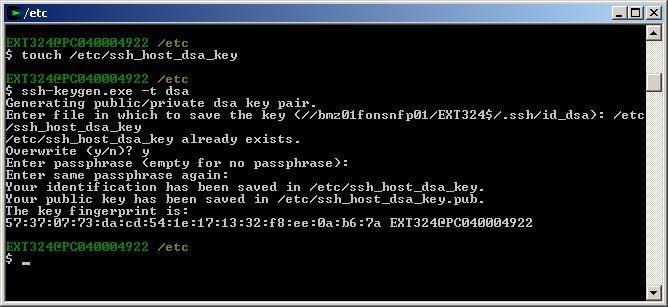
Your article is very wrong in a couple of areas. Cygwin fully supports PTYs and signals for Cygwin-compiled apps, as well as many other POSIX capabilities such as IPC. Secondly, you should not do all that ssh setup by hand, just run the "ssh-user-config" script.
Linux Journal comment on Cygwin site outage?
Since this article is likely responsible for killing the Cygwin site, does Linux Journal have any information on when the Cygwin site will be back up?
Thanks.
cygwin site down
The cygwin site has been down for at least the last day. Is cygwin still available somewhere?
Try one of these http://linux
Try one of these http://linux.rz.ruhr-uni-bochum.de/download/cygwin/ or ftp://linux.rz.ruhr-uni-bochum.de/cygwin/ they are both the same just depends on your preference between http and ftp. Looks pretty up to date. In the release folder are all of the packages and options. If you could map the site to a network drive it would be easiest to run setup.exe and tell it is installing from the local directory. I don't think you can though so you probably have to download everything or dig for what you want.
All of the sites hosted by re
All of the sites hosted by redhat seem to be down right now that are under sources.redhat.com, such as cygwin and insight/gdb. However, I always use this mirror site for cygwin
ftp://ftp.funet.fi/pub/mirrors/cygwin.com/pub/cygwin/
Just get the setup.exe and run it and choose a mirror. For some reason this site always works for me, better than many much closer (to me) that you can choose in setup.
You can just select what you want from the setup program, no digging.
cygwin.com is back!!!!
Oops, this won't work. As someone pointed out below setup.exe tries to connect to cygwin.com to get mirror list. However, there is a --site command line option for a non-default "download site" but can't seem to get it to work. ...But, cygwin.com just came back online while I was trying various other options. (So is sources.redhat.com/insight.)
gone again
It's gone again. Does anyone know if you can skip the install step that looks for the mirror list and just input one manually? Or how to use the option mentiont in the previous comment.
Cygwin for helping people migrate to Linux
I've been using Cygwin for years as a way to introduce windows users to the world of *nix and especially Linux, without the trauma of repartitioning their hard drive, flipping between boot environments, or the expense of VMWare. Even today, I use cygwin on my corporate laptop because I have to have access to corporate applications which use ActiveX controls (yuck!!) and other "Windows only" capabilities. We are workind toward better support of "Linux-Only desktops" but until that day becomes a reality, cygwin is a great way to develop for ONE API (Linux/GNU/OpenSource) and have that application run on Linux, Windows, and most flavors of UNIX.
The article is very good. Unfortunately, for some reason the cygwin site has been taken off-line. I hope they bring it back up very soon. All that's really needed is the setup.exe - you can get to a number of exellent mirrors from there.
The other nice thing about cygwin is that it doesn't require lots of resources. The base installation with most of the applications will be smaller than a CD-ROM even when uncompressed. The X11 will still fit in less than 2 gig.
cygwin utility- the cygwin discussion list rejected this
Hi,
( I searched the archives, this hasn't come up before and the question is
at the bottom- sorry for the long intro. I posted this on cygwin because
I run my scripts on cygwin and cygwin illustrates the relationship between
graphicly oriented things like windoze and information oriented systems
like linux. )
I've been using scripts now to access and organize searches from various
sources. Given the proliferation of documents and document types,
I think everyone recognizes the need for more structured documents and
the ability to easily do ad hoc searches and extractions- scripts make that
possible and indeed I have some examples to show that may be of
interest beyond specialized communities.
The federal government is one entity that collects structured documents
of public interest from a variety of sources. However, the
various agencies support automated access ( scripts) in highly
variable ways.
My favorite example of an information-friendly site is still the
ncbi api:
http://eutils.ncbi.nlm.nih.gov/entrez/query/static/eutils_help.html
"Entrez Programming Utilities are tools that provide access to Entrez
data outside of the regular web query interface and may be helpful for
retrieving search results for future use in another environment."
( the IEEE you would think would he leading the charge in automated document
access but so far all I've seen is requests for money when I try to search
their journal databases)
As one example:
http://bioinformatics.org/pipermail/bio_bulletin_board/2006-May/003249.html
Most other sites seem to just accept that interactive access via
a web interface is how "normal people" will use the site- this
is just not practical or in the public interest at most sites.
Consider searching US patent documents- afaik you have to parse the
html document hits from their search engine- there is no way
to get documents returned in some simple to use format:
http://www.uspto.gov/main/search.html
You do have a choice of tiff images but these of course offer nothing
unless you also have local OCR software. Try to do a search on
reasonable criteria and see that you get lots of hits- it is difficult to do
keyword searches without download a bunch of documents and
finding confounding words. I've got scripts to do much of this
but it would be easier if there was a stable API supported at uspto.
This site's "API" changes everytime they regenerate their site
since they seem to use generated code:
http://portal.uspto.gov/external/portal/pair
Or, consider the SEC website ( their webmaster has been very interested in this
but apparently an API is not currently a priority):
http://www.sec.gov/edgar/quickedgar.htm
Public companies in the US submit lots of info of interest to the general public
but it is difficult to find and sort. Scripts offer a great solution for even casual
investors who happen to know a little programming. However, the SEC currently
forces you to either use the web interface or parse some cumbersome html.
Further, their full text search is being implremented with even more difficult to parse
html but it offers incredible benefits to those seeking to sort out potential
financial disasters ( for example, look at the option ARM situation):
http://www.investorshub.com/boards/read_msg.asp?message_id=13071715
http://messages.finance.yahoo.com/Business_%26_Finance/Investments/Secto...
Even FDA filings concerning the drugs we take are available but difficult to access
due to the web, rather than programming, interface that the FDA
presents- in this case they have all the important documents but
the search facilities are limited due to the data being presented as
scanned pdf files ( scripting very difficult):
( if you wanted to find all approved drugs with certain incidental properties,
this could be a great database except for the above issues)
http://www.accessdata.fda.gov/scripts/cder/drugsatfda/index.cfm
I could go on and on about the government sources of info-
NOAA, CDC,FTC, various courts, etc - all provide great information of importance to the
public but access is artificially constrained for any serious uses. If it was available to
programmers, it could be repackaged at low cost and presented in a range
of web formats ( for even larger audiences). Of course- local governments
have even more information types (ranging from traffic cameras and abduction alerts to
court and property records)
that have audiences that could be more easily targeted by making the information
available for innovative programmers to re-distribute.
So, my question is, are there other people who have used cygwin for
these purposes and what sites have you accessed or attempted to access
in some script based way? Has anyone approached govt sites at
any level requesting computer friendly interaction mechanisms?
What responses have you gotten?
Many private sites make their money from things predicated on
interaction ( advertising for most sites- academic journals have a number
of revenue sources and I find it difficult to believe that they
would have problems with free, automated online access).
Does anyone have examples or thoughts
on free-to-user private entities that are still compatible with
automated access? 10kwizard had a nice service but they took
even their simple features into their subscription rather than free area.
Thanks.
The X11 will fit in MUCH
The X11 will fit in MUCH LESS than 2 gigs.
i had a full install will sshd xorg and KDE (not ALL apps) in less than 1.5 Go.
a minimal install of Xorg should fit in about 20 to 30 Megs when really slimmed down.
for those who like the X server, you may like Xming as well.
it is less full-featured (mainly missing xhosts support) and a little less stable, but easy to install and configure, and it is slightly more responsive than cygwin's Xorg. it runs as a daemon using cygrunsrv pretty easily.
for those who want speed with graphical apps, give colinux a try
...the latter two projects being in my opinion good complements to cygwin.
FSU is NOT FREELY downloadable for some versions of windows, is NOT PROPERLY documented if at all... and does not emulate all the POSIX subsystem as far as i know... just have a look at the file access rights...
good luck to all of you.
And the evidence for Xming
And the evidence for Xming being less stable than Cygwin/X is?
Cygwin/X is only intermittently maintained, Xming is fully maintained and tracking bug fixes in Xorg.
Colin Harrison
Xming now has host-based access control via Xn.hosts
Xming now has support for the simple host-based access control via Xn.hosts files.
I have the setup.exe and have
I have the setup.exe and have run it. It seems though that it is trying to contact cygwin.com for the list of mirrors. If I select use HTTP/FTP Proxy do I directly enter the mirror address? If so is there a list available of mirror sites that have cygwin.
Cygwin for helping people migrate to Linux
I've been using Cygwin for years as a way to introduce windows users to the world of *nix and especially Linux, without the trauma of repartitioning their hard drive, flipping between boot environments, or the expense of VMWare. Even today, I use cygwin on my corporate laptop because I have to have access to corporate applications which use ActiveX controls (yuck!!) and other "Windows only" capabilities. We are workind toward better support of "Linux-Only desktops" but until that day becomes a reality, cygwin is a great way to develop for ONE API (Linux/GNU/OpenSource) and have that application run on Linux, Windows, and most flavors of UNIX.
The article is very good. Unfortunately, for some reason the cygwin site has been taken off-line. I hope they bring it back up very soon. All that's really needed is the setup.exe - you can get to a number of exellent mirrors from there.
The other nice thing about cygwin is that it doesn't require lots of resources. The base installation with most of the applications will be smaller than a CD-ROM even when uncompressed. The X11 will still fit in less than 2 gig.
Cygwin site down?
Is it just me or is the cygwin site (http://www.cygwin.com) down after this popular article ;-)
Cygwin site down?
Yes it has been off line since at least Thursday. Where to find out what's up with that is a good questin, been searching for a while.
WTF has happened to cygwin.co
WTF has happened to cygwin.com? It's been inaccessible all day!
Cygwin server down???
For the last two days I have been completely unable to access any of the cygwin web servers or web pages or url's (sources.redhat.com or *.cygwin.com) . Has anyone else noticed this. Did a server go down, or am I just unable to access. I tried it from several locations from servers in London, Korea, the Bay area, and San Diego and on several different providers so I couldn't imagine it's a routing problem or my home system. Thanks
I too cannot connect to cygwi
I too cannot connect to cygwin.com. Most of the time I get this message box: "The connection was refused when attempting to contact www.cygwin.com." I've been trying for 3 or 4 days now to get there.
Cygwin down
I am having the same trouble getting connected... I am stil searching around to see if anyone else has a copy or another mirror access...
Cygwin Down
You can get a relatively new iso here:
http://www-inst.eecs.berkeley.edu/~instcd/iso/
Yes. I doubt that they are c
Yes. I doubt that they are complete sets of packages but I havn't actually looked at it yet. Right now the entire mirror is 2.38GB in size. I am working on creating a distro that will contain the entire contents of a mirror on DVD for those that want it. I will get a friend of mine to review the other one that you mentioned though and see what he thinks.
Cygwin root
I've been happily installing Cygwin with C:\ as the install root on lots of machines.
If you happen to have C:/bin, C:/etc, C:/usr and so on from another *nix emulation package or whatever, it's not a good idea -- but then again, do you?
There might be various reasons for using Cygwin. For me, I didn't want Cygwin to be a walled garden, I want to mingle the POSIX-like environment provided by Cygwin with whatever applications were the reason for using a Windows box in the first place. It's a bit easier if filesystem paths are more similar.
BTW, Cygwin includes utility commands to help you set up ssh, ssh_host_config and ssh_user_config. Please see /usr/share/doc/Cygwin/openssh.README before you try anything on your own.
If you use rxvt in Windows-native mode (rather than on an X-server), beware that rxvt sets DISPLAY. This is quite annoying when you ssh from a Windows-native rxvt, because ssh will call xauth to establish X forwarding and then subsequently hang. To avoid this, unset DISPLAY before calling ssh, or call ssh -x to avoid X forwarding.
I use Cygwin for some stuff and coLinux for other stuff
If you haven't checked out coLinux then do so http://www.coLinux.org .
coLinux is like User-Mode-Linux under Windows + better preformance.
I wanted to use SNMP to query a device so I used Cygwin and linux snmp programs along with cron to schedule the snmp scans and data minipulation. It worked really well, I was able to use Cygwin to run Linux apps to get the SNMP info, then I was able to import the data into a Windows based MYSQL install (after grep, cut ,etc). Since I work at a Windows shop it was a great solution for me.
Problem with Cygwin is that you maybe one of the few people who are using it for the specific application. Just look at the Nagios mailing list some people reported getting it to run on Cygwin but never gave details. That is a case with coLinux really rocks if you do not want to dedicate a pure Linux machine to the task.
Mark
Please leave out the environm
Please leave out the environment specific stuff about your company firewall. What does YOUR COMPANY FIREWALL have to do with my use of CYGWIN.
Some relavance please. This was a bad article.
you missed something
The article _is_ a story about _my_ environment. Cygwin was just a way to make me feel better. If you want to read more about Cygwin, go to the Cygwin website, instead of reading bad articles ;-)
Cygwin != Linux
Actually Cygwin is nothing to do with Linux since the Linux kernel is not involved at all.
Cygwin provides a GNU operating environment.
Perhaps if people were more willing to render unto GNU what is GNU's then more people would appreciate GNU's contribution and understand the need for the freedoms that GNU promotes.
GNU is great, but not everything.
I think GNU just needs to render unto others what belongs to others. Most Free Software and Open-Source Software that did not originate with GNU, and to claim otherwise is self deceiving. Go look at all the software on your system and do the math.
GNU provided some very key fundamentals - EMACS, GCC, and lots of small command-line utilities, but doesn't overestimate the contribution, ok? The Free Software and Open-Source Software communities stand on the shoulders of giants - the work of GNU and the FSF, but they themselves stand on the shoulders of other giants - K&R for example :)
The Linux / Open-Source movement brought enthusiasm and new life to the Free Software movement. GNU should recognise that and stop being "glory hogs" and just get on with the job of writing software and spreading freedom.
Richard, is that you?
So all in all this is a story
So all in all this is a story of one man's attempt at subverting company security policy. I don't think your peers would be too happy with you 1) installing unapproved software 2) hacking past a company firewall, and then 3) publishing details of your company security policy on the Internet.
What are you talking about? n
What are you talking about? nonsense
Mr. Gates, is that you?
a woman, actually
just trying to make people more aware of the false sense of security they have when they know themselves "protected" by a firewall. If you call this hacking, you're probably one of them.
hang on
".....it is best to change the default, C:\cygwin, to some other path. Doing so keeps the Cygwin files separated from your native Windows files"
wtf?
Perhaps if it's default installation path was c:\windows, I would be worried about this....*perhaps*. What the hell is going to be in c:\cygwin that comes with a default windows installation?
the only other way a 'conflict' like this could occur would be if there was a windows binary called, for arguments sake, "a.exe", in c:\windows, and cygwin installed a file called "a.exe" too - but this would be an issue wherever cygwin was installed, because it would still be in your %PATH% and still conflict with the original windows binary.
so wtf?
I think benefit of putting it
I think benefit of putting it on different partition than windows drive, is that cygwin binaries won't fill up your system drive.
There are softwares out there which install some part of it on windows partition. (You don't get choice here) So when software lets you specify a path, one should choose non-windows drive.
Yap!
That's what I was talking about
the writer probably meant par
the writer probably meant partition separation. As in:
Disk C - use it for system
DISK D - use it for programs
DISK E - use it for other data.
So that if (when - hehe) win stops working you just format disk C and reinstall this increadible superiour system called windows again.
:)
partitions
That's great advice about having a partition just for the system because I had two hard-drive crashes when I was running Win98 and I learned that lesson the hard way.
I used to use Cygwin for logging-on to SSH sessions at school to run oracle programs. I found it very useful for learning Linux commands and editing files in VI, VIM and EMACS. But I got the most mileage out of it running C++ programs on Cygwin rather than going to the lab or logging-in remotely.
I've stopped using it now that I found out about Putty for SSH and Secure iXplorer, which is a Putty SSH client, for secure file transers.
Installing programs to a
Installing programs to a separate harddisk/partition is stupid. Data, sure, but programs? When windows crashes/corrupts (and it eventually will) the registry goes with it. Then what? You reinstall the system and have to reinstall the programs anyway. Might as well install the programs to the same partition as the system.
rxvt...
Cygwin is great.
I think you absolutely want to use rxvt (included in cygwin) instead of the native cmd.exe like bash window. rxvt works even without the X server - it has a native Win32 mode for cygwin.
I agree, though, that cygwin will not make your Windows box an unix box. Services/dameons work much less reliably, and things are shaky at times. But it does make your life much more pleasant in Windows environment.
Cygwin and expect
The REAL mindblower for me was that expect works under cygwin. THAT has made my corporate windows laptop very powerful indeed...and just today I learned about rlwrap. I've used it to put command line editing into Oracle's piddling sqlplus. FANTASTIC!! Worth every penny I didn't have to pay.
I'd gladly cough up $100 for cygwin to keep the maintainers fed.
Re: rxvt...
rxvt is OK, but xterm is much better. I run bash in an xterm and it makes Windows almost tolerable.
Your absolutely right about c
Your absolutely right about cmd.exe. It's bad. :-)
I'm using this one in stead of rxvt. I think it's even better:
http://gecko.gc.maricopa.edu/~medgar/puttycyg/
It's the same terminal as putty uses. I have always found that one to be really good.
bye,
Bart
cygPutty
Very nice...unset the display, make it go full screen and run aafire.
XLiveCD
You can get a lot of this functionality without fulling installing Cygwin by using the XLiveCD. This is set of packages and scripts designed to run Cygwin from the CD, so you can test out this type of environment before commiting to a full installation. It is also useful if you are in an environment where you can't install software on the host machine.
Winik
You can get a lot of this functionality by Cygwin using the Winik CD. This is set of packages and scripts designed to install Cygwin from the CD, so you can commiting to a full installation without hassle. You can test out this type of by using XLiveCD environment before commiting to a full installation.