
Cygwin: Changing the Face of Windows
I recently found myself working at a company that uses Windows as the desktop environment. I was used to Linux, however, and wanted to have that on my desktop instead. Should you find yourself, for one reason or another, working in a Windows desktop environment but want to use Linux, Cygwin offers the opportunity to do so. Cygwin is a dynamic link library (DLL) that acts as a Linux API emulation layer. Included with the Cygwin suite are most of the common Linux command-line tools and quite a few graphical applications, giving you the look and feel of a Linux machine on top of your MS Windows box. Cygwin provides substantial Linux functionality on all non-beta, non-Release Candidate, x86, 32-bit versions of Windows, starting with Windows95. The only exception is Windows CE.
Cygwin does not convert your Windows machine into a UNIX-compatible one, however. Cygwin does not enable your computer to understand UNIX signals, pseudo-terminals (PTYs) and such; it only provides mappings of UNIX actions to the Windows platform. It is not a way to make native Linux applications run on Windows. If you want an application to run on your Windows workstation, and it is not yet a part of the Cygwin suite, you will have to compile the source. If the application is a graphical one, another solution is to run the application remotely by using X functionality. We discuss the set up for remote display later in this article.
You can download the Cygwin tools freely from the Cygwin Web site. Click on the Install Cygwin Now icon, and save the setup.exe tool somewhere on your hard disk. Then, double-click to install the Cygwin base configuration. You can either install everything directly or download to a directory on your local system and then install from that directory.
When the installation procedure asks to specify the root install directory, it is best to change the default, C:\cygwin, to some other path. Doing so keeps the Cygwin files separated from your native Windows files. There have been problems of this sort in the past, and even though Cygwin developers are 99% sure that no conflicts can happen anymore, it is wise not to take the risk. I installed Cygwin in D:\cygwin.
You can install the Cygwin programs for your own use or for the entire system. If you are not too deeply involved with development on Windows, select the UNIX text file type. If you need text files from your Windows machine, in some cases it is necessary to use DOS file types. In any case, the CYGWIN variable can be set to specify explicitly the text file type that you want to work with, should you need to switch file types at a later time. Compatibility with DOS text files is built in to Cygwin. Details about this and other UNIX-to-Windows mapping specifics can be found in the user guides on the Cygwin Web site.
Next, specify the package directory that should be used for downloading. With Firefox installed on my machine, my directory was C:\Program Files\Mozilla Firefox by default. To connect to the Internet, I had to pass an MS ISA proxy/firewall server--Internet security and acceleration server--which runs on Windows and does not agree with the normal standards. So I had setup.exe import the MS IE5 settings in order to download through the proxy server. This worked, at least in part; I will explain more about the ISA proxy/firewall troubles later.
Usage of a mirror for this part of the download and installation process is required. If you try to download directly from the Cygwin site you encounter errors, so select a mirror near you.
A minimal installation requires the base packages, which include the DLL, a bash shell, the coreutils, findutils, diffutils, documentation, libraries and a couple of basic UNIX tools, such as tar and grep. Select these basic packages and let the setup.exe tool do the rest.
The X server was the most important component for me, because I wanted to be able to do remote display. Unfortunately, the X server is not included in the base package. I was able to install most packages using the setup.exe tool, but my company's proxy/firewall settings prevented me from downloading bigger packages, such as the 75 dpi fonts, with this method. I tried playing with the proxy settings in the setup tool for a while, but to no avail. In the end, I manually downloaded the necessary packages from the mirror to a local directory, using HTTP in my browser, and instructed setup.exe to use that local repository.
After installing all the packages necessary for running X, you can start the server from the bash shell using one of several methods: an MS-DOS batch file, a shell script, the startx command or a direct call to XWin.exe. Example batch files and scripts are included in the Cygwin package. The batch file works the easiest, because it does a lot of things for you, including starting an X terminal.
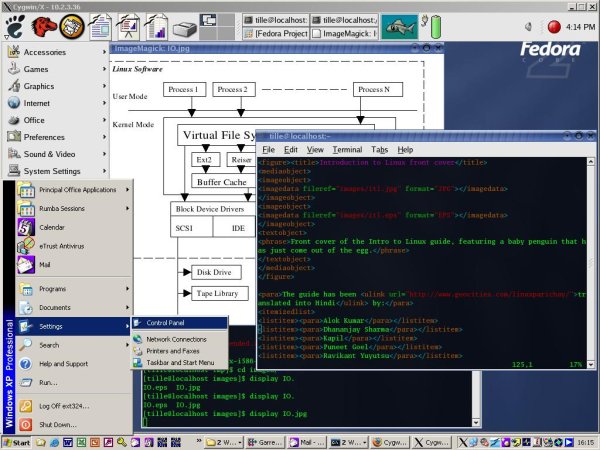
When the X server is started successfully, the X logo is displayed in the task bar of your Windows desktop. From this moment on, your Windows workstation can display UNIX graphical applications. To test it, log in to a UNIX or Linux host and run a simple and small program, such as xclock or xlogo. When everything proves to work as it should, you can start the applications you need.
Use the X11 forwarding feature of SSH to get rid of the export DISPLAY routine that is inherent to XDMCP (X Display Manager Control Protocol). When I tried to install SSH, the proxy server made a mess of it. I tried to install it manually but received errors because a cryptographic library in the SSL package was not installed yet. So don't forget to add SSL when installing SSH. If you use the setup.exe tool, these dependencies are satisfied automatically.
Because no default SSH configuration is present, you need to go through the following steps to set up the SSH client configuration decently:
Create an ssh_config file in /etc. If you do not have the Cygwin version of vim installed yet, use these echo commands to obtain the file:
	echo "ForwardX11 yes" > /etc/ssh_config
	echo "ForwardAgent yes" >> /etc/ssh_config
If you do not create this file, you have to set the DISPLAY variable locally before connecting to a remote server:
export DISPLAY=localhost:0.0
If you want to be able to connect to your Windows workstation using SSH, you need to perform these additional steps to run the SSH daemon:
Copy sshd_config and ssh_config from an existing UNIX machine to the Cygwin /etc directory, and make sure X11 forwarding is enabled.
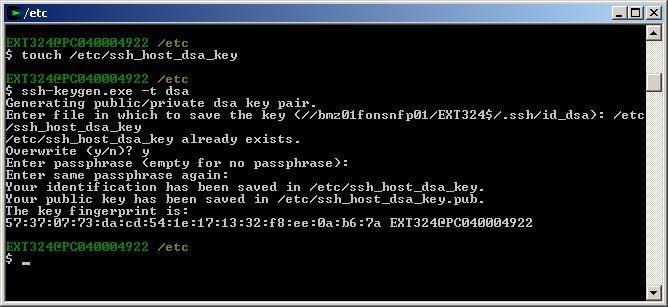
Generate SSH host keys. This does not work off the bat, because the file does not exist. The solution is to run touch /etc/ssh_host_dsa_key and then generate the key using ssh-keygen and overwrite.
Change permissions on your private host key to 600.
Run mkpasswd and mkgroup, which create UNIX-style /etc/passwd and /etc/group files based on Windows user information.
Create the SSH privilege separation user, adding a line like the following to /etc/passwd:
sshd:*:74:74:SSH Privilege Separation User:/var/empty/sshd:/sbin/nologin
Start /usr/sbin/sshd
Now start SSH with the -Y option:
ssh -Y user@remote_host
Check the DISPLAY variable when you are logged in to the remote server; it should say something like remote_host:14.0. You now can start any graphical UNIX application, and it will be displayed on your Windows desktop.
While testing the graphical applications, I noticed that a number of GNOME applications are included in the package list. All the libraries that you need to run GNOME programs already are ported, but a full-blown desktop is not available yet--unless you do some compilation yourself, of course. As a workaround, use the standard -query option to the X server to display a complete remote desktop:
/usr/X11R6/bin/XWin.exe -query remote_host
On Solaris, the XDMCP feature still is enabled by default. On Linux, you need to change your XDM configuration, preferably serve fonts and your GNOME or KDE configuration. On my Fedora box, I did the following:
Comment the line DisplayManager.requestPort in /etc/X11/xdm/xdm-config.
Uncomment #* # any host can get a login window line in /etc/xdm/Xaccess.
Comment no-listen = tcp in /etc/X11/fs/config.
Run /etc/init.d/xfs restart
In /etc/X11/gdm/gdm.conf, change Enable=false to Enable=true.
Run pkill -HUP gdm.
Then, from the Windows station, make sure that the X server is stopped before entering the X -query command.
This kind of remote display, however, is not optimized. I included it here only to demonstrate the capabilities of Cygwin. A faster solution is the VNC client/server. In this method, the client goes on your Windows machine, and the server either is enabled through the inet daemon or is run independently on any UNIX system. If you need to display only one application, the method described above--the example with SSH and xclock--probably is the fastest. The data automatically is compressed through the secure connection.
The next problem I faced was the near-impenetrability of the MS ISA firewall/proxy. Although firewalls typically are designed to keep people out, our company's firewall was set up to keep people in. The only available ports for outgoing traffic were 80 and 443, HTTP and HTTPS. I wanted to connect to my home mail server. Also, being a system administrator, I'm used to having extra services available when solving troubles, such as IRC, my personal e-mail and my personal files. I had to get out of this prison. In the end, I managed to do so using an external Debian server. On that machine I configured SSH to listen on port 443 as well as on port 22, by simply entering this line to sshd_config:
Port 443
I then discovered that the normal text-based SSH client that comes with Cygwin does not support authentication using the Windows domain name with a user and password pair. Putty, however, did the trick.
Putty also helped me with the last problem: I was denied access to a variety of interesting sites, for the strangest of reasons--the automatic scanning performed by the ISA server. To be able to surf wherever I want, I installed Squid on my external server on the default port 3128. Then, still using the SSH connection to port 443, I also configured port forwarding. Putty was instructed to forward local port 80 to port 3128 of the remote server.
After starting that connection, I configured my browser to use localhost:80 as a proxy, and I once again could surf to Amazon.co.uk and other interesting sites.
Cygwin User Guides, History and Background
XFS, XDM and GDM Configuration
Part 1, Part 2 and Part 3 of an article series explaining how SSH tunneling works.
