
Performers Go Web
Writers, musicians, painters, filmmakers and artists of every kind are using the Web as a platform. Only one traditional art form does not have a strong presence in cyberspace yet—theater. But, as soon as one is willing to adapt to the medium, a new art form evolves, cyberformance.
The term cyberformance was coined by New Zealand performance artist Helen Varley Jamieson to describe “performance that uses the Internet to bring remote performers together, in real time, in a live theatrical event”. She has been working for several years with the cyberformance troupe Avatar Body Collision, using free Internet chat applications to create performances in cyberspace. To provide her, her coperformers and their audience with a Web-based stage, she initiated an open-source project called UpStage, written by Douglas Bagnall (see the on-line Resources). The first release, launched in January 2004, was funded by the New Zealand Ministry of Research, Science and Technology and Creative New Zealand, and funds now are being sought to continue its development.
Of course, the software isn't restricted to on-line performances. UpStage also makes an interesting tool for on-line teaching, as well as product and other types of presentations. It even serves as a collaboration tool for virtual workgroups. UpStage's strength is its user-friendly and highly accessible interface: players and audience alike need to have nothing more than a standard browser and Internet connection to participate. Newbies can learn the basics and find themselves happily text-rapping and avatar-hopping in no time.
The server software itself is written in Python and comes with its own Web server, giving artists the opportunity to set up a stage easily, wherever their laptop is located on-line. Apart from the Web server, which requires the Python Twisted framework, the software makes extensive use of other open-source programs commonly installed on Linux systems, such as the text-to-speech-system Festival, the netpbm tools and gif2png. See the Problems with GIFs sidebar to this article for more details.
Often not shipped with Linux distributions are swfttools and the MP3 encoder lame. The timeout program from The Coroner's Toolkit, which is used during speech synthesis, also generally is not included. But it usually can be omitted if one isn't afraid to touch the source code.
The stage is a Flash client, and here is where the swfttools enter the picture. They convert the PNGs and JPEGs used both for stage decoration and as avatars into Flash format. Hence, performers and audience alike need the Macromedia Flash plugin for their Web browsers. KHTML- and Mozilla-based browsers work fine, but at present, Opera isn't suitable.
Unfortunately, at the time of this writing, the current version of UpStage does not honor PATH settings. Therefore, it is wise to check whether all the above-mentioned programs are situated in one of the directories that are hard-compiled into /bin/sh:
$ strings /bin/sh | grep -E "/(bin|sbin)"
[...]
/usr/local/sbin:/usr/local/bin:/usr/sbin:/usr/bin:
/sbin:/bin
If not, appropriate links should be set. Otherwise, error hunting can become tricky, as UpStage isn't good at providing meaningful error messages in every situation. Things become even more complicated when using the sound tools. Despite UpStage using graphics tools in /usr/local/bin, it doesn't necessarily find lame there. So for users who aren't up to hacking the source, creating a link named /usr/bin/lame seems unavoidable.
Now it is time to start the server. Unpack the source archive, Upstage-2004-09-28.tar.gz, and enter the newly created Upstage directory. Here, you find the shell script go.sh that tries to kill an old twisted-server mentioned in the file Upstage/twistd.pid and starts a new one. So, don't worry about the relevant error message when you run ./go.sh as a nonprivileged user for the first time. It's only then that Upstage creates the pid-file.
For security reasons, it is not advisable to run UpStage as root. That's why the server uses an unprivileged port above 1024. The port on which your UpStage server runs can be configured. If you dislike the default port 8081, change the line:
WEB_PORT = 8081
in Upstage/upstage/config.py, and re-run ./go.sh.
Because the September 2004 version of UpStage is missing the directory that the server uses to store temporary MP3 files, you can save yourself a lot of trouble if you create it by hand:
mkdir html/speech
Now, point your local Web browser to the following: http://localhost:8081/, and you should end up at the entrance to your theater (Figure 1). To customize it according to your needs, change its HTML code in Upstage/html/index.html and the corresponding stylesheet, Upstage/html/style/main.css. It's a good idea to keep the relative link "<a href="/stages"></a>" to the stages—your audience will be grateful—and the login for the artists.

Figure 1. The default entrance hall clearly shows the origin of the software.
The theater also has a back door for its personnel. The URLs http://localhost:8081/admin and http://localhost:8081/login.html lead you directly to a login dialog that can be changed in Upstage/html/login.html.
The name of UpStage's default theater director is z, and z has no password. You probably want to change this, so log in and enter the theater's director. Using the Add a new player link, go to http://localhost:8081/admin/new/player and add the name and password of the new director. To make him or her the big boss who can hire and fire, make sure you tick the permission to Add or Remove Players (Figure 2).

Figure 2. LJ becomes a big boss.
This new player is written to the user configuration file, Upstage/config/players.xml, like this:
<player password="551a9c1c68844936b0d182080fe7dcc0"
 name="lj" rights="act,admin,su">
</player>
The password attribute doesn't contain the actual password, which is upstage for this example, but its md5sum. If you want to add users using your favorite text editor, you can generate the password like this:
$ echo -n "upstage" | md5sum
551a9c1c68844936b0d182080fe7dcc0  -
The name attribute contains the user name of the player, and you can grant up to three rights. The big boss needs the su right. Everyone who is supposed to create and edit things that can be seen and used on stage needs the admin permission, and all players need the right to act.
Unfortunately, the Web front end is quite buggy when it comes to deleting and editing users. It doesn't show you the correct rights, it doesn't allow you to change them (not even with superuser power) and it doesn't let you delete users. If you click the check box before the relevant user entry in http://localhost:8081/admin/edit/player/ and press the Remove Players as a superuser button, UpStage removes the relevant player until the end of the session but doesn't delete him or her from players.xml. After restarting the server, all the players are alive and kicking again. Douglas Bagnall promised to fix this bug soon.
Problems with GIFs
Even if you have installed gif2png properly, the September 2004 version of UpStage can't convert GIF pictures for use as avatars, props or backgrounds. Until a new version is available, you can fix this bug yourself by uncommenting line 38 in Upstage/img2swf.py and deleting "giftopnm" flag "--background "#fff"" in line 63. The relevant lines then should read as follows:
[...]
35 def do_gif(tfn, swf):
[...]
38 #    os.path.remove(png)
[...]
57 def thumbnailer(filetype, tfn, thumb, log):
[...]
63           'image/gif'      :     'giftopnm %s |
pnmscale -height=10 | pnmtojpeg > %s'
These problems with users and permissions don't appear with the inventory of your theater. You can add and edit stages, avatars (an avatar complies with a character in your performance in one disguise),backdrops or stage designs and props using the workshop http://localhost:8081/admin/ URL. The latter can be carried by your avatar, and they always appear in the upper-left portion of the avatar, such as the blue bubbles attached to the bomb in Figure 6.
When creating new avatars, props and backdrops, you have some choices: two-dimensional pictures, Flash animations and video streams. Be careful with moving pictures, however; they require bandwidth and are real performance killers.
Video streams must be available locally and should be stored in Upstage/html/media/. For Linux, the UpStage user manual recommends webcamd as the software to use to upload a video stream by way of FTP. Unfortunately, webcamd's original project site seems to be closed (see Resources), but it still is available both as a binary and as a source archive from Debian servers.
Differing from real-world theater, an avatar, backdrop or prop can be assigned to multiple stages simultaneously. This is done in the Manage an existing stage section (http://localhost:8081/admin/edit/stage/<stagename>/, Figure 3).
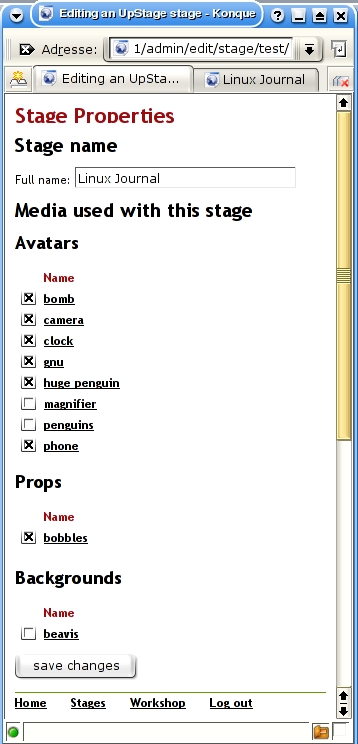
Figure 3. Although the inventory names are clickable, these links don't lead to the edit dialog for the relevant item but instead point to the Flash file.
The configuration data for the stages are stored in XML format in Upstage/config/stages.xml and Upstage/config/stages/<stage-id>/config.xml. The first file lists all available stages; each of the latter holds information about the inventory assigned to the appropriate stage.
Needless to say, the three types of inventory have their own text configuration files, namely Upstage/config/props.xml, avatars.xml and backdrops.xml. They all follow the structure shown in Listing 1.
Listing 1. The Structure of avatars.xml
configuration file

<avatars>
<avatar url="/media/Pbp9_q8I.swf" voice="ked"
name="huge penguin" file="Pbp9_q8I.swf"
thumbnail="/media/thumb/Pbp9_q8I.jpg">
</avatar>
<avatar url="/media/clock.swf" name="clock"
file="clock.swf" thumbnail="/media/thumb/clock.jpg">
</avatar>
</avatars>
Although the name of the root element does not actually matter, UpStage uses avatars, props and swamp, respectively, when generating the files. What matters is the name of the sub-elements: avatar, prop and backdrop. Each sub-element has four mandatory attributes plus one optional attribute, as described in Table 1.
Table 1. Attributes to Stage Inventory and Avatar Elements
| Attribute | Value |
|---|---|
| url | Path to the relevant Flash file, starting with the media catalog below Upstage/ html. UpStage generates random filenames. If you edit entries by hand, it is fine to use filenames suitable for humans. |
| name | The name of the item. It appears on stage, so choose carefully. To change it during performance, use the /nick <name> command, typed into the text input field below the chat window. |
| file | The filename of the relevant Flash file repeated, without the path. Thumbnail Path to the thumbnail in JPEG format, relative to the Upstage/html directory. UpStage stores them in Upstage/html/media/thumb. These thumbnails appear on stage to help players select items. |
| voice | This attribute affects avatars only and even here it is optional. It defines the voice used in text-to-speech synthesis. The voice names are defined in Upstage/upstage/config.py. |
Choose the http://localhost:8081/admin/edit/avatar/ link from the workshop and click the name of the relevant item to edit an existing avatar. The appropriate dialog (Figure 4) leaves you with two options, to change the item's name and voice.

Figure 4. The Edit dialog of this avatar doesn't tell you this penguin is so big that it takes up almost the entire screen.
Unfortunately, this dialog is of little help when it comes to estimating the size of the picture on stage. The UpStage client renders backdrops to fit the size of the browser window, while props and avatars appear about three times their original dimensions. The user manual (see Resources) contains a section with recommendations for sizes and formats for creating graphics.
When it comes to voice definitions, one no longer has to deal with XML—now it's Python. The file Upstage/upstage/config.py contains a section, actually a dictionary object, called VOICES that defines the commands used in text-to-speech synthesis (Listing 2). Having said this, UpStage speech generation does not depend on Festival exclusively. This is especially important for non-English speakers, because the Festival distribution as is limits itself to English.
If you want to add new voices, simply start a new line inside the curly braces following the VOICES keyword. Type the name of the new voice in single quote marks and add:
: ("| ", _fest),
Make sure you start the line with as many whitespaces as needed to place your opening single quote directly below the beginning of the other voice definitions. Python is picky about indentations, and incorrect indentations mean that UpStage stops working.
Listing 2. Voice Definitions in config.py
VOICES = {
          'kal': ("| timeout 15 text2wave -eval
'(voice_kal_diphone)' -otype raw",
                 _fest),
         [...]
         }
Following the pipe character (|), enter whatever command (pipeline) you like, provided it reads text from stdin and provides 16kHz raw PCM output on stdout. To test it, issue the following command:
echo "Say something in the relevant language" |
<command> | timeout 15 lame -S -x -m s -r -s 16
--resample 22.05 --preset phone - /tmp/test.mp3
If an MP3 player playing the resulting /tmp/test.mp3 file says what it is meant to say, insert your command into config.py. Because UpStage is particular about paths, make sure you're using absolute paths in this file.
The original config.py file contains more text-to-speech commands than probably will work with your installation. Because all of them appear in the voice drop-down menu when adding or editing an avatar, it is wise to comment them out using the # sign. Notice that with the original voice definitions, you have to comment out two or three lines per item. If you miss one, you receive an error message such as this:
Failed to load application: invalid syntax
(config.py, line 92)
when restarting the server using ./go.sh in order to activate the changes.
If all of your avatars lose their voices after this, you probably commented out the default voice definition as well. Bad idea! It's perfectly fine to redefine the command behind the default entry, but you must not leave UpStage without having one.
When your stage is prepared, it is time to start rehearsing. This means all players need to log in and enter the relevant stage using the Stages link, http://localhost:8081/stages/, in the workshop. Once in, they at first find a big empty space, the stage, surrounded by the chat window to the right where all uttered text can be read. An image gallery is located beneath the chat window. Clicking one of the backdrop icons in the left part of the image gallery changes the stage design. The right part holds the props (Figure 5).
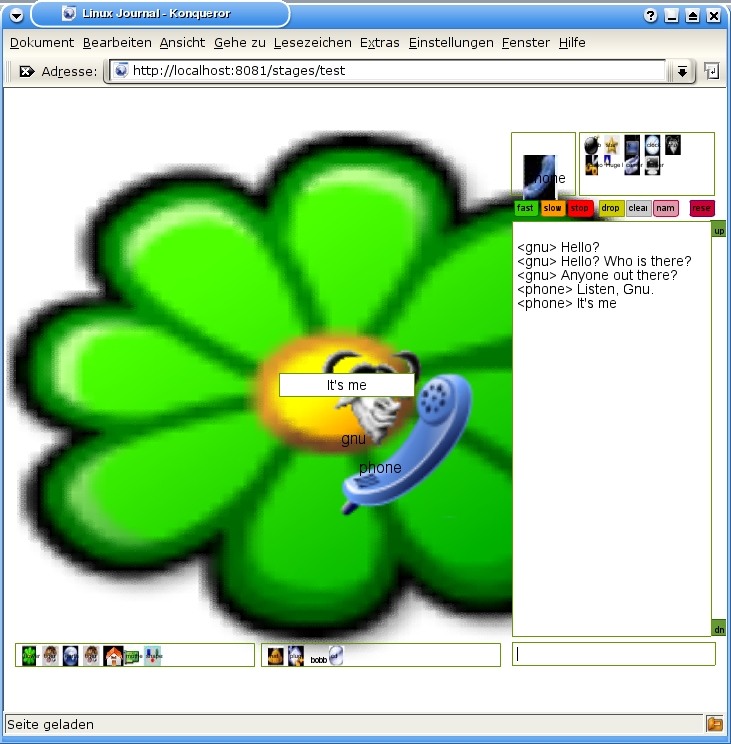
Figure 5. When choosing backdrops, one needs to consider that the outer-right portion will be obscured by the chat window.
Above the chat window users see a button bar that mainly serves to control avatars. The characters themselves can be found in the wardrobe above the buttons on the right-hand side. Here users find thumbnails of all avatars activated for this stage. If you click one of them, it appears in the mirror to the left of the wardrobe. Hence, a glimpse in the mirror always shows you which role you are playing.
But, your character can't be seen on stage at once. If you type some text in the input field below the chat window, your avatar acts as a voice-over. When you first click on the stage window, the avatar appears there and its utterances can be read as balloons (Figure 5). Whether UpStage shows the avatar's name as text on stage can be triggered by using the pink name button.
When you click elsewhere on stage, your avatar moves slowly there. If you want it to jump there at once, click the green fast button first; the orange slow button brings you back into slow-motion mode. To bring the character to a full stop use the red stop button.
To equip your avatar with a prop, click the appropriate thumbnail in the right part of the image gallery below the stage window. It then follows your avatar in all its movements.
When you click another thumbnail in the wardrobe, your old character remains on stage but can be overtaken by your coplayers. When the avatar you currently hold needs to leave the stage, use the yellow drop button. At the moment, this also is the only way to get rid of a prop. Even though it is possible to change props by clicking another prop icon—although this is not done entirely without side effects—this current UpStage version has no “get rid of prop” button yet.
The gray clear button empties the stage except for the avatars your coplayers are holding. The entire operation, however, has a side effect: before your coplayers can move their characters again, they have to reselect them in the wardrobe.
Sometimes it might seem as though things haven't disappeared from the stage. In most cases, a browser reload helps, but then you need to grab your avatar again.
When for some reason you need to start from scratch, you can use the red reset button. This should not be done during a performance or when others are on the same stage, as it dramatically throws everyone off and requires a browser reload. Some players even may need to log in again. Moving the reset button to a less-tempting location is on the priority fix list.
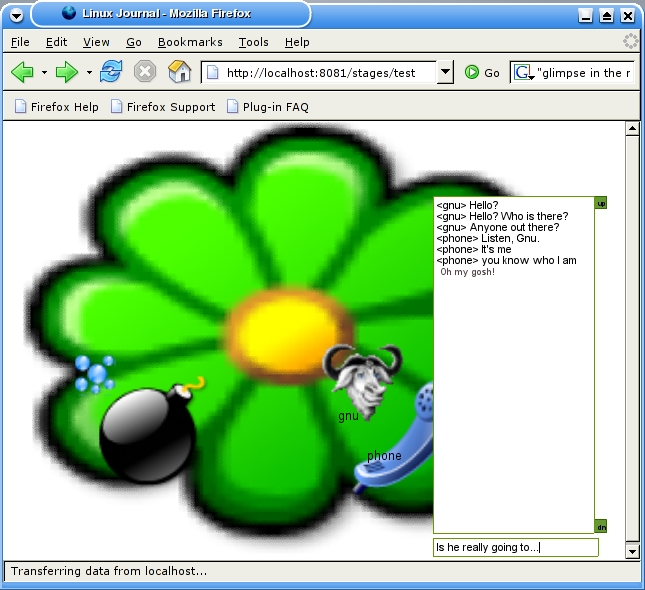
Figure 6. To applaud or to hoot, the audience can type into the chat.
If not logged in, one sees the stage and the chat window only (Figure 6). This however, doesn't mean the audience has no voice. Everything non-actors type in can be seen by everyone in the chat window, which makes UpStage a brilliant choice for on-line teaching and presentations. You can choose to respond or ignore the audience comments. The only differences are the audience text appears in gray font, without an avatar name attached, and it isn't spoken aloud. Hence the applause in UpStage is silent.
You can try it out even without installing UpStage. Every month Avatar Body Collision offers an open session for those interested in sampling and learning more about performing interactively with UpStage. Watch out for the next date (see Resources). Additional help is available through the user manual and the mailing list.
Resources for this article: /article/8056.
Patricia Jung (trish@answergirl.de) works as an editor and sysadmin for Open Source Press (www.opensourcepress.de). As such, she is happy to have the privilege of dealing with Linux and UNIX exclusively.
