
Building a Bioinformatics Supercomputing Cluster
Bioinformatics is an increasingly important scientific discipline that involves the analysis of DNA and protein sequences. The Basic Local Alignment Search Tool (BLAST) was developed by The National Center for Biotechnology Information (NCBI) to aid scientists in the analysis of these sequences. A public version of this tool is available on the Web or by download. Because the BLAST Web site is such a popular tool, its performance can be inconsistent at best. The University of South Dakota (USD) Computer Science Bioinformatics Group decided to implement a parallel version of the BLAST tool on a Linux cluster by combining freely available software. The BLAST cluster, comprised of old desktop PCs destined for surplus, improves searches by providing up-to-date databases to a smaller audience of researchers.
Our cluster project began with an implementation of the Open Source Cluster Application Resources (OSCAR). OSCAR was developed by the Open Cluster Group to improve cluster computing by providing all the necessary software to create a Linux cluster in one package. OSCAR helps automate the installation, maintenance and even the use of cluster software. A graphical user interface provides a step-by-step installation guide and doubles as a graphical maintenance tool.
WWW BLAST was created by NCBI to offer a Web-based front end for BLAST users and is the Web interface we selected for our BLAST cluster. WWW BLAST can be installed easily on a Linux machine running a Web server such as Apache.
Although WWW BLAST enhances the usability of our cluster, mpiBLAST enhances the performance. mpiBLAST was developed by Los Alamos National Laboratories (LANL) to improve the performance of BLAST by executing queries in parallel. mpiBLAST is based on the Message Passing Interface (MPI), a common software tool for developing parallel programs. mpiBLAST provides all of the software necessary for parallel BLAST queries.
A Web-based query form marks the beginning of a BLAST search on our cluster. By default, WWW BLAST does not support batch processing and job scheduling. Fortunately, OpenPBS and Maui are provided by the OSCAR software suite to handle job scheduling and load balancing. With this support, the cluster can handle more easily a larger user audience. OpenPBS is a flexible batch queuing system originally developed for NASA. Maui extends the capabilities of OpenPBS by allowing more extensive job control and scheduling policies.
Once the user submits the query, a Perl script provided by WWW BLAST is invoked. This script creates a unique job based on parameters from the query form. A job is a program or task submitted to OpenPBS for execution. Once the job has been submitted, OpenPBS determines node availability and executes the job based on scheduling policies. This job starts the local area multicomputer (LAM) software, which is a user-level, dæmon-based run-time environment. LAM is available as part of the OSCAR installation and provides many of the services required by MPI programs. OpenPBS executes the job by utilizing the mpirun command, which executes the query on each node and gathers the results. WWW BLAST passes these results back to the browser, presenting the user with a human-friendly report (Figure 1).

Figure 1. When a query comes in from the Web, WWW BLAST submits a job to OpenPBS. OpenPBS starts the job with mpirun and WWW BLAST formats the results.
Implementing cluster technology to perform parallel BLAST searches requires some software reconfiguration. Many of the tools we use work with default installations, but a parallel BLAST cluster requires extra configuration to get things running.
Clusters may be made up of a variety of PCs. The 17 nodes we used had 533MHz Intel Celeron processors, 256MB of RAM and 15GB of hard disk space—relatively low-end by today's standards. Using the exact same hardware setup for all of the nodes is not vital for cluster set up, but doing so does reduce the time and effort needed to install and maintain your cluster. Once all of the hardware is ready, you must choose a machine to be the head node. If you are not using identical machines, it would be beneficial to use the most powerful as the head node. Because all of the PCs we used have the exact same hardware configuration, the choice of the head node was arbitrary.
After you have obtained all the necessary PC hardware, you need to choose a Linux distribution. The OSCAR documentation lists all of its supported distributions, and Red Hat 9.0 was our distribution of choice. Installing Red Hat was pretty straightforward; we chose the default options. Because the OSCAR software depends on specific versions of OS packages, you should not install any updates once the installation completes. Of course, this has many security implications, which is why it is important to keep your cluster separated from the Internet by a firewall.
Once Red Hat was installed on the head PC, we downloaded the OSCAR 2.3.1 tarball. See the on-line Resources for installation documentation. We downloaded OSCAR into root's home directory, because OSCAR needs to be installed as root. Installing the OSCAR software was as easy as running the following commands:
tar -xvfz oscar-2.3.1.tar.gz
cd oscar-2.3.1
./configure
make install
After the installation completed, we needed to copy all of the Red Hat 9.0 RPMs to /tftpboot/rpm on our head PC. The OSCAR installation needs to install certain packages from this directory during its installation. We used the following command to copy the files:
cp /mnt/cdrom/RedHat/RPMS/*.rpm /tftpboot/rpm
Once all of the RPMs are copied, the OSCAR installation can begin. OSCAR provides a graphical installation wizard for the installation. Substitute the name of your private network Ethernet adapter; ours was eth1:
cd $OSCAR_HOME ./install_cluster eth1
After a few moments, the OSCAR installation wizard begins to load. This wizard provides a graphical user interface and an intuitive eight-step process to complete the cluster setup (Figure 2). The only variation in our installation procedure was to set the default MPI implementation to LAM/MPI instead of MPICH. We chose LAM because it is needed for mpiBLAST to execute properly.
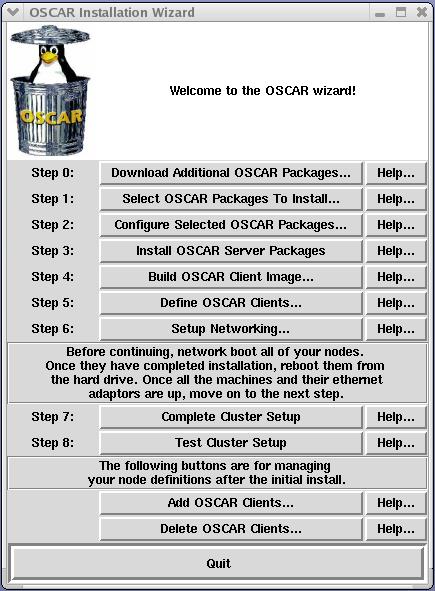
Figure 2. The OSCAR installation wizard lets you deploy, configure and test cluster software.
Clicking on step 2, Configure Selected OSCAR Packages, displays a small dialog (Figure 3). From there you can select the Environment Switcher button and choose LAM as the default for the installation (Figure 4).

Figure 3. Click on Config... to change environment to LAM.

Figure 4. Select LAM for default environment.
We followed the remaining steps as described in the OSCAR documentation to build and install a disk image for the nodes. Once all of the nodes were installed and tested, we downloaded and installed mpiBLAST.
We downloaded mpiBLAST and installed it according to the documentation provided in the README file. We created symbolic links for mpiblast and mpirun in our $PATH, and no further configuration of mpiBLAST was necessary.
Once mpiBLAST was installed, we needed to download a database to search. For mpiBLAST to execute properly, the database needs to be in the FASTA format. NCBI offers an index for all of its databases on the NCBI Web site, and that index lists a FASTA subdirectory containing all of the databases in FASTA format. We downloaded a copy of the nr database to /usr/local/mpiBLAST/db/, an NFS-shared folder set up during the installation of mpiBLAST. mpiBLAST provides the mpiformatdb command, which formats the database into segments; the number of segments depends upon the number of nodes in the cluster. mpiformatdb places the segments it creates into a shared directory. This directory is defined in mpiblast.conf during installation and is utilized by all mpiBLAST programs. Here is an example of formatting the database:
# /usr/local/mpiBLAST/bin/mpiformatdb -N 16 -i nr
Here, -N specifies the number of database segments—usually the number of nodes in the cluster—and -i specifies the name of the database file to format. In this example, the nr database is formatted into 16 individual segments. mpiformatdb does not copy the segments to the nodes, so a significant amount of overhead is incurred while each node copies its database segment during the first query. Each node copies a segment only once. If the segment is erased from the node, it is copied again during the next query.
To simplify management of the cluster, we wrote a script to download the newest version of a database, format it with mpiformatdb and distribute it to the nodes by executing a simple BLAST query. We scheduled this script with cron to run on a weekly basis. Once we were able to execute BLAST queries in parallel, we added the Web-based front end from WWW BLAST.
mpiBLAST provides command-line BLAST searches and includes two files for interaction with a Web-based front end, blast.cgi and WWWBlastwrap.pl. These files are configured to work with WWW BLAST. So our next step was to download WWW BLAST into the /var/www directory, creating the /var/www/blast/ directory. Several configuration changes had to take place for WWW BLAST to submit BLAST searches for parallel execution.
WWW BLAST provides its own directory for databases. Because we are using mpiBLAST to format the databases, we had to point WWW BLAST's db/ directory to mpiBLAST's. We then made the db/ directory in blast/ a symbolic link to the db/ directory for mpiBLAST.
WWW BLAST provides a file called blast.cgi that executes a BLAST query. mpiBLAST provides a replacement blast.cgi that executes a parallel BLAST query by way of WWWBlastwrap.pl. WWWBlastwrap.pl is a Perl script that creates a query for mpiBLAST to execute. WWWBlastwrap.pl creates this query in the form of another Perl script, populating it with the parameters from the Web form. This script is submitted to OpenPBS. WWWBlastwrap.pl serves several functions, including parsing the parameters of the form, creating a script to be submitted to the cluster through OpenPBS for job queuing and load balancing and returning the BLAST search results in a browser-friendly format.
We needed to make some changes to WWWBlastwrap.pl, however, to allow it to operate correctly in our environment. The first change that we made was to the global variables $scratch_space and $MPIBLASTCONF. These two variables are used throughout the life of the script. $scratch_space holds the absolute path to a directory containing temporary files used during a query. $MPIBLASTCONF holds the absolute path to the directory containing the mpiBLAST configuration file. Both of these directories were set up during the installation of mpiBLAST. We set the two variables as follows:
$scratch_space="/usr/local/mpiBLAST/shared/scratch";
$MPIBLASTCONF="/usr/local/mpiBLAST/etc/mpiblast.conf";
The next change involved changes to a series of if statements. These statements hard-code the NUMPROC environment variables for the nt, nr and pdb databases. Because the databases need to be preformatted by mpiBLAST, the number of processors used per query is constant. We changed the default number of 20 to 16, which is the number of processors we use:
if($data{'DATALIB'} eq "nt"){
    $data{'NUMPROC'} = 16;
}
Further down in the script, the ValidateFormData subroutine is defined. This subroutine ensures that the user has selected a valid database/program combination and produces a 500 server error if a valid combination is not selected. We changed the subroutine to allow the tblastx program to execute queries on the nr database by making the following change:
#### BEFORE ####
# Must be applied to a nucleotide database
if($data_ref->{'DATALIB'} ne "nt"){

#### AFTER ####
# Must be applied to a nucleotide database
if($data_ref->{'DATALIB'} ne "nt" ||
   $data_ref->{'DATALIB'} ne "nr"){
Later on, the script creates a string of command-line arguments for mpiBLAST and stores them in the variable $c_line. We needed to change the value passed to the -d option, which tells mpiBLAST which database to search. By default, WWWBlastwrap.pl concatenates the number of processors to the database name and passes the result to the -d option. So if our database was named nr and we had 16 processors, it would pass nr16. Presumably this is done to allow more than one version of a database to be searched, that is, nr16 for a 16-segment database and nr8 for an 8-segment database. You either can name your databases in that manner or modify the script. Because we only ever have one version of a database, we chose to modify the script, removing the number of processors from the database name. The code changes are summarized below:
#### BEFORE ####
# Create the command line to pass to mpiBlast my
$c_line = "-d $data_ref->{'DATALIB'}" .
          "$data_ref->{'NUMPROC'} " .
          "-p $data_ref->{'PROGRAM'} " .

#### AFTER ####
# Create the command line to pass to mpiBlast my
$c_line = "-d $data_ref->{'DATALIB'} " .
          "-p $data_ref->{'PROGRAM'} " .
When running test queries, we received several lcl|tmpseq_0: Unable to open BLOSUM62 warnings in the OpenPBS error log. Pointing the environment variable BLASTMAT to the location of the BLAST matrices clears up these warnings, so we made the following change:
#### BEFORE ####
print SCRIPTFILE '#PBS -e '.
"$data_ref->{'ERROR_LOG_FILE'}\n\n";
print SCRIPTFILE 'if(-e $ENV{PBS_NODEFILE} ){'."\n";

#### AFTER ####
print SCRIPTFILE '#PBS -e '.
"$data_ref->{'ERROR_LOG_FILE'}\n\n";
print SCRIPTFILE '$ENV{BLASTMAT} = '.
'"/usr/local/ncbi/data";'."\n";
print SCRIPTFILE 'if(-e $ENV{PBS_NODEFILE} ){'."\n";
We encountered the final alteration toward the end of the script in the HtmlResults subroutine. The code that directs the user to the results uses a default base URL, which almost certainly is not what you want. Changing the base URL to point to our Web server allowed the client's Web browser to display the results of the BLAST query:
#### BEFORE ####
print "Location: https://jojo.lanl.gov/blast/".
"BlastResults/$results_file\n\n";

#### AFTER ####
print "Location: http://domain_name/BlastResults".
"/$results_file\n\n";
Our local cluster is able to search an up-to-date database with fewer concurrent users and better overall throughput times than is the NCBI Web site. Simple wall-clock time trials were performed using our cluster and the NCBI Web site. We used eight simple queries consisting of protein and DNA sequences. A timer was started after submitting a query from the Web site and stopped once the results were displayed in the browser window. Trials on the NCBI Web site were performed at various times throughout the span of two weeks. All eight trials were averaged and compared to the cluster's times. The purpose of timing the query from the point of submission until the results are displayed was to observe times that an actual user would incur. On average, the cluster took less time to complete a query.
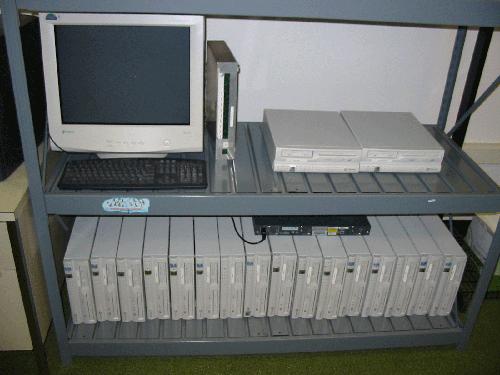
Figure 5. Our cluster, consisting of 17 recycled PCs, improves response times for users' queries.
Resources for this article: /article/8140.
Josh Stroschein (jstrosch@usd.edu) currently is pursuing his undergraduate degree in Computer Science and Criminal Justice. Josh is working on the cluster project through a grant at USD. He also works for Walton Internet Solutions, based in Vermillion, SD.
Doug Jennewein (djennewe@usd.edu) is a research analyst in Computer Science, and he has been with the USD since 1998. He received his Masters degree in Computer Science from USD in 2004. Doug's main research interest is high performance computing.
Joe Reynoldson (jreynold@usd.edu) is the research computing manager/instructor for the Computer Science Department, and he has been with USD since 1994. He received his Masters degree in Computer Science from USD in 1997. Joe teaches topics in Perl, systems management and Web development.
