
Managing Projects with WebCollab
As a network consultant I frequently work with small teams on any IT-related project. For any given job, I have to coordinate with other consultants, clients, data-line vendors and office staff. I am constantly in need of a way to update coworkers on various aspects of a project, and oftentimes this includes sharing files, notes and comments. My corporate days have taught me that this can be done with a combination of the Microsoft Exchange public foldering system and Microsoft Project.
Although the Microsoft products are able to give me most of what I want, they have their limitations. First, Exchange/Project is a proprietary setup geared exclusively toward Microsoft Windows users and, more specifically, Microsoft users within the same organization. Second, Microsoft's Exchange package is not cost effective for most small companies. Third, although MS Project and other Gantt charting applications are the de facto standard for project management applications, they tend to take a macro-management approach to jobs and are a better fit for larger-scale operations like construction. Finally, I wanted integration between the file repository and the project status information, so that a project could be managed by a group of people with the proper collaboration between parties and across organizations.
I stumbled upon WebCollab on SourceForge and was pleasantly surprised. According to its creators, WebCollab is “a collaborative Web-based system for projects and project management; WebCollab is easy to use and encourages users to work together. The software is functionally elegant and secure without being cumbersome for users or graphically intensive.”
I found all of the above to be true. The authors of the software designed with function over form in mind, and the interface is extremely plain and simple with speed and security as its primary goals.
WebCollab is ideal for projects involving small groups of users who have a fairly constant stream of communication. More than simply a multiuser to-do list, each created project carries with it a task list, due dates, color-coded completion status meters, priority settings, message boards and a file upload section. When any task has a change in status, there is an option to notify any involved users or groups by e-mail. Between the continuous message board banter, the file exchange and status e-mails, WebCollab creates an interactive environment for project management. A manager easily could use this as a tool to delegate tasks and keep tabs on exactly what is going on by having a constant dialog with employees, all through this software.
WebCollab has quite a few great features, and coupled with its simple install and nonexistent learning curve, it's a great fit for a small office environment or for projects involving people from different organizations. For example, I use this as a tool to keep my clients updated on the status of my work for them, as well as a tool to communicate with the other engineers and technicians I may be working with.
The software consists of an Apache-hosted PHP front end to a database back end. Once the PHP pages are made available with the Web server, any computer with connectivity, a Web browser and user credentials can access WebCollab.
I found the optimal configuration to be a Linux, Apache, MySQL, PHP box, but any operating system capable of running Apache, PHP and either MySQL or Postgres can be used. The database can be hosted on a separate server if necessary. I am currently using a Pentium III 500MHz workstation with 256MB of RAM and a 20GB hard drive without issue, and I probably am overdoing things for my load of about 15 users. This software is perfect for the old system you have been meaning to use for something productive or as a lightweight service on an existing server. All personal biases aside, I'd recommend using Linux over Windows, or even Mac OS, because of the ease and security of Linux remote administration and its lower cost. To set up WebCollab, you need the ability to create a database and change a few permissions within the WebCollab directory. Depending what your file upload traffic is like, you shouldn't need more than a few hundred megabytes of space in your Web directory, because the individual file upload size is limited to 2MB.
With Apache and MySQL under the hood, I have had no stability issues, and the quality of the PHP code seems, in general, very solid. That being said, this is not a software package I would recommend for an enterprise-level organization. With a small user base, WebCollab is unproven under heavy load. Most corporate firms also put an emphasis on support when choosing software packages. With WebCollab's current status as a small open-source project, there is not a programmer standing by 24/7 to help with any data catastrophes.
Installation is extremely simple and took me less than ten minutes. I used my distro's vanilla installations of Apache, PHP and MySQL, which worked perfectly. Linux beginners will find the most difficult part of the install to be creating a new user in MySQL that has the appropriate access to the database. Aside from that, this is definitely something that a person who is just beginning to experiment with Linux can install without complication.
There are two methods of installation, one using the command line and the other through a Web-based setup routine. I chose the latter. For the sake of an example, I use collab.example.com here.
Download and unzip the tarball into your Web directory:
# tar -zxvf WebCollab-1.62.tar.gz
Change the permissions on the main config file:
# cd WebCollab-1.62/config
# chmod 666 config.php
Point a Web browser to collab.example.com/WebCollab-1.62/setup.php. This guides you through the automated portion of the setup, which includes creating an SQL database and running a table creation script, as well as setting four environment variables in the relevant config.php file.
Restore the permissions on the config file:
# chmod 664 config.php
A user name and password are required to access any part of the software and determine which projects can and cannot be viewed and/or edited. As with most other systems, only administrative users have the ability to add or remove accounts. A user also can be designated as a project or task owner, giving that account the ability to perform administrative tasks on that particular project or task.
Groups also play an important role in task designation. Projects can be assigned by the owner to a user or to an entire group. Subgroups or task groups can then be used to further delegate tasks within a given project.
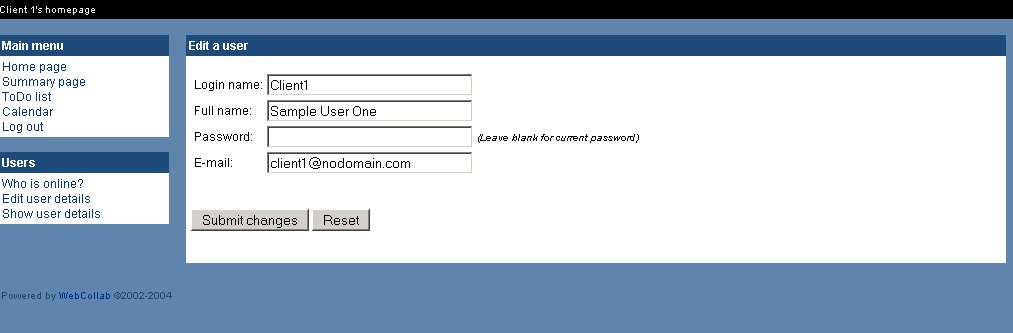
Figure 1. Administrators can create new user accounts from this page. The e-mail address entered here is used for the e-mail notifications for status updates.
The access control is fairly comprehensive and provides a lot of flexibility for administrators and project owners. For example, I frequently have projects with other engineers, which required the ability of all parties to edit tasks, mark jobs complete and change due dates. In these cases, I assign everyone in my group edit rights to the project. I also have projects that I allow clients to view, and in these cases, I want to restrict them to read-only. I also do not want clients to be able to view any project other than their own. Both of these details easily are achieved by checking or unchecking the All users can view or Anyone in the user group can edit buttons.
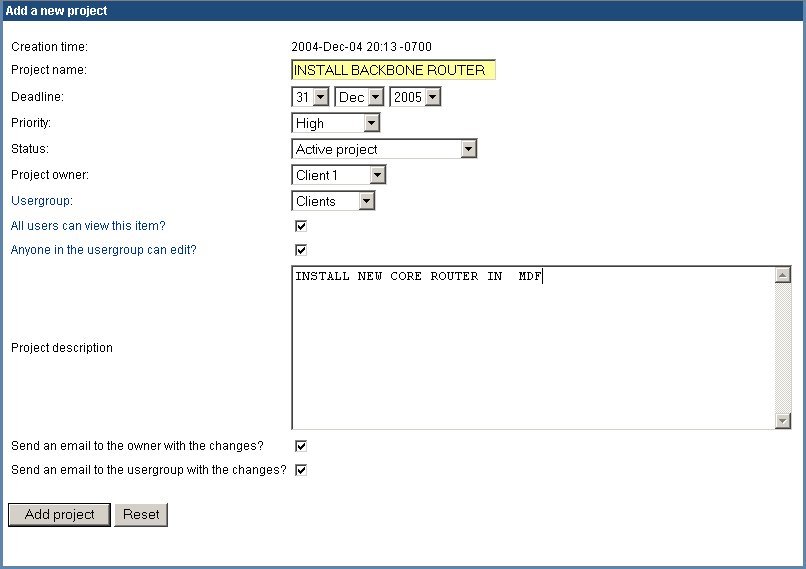
Figure 2. The creation form for a new project gives you the opportunity to set up access control and user notification, simply by checking the appropriate boxes.
WebCollab is ideal for projects that can be broken down into a series of tasks with brief, one or two sentence, descriptions. Each project and task has a description field, start date, end date, priority and assigned group. When a task is created for a given project, it is treated as a subproject, with the same information fields and editable data as its parent job. This portion of the software is similar to most versions of popular to-do lists, but it adds the flexibility to be used as a quick checklist or a fairly in-depth breakdown of a task with running commentary.
The project and task views are where the software really shines. As mentioned before, each has its own file upload section and message board. This is where the collaborative aspects of WebCollab really set it apart from a traditional to-do list. Users can ask each other questions, make comments, upload relevant documents and much more. This is what separate WebCollab from task management applications and makes it more of a project-oriented groupware. I find the message board element of WebCollab to make things more interactive and thus more interesting for everyone involved.

Figure 3. Task views include links to relevant files. This VPN task information page makes it easy to find the necessary configuration file.
The ability to navigate between views is intuitive and easy. Almost everything is a hyperlink, which, when clicked, takes you to a more in-depth view of that particular piece of data. For example, in the main view for a project, each task is represented by its title, and clicking on that title takes you to the main view for that task, complete with summary, due dates, related files and more.
Every user or group name displayed within the context of the project or task descriptions is also a link to more information about that particular user. Everything initially is represented in a shorthand view, with more information available when clicked. Although this may not seem like much, it becomes handy and makes toggling between various views a breeze. A navigation bar also is present along the left side of the screen at all times.
As is typical with project management packages, there are a variety of different views, each of which gives a slightly different perspective. When a user logs in, he or she is initially at Home Page view. This shows a listing of projects and tasks that the user is involved in with completion status and due dates. Two other key views are the To-Do List view and the Calendar view; both are self-explanatory. Again, interpreting each view is far from complex, which is not always the case with project software. All views can be filtered by both user and group and have a print view button, which displays the current screen in a more paper-friendly format.

Figure 4. The Calendar view is basic, but it provides a nice visual breakdown of what has to be done when.
WebCollab is best fitted for a small or home office environment. Being a noncommercial open-source project, the only real support available is through the message board on the Web site. Although that may be excellent, it usually is something that corporate higher-ups will frown upon. Given its tiny user base, I doubt that software like this is a target for attacks, but Apache and MySQL are. For those who are not intimately familiar with Apache, PHP and MySQL, I would advise looking into using some of the Linux distro-specific security update tools, like Debian's apt-get or SuSE's YaST, to keep these packages up to date and as secure as possible.
The user management and access-control tools within the software itself do a good job of limiting what people can and cannot see, and these controls are granular enough that they can be customized on a user, group or subgroup level. All accounts and passwords are stored in MySQL with the passwords obviously being an encrypted field. It's probably a good idea to configure your Web server to serve this with SSL, over port 443, to deter any potential snoopers.
I also would suggest that anyone putting mission-critical data on this do a bit of homework on the interaction of PHP and MySQL with respect to passing database user names and passwords. All in all, I am fairly satisfied with the developers' efforts to make this software as secure as possible given its target audience.
WebCollab's beauty is in its simplicity. It's easy to install, use and maintain. It provides a comprehensive and flexible take on small-scale project management. Some users may be deterred by its lack of aesthetic detail, but if you prefer streamlined interfaces and quick-to-render pages to other bells and whistles, I would definitely suggest giving WebCollab a try. It's built on proven technology, so it's fast and stable, and because it's Web-based, it's essentially clientless. Users can be added to the system, and creating tasks and projects takes minutes. I also recommend this for transient users looking for a centralized to-do list that they can access from anywhere, as it's a very useful single-user tool.
As someone new to the Open Source community, I've found browsing sites like Freshmeat and SourceForge to be a lot like watching independent films or listening to indie rock bands. Every once in a while, you come across an unbridled gem that no one seems to know about; I've found WebCollab to be one of these.
Resources for this article: www.linuxjournal.com/article/7965.
Mike Cohen is a cofounder of Antropy, Inc., a small-business IT-consulting firm in Southern California. He enjoys spending time with his family and tow-in surfing at Todos Santos Island in Mexico.
