
Staying Current with Your Distribution's Security Updates
One of the key elements of making and keeping Linux a prime-time player in your desktop or server environment is ensuring that it is current with security patches. You take measures to address security at the network and hardware levels, but it takes only one security hole to compromise your entire environment. All users, whether they are commercial, nonprofit or home users, must know how to update their systems and applications, and they must do so regularly.
Two steps are key to keeping your system clean: knowing when to update and actually performing the updates. The first can be solved by monitoring security bulletin mailing lists for your specific distribution. The second can be solved in numerous ways through graphical and command-line tools. Some distributions also include auto-upgrading software utilities that can help you monitor your system.
I admit that I use the terms update and upgrade interchangeably when referring to moving from one version of a software package to another. These essentially mean the same thing. You also want to be careful when updating software so you do not install a version of a package you did not intend to. Development versions of packages usually carry a different version series. If the version differs by too much, check for a different update.
This article investigates both command-line and GUI tools for keeping your Linux system up to date. We specifically look at Debian 3.0 (Woody), Mandrake 10.0, SuSE 9.1 and Fedora Core 2.
So how do you know when you should update? One good method is to subscribe to the security bulletins that your distribution provides. The on-line Resources provide URLs for the distributions covered in this article here and their respective security mailing lists. These usually are low-traffic mailing lists to alert you of security-related patches or updates. They also usually provide direct links for downloading the updated packages and MD5 sums to ensure you have a clean package. You manually can install a package this way. You also might need to grab any dependencies, if necessary.
Another method for knowing when to update is to use a script or application that polls for any updates. SuSE 9.1 and Fedora Core 2 include easy methods for automatically updating your current software with GUI tools. Debian and Mandrake also both have easy GUI tools and can be scripted to download packages in the middle of the night, letting you upgrade later.
I must offer a word of caution on upgrading software when no one is present to monitor the process. For instance, I heavily configure the Apache Web server. When I upgrade, it always asks me if I want to replace my config files. I usually run diff to see what the changes will do, but I rarely let them overwrite my config file. Make sure you note any changes in the software versions that are upgrading if you have any critical applications. Always back up your critical application config files.
The RPM command-line tool is a manual and dependable method for upgrading your RPM security update. The rpm command has a lot of switches for various options, but for upgrading packages, you should run:
# rpm -Uv package.rpm
For the RPM file, you can specify a local filename, or even an FTP or HTTP location. If your security mailing list includes direct URLs for package updates, command-line updating is very simple. For more information on the rpm command-line tool, check out the RPM Web site or the man page.
Debian and other Debian-based distributions use dpkg as their package management system. It used to stand for Debian GNU/Linux package manager. The dpkg FAQ page states that it no longer stands for anything, because it is used in non-Debian and non-Linux environments. This package manager does the mid-level work for APT, the Advanced Packaging Tool, and GUI tools such as Synaptic. Much like RPM, dpkg includes a plethora of command-line switches, but we focus on the simple upgrade switch:
# dpkg -i package.deb
The -i switch instructs dpkg to install the package. If a prior version of the package exists, dpkg removes the prior version and installs the newer version. Unlike rpm, dpkg requires wget or curl to download the package before installing.
Advanced Package Tool (APT) is where you probably will do most of your command-line package management in Debian. APT uses a list of repositories with available packages. If there is a newer package version in the repository's Package list, APT downloads the package and hands the process over to dpkg. First, make sure you have the security update source in your sources.conf file. It should read:
deb http://security.debian.org/ stable/updates main
Instead of the word stable, you might have woody instead, but either will do. After editing the sources.conf file, you also need to update your available package list. To update and then upgrade them, run the apt-get two-step:
# apt-get update
# apt-get upgrade
This upgrades only packages that do not require modifications to other packages. To upgrade packages that do require some sort of dependencies, run:
# apt-get update
# apt-get -u dist-upgrade
The -u switch shows exactly which packages will be upgraded, newly installed or removed. You can set these lines to run from the crontab and have your machine download, but not install, the latest packages you need. A command to put in your crontab file might look like:
(apt-get update && apt-get -dy upgrade) \
| mail -s "`hostname` update" root
This command downloads the list of the latest packages and, if successful, downloads the packages that need to be updated. It sends the results by e-mail to the root user. Substitute your user name or e-mail address as necessary. When you receive e-mail notifying you that there are updates, you can run:
# apt-get upgrade
This installs the previously downloaded packages allowing you to be present at the console or terminal. Some package upgrades require additional user input, so it may not be wise to run a completely automated upgrade solution.
Available on the GUI side for Debian users, Synaptic is a complete front end to dpkg. To run Synaptic, go to the Debian menu in your desktop environment and select Apps→System→Synaptic Package Manager. Synaptic works much the same as APT. To update your list of available packages, click the Reload button at the top left of the window. A window list of mirror locations updates you on the status of the package list download. When Synaptic finishes downloading the package lists, you can view all available upgrades. Packages that need to be upgraded have a green box and an arrow pointing up. Newly available packages have a yellow star on the box. Installed packages have a green box, and not installed packages have a white box.
To download and install all package updates, click the Apply button. You then are prompted with a window detailing which packages will be upgraded, installed, kept back or removed (Figure 1). Kept back means that the package would require other dependencies that were not stated specifically. Clicking Apply begins downloading the updates. Following the download process, the updates will install in a terminal-like text box, allowing you to answer questions if needed. When finished, click the Close button (Figure 2).
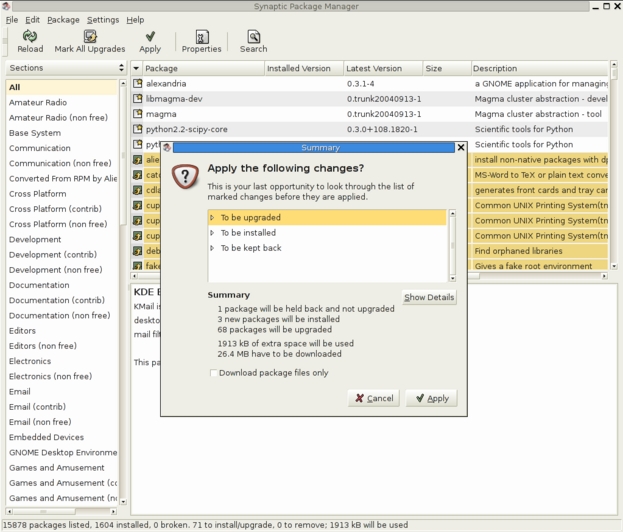
Figure 1. Synaptic Showing the Applications to Be Modified
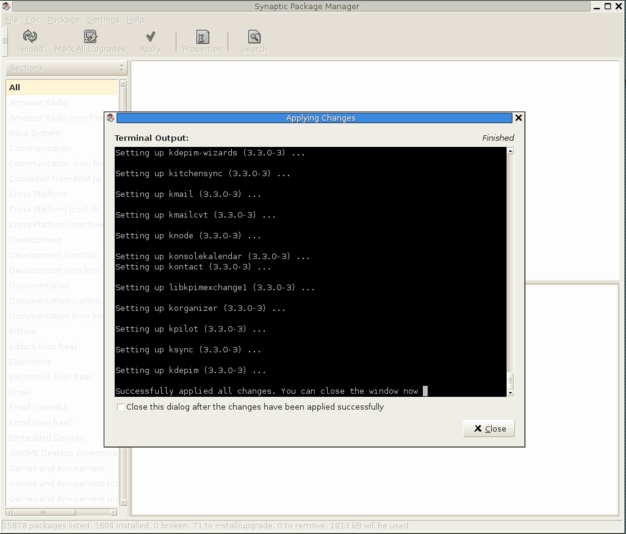
Figure 2. Synaptic after All Upgrades Have Been Performed
When installing Mandrake 10.0, one of the final steps before the first login is to check for any critical updates. If you are installing this distribution from scratch, this would be a great step. However, what do you do now that Mandrake is installed, and you need a patch for a security hole?
Mandrake 10.0 users have a nice GUI package management application called rpmdrake. You can find it by clicking on the KDE star menu and selecting System→Configuration→Packaging→Mandrake Update. You also can run rpmdrake as root on the command line. Answer a couple of questions, and then you are presented with a list of packages that need updating due to security updates (Figure 3). To update all of them, click in the box on the All line, then press the Install button, and grab your favorite beverage!
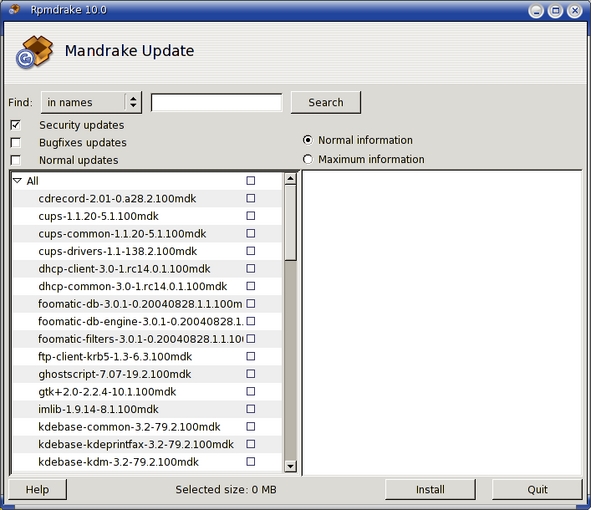
Figure 3. rpmdrake's List of Available Package Upgrades
After downloading and installing all updates, you are presented with a dialog box letting you know everything has been installed. It's that easy.
The command-line urpmi package was installed with my stock installation of Mandrake 10.0. urpmi acts much like APT, allowing you to use multiple sources to update packages. These repositories can be accessed by CD-ROM, a local RPM directory or an FTP or HTTP Internet source. For our purpose of installing security updates, we want to run something like the following command:
# urpmi.addmedia --update updates \
ftp://example.com/Mandrake10.0/RPMS \
with ../base/hdlist.cz
This adds security updates from an FTP mirror to your list of sources. You need to substitute the ftp:// URL with a real mirror. The Web site Easy urpmi gives you a nice Web interface to choose your nearest mirror, your architecture and from which source pools you'd like to download updates.
To update the list of available packages and then install all package updates, do the urpmi two-step:
# urpmi.update -a
# urpmi --auto-select
You then are prompted to install the updated packages and any dependencies, if necessary.
SuSE 9.1 has a similar method for installing updates by using the YaST2 Online Update (YOU) GUI tool. You can find this by clicking on the SuSE icon, then System→YaST. After entering your root password, click on Software and then Online Update. You can choose your installation source or add a new server manually (Figure 4). Additionally, you can configure YOU to download and/or install updates automatically at a specified time each day. Clicking Next downloads information that tells you what packages need to be updated. After this list is updated, we are presented with the list of packages, a patch description and disk usage (Figure 5). In the list of patches, red lines denote security updates, blue lines denote recommended updates and black lines are optional updates. To perform the upgrade, click Accept. After the updates are completed, click Finish, which configures a few system services. In addition to the YOU system, you can use the rpm command from the command line.

Figure 4. YaST2 Online Update's Mirror Selection Process
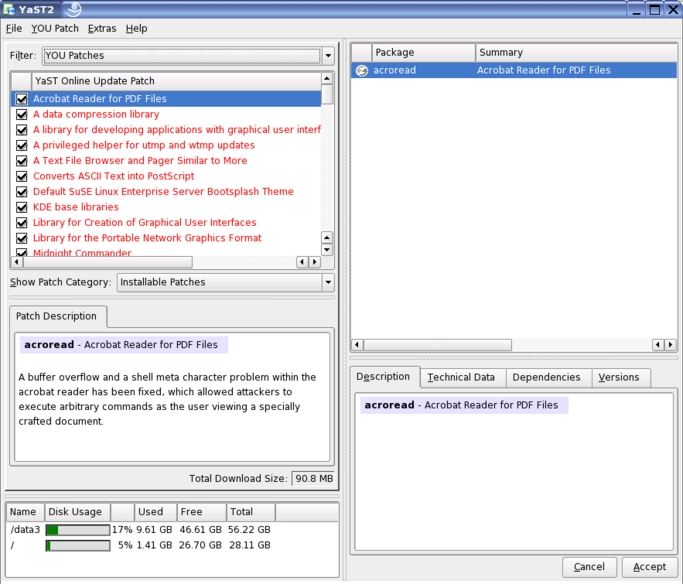
Figure 5. YaST2 Online Update's List of Available Package Upgrades
The Red Hat Update Agent, up2date, has been around for several Red Hat versions and is present in Fedora Core 2. To check for new software updates in Fedora Core 2, right-click on the red exclamation point in the system tray and choose Check for updates. To download and install the latest updates, right-click on the red exclamation point and choose Launch up2date. You can choose the defaults. The first time you run up2date, you are asked whether you want to install the Red Hat GPG key signature. I chose yes on my system.
In the Channels menu, you can subscribe to two channels or repositories where updates are kept, fedora-core-2 and updates-released-fc2. Channels in up2date are similar to the repository in APT or urpmi. You are asked to note any packages you want to skip. The package already listed for me was a kernel upgrade. Clicking Forward gives you a list of available software updates (Figure 6). To select all updates, click the check box next to Select all packages.
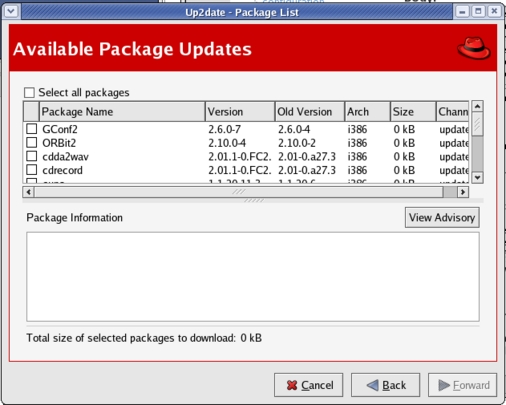
Figure 6. Up2date's List of Available Package Updates
Clicking Forward starts retrieving packages. Again, a break with your favorite beverage will do nicely at this point. When the download process is finished, click Forward to start the installation process. When the installation process is finished, you are given a nice summary of exactly what packages were installed and their versions (Figure 7).
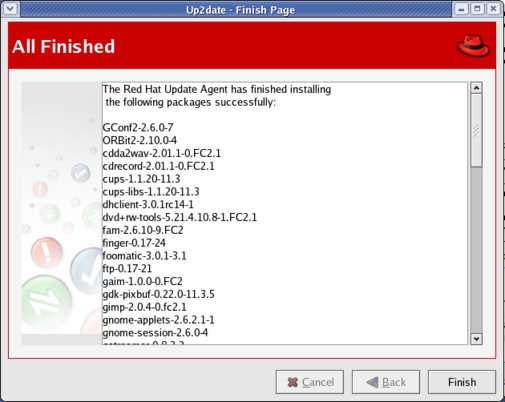
Figure 7. Up2date All Finished Downloading and Installing
Fedora Core 2 also is based on the RPM system, which allows you to use the rpm command at a terminal.
Another package management front end that has received notoriety is the Yellow dog Updater Modified, or Yum. Yum is much like APT, but it has several differences that the author explains on the Yum Web site. In essence, Yum acts like urpmi or APT in dealing with package repositories, and then it hands the actual package installation off to RPM. The anaconda installer uses Python bindings for RPM access, so you can count on the Python support staying around.
There's a saying in baseball: “You're only as good as your last at-bat.” The computer application of this principle is that your system is only as secure as your last update. A fancy network firewall and a magnetic-stripe server-room door key are good security steps, but running an outdated version of Apache or OpenSSH can bring your systems to a halt if you don't keep your Linux systems up to date.
Resources for this article: /article/7862.
Jeremy Turner has been a Linux user for more than five years and has a passion for helping users learn open-source software. He hacks PHP, sings first tenor, watches too much baseball and checks his e-mail regularly (jeremy@linuxwebguy.com).

