
Cyclades AlterPath Manager E200
Product Information.
Vendor: Cyclades
Price: $8,950 US
The Good.
Simple backup/restore.
Global console namespace across managed devices.
Global user management across managed devices.
Access via SSH and Web.
Automated firmware updates.
The Bad.
A little pricey.
Passwords stored clear text and world-readable.
Needs more comprehensive documentation.
Cyclades makes a number of excellent products aimed at easing system administration and data center management. These include console (serial and KVM) and remote power management. In the past, these devices were all islands unto themselves needing individual management. Authentication and authorization could be unified easily with a directory service such as LDAP, Radius, NIS or Kerberos, but the configuration of the devices would need to be managed individually and manually.
In modern complex data center environments, infrastructure must be flexible to keep up with changing circumstances and requirements. A central management system was needed.
Serial Consoles in the Data Center
For most computers, the console is the video monitor and a directly attached keyboard. This is where kernel and boot messages go as a system is coming up. The console eventually becomes a login terminal, either graphical or text mode, after a system is fully booted. On servers, however, graphical consoles are not needed and are often unwanted. Consoles on servers usually are used only to recover an ailing system or install a new OS. In these cases, a serial port is used as the console. This provides a very simple device for the kernel to deliver messages without the complexity or wasted CPU cycles of a graphics device. Serial consoles have the added benefit of remote access when used in conjunction with a console server such as the Cyclades ACS series products. These devices literally allow you to use SSH (secure shell) to connect directly to a server's console and manage it from anywhere. Remote access to a server console allows the system administrator to recover and even re-install the OS from anywhere, if the server is running Linux or UNIX. For more information on implementing serial consoles on Linux see my LJ article in the August 2004 issue.
Some of Cyclades' most popular products are the TS and ACS serial console management devices. These thin 1U-rackmount enclosures allow secure remote console access to servers and serial-port-equipped appliances such as filers, routers, firewalls, SAN arrays and switches. The AlterPath Manager (APM) is designed to sit above multiple ACS and TS units and centralize configuration and authentication.
The APM unit sports an 850MHz Intel Celeron CPU, 256MB RAM, 40GB disk, two 10/100 Ethernet ports and two serial ports, one for the APM's console and another for an optional dial-in modem. Not much horsepower by today's standards, but more than enough for what the APM needs to do. This is all basically off-the-shelf hardware; the APM is primarily a software product that includes integrated hardware.
The hardware is packaged nicely in a sturdy 1U-rack enclosure. Indicators are on the front with all connectors on the rear.
The APM runs a small customized Linux OS. Cyclades' management application is Web-based and runs under the Tomcat Java servlet engine. The servlet engine serves on both HTTP and HTTPS (encrypted) ports, and Cyclades provides simple instructions for disabling the non-encrypted port. All configuration and control of the managed devices is done over encrypted SSH connections.
The APM uses password-style authentication to the managed devices using expect. I would have liked to see public key authentication, but passwords are easier to understand for most people and at least it's still all encrypted. The root passwords for all managed devices are stored in a MySQL database running on the APM. This database allows connections only from localhost and stores these passwords in clear text. It also appears that the MySQL databases on all APM devices use the same hard-coded database root password. All the database passwords can be found in the world-readable configuration file /var/apm/apm.properties. It needs to be assumed that any user with shell access to the APM will have complete control of the managed devices because of the unfettered access to the root passwords. This security situation should be significantly tightened up by Cyclades' developers.
The APM can control any Cyclades TS or ACS console server accessible on your network. All management, as previously stated, is done over encrypted SSH connections. One installation scenario suggested in the APM documentation is to create a private network using the second network port. In this situation, you can allow the APM to serve DHCP and automatically manage the network numbering of the managed devices. This also utilizes the APM as a firewall between your public network and your management network.
Cyclades also provided me with an ACS16 for this review. This device is a small Flash-based Linux box with 16 serial ports that can be used to connect to server consoles, modems, terminals or any other serial devices. Each managed device must have basic networking configuration and a root password set. This is done in exactly the same way as the APM—using an included serial cable and an interactive wizard. If you are planning on using the private network approach mentioned above, simply set the device to use DHCP and set the root password.
The initial configuration of the APM is done using a serial cable to a PC or terminal. The APM presents you with a simple configuration utility to get basic networking information, then directs you to continue with a Web browser.
The APM is now ready to configure and manage devices. Log in to the APM's Web interface and click on Devices, then add. Enter a device name (for example, ACS001), device type, model number, network address and root password. The APM then automatically creates entries for each port on the device named similarly to ACS001_00, ACS001_01 and so on. These names uniquely and globally represent every port on the managed devices. They can be renamed later to something a little more meaningful.
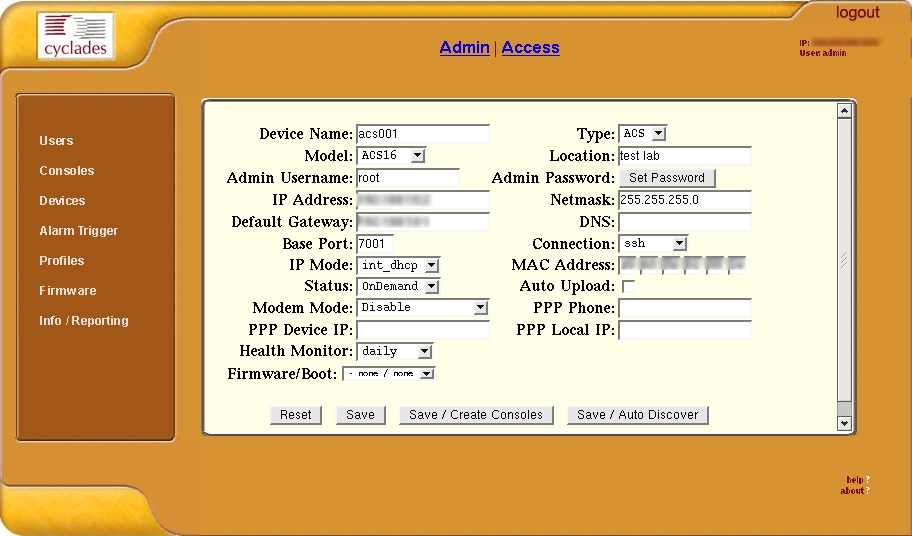
Figure 1. Console Server Device Management
Next, customize one or more Profiles (Figure 1) to describe the various types of devices you intend to connect to the ACS or TS units that this APM will control. The default profile is appropriate for most devices with serial consoles that operate at 9,600 baud, 8 bits, no parity and 1 stop bit.
The next step is to do per-console configuration. Then you're ready to connect to the connected devices. This can be done in one of two ways. From the APM's Web interface you simply can click on the console name under consoles, and the APM launches a Java-based terminal emulator. Alternatively, you can connect directly to a console from any SSH client. If the APM's hostname is myapm, your user name is admin and the console name is myserver, you would issue the following command:
ssh admin:myserver@myapm
The username:consolename syntax is a Cyclades modification of the SSH server running on the APM. It allows very easy access to the console ports. This is my absolute favorite feature.
Up to this point, we have been doing everything as the admin user created during the initial configuration. The APM gives you the ability to create users and delegate control of ports. This is useful in a large data center with a complex management structure.
The APM has the ability to monitor ports and raise alarms based on what it sees. This is done using pattern expressions. Events are classified as Info, Warning or Severe and are sent by e-mail to users listed in the notify list under each console port configuration.
Every console port has a data buffer and log associated with it. These logs can be viewed with the Web interface.
Keeping up to date with software and firmware versions is always a task at the forefront of a system administrator's priorities. The APM simplifies this by automating firmware updates of managed devices. Updated firmware packages are downloaded from Cyclades' Web site then installed on the APM. From there they can be pushed to the managed devices.
The APM provides a simple command-line tool for backup and restore. This provides an easy-to-use way to back up all configuration, logs and the APM system itself to a remote system using SSH. The restore utility does the exact reverse. So many appliance-style devices do not include this vital feature, but the APM does. It is important not to neglect backup and restore when evaluating any appliance-type device. Any device you depend on for day-to-day administrative operation needs to be classified as critical infrastructure and needs to be held to the same backup, restore and disaster recovery requirements as any other system.
The APM is advertised as a way to unify management of various devices Cyclades produces. These include Power Management (PM Series), KVM (Keyboard Video and Mouse switches over IP) and ACS (Console Management). At this time, there is no integration for PM or KVM devices other than to connect and manage them individually through their console ports. According to Cyclades, future releases of the APM software will include tightly integrated support for PM and KVM ports. Right now, the APM is targeted mainly at managing serial console ports.
One other wish-list feature I would like to see is some ability for the APM to do all the initial configuration of a new ACS/TS unit. I would like to be able to unbox a new, factory-fresh ACS, plug it in to the APM's private network or AUX serial port and have the APM do the configuration from the ground up.
The APM does a great job at unifying configuration of Cyclades' various serial console management devices. It also provides a global naming system for console ports, a truly valuable feature. Overall, the APM is a good product, comprising well-designed hardware and software. Some issues should be addressed by the designers as stated above, but these do not affect the overall usability of the device. The security issues I listed above can be worked around by not allowing local shell access to non-administrative users. The APM can manage a maximum of 2,048 console ports (or 42 ACS 48-port units), with a maximum of 256 ports in use at any one time.
Matthew Hoskins is a Senior Linux/UNIX System Administrator for The New Jersey Institute of Technology where he maintains many of the corporate administrative systems. He enjoys trying to get wildly different systems and software working together, usually with a thin layer of Perl (locally known as MattGlue). When not hacking systems, he often can be found hacking in the kitchen. Matt can be reached at matt@njit.edu.

