
Legacy Database Replacement with LAMP
Radio New Zealand is a public radio broadcaster, and as with other broadcasters, we have a huge library of music and programmes about music. In 1987, a new computerized library cataloging system, called BRS, was commissioned to assist broadcasters in the storage of library data.
Specifically, BRS was used to store data about LPs (and later CDs), tapes, live concert recordings, interviews and the collection of classical music scores. The system was accessed by way of dumb terminals and, later, terminal emulators on PCs. It also was used by radio staff to schedule and track the music broadcast on Concert FM—the company's classical music network.
BRS was a proprietary cataloging application sold by Maxwell Online, Inc. It ran on UNIX and had a long life. It had a couple of hardware upgrades during its 16-year life; on the software side, a few extra database tables were added for other types of data. BRS survived Y2K without a glitch, in spite of claims to the contrary, and in 2003 talks began in earnest to replace it.
In the past, a replacement project of this nature probably would have been outsourced. Experience has shown, however, that in some cases we'd end up with a closed-source custom application and be locked in to one company for ongoing upgrades and modifications. Sometimes when these companies cease trading and people move on, the application we depend on becomes an orphan, and the data is difficult or impossible to move to a new application.
DIY projects are not always appropriate, and we carefully weighed all the issues. Because of the critical nature of both the data and the application, plus the availability of in-house skills, we felt it was appropriate in this case to undertake the project ourselves.
Bruce Intemann from our IT department was the project leader and put together a quick proof of concept on a desktop PC running Red Hat Linux 8, an Apache Web server, MySQL and PHP (LAMP). Bruce was able to work out how to extract the data from BRS in plain-text format, and he constructed a simple search interface based on the Full-text Index of MySQL, with a small sample of the data converted by hand. Access was granted by way of a standard Web browser.
Around this time, I was completing a PHP Web project for another part of the company and offered my skills to this new project. When it came to name the system, I thought it would be nice to retain the B and R since the they are the first initials of the system's “parents”. My wife came up with the name BRAD, and one of our staff decided the acronym stood for Bruce and Richard's Audio Database. The name stuck.
After the proof of concept was accepted, I wrote a short Perl script to parse all the data—about 200,000 records—and insert it into the MySQL database. This was complicated because several of the smaller databases had been merged into the main database, Works, to aid global searching. Fortunately, one field was used to indicate the location (source) of the original data. See Listing 1 for a sample of BRS data.
Listing 1. One Record from the BRS in Original Text Format
*** BRS DOCUMENT BOUNDARY ***
..Document-Number:
     000080019
..TI:
     Ode for the centenary of Trinity College Dublin,
     Great parent, hail to thee (Z327)
..MA:
     Hyperion
..CA:
     CDA 66476
..ME:
     cd
..RA:
     The King's Consort
..CF:
     vocal - ode
..CP:
     PURCELL
..CD:
     Robert King
..SO:
     Gillian Fisher, Evelyn Tubb (sopranos), James Bowman, Nigel
     Short (counter-tenors), Rogers Covey-Crump (high tenor), John Mark
     Ainsley (tenor), Michael George, Charles Pott (basses)
..ST:
     T12-21
..AT:
     Purcell - Complete odes and welcome songs vol 5
..DU:
     002419
..PT:
..RD:
     2-4 Jan 1991
..RE:
..AD:
..SR:
..RO:
..CY:
     1694
..LI:
     Nahum Tate
..OR:
..LN:
..PU:
..RI:
..ED:
..LP:
..LQ:
     cp
..LQ:
..NO:
..IS:
..LD:
     921012
..LU:
     leander
*** BRS DOCUMENT BOUNDARY ***
Once a complete snapshot of the data was transferred, I rewrote Bruce's code using object-oriented PHP. I also utilised a search class I wrote for another project, modifying it to display music data instead of news stories.
The rough-and-ready demo was deployed on a development server, and staff members were asked for comments. Based on their responses, we decided the best way to proceed was to improve the system continually based on staff feedback, alongside the operation of the existing system. Dual operation during development ensured that staff still had access to a working system and also allowed comparisons between the search results obtained from both systems. It also allowed staff to gain confidence in using the new system and the results it presented.
To separate out the data into its original sets, a more complex script was written to parse the data files, un-merging all the original data sources from BRS. These sets were inserted into the separate databases and tables shown in Figure 1. Each division of the company is considered a zone in BRAD, and each data source is known as a section. Any zone can contain aliases to sections in other zones or options to search across any list of tables, regardless of where they are in the system.
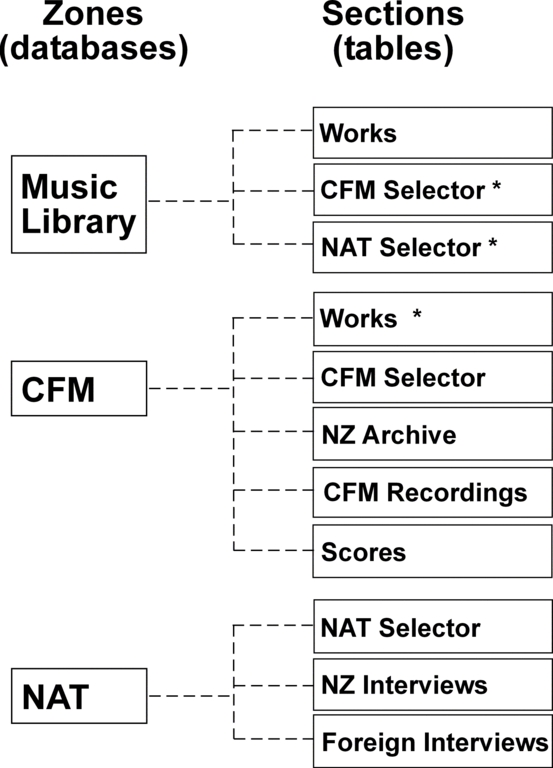
Figure 1. The arrangement of BRAD's data sources. The table marked * represents an alias to another table outside the current zone.
The BRS database was flat (nonrelational), and data had been entered by different people in different formats over many years. As I viewed the results of each snapshot going into the new system, I adjusted the Perl script to clean up some of the data anomalies—particularly in date fields. For example, the original text date field for the last update to a record was edited manually in the past—in BRAD this is a datetime field maintained by the system. Fields also were added to track the creation date.
BRAD was built on a server running LAMP, and it seemed obvious that we should use open-source PHP classes in its development. PHP Extension and Application Repository (PEAR) modules were used for database access, form generation and processing and basic error handling. An existing error class was modified to warn of an error but hide the full message from the user.
Whenever I needed a particular function, I went looking for an open-source module before writing my own. Doing so dramatically sped up the development cycle (see Table 1 for a list of modules used in BRAD).
Table 1. Open-Source Modules Used in BRAD
| PEAR::DBM | Database access. |
| PEAR::HTML:QUICKFORM | Forms on the editing interface. |
| PATUSER | User management and control of editing access. |
| Error Reporter Class | Heavily modified to allow swapping of error messages with the main content of page. |
| Paginator | Pagination of results. Modified to allow parsing of URL into the class. |
Because the BRS system had been around for so long, staff had refined their use of the system to a high degree. BRS did have a powerful and fast search facility. It was able to search for particular words in all or any fields specified by the user. Some quirks had to be overcome, however, such as stop words, words not indexed. These included complete names of some musical groups, The Who being one example. In this particular case, to find items by The Who you have to know something else about the group, such as one of the members (Pete Townsend) or something they wrote (Tommy). Neither approach always was reliable.
The sometimes unexpected behavior and the difficulty of using a command-line interface meant that most staff used the music librarian to find items, simply presenting a handwritten list of requests. Among the expectations for the new system were an equal or better search capability and a simplified interface that could be used by anyone with minimal training.
One of the most powerful features of BRS was that you could limit search terms to certain fields, for example:
Mozart.cp. piano
would return anything with Mozart in the composer (cp) field and piano in any field. We decided to retain this syntax in BRAD so that power users still could do the kinds of searches they were used to doing. We had planned to add an advanced search page for BRAD; however, this syntax has turned out to be so flexible that we haven't needed it.
We faced several challenges with the project. Most of them had to do with modifying MySQL's default behaviors to suit our requirements. The first challenge was to remove all stop words—the list of words not indexed by MySQL due to their presumed commonality in the data. In our situation, every word is considered important.
In MySQL, removing stop words is achieved simply by adding the following line to the MySQL configuration file before adding anything to the database:
ft_stopword_file = ""
The second challenge was to allow searches for words smaller than the four-character limit typically used by MySQL. The BRS system indexed every word regardless of size, apart from those listed as stop words, and removing all stop words would make any search results more in-line with the terms entered.
This problem was solved by doing two things. First, we reduced the index word size to three characters by adding the following to the config file:
set-variable = ft_min_word_len=3
Because of the amount of data, these settings were considered to be acceptable performance trade-offs.
The second thing we did was implement a smart query engine that adapted the query, depending on the shortest word in the search terms, before sending it MySQL. This allows full-text searching regardless of the length of any search term.
The last challenge was to make all searches AND by default. MySQL's boolean full-text mode is an OR search when no modifiers are used. You normally would add a + before each term to make it an AND search. The query engine was built to add the + automatically when no other modifier is present.
At the core of BRAD is a term parser and a query compiler. The term parser takes a query, breaks it down and places the components into an array. The array contains a MySQL modifier, +, -, <, >, ~; an atom, a part of the query string—either a word or a phrase; and an optional field name.
The term parser automatically adds a + to each atom when no modifier is present, making all searches AND by default. This is a good thing because users expect that this is how a search engine will work—the more terms you add, the more refined the search.
The optional field is used to support advanced searches when particular words are required in a specific field. In BRAD we retained the . field search operator.
When a normal search is undertaken, the query compiler interrogates each table within the scope of the search and returns a list of full-text fields for each. These are used to compile a query that spans all the full-text fields.
The query compiler can manage a mix of full-text general terms and non-full-text, field-specific terms. The query compiler allows BRAD's data sources to be extended almost without limit and the generated queries to adapt dynamically—removing the need for static query boilerplates for each object class that represents real objects in the database.
A standard Web page form allows the user to control all aspects of the search (Figure 2). Users can select as few or as many zones or tables as they want. These can be customised to meet company and user requirements.

Figure 2. An Explanation of the BRAD Search Interface (See Table 2)
Table 2. Fields in the Search Interface
| 1a: Search Area | This is where the search terms are entered. |
| 1b: Search Button | Press to search. |
| 2a: Past Searches | Opens an area that shows searches made in the past. Items in this list can be clicked to do the search again. |
| 2b: Latest | Shows the latest entries in Works, CFMS and NATS data sources. Limited to 250 from each, and sorted with the latest at the top. |
| 2c: Fewer | This link (and the one on the next row) toggles between More and Fewer and reduces or increases the number of BRAD search options that show. |
| 3a: Zone | BRAD divides its data into zones that relate to different parts of the company. Each zone has a number of different data sources. The zone selector allows you to choose the area of the company in which you'd like to search. |
| 3b: In | This selector allows you to determine which data in the zone will be searched. You typically can search across all data in a zone or only one type of data. |
| 4: Order by | |
| 5: Media | You can ask BRAD to search only for records that are stored on certain types of media. |
| 6: Count | The number of items displayed per page. |
| 7: Display Mode | Display modes relate back to the old BRS system and allow the user to choose different summaries for the search results. Display modes can be customised, so if users need a special format it can be added. |
| 8: Show Results | In tabs or as a list. BRAD's normal mode displays the results of each search under a tab-style interface. In list mode, it prints out a list under individual headings. List mode can be used to make lists for printing or pasting into e-mails. |
| 9: Show Details in | This selector allows users to choose between viewing full-record data, by clicking on the link for an item, in a new window or the current browser window. |
BRAD was written to be extensible in all respects. The data searching can be extended to any kind of data, and specific kinds of searches can be applied to that data.
One of the problems that existed in our company was the use of different database applications for different tasks, with different data being spread across several applications. Our two radio networks use an application called Selector to schedule music items for air. One database, with around 10,000 music tracks, is used for National Radio, while 100,000 music tracks spread across five databases are used for Concert FM. Five databases are used for Concert FM due to limitations in the size of data that Selector can handle.
If a staff member wanted to search for a piece of music, he or she would have to go to each of three applications—BRS, National Radio Selector and Concert FM Selector. There was no way to search all of these at one time.
Fortunately, Selector has a utility to export data in XML format. Although there is no documentation for this and none could be obtained, Bruce was able to determine how to run the export utility and FTP the data to the BRAD server from a Windows workstation. This is done each morning, and a Perl script is run on BRAD to import all the data. The five Concert FM databases are merged into one table, as all the data is unique.
The original search module was extended to search more than one table and return the results, regardless of the number or type of fields. Results are displayed in a tab-style manner (Figure 3).
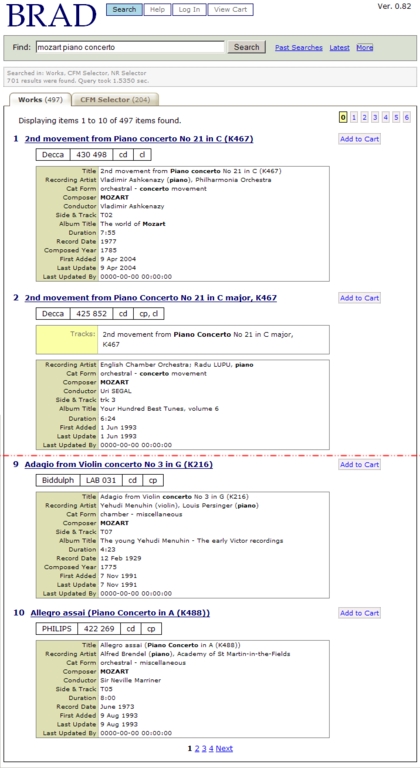
Figure 3. A Truncated Page of Results
You can see the first results from the Works table. The other inactive tab shows the number of results in the CFM Selector table. Depending on the scope of the search and the results, any number of tabs might be showing. Producers now can search any of the music data from one simple interface.
Since the first Alpha version was released, many other new features have been added at the request of the staff. Among these are a search history and a shopping cart. The cart can hold items from any table. Carts can be saved and restored, and once created, a cart number also can be e-mailed to the librarian. This saves staff having to print or e-mail whole lists of material—they simply e-mail the cart number.
The most recent feature that was added was the alias search. An alias replaces a more complex set of terms that might be used a lot. An example of this is a search for New Zealand content—music that contains NZ artists or was composed by a New Zealander. This is useful as we have self-imposed NZ music quotas for both networks.
Over many years of data entry and staff changes, different fields and identifiers were used to indicate NZ status in the main Works database. The NZ Music alias automatically adds the required terms and fields to the query as an OR search. This was achieved by building a new class on top of the term parser and using it to extract any aliases from the query. The parser then adds the required parameters to the query stack maintained by the Query Complier. Here are some BRAD Alias examples. The query:
Mozart @nza
gives us Mozart and any NZ content field true. The actual query looks like this:
SELECT * FROM brs.works WHERE (cf REGEXP '[[:<:]]local[[:>:]]' OR cf
REGEXP '[[:<:]]nz[[:>:]]' OR lq REGEXP '[[:<:]]nz[[:>:]]') AND MATCH
ti,ra,cf,cd,cp,so,at,notes,lq AGAINST ('+Mozart' IN BOOLEAN MODE) ORDER BY ti asc LIMIT 1000
A duration search also was added so that producers can find material within certain ranges—it is quite common to need music by a certain composer of approximately a known duration. In BRAD, numbers in square brackets are treated as a duration query. BRAD can do approximate searches or searches within a range of durations. See the sidebar for some examples.
BRAD Duration Examples
Less than:
brahms [<20]
Between (you also can specify a range of times). The following looks for anything with mozart in it that is between 20 minutes, 30 seconds and 30 minutes, 15 seconds:
mozart [20:30-30:15]
Approximate matches—this looks for the time you specify plus or minus 10%; c is short for circa:
mozart [ c 24 ]
You also can add a time range. The following input retrieves items 24 minutes in length, plus or minus 1 minute:
mozart [ c 24 r 1 ]
Complex duration searches— the following searches for pieces with Beethoven as the composer that last between 20 and 22 minutes:
beethoven.cp [20-22]
The query compiled for the last search:
SELECT * FROM cfm.cfms WHERE (du <= 1320)
  AND (du >= 1200)
  AND MATCH ti,ca,ma, ra,cd,cp,so,at,notes AGAINST
    ('+beethoven' IN BOOLEAN MODE)
  AND MATCH cp AGAINST ('+beethoven' IN BOOLEAN MODE)
  ORDER BY ti asc LIMIT 1000
The Concert FM Selector data mentioned earlier has NZ artist and duration fields set correctly for all data, so these aliases can be used reliably on the whole data set. Because there is a mix of item types in the Works data, only those with a valid duration are searched. In the past, it was not possible to do any duration search at all within Works, so this is an improvement.
At the time of writing, I was asked about putting the company phone directory into BRAD, and a proof-of-concept pronunciation guide was added for our News department.
This project has enabled us to replace a key Radio NZ cataloging system and provide enhanced functionality to staff at a low TCO. It also has provided a storage platform for new and legacy data.
In the future, it may be possible for programme producers to do a single search on a composer or artist and get back a whole set of results that includes music tracks, interviews and archival material. It even could indicate the correct pronunciation of the person's name and provide his or her phone number.
BRAD probably will continue to be a work in progress as we find more uses for it. This is one of the benefits of DIY-IT—the system is ours to extend or modify as we see fit, whenever we need to do so.
Resources for this article: www.linuxjournal.com/article/7968.
Richard Hulse is a Senior Recording Engineer for Radio New Zealand and currently is working on a number of IT projects, including improving the Radio NZ Web site (www.radionz.co.nz).

