
KDE Kiosk Mode
One of the more powerful aspects of the KDE desktop is the ability to customize the user experience completely. Most KDE programs use core features and plugins provided by the desktop system, creating a consistent user interface and easy-to-access configuration setup. One popular extension to this interface, known as KDE's Kiosk Mode, allows a system administrator to configure all aspects of the desktop for an end user and optionally prevent the end user from making modifications to the provided setup.
KDE applications utilize a configuration framework similar to Microsoft Windows INI files. One benefit of this file type is the ease of direct manual editing of the configuration file by an administrator or user. The INI file format is an ordinary text file that is divided into smaller named sections, each section having one or more key/value pairs. These values are used and stored directly by the applications:
...
[GroupName]
key=value
key2=value2
...
Configuration files are located in a number of places, largely based on which distribution is being used. When an application attempts to find its configuration, it scans according to a predefined search order. The list of directories that are searched for config files is seen by using the command kde-config --path config. The directories shown actually are searched in the reverse order in which they are listed. This search order is put together by the following set of rules:
/etc/kderc: a search path of directories can be specified within this file.
KDEDIRS: a standard environment variable that is set to point KDE applications to the installation directories of KDE libraries and applications. It most likely already is set at login time. The installation directory of KDE automatically is appended to this list if it is not already present.
KDEDIR: an older environment variable now considered deprecated in favor of KDEDIRS. If KDEDIRS is set, this variable is ignored for configuration.
The directory of the executable file being run.
KDEHOME or KDEROOTHOME: usually set to ~/.kde. The former is for all users, and the latter is for root.
Configuration files are stored in directory trees that end in /share/config, so an environment variable directory like KDEHOME has a /share/config appended to it to make the configuration file directory name.
When an application requests its configuration information, KDE searches all of the above directories for the files that go with the application and merges them together into one configuration object for the program. Information is combined on a key-by-key basis—any conflicts receive the value that was read latest in the chain. Because KDEHOME files always are read last, any local user changes made to the file always override values in other configuration files. This is the reason the output directories of the kde-config command are shown in reverse order—they are listed based on the precedence of the config files contained within.
Because the configuration file values cascade downstream, system administrators can preset certain configuration values in an upper-level directory to be used as the default for all users, or at least until those users make any changes. For example, if the system administrator wanted to set a default wallpaper for all users, until those users made custom changes, a simple edit of the kdesktoprc file in an upper-level configuration directory would provide this feature:
[Desktop0]
...
Wallpaper=/usr/kde/3.3/share/wallpapers/custompaper.jpg
...
One of the features of KDE's Kiosk Mode is the ability to lock values read from configuration files earlier in the chain so that values read later cannot override them. This utility not only allows system administrators to preset certain configuration items, but it also lets the administrators lock those configuration items down so that end users cannot make custom changes. Locking configuration values in this fashion is easy.
Assume an administrator wants to lock the Konqueror configuration down so that the navigation toolbar always is presented in text form. A simple scan of the $KDEHOME/share/config/konquerorrc file shows the following information:
...
[KonqMainWindow Toolbar mainToolBar]
IconText=TextOnly
...
This configuration item specifies that Konqueror use Text instead of Icons in the Main Toolbar. Changing this value in Konqueror is easy—right-click on a Konqueror toolbar and select Text Position to change between settings. Figures 1 and 2 show the difference in toolbars with text and icons.

Figure 1. The Konqueror Main Toolbar with the TextOnly Setting

Figure 2. The Konqueror Main Toolbar with the IconOnly Setting
To lock this value for users, the administrator simply can create or edit konquerorrc in a higher-level configuration directory. To make this value unchangeable, simply edit the file as shown:
[KonqMainWindow Toolbar mainToolBar]
IconText[$i]=TextOnly
The above [$i] specifies that this configuration value is immutable, meaning Konqueror should use this configuration value and not merge in any values in lower-level directories that normally would override this setting. Any configuration files farther down the configuration directory structure containing [KonqMainWindow Toolbar mainToolBar] group cannot override the IconText value.
Once this file is saved and Konqueror is restarted, any changes to the navigation toolbar's Text Position are not saved between Konqueror restarts. This is because the value was locked in an upper-level configuration directory, so it cannot be overwritten in a lower-level directory.
On a larger scale, whole groups of configurations can be specified as immutable. Setting the group as immutable makes all values in that group immutable as well. For example, in KCalc's configuration file, kcalcrc:
...
[Precision][$i]
fixed=true
precision=12
...
starting kcalc with the Precision group set as immutable makes changing these values impossible. Figures 3 and 4 show the difference between the locked and unlocked kcalc Precision settings.

Figure 3. The kcalc General Settings Dialog with Locked Precision Settings

Figure 4. The kcalc General Settings Dialog with Unlocked Precision Settings
Finally, the whole configuration file for the application can be made immutable by placing a [$i] at the very top of the file. This immutable mark cascades to all group and key/value pairs contained within the file. Setting the configuration file to immutable in this fashion completely disallows any changes made to an application's configuration.
Alternatively, if the KDE application does not have write access to the configuration file, it also is considered to be an immutable configuration file. This file permission restriction can be set directly on configuration files in the KDEHOME directory to prevent a user from editing the configuration.
For example, saving a non-writable kickerrc file restricts users from making any changes to the kicker panel. Many other KDE applications follow a similar procedure, though a restart of the application may be required in order for it to re-read its new configuration.

Figure 5. A kicker with its configuration file marked as immutable. It has a noticeable lack of handles, which allows the applets contained within to be customized.

Figure 6. The Normal Kicker
On top of being able to lock configuration items for users, administrators also can remove the functionality of certain actions users can perform. An action is simply something the user can perform, such as File→New. Because most KDE applications provide common actions, predefined standard action restrictions are easy to lock down. Program action restrictions are configured in the kdeglobals file, located in the same configuration directory structure noted above.
The following code snippet disables the standard Help menu available from the main toolbar of KDE applications:
...
[KDE Action Restrictions][$i]
action/help=false
...

Figure 7. Konqueror with Help

Figure 8. Konqueror without Help
Another option is disabling the Bookmarks feature of Konqueror. This can be accomplished like this:
...
[KDE Action Restrictions][$i]
action/bookmarks=false
...
Not all action restrictions have to be menu items. For example, the following snippet disables any options that require root access:
...
[KDE Action Restrictions][$i]
user/root=false
...
Many more actions can be set. A more complete list can be found in the kiosk documentation. Many of the actions are standard across KDE applications. Some applications, however, provide their own local actions, which can be restricted as well. Some of the more interesting actions are:
print/system: disables the ability to select the printing system.
shell_access: disables ability to start up a shell.
logout: disables user logouts.
run_command: disables Alt-F2 run command.
lineedit_text_completion: disables lineedits from remembering previous entries for partial text completion.
On top of configuration files, KDE applications utilize other types of resources in the KDEDIRS directories. Similar to the configuration file examples above, these resources are extended by resource files installed in KDEHOME. KDE provides the ability to restrict access to these types of files as well. This configuration information is stored in the kdeglobals configuration file. For example, the following kdeglobals snippet limits users' ability to add and utilize custom icon sets other than the ones already existing in an upper-level resource directory:
...
[KDE Resource Restrictions][$i]
icon=false
...
A list of resource types defined by KDE is shown in Table 1.
Table 1. Resource Types
| Resource Type | Location |
|---|---|
| apps | share/applnk |
| config | share/config |
| data | share/apps |
| exe | bin |
| html | share/doc/HTML |
| icon | share/icon |
| lib | lib |
| locale | share/locale |
| mime | share/mimelnk |
| pixmap | share/pixmaps |
| services | share/services |
| servicetypes | share/servicetypes |
| sound | share/sounds |
| templates | share/templates |
| wallpaper | share/wallpapers |
| xdgdata-apps | share/applications |
Although the Control Center menu items can be removed, it still is possible for users to control settings. Control Center restrictions can be set to ensure users cannot make many global system changes.
The following section in kdeglobals disallows users from accessing the respective control modules. A complete list of modules can be seen by using the kcmshell --list command:
...
[KDE Control Module Restrictions][$i]
kde-crypto.desktop=false
kde-clock.desktop=false
...
KDE even provides the ability to restrict URLs entered into Konqueror or another program using KDE's internal URL libraries. To block URL access to a specific Web site, use the following in kdeglobals:
...
[KDE URL Restrictions][$i]
rule_count=n
rule_1=open,,,,http,example.com,,false
rule_2=open,,,,file,,/mnt/share,false
rule_3=list,,,,file,,/mnt/cdrom,true
...
rule_n=...
...
The format for the rules is: rule_N=<action>,<referrer protocol>,<referrer host>,<referrer path>,<URL protocol>,<URL host>,<URL path>,<enabled>. Any option that isn't listed explicitly matches all by default.
The first rule above restricts users from accessing the example.com Web site. The second rule blocks a user from opening or saving any file in the /mnt/share directory. The third rule blocks users from even seeing a list of files in the /mnt/cdrom directory.
The following rules prevent users from accessing a certain domain using http, forcing them to use https instead:
..
[KDE URL Restrictions][$i]
rule_count=2
rule_1=open,,,,http!,*example.com,,false
rule_2=open,,,,https,*example.com,,true
..
The URL Restriction convention is to match protocols of similar name, so a rule involving http would also encompass https. In the above example, http! is used to match only http and not https.
Recent work on automating the kiosk environment has led to the production of a Kiosk Admin Tool (see the on-line Resources). This program automates the administration of many of the advanced kiosk features KDE supports. The administrator can customize many of the items covered in this article using the Kiosk Admin Tool without the need for manual editing of the configuration files. The Kiosk Admin Tool also allows the administrator to create multiple kiosk profiles, maintain the profiles on a central machine and dispatch the configuration framework over a network with a protocol like SSH. Although the tool does not yet support every possible configuration value that could be customized, future versions are sure to add more configurability.
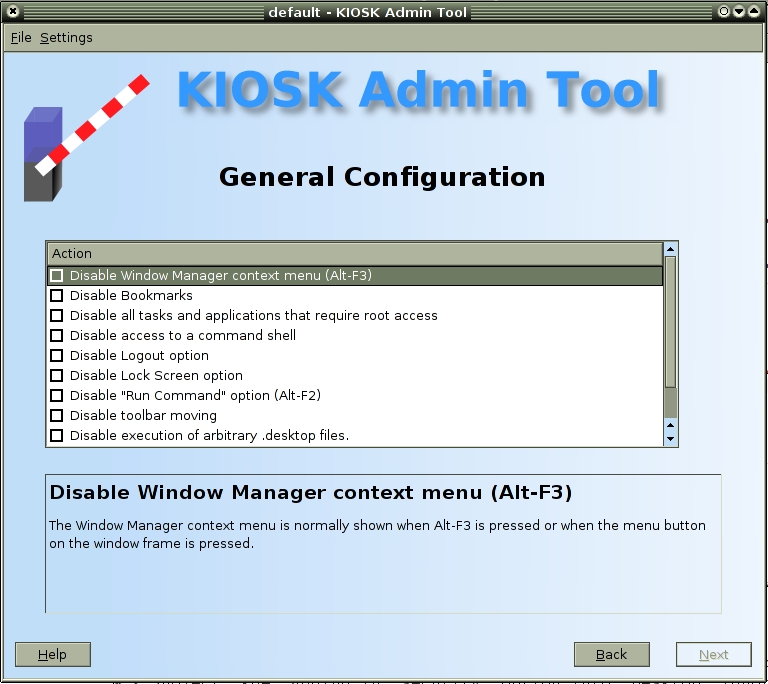
Figure 9. The Kiosk Admin Tool gives the administrator the ability to create and deploy kiosk configurations.
By using the advanced configuration features that KDE's Kiosk framework provides, the desktop experience can be completely customized. Whether it's administering multiple workstation configurations or simply providing a default configuration for new users, administrators have more than enough power at their fingertips to create the desired configuration result. This article barely begins to scratch the surface of possible configuration items. Experience and experimentation will provide more insight into all of the items available to create a customized desktop configuration.
Resources for this article: www.linuxjournal.com/article/7927.
Caleb Tennis is a design engineer with a small research and development company in Columbus, Indiana. He has been involved with many open-source projects, including KDE, Comedi and Gentoo Linux. When the weather cooperates, he likes to spend time rollerblading and wakeboarding, neither of which he is any good at.

