
Kernel Korner - Network Programming in the Kernel
All Linux distributions provide a wide range of network applications—from dæmons that provide a variety of services such as WWW, mail and SSH to client programs that access one or more of these services. These programs are written in user mode and use the system calls provided by the kernel to perform various operations like network read and write. Although this is the traditional method of writing programs, there is another interesting way to develop these applications by implementing them in the kernel. The TUX Web server is a good example of an application that runs inside the kernel and serves static content. In this article, we explain the basics of writing network applications within the kernel and their advantages and disadvantages. As an example, we explain the implementation of an in-kernel FTP client.
Why would one want to implement applications within the kernel? Here are a few advantages:
When a user-space program makes a system call, there is some overhead associated in the user-space/kernel-space transition. By programming all functionality in the kernel, we can make gains in performance.
The data corresponding to any application that sends or receives packets is copied from user mode to kernel mode and vice versa. By implementing network applications within the kernel, it is possible to reduce such overhead and increase efficiency by not copying data to user mode.
In specific research and high-performance computing environments, there is a need for achieving data transfers at great speeds. Kernel applications find use in such situations.
On the other hand, in-kernel implementations have certain disadvantages:
Security is a primary concern within the kernel, and a large class of user-mode applications are not suitable to be run directly in the kernel. Consequently, special care needs to be taken while designing in-kernel applications. For example, reading and writing to files within the kernel is usually a bad idea, but most applications require some kind of file I/O.
Large applications cannot be implemented in the kernel due to memory constraints.
Network programming is usually done with sockets. A socket serves as a communication end point between two processes. In this article, we describe network programming with TCP/IP sockets.
Server programs create sockets, bind to well-known ports, listen and accept connections from clients. Servers are usually designed to accept multiple connections from clients—they either fork a new process to serve each client request (concurrent servers) or completely serve one request before accepting more connections (iterative servers). Client programs, on the other hand, create sockets to connect to servers and exchange information.
Let's take a quick look at how an FTP client and server are implemented in user mode. We discuss only active FTP in this article. The differences between active and passive FTP are not relevant to our discussion of network programming here.
Here is a brief explanation of the design of an FTP client and server. The server program creates a socket using the socket() system call. It then binds on a well-known port using bind() and waits for connections from clients using the listen() system call. The server then accepts incoming requests from clients using accept() and forks a new process (or thread) to serve each incoming client request.
The client program creates a control socket using socket() and next calls connect() to establish a connection with the server. It then creates a separate socket for data transfer using socket() and binds to an unprivileged port (>1024) using bind(). The client now listen()s on this port for data transfer from the server. The server now has enough knowledge to honor a data transfer request from the client. Finally, the client uses accept() to accept connections from the server to send and receive data. For sending and receiving data, the client and server use the write() and read() or sendmsg() and recvmsg() system calls. The client issues close() on all open sockets to tear down its connection to the server. Figure 1 sums it up.
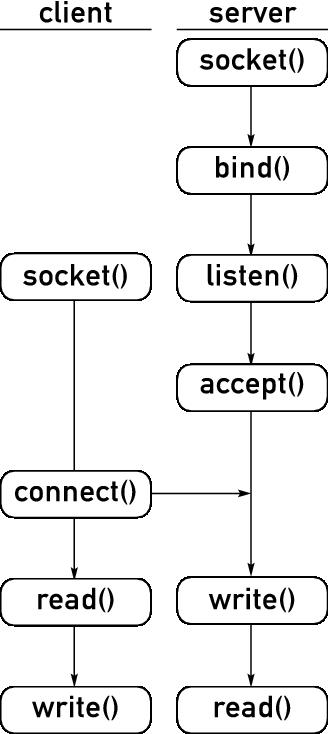
Figure 1. The FTP protocol uses two sockets: one for control messages and one for data.
Here is a list of a few the FTP commands we used. Because our program provides only a basic implementation of the protocol, we discuss only the relevant commands:
The client sends a USER <username>\r\n command to the server to begin the authentication process.
To send the password, the client uses PASS password\r\n'.
In some cases, the client sends a PORT command to inform the server of its preferred port for data transfer. In such cases, the client sends PORT <a1,a2,a3,a4,p1,p2>\r\n. The RFC for FTP requires that the a1–a4 constitute the 32-bit IP address of the client, and p1–p2 constitute the 16-bit port number. For example, if the client's IP address is 10.10.1.2 and it chooses port 12001 for data transfer, the client sends PORT 10,10,1,2,46,225.
Some FTP clients request, by default, that data be transferred in binary format, while others explicitly ask the server to enable data transfer in binary mode. Such clients send a TYPE I\r\n command to the server to request this.
Figure 2 is a diagram that shows a few FTP commands and their responses from the server.
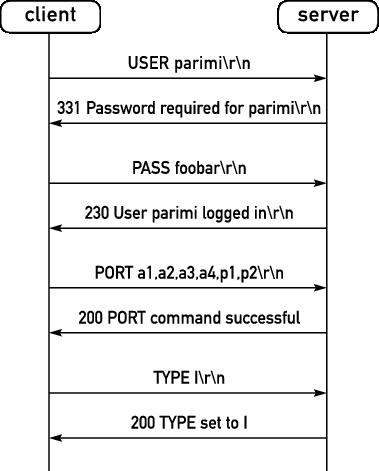
Figure 2. The client issues FTP commands over the control connection to set up the file transfer.
Writing programs in the kernel is different from doing the same in user space.
We explain a few issues concerned with writing a network application in the kernel. Refer to Greg Kroah-Hartman's article “Things You Never Should Do in the Kernel” (see the on-line Resources). First, let's examine how a system call in user space completes its task. For example, look at the socket() system call:
sockfd = socket(AF_INET,SOCK_STREAM,0);
When a program executes a system call, it traps into the kernel via an interrupt and hands over control to the kernel. Among other things, the kernel performs various tasks, such as saving contents of registers, making changes to address space boundaries and checking for errors with system call parameters. Eventually, the sys_socket() function in the kernel is responsible for creating the socket of specified address and family type, finding an unused file descriptor and returning this number back to user space. Browsing through the kernel's code we can trace the path followed by this function (Figure 3).
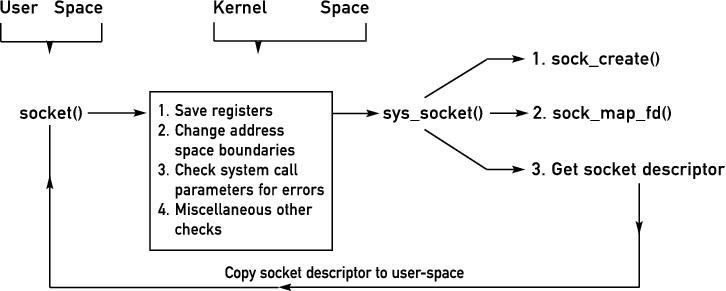
Figure 3. Behind the scenes of a system call: when user space executes socket(), the kernel does necessary housekeeping and then returns a new file descriptor.
We now explain the design and implementation of a kernel FTP client. Please follow through the code available at the Linux Journal FTP site (see Resources) as you read through the article. The main functionality of this client is written in the form of a kernel module that adds a system call dynamically that user-space programs can invoke to start the FTP client process. The module allows only the root user to read a file using FTP. The user-space program that calls the system call in this module should be used with extreme caution. For example, it is easy to imagine the catastrophic results when root runs:
./a.out 10.0.0.1 10.0.0.2 foo_file /dev/hda1/*
We first need to configure the Linux kernel to allow us to add new system calls via a kernel module dynamically. Starting with version 2.6, the symbol sys_call_table is no longer exported by the kernel. For our module to be able to add a system call dynamically, we need to add the following lines to arch/i386/kernel/i386_ksyms.c in the kernel source (assuming you are using a Pentium-class machine):
extern void *sys_call_table;
EXPORT_SYMBOL(sys_call_table);
After recompiling the kernel and booting the machine into it, we are all set to run the FTP client. Refer to the Kernel Rebuild HOWTO (see Resources) for details on compiling a kernel.
Let's examine the code for the module first. In the code snippets in the article, we omit error-checking and other irrelevant details for clarity. The complete code is available from the LJ FTP site (see Resources):
#include <linux/init.h>
#include <linux/module.h>
#include <linux/kernel.h>

/* For socket etc */
#include <linux/net.h>
#include <net/sock.h>
#include <linux/tcp.h>
#include <linux/in.h>
#include <asm/uaccess.h>
#include <linux/file.h>
#include <linux/socket.h>
#include <linux/smp_lock.h>
#include <linux/slab.h>

...

int ftp_init(void)
{

    printk(KERN_INFO FTP_STRING
    "Starting ftp client module\n");
    sys_call_table[SYSCALL_NUM] = my_sys_call;
    return 0;
}

void ftp_exit(void)
{
    printk(KERN_INFO FTP_STRING
    "Cleaning up ftp client module, bye !\n");
    sys_call_table[SYSCALL_NUM] = sys_ni_syscall;
}

...
The program begins with the customary include directives. Notable among the header files are linux/kernel.h for KERN_ALERT and linux/slab.h, which contains definitions for kmalloc() and linux/smp_lock.h that define kernel-locking routines. System calls are handled in the kernel by functions with the same names in user space but are prefixed with sys_. For example, the sys_socket function in the kernel handles the task of the socket() system call. In this module, we are using system call number 223 for our new system call. This method is not foolproof and will not work on SMP machines. Upon unloading the module, we unregister our system call.
The workhorse of the module is the new system call that performs an FTP read. The system call takes a structure as a parameter. The structure is self-explanatory and is given below:
struct params {
    /* Destination IP address */
    unsigned char destip[4];
    /* Source IP address */
    unsigned char srcip[4];
    /* Source file - file to be downloaded from
       the server */
    char src[64];
    /* Destination file - local file where the
       downloaded file is copied */
    char dst[64];
    char user[16]; /* Username */
    char pass[64]; /* Password */
};
The system call is given below. We explain the relevant details in next few paragraphs:
asmlinkage int my_sys_call
(struct params __user *pm)
{
    struct sockaddr_in saddr, daddr;
    struct socket *control= NULL;
    struct socket *data = NULL;
    struct socket *new_sock = NULL;

    int r = -1;
    char *response = kmalloc(SNDBUF, GFP_KERNEL);
    char *reply = kmalloc(RCVBUF, GFP_KERNEL);

    struct params pmk;

    if(unlikely(!access_ok(VERIFY_READ,
                 pm, sizeof(pm))))
        return -EFAULT;
    if(copy_from_user(&pmk, pm,
       sizeof(struct params)))
        return -EFAULT;
    if(current->uid != 0)
        return r;

    r = sock_create(PF_INET, SOCK_STREAM,
                    IPPROTO_TCP, &control);

    memset(&servaddr,0, sizeof(servaddr));
    servaddr.sin_family = AF_INET;
    servaddr.sin_port = htons(PORT);
    servaddr.sin_addr.s_addr =
        htonl(create_address(128, 196, 40, 225));

    r = control->ops->connect(control,
             (struct sockaddr *) &servaddr,
             sizeof(servaddr), O_RDWR);
    read_response(control, response);
    sprintf(temp, "USER %s\r\n", pmk.user);
    send_reply(control, temp);
    read_response(control, response);
    sprintf(temp, "PASS %s\r\n", pmk.pass);
    send_reply(control, temp);
    read_response(control, response);
We start out by declaring pointers to a few socket structures. kmalloc() is the kernel equivalent of malloc() and is used to allocate memory for our character array. The array's response and reply will contain the responses to and replies from the server.
The first step is to read the parameters from user mode to kernel mode. This is customarily done with access_ok and verify_read/verify_write calls. access_ok checks whether the user-space pointer is valid to be referenced. verify_read is used to read data from user mode. For reading simple variables like char and int, use __get_user.
Now that we have the user-specified parameters, the next step is to create a control socket and establish a connection with the FTP server. sock_create() does this for us—its arguments are similar to those we pass to the user-level socket() system call. The struct sockaddr_in variable servaddr is now filled in with all the necessary information—address family, destination port and IP address of the server. Each socket structure has a member that is a pointer to a structure of type struct proto_ops. This structure contains a list of function pointers to all the operations that can be performed on a socket. We use the connect() function of this structure to establish a connection to the server. Our functions read_response() and send_reply() transfer data between the client and server (these functions are explained later):
r = sock_create(PF_INET, SOCK_STREAM,
                IPPROTO_TCP, &data);
memset(&claddr,0, sizeof(claddr));
claddr.sin_family = AF_INET;
claddr.sin_port = htons(EPH_PORT);
clddr.sin_addr.s_addr= htonl(
                       create_address(srcip));
r = data->ops->bind(data,
         (struct sockaddr *)&claddr,
         sizeof (claddr));
r = data->ops->listen(data, 1);
Now, a data socket is created to transfer data between the client and server. We fill in another struct sockaddr_in variable claddr with information about the client—protocol family, local unprivileged port that our client would bind to and, of course, the IP address. Next, the socket is bound to the ephemeral port EPH_PORT. The function listen() lets the kernel know that this socket can accept incoming connections:
a = (char *)&claddr.sin_addr;
p = (char *)&claddr.sin_port;

send_reply(control, reply);
read_response(control, response);

strcpy(reply, "RETR ");
strcat(reply, src);
strcat(reply, "\r\n");

send_reply(control, reply);
read_response(control, response);
As explained previously, a PORT command is issued to the FTP server to let it know the port for data transfer. This command is sent over the control socket and not over the data socket:
new_sock = sock_alloc();
new_sock->type = data->type;
new_sock->ops = data->ops;

r = data->ops->accept(data, new_sock, 0);
new_sock->ops->getname(new_sock,
    (struct sockaddr *)address, &len, 2);
Now, the client is ready to accept data from the server. We create a new socket and assign it the same type and ops as our data socket. The accept() function pulls the first pending connection in the listen queue and creates a new socket with the same connection properties as data. The new socket thus created handles all data transfer between the client and server. The getname() function gets the address at the other end of the socket. The last three lines in the above segment of code are useful only for printing information about the server:
if((total_written = write_to_file(pmk.dst,
            new_sock, response)) < 0)
    goto err3;
The function write_to_file deals with opening a file in the kernel and writing data from the socket back into the file. Writing to sockets works like this:
void send_reply(struct socket *sock, char *str)
{
    send_sync_buf(sock, str, strlen(str),
                  MSG_DONTWAIT);
}


int send_sync_buf
(struct socket *sock, const char *buf,
 const size_t length, unsigned long flags)
{
    struct msghdr msg;
    struct iovec iov;
    int len, written = 0, left = length;
    mm_segment_t oldmm;

    msg.msg_name     = 0;
    msg.msg_namelen  = 0;
    msg.msg_iov      = &iov;
    msg.msg_iovlen   = 1;
    msg.msg_control  = NULL;
    msg.msg_controllen = 0;
    msg.msg_flags    = flags;

    oldmm = get_fs(); set_fs(KERNEL_DS);

repeat_send:
    msg.msg_iov->iov_len = left;
    msg.msg_iov->iov_base = (char *) buf +
                                written;

    len = sock_sendmsg(sock, &msg, left);
    ...
    return written ? written : len;
}
The send_reply() function calls send_sync_buf(), which does the real job of sending the message by calling sock_sendmsg(). The function sock_sendmsg() takes a pointer to struct socket, the message to be sent and the message length. The message is represented by the struture msghdr. One of the important members of this structure is iov (io vector). The iovector has two members, iov_base and iov_len:
struct iovec
{
    /* Should point to message buffer */
    void *iov_base;
    /* Message length */
    __kernel_size_t iov_len;
};
These members are filled with appropriate values, and sock_sendmsg() is called to send the message.
The macro set_fs is used to set the FS register to point to the kernel data segment. This allows sock_sendmsg() to find the data in the kernel data segment instead of the user-space data segment. The macro get_fs saves the old value of FS. After a call to sock_sendmsg(), the saved value of FS is restored.
Reading from the socket works similarly:
int read_response(struct socket *sock, char *str)
{
        ...
        len = sock_recvmsg(sock, &msg,
                max_size, 0);
        ...
        return len;
}
The read_response() function is similar to send_reply(). After filling the msghdr structure appropriately, it uses sock_recvmsg() to read data from a socket and returns the number of bytes read.
Now, let's take a look at a user-space program that invokes our system call to transfer a file. We explain the relevant details for calling a new system call:
...
#define __NR_my_sys_call 223
_syscall1(long long int, my_sys_call,
          struct params *, p);

int main(int argc, char **argv)
{
  struct params pm;
  /* fill pm with appropriate values */
  ...
  r =  my_sys_call(&pm);
  ...
}
#define __NR_my_sys_call 223 assigns a number to our system call. _syscall1() is a macro that creates a stub for the system call. It shows the type and number of arguments that our system call expects. With this in place, my_sys_call can be invoked just like any other system call. Upon running the program, with correct values for the source and destination files, a file from a remote FTP server is downloaded onto the client machine. Here is a transcript of a sample run:
# make
make -C /lib/modules/2.6.9/build SUBDIRS=/home/ppadala/ftp modules
make[1]: Entering directory `/home/ppadala/linux-2.6.9'
  CC [M]  /home/ppadala/ftp/ftp.o
  Building modules, stage 2.
  MODPOST
  CC      /home/ppadala/ftp/ftp.mod.o
  LD [M]  /home/ppadala/ftp/ftp.ko
make[1]: Leaving directory `/home/ppadala/linux-2.6.9'
# gcc do_ftp.c
# ./a.out <local host's IP address> 152.2.210.80 /README /tmp/README anonymous anon@cs.edu
Connection from 152.2.210.80
return = 215 (length of file copied)
We have seen a basic implementation of an FTP client within the kernel. This article explains various issues of socket programming in the kernel. Interested readers can follow these ideas to write various network applications, such as an HTTP client or even a Web server in the kernel. Kernel applications, such as the TUX Web server are used for high-performance content serving and are well suited for environments that demand data transfer at high rates. Careful attention has to be paid to the design, implementation and security issues of such applications.
Resources for this article: /article/8453.
Pradeep Padala is a PhD student at the University of Michigan. His general interests are in distributed systems with specific emphasis on scheduling and fault tolerance. He is the author of the NCurses Programming HOWTO and contributes to various open-source projects. More about him can be found on his Web site at www.eecs.umich.edu/~ppadala.
Ravi Parimi has a Master's degree in Computer Engineering and currently works in Silicon Valley, California. His main interests are in operating systems, networking and Internet security. He has been using Linux since 1998 and aspires to be a kernel hacker. In his free time, he pursues Vedic studies and Chess.

