
Cooking with Linux - It's a Cross Platform, All Right!
Yes, I admit it, François. That's very funny. When I told you that this month's theme was cross-platform development, I didn't mean platforms that make you cross, although I can understand thinking of some OSes as cross platforms. As amusing as those images are, I think the artwork you chose for the menus tonight might raise a few eyebrows, despite our, shall we say, sympathetic audience.
Speaking of which, I see that our guests have arrived. Welcome, mes amis, to Chez Marcel, home of exceptional Linux fare, one of the world's greatest wine cellars and the greatest customers in the world. Make yourselves comfortable. François and I were discussing the theme of this month's issue, cross-platform development, and my waiter was getting a little rambunctious. It almost seems as though we should bring out a white Zinfandel for this, but luckily, we have none in stock. François, to the cellar, immédiatement! Bring up the 1992 Napa Valley Cabernet Sauvignon. Vite!
As many of you know, Microsoft Windows remains a part of the average business IT department. Many of us must be able to exchange information between Windows and Linux. For example, somehow you convinced management to let you run Linux on your workstations instead of Windows. Maybe you are using your own notebook. Whatever the reason, you now are going to have to deal with the Windows workgroup or domain and the appropriate shared files and printers. Although Jon in accounting isn't particularly fond of his Windows XP box, many important files are shared from that machine, files that are shared in the network neighborhood.
You might ask yourself how easy it is to take advantage of the network neighborhood. This is an interesting question considering how many file and print servers out there aren't running Windows but Linux, providing the file sharing experience through Samba. Consequently, it isn't surprising that Samba-compatible client software tends to come as part of the standard installation on most modern Linux distributions. What that means is you can connect to a Windows share on the network using the smbclient program, started with smbclient -L sedna, which would produce a report of shares that looks something like this:
Domain=[ACCOUNTING] OS=[Windows 5.1] Server=[Windows 2000 LAN Manager]

        Sharename      Type      Comment
        ---------      ----      -------
        SEDNA_C        Disk
        IPC$           IPC       Remote IPC
        Reports        Disk
        Policies       Disk
Assuming you had permission to view the Reports folder, you could connect to it like this:
smbclient //sedna/reports -U winuser
In the above example, I am connecting to a Windows XP box from my Linux workstation as user winuser. The system then asks me for a password, after which I am taken to a Samba prompt that looks like this:
Domain=[ACCOUNTING] OS=[Windows 5.1] Server=[Windows 2000 LAN Manager]
smb: \>
From there, type help and smbclient offers up a list of all the things you can do while connected using the commands at your disposal. A number of them are obvious things, such as dir, copy and so on. Although all of this is good, it's not pretty in the graphical sense and you can't use this while working in your graphical file managers or inside OpenOffice.org's applications.
Whether you are using KDE or GNOME as your desktop environment, rest assured that all the tools you need to join the network neighborhood are right there at your disposal. Best of all, it's extremely easy to do. Let's start by taking a look at Konqueror.
Open up Konqueror (either as the file manager or the browser) and type smb:/ in the Location field.
Samba servers or Windows machines advertising network shares first appear in the browser window under their workgroup name (for example, ACCOUNTING, SALESGRP). Figure 1 shows a Konqueror session with a two-panel view; click Window on the menubar and select Split View, Left/Right. In the left panel, we have the basic network browser view with three active workgroups. In the right-hand panel, I've clicked on the ACCOUNTING workgroup to show the computers belonging to that group.
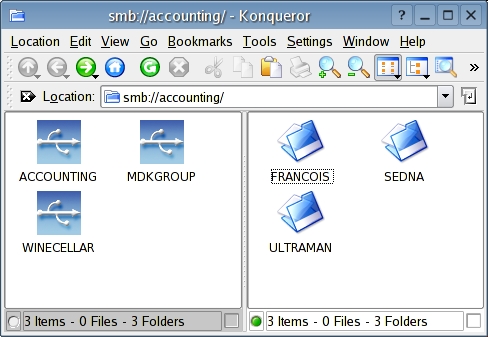
Figure 1. Using Konqueror to Browse Workgroups
To read, write or otherwise make use of the files shared on those computers, double-click on the corresponding folder for that computer—François' computer for instance. All of the available shared directories (or folders) then are visible (Figure 2).
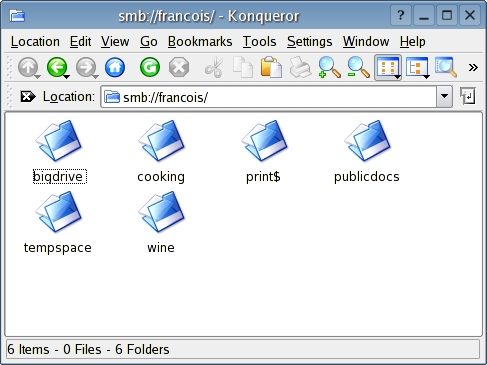
Figure 2. Once connected, browsing is basic file manager navigation.
From here, it's all classic drag and drop, graphical file manager browsing. By clicking (or double-clicking, depending on the configuration), I can go inside the cooking folder, locate the appropriate document and open it with OpenOffice.org Writer if I choose. (Right-click on the file, select Open with and voilà, I'm editing a document on a shared Windows resource.)
Ideally, we don't want to go through this whole navigation process each and every time. To bring a given network share a few clicks closer, simply bookmark the appropriate shared folder.
Over on the GNOME side of things, we have Nautilus. You should find the process similar to what we went through with Konqueror. Start Nautilus and type smb:/// in the Location bar. Nautilus then displays the active workgroups on the network (Figure 3).
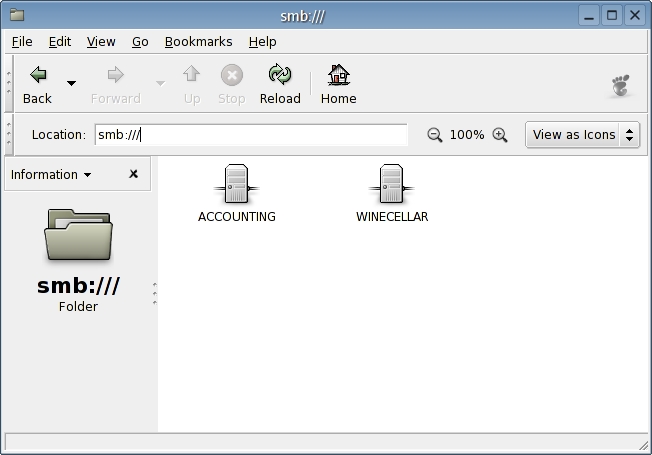
Figure 3. Nautilus in SMB Network Browse Mode
From there, you can double-click on one of the workgroups to select a computer. Then, from the list of computers, double-click on your choice, and you can browse the individual resources offered (Figure 4). Be aware that when you move around from computer to computer like this, you occasionally may be asked for a user name and password for that computer or even the specific folder.
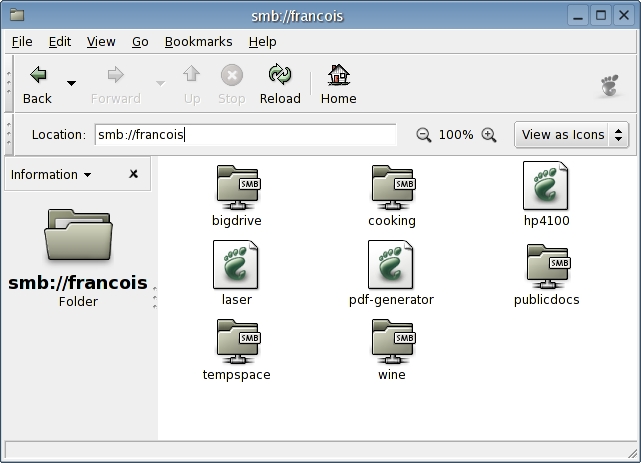
Figure 4. Windows and Samba shares are accessed easily.
As with the Konqueror example before this, you can save yourself a little time by bookmarking the folder of your choice. The problem with both of the suggestions I've made is that neither of them lets you permanently mount network drives. Accessing a particular folder requires that you do a little command-line work, an easy enough process but not quite the point-and-click ease that Windows users on your network want to see. Let's have François refill our glasses while we take a look at a way to solve this dilemma.
For a more robust and flexible means of working in and with the network neighborhood, you simply must take a look at Smb4K, a super-classy SMB browser tool that also is flexible and powerful. Furthermore, Smb4K makes it possible to preview shares, mount shares locally without needing to run as root, reconnect automatically on startup and more.
At the time of this writing, Smb4K was sitting at the 0.3.2 release, but I found it to be a capable package and definitely worth the time it takes to investigate. Binary packages for Debian, SuSE and Fedora are available from the site, as is the full source. Building Smb4K from source is as easy as the classic extract and build five-step:
tar -xzvf smb4k-0.3.2.tar.gz
cd smb4k-0.3.2
./configure --prefix=/usr
make
su -c "make install"
When you have installed the package, run the program by calling smb4k. As soon as you start Smb4K, it scans the network looking for active shares. You can fine-tune its functionality, including such options as whether you want shares to be reconnected automatically by clicking on Settings in the menubar and selecting Configure Smb4K. The graphical interface is intuitive and easy to navigate, and the package as a whole is easy to use.
The display is divided into a left-hand side navigation panel where workgroups, computers and shares can be listed and navigated. To mount a share, right-click on it and select mount. If you would rather see what you are getting into first, choose Preview instead.
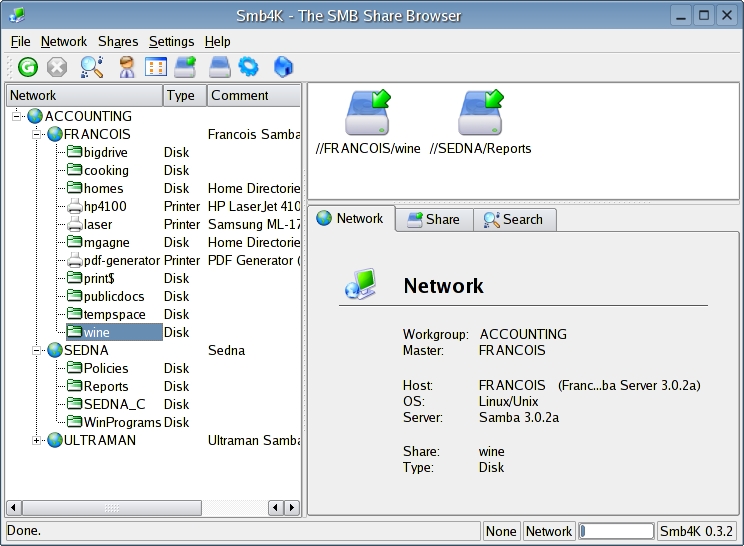
Figure 5. Smb4K: could this be the ultimate SMB browser?
Mounted drives appear in the top right-hand window as drive icons. Double-clicking on one of the drive icons calls Konqueror. If you run df from the command line, you see that the drives now are mounted for your use in your own home directory under an Smb4K directory prefix. For instance, for the example in Figure 5, the listing looks like this:
Filesystem       Size Used Avail Use% Mounted on
//SEDNA/Reports  4.0G 3.0G  1.1G  75% /home/marcel/smb4k/SEDNA/Reports
//FRANCOIS/wine   13G 8.8G  3.3G  73% /home/marcel/smb4k/FRANCOIS/wine
Now, any of my applications—whether KDE, GNOME, shell-based or anything else—can access the shares. Being part of the neighborhood has never been easier.
Mon Dieu, mes amis, closing time has come so quickly. François, would you be so kind as to refill our guests' glasses a final time? We certainly don't want anyone going home cross, and with the items on today's menu, the neighborhood's doors all are open to you. Until next time, mes amis, let us all drink to one another's health. A v�re sant� Bon app�it!
Resources for this article: /article/7548.
Marcel Gagné (mggagne@salmar.com) lives in Mississauga, Ontario. He is the author of Moving to Linux: Kiss the Blue Screen of Death Goodbye! (ISBN 0-321-15998-5) from Addison Wesley. His first book is the highly acclaimed Linux System Administration: A User's Guide (ISBN 0-201-71934-7). In real life, he is president of Salmar Consulting, Inc., a systems integration and network consulting firm.

