
At the Forge - Slash
The popularity of Weblogs, also known as blogs, has been growing for several years and shows no signs of letting up. Although many Webloggers continue to record their thoughts using third-party services, such as LiveJournal and Blogger, running a Weblog on your own server is becoming easier to do. Over the last few months, we have looked at several different packages that provide this functionality, including COREBlog, a Zope product, and Blosxom, a set of CGI programs written in Perl.
Last month, we looked at a slightly different type of system for Weblogs when we examined XOOPS. XOOPS, like its cousins PHPNuke and PostNuke, allows users to create content management and on-line communities as well as administer users and groups. XOOPS makes it easy to give each user on a system his or her own personal Weblog.
As popular as XOOPS may be, the undisputed granddaddy of community software is Slash, which powers the popular Slashdot.org and use.perl.org Web sites. Slash primarily is used to disseminate news articles and comments, but it has a powerful Weblog feature that is available to every user on the system. Some would argue that Slashdot itself is a community-authored Weblog, an argument I also find somewhat convincing. Best of all, this Weblog feature is combined into other elements of the site. Thus, when you see a particularly insightful or insipid comment from another user, you immediately can view that user's journal to learn more.
This month, we look at the installation and configuration of a simple Slash site, with built-in support for users and Weblogs, or journals, as they are called in Slash lingo. Next month, we will take a closer look at the Weblog functionality available on Slash, as well as how to configure and change it to suit our particular needs.
The main distribution and discussion site for Slash is Slashcode. As I write this in early April 2004, the most recent posting is titled, “Making Slash Install Friendly”, in which the author asks if there are clear and simple directions for installing Slash. Unfortunately, the answer appears to be no. This is the case for several reasons:
The Slash documentation and instructions point most people to the officially released .tar.gz packages, and these packages are more than two years out of date.
The latest CVS version is freely available and up to date but potentially unstable, unless you know which tagged version to grab.
The installation is a fairly manual process, with room for error at several critical points.
The documentation for Slash is somewhat lacking in quality.
Even if you get a recent, working copy of the code installed, full Slash installation requires installing mod_perl, Template Toolkit, MySQL and a number of other Perl modules and standalone tools, each having its own slightly odd and nonstandard options.
If you are an expert with mod_perl, MySQL and Apache, installing Slash is a slightly annoying but doable process. If you are less than an expert, the results probably are worthwhile, but you should expect to learn quite a bit about each of these technologies along the way. You may find yourself turning to the IRC channel and Web site for support and ideas.
The first step in installing Slash is to install Apache, mod_perl and MySQL. Any modern version of MySQL works fine; the real problems are with Apache and mod_perl, which can be tricky for first-timers to install. Luckily, this part of the installation process has not changed significantly over the years, meaning that you can follow the MySQL, Apache and mod_perl installation instructions at the InstallSlash site (see the on-line Resources section). If neither Perl nor expat are installed on your system, you should follow the InstallSlash instructions for those as well. Remember that on Red Hat and Fedora systems, you need to install not only the expat RPM but the expat-devel RPM too. You also need to define a MySQL database into which site information can be stored; by default, this is called slashdb.
A major source of trouble when compiling Apache and mod_perl is the need to define EVERYTHING=1. This activates all of mod_perl's hooks, allowing mod_perl to override all of Apache's default behavior, including authentication, authorization, URL rewriting and logging. Without defining EVERYTHING=1, mod_perl can generate only content. If your system came with mod_perl installed, it probably was not compiled with EVERYTHING=1 defined, meaning that you need to compile it again by yourself.
The Slash instructions also advise system administrators to set PERL_MARK_WHERE=1 when compiling, although the mod_perl code and documentation indicate this directive removes most undefined value warnings from the error log. I ignored this suggestion and used Slash on my existing mod_perl installation, and I did not notice any ill effects.
Finally, you should install the Bundle::Slash package from CPAN (a worldwide network of servers containing freely available Perl modules and documentation) on your system, using the automatic CPAN tools. Actually, Bundle::Slash does not contain any code; it lists the modules you need in order to run Slash. In this way, it saves you from having to remember (and type in) all of the Slash-related modules that must be installed. You can install these modules while logged in as root by typing:
# perl -MCPAN -e 'install Bundle::Slash'
If you never have used CPAN before, you will be asked to define a number of CPAN-related parameters, including the closest CPAN archive from which you can retrieve modules. This can be a bit tricky the first time, although you probably can accept the defaults without suffering any consequences.
One complicated part about installing these CPAN modules is DBIx::Password, which asks for some site-specific information when it is installed. The InstallSlash directions indicate what you should type in response to the prompts. If you decide to change values for reasons of security or personal taste, be sure to remember what names you used.
The most difficult part of the Bundle::Slash download is the Template Toolkit installation. Template Toolkit is a popular and powerful templating system for mod_perl, and it is used to display the various pages within a Slash site in a consistent and efficient manner.
At this point, you need to download and install the Slash code itself. The InstallSlash instructions walk you through the download and installation process for the latest packaged version (2.2.6), which is on SourceForge. However, as I indicated above, a great deal of development has happened in the two years since 2.2.6 was released, and those improvements are available only in the CVS version. You can retrieve the latest version from CVS and save it in a directory named slash with the following command:
cvs -z3 -d:pserver:anonymous@cvs.sourceforge.net:
↪/cvsroot/slashcode co -r T_2_3_0_148 slash
At the same time, checking out the latest CVS version from SourceForge has its own pitfalls, because you run the risk of installing code recently checked in but not tested. The best solution is to use a tagged version. As experienced CVS developers know, each file in CVS has its own revision number, such as 1.5 or 2.8 or 3.1.1.2. These revision numbers reflect the revision of the individual file and have nothing to do with the overall project. Thus, although a software project might be released to the public as version 2.0, the individual files almost certainly do not have revision numbers of 2.0. To assign a collective name (or number) to the current state of all files in a project, you must use tags, sometimes known as symbolic revisions. Assuming that you have write privileges, you can tag all of the files in the current directory release-2-0 with the following:
cvs tag release-2-0
Tags cannot contain certain characters, including periods and commas. This is why we needed to use a hyphen rather than a period to indicate release 2.0 of our software. This raises the question of which tag you can or should retrieve. In the case of Slash, the code is moving slowly toward the 2.3.0 release, and the developers have standardized on tags that look like T_2_3_0_XXX, where T stands for tested and XXX is incremented with each new tag. As of this writing, the latest tag is T_2_3_0_148; it can be retrieved with:
cvs -z3 -d:pserver:anonymous@cvs.sourceforge.net:
↪/cvsroot/slashcode co -r T_2_3_0_148 slash
This command creates a directory named slash and puts all of the Slash-related code, libraries and documentation into it. Particularly helpful is the INSTALL file, which is an up-to-date version of the directions designed to work with the CVS version you just checked out. I followed the directions in this file, typing make install to install all of the Slash components. A message from the installation procedure indicates what command to add to the end of the Apache configuration file. This ensures that Apache includes the appropriate Perl modules at startup, reducing mod_perl's memory footprint and execution time significantly.
One of the nice things about Slash is that it can handle multiple sites easily using the same code. That is, if you decide you want to have separate on-line communities for Perl, Python, Tcl and Ruby, Slash can handle this for you. Each community needs its own hostname, but they can be totally distinct from one another. In other words, installing a Slash site is a separate procedure from installing the Slash software. Once the software is installed, in /usr/local/slash by default, you can create a new site by running:
/usr/local/slash/bin/install-slashsite -u USER
Here, USER is the same virtual user you created back when you installed DBIx::Password. By default, this user is virtslash. install-slashsite asks several more questions, including the administrator user name and password, and then tells you to stop and start Apache with the apachectl program, typically installed in /usr/local/apache/sbin. You should not use apachectl's restart command. Especially when working with mod_perl, you should always stop Apache, pause a few seconds to allow the processes to exit completely, and then start it again.
When I tried to run install-slashsite, I discovered that at least one CPAN module (LWP::Parallel::UserAgent) was missing. It did not take too long to install it, but I was frustrated to discover that neither Bundle::Slash nor make install noticed or fixed this.
Your Slash site now is ready for use. On my machine, named chaim-weizmann on my private home network, I was able to view my site by going to http://chaim-weizmann.
Of course, a newly installed Slash site is not very exciting. If you log in using the administrator user name and password you gave to install-slashsite, you are given a number of options and menus that provide a fair amount of control over the system. Many of the menus are hard to find, and it takes some time before a new Slash administrator will understand where different changes are made, either on the Web site or in the on-disk templates and programs. A good introduction to Slash-site maintenance, slashguide.pod, is in the docs directory that comes with the CVS version of Slash.
But, if you are at all familiar with the original Slashdot site, you should be able to start posting stories and soliciting comments right away. While logged in as the site administrator, click on the New link at the top of the home page. Enter a topic, title, department, intro copy (displayed on the home page) and extended copy (displayed on the individual story page). You even can set up a poll or link a story to an existing poll. Once the story is approved, it is visible to the entire world. Visitors to the site optionally can be allowed to comment and even can act as moderators. Indeed, the community moderation and meta-moderation of Slash stories is one of the most intriguing ideas that Slash has brought to the table.

Figure 1. Enter the text here...
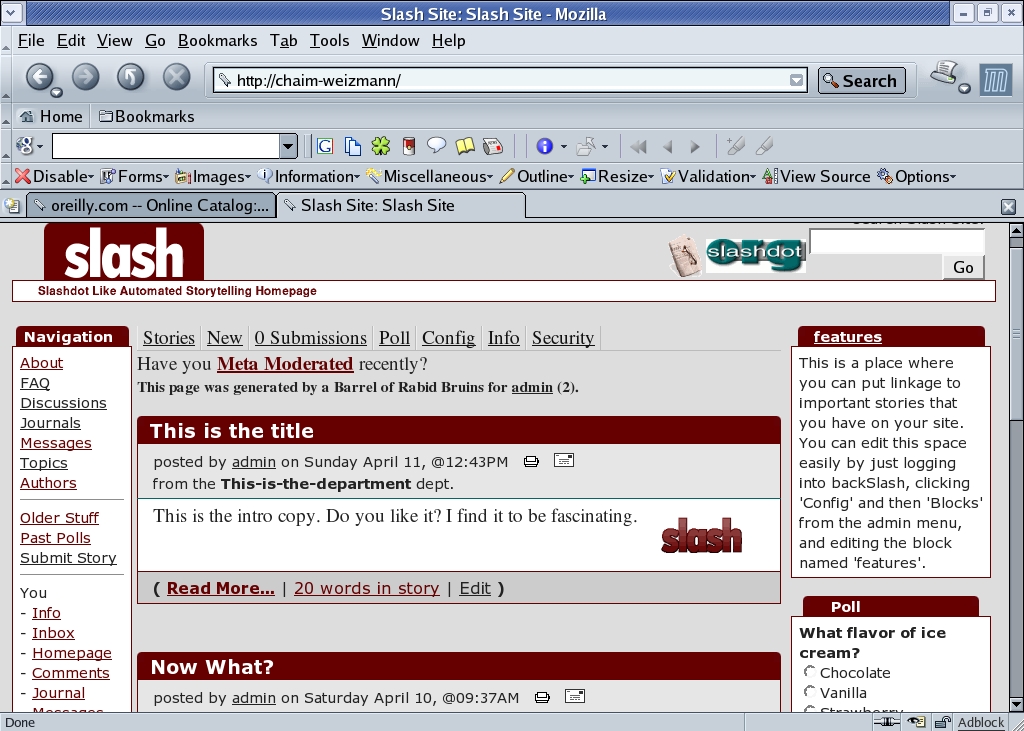
Figure 2. ...and it appears like this.
Slash is more difficult to install than any of the other packages we have discussed to date. This is partly due to the authors' choice of technology, because mod_perl inherently is more difficult to install than is PHP, used by XOOPS, or Zope. At the same time, Slash provides more community and Weblog functions than the other packages, is known to handle a high load and continues to be maintained at a fairly high level.
If you aren't afraid to get your hands dirty, and if you want the functionality the Slashdot site provides, Slash may be a good choice for Weblogs written by a community or by individuals. Next month, we will look at the personal journals that Slash allows people to make, along with the friend system that allows people to categorize other users on the system, creating a virtual community that reflects the real world.
Resources for this article: /article/7545.
Reuven M. Lerner, a longtime Web/database consultant and developer, is now a first-year graduate student in the Learning Sciences program at Northwestern University. His Weblog is at altneuland.lerner.co.il, and you can reach him at reuven@lerner.co.il.
