
Ximba Radio: Developing a GTK+/Glade GUI to XM Satellite Radio
As American TV slowly sinks into the abyss of fictional reality, you may find yourself, like me, returning to the roots of electronic entertainment—radio. Satellite radio is the latest incarnation of this medium, offering a wide range of stations accessible from nearly anywhere you can drive your car.
Because I spend more of my time in front of a monitor than behind a steering wheel, I was fortunate to find a PC-based solution for satellite radio. XMPCR is a USB-connected receiver for the XM Radio satellite system that is sold primarily for Microsoft Windows systems. The device is supported under Linux by the OpenXM Project, a set of Perl scripts that acts as a network dæmon for controlling the device. Unfortunately, the only user interface for the dæmon is a limited text-based tool.
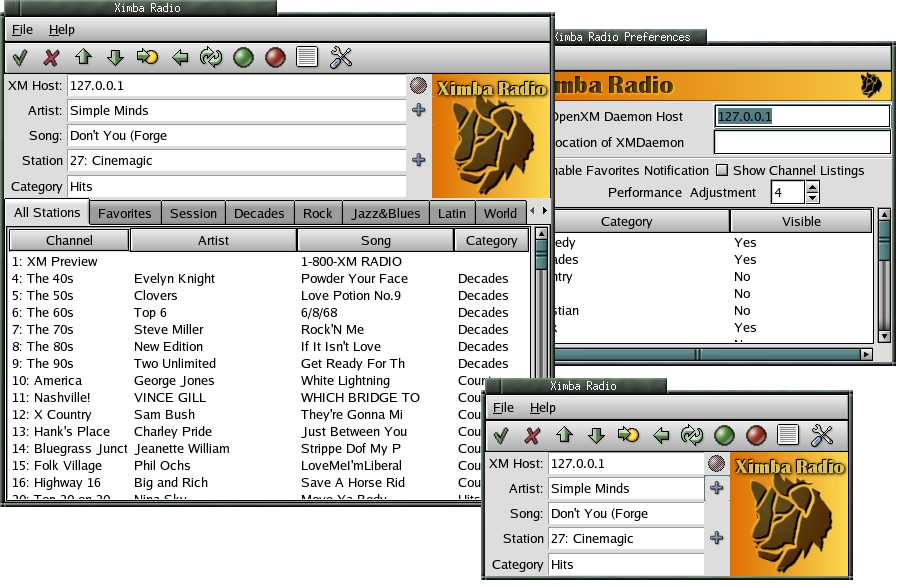
Figure 1. The main window, channels listings and preferences. The second version shows the minimalist form, with the channel listings hidden.
Ximba Radio was born as a graphical front end to OpenXM. The application provides a minimalist main window with current channel information that can be expanded to show channel listings and user favorites. A button bar across the top offers easy management of the radio and station navigation as well as quick access to configuration options. The menu bar gives users the comfort of a traditional desktop application.
Channel listings are shown in multiple formats. A main channel listing window shows all channels, and category-specific tabs show related channels. Separate tabs provide access to user-selectable artist and channel favorites along with a current session history. Category tabs can be hidden using the Preferences dialog, which also allows a user to set performance settings and favorites notices.
On the back side of Ximba Radio is the OpenXM dæmon. This Perl script and associated Perl module drive the connection to the USB port. The dæmon reads from a configuration file or can take command-line arguments. Communication with the dæmon occurs on a configurable TCP port with a list of acceptable clients. The dæmon also can run on Windows systems.
My goals for this application were to match the functionality of the Windows version, provide a minimalist interface and be simple to configure. Also, implementation would need to be completed in less than one man-week (40 hours).
Another goal was to keep the user-interface code as independent of the application code as possible. Application code should be able to be used with any suitable user interface, so a good design could have a curses or Web interface dropped on top with little additional work. This goal is in line with GNOME development guidelines as well as future plans for Glade.
To meet these goals, I planned to use a single header file and a single C module. To speed the implementation and solve some time-consuming problems, I opted to use global variables. Remember, this is a prototype of a simple desktop application, not an enterprise-ready 24/7 fault-tolerant behemoth. If managed correctly, the use of globals can be removed with future updates.
With goals in hand, I started working with Glade to sculpt the user interface; I cover specific code details in the next section. I configured Glade to generate C code and took the default settings for everything else in the Options dialog. Most important here are the source and header files that hold the user-interface definitions (interface.c) and the widget callbacks (callbacks.c), along with the option to generate a main.c file.
Glade generates a complete build environment for building an application. This includes the source directory (src) and a directory for image files (pixmaps). Image files used in GtkImage widgets need to be in .xpm format. Other generated files include autoconf and automake templates and pot files for internationalized strings.
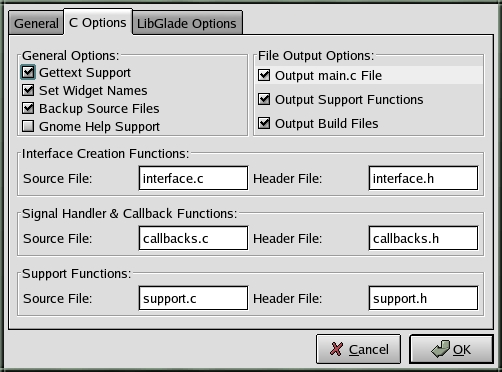
Figure 2. The Options dialog for Glade allows you to generate code, specify filenames and choose support for internationalized text.
Internationalization is optional and handled with GNU gettext support. The interface.c file, for example, has gettext-enabled strings. Even with this option enabled, you don't have to create pot files for any language; Glade simply uses any text strings you provide as the default language.
I found that prototyping Ximba Radio with Glade required hand-editing only two of the generated files, main.c and callbacks.c. The former required only minor additions for initialization options related to configuration handling for the application. The callbacks.c file was modified mostly to pass calls to my C module, utils.c.
As I edited my project in Glade and regenerated the C code, the callbacks.c file was appended with new functions. Fortunately, Glade does a good job of knowing when a callback already exists and didn't destroy any of my changes. Unfortunately, it sometimes re-adds an existing function. It was necessary to pull out those extra functions manually from time to time. When using libGlade, which processes the Glade XML file directly instead of using generated C code, this problem does not exist. Discussion of libGlade is beyond the scope of this article.
Ximba Radio required two primary windows, the Main Window and the Preferences Dialog, and a number of secondary pop-up windows. The Main Window's button bar was created with Glade's toolbar widget, and the buttons were added to that manually. GTK+ buttons can have text or images. Glade allows a choice of application images, stock buttons or stock icons. Stock buttons use the same icons as stock icons except that tooltips are not available. Because of this, I suggest using stock icons and leaving the stock button field blank.
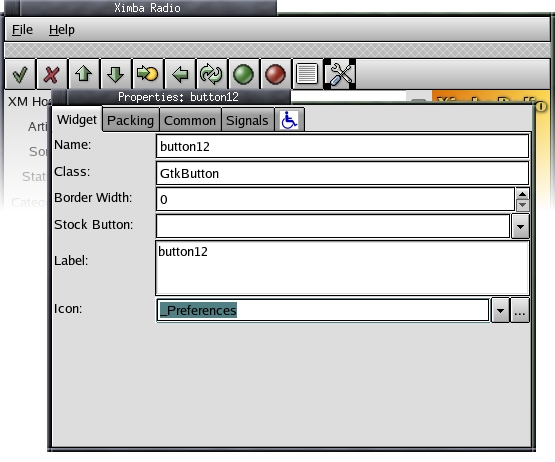
Figure 3. Glade's toolbar widget and the properties used to set icons in buttons inside a toolbar.
Each button in the toolbar has a single callback function attached to the click signal. The callback function can have any name and, if desired, be passed the name of the widget itself as an argument. For callbacks attached to click signals, the latter is not necessary. In callbacks attached to realize signals, which I discuss in a moment, the widget name is passed to the function.
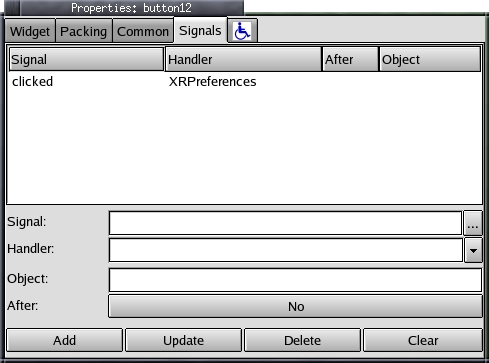
Figure 4. Buttons in the toolbar have a single callback attached to the clicked signal.
I added three GtkImage widgets in the Main Window. The first is a State icon positioned to the right of the Host name field. I set this to the Remove icon—Glade offers many stock icons—to show no connection to the dæmon. To show a connected state I used the Apply icon. In order to change the icon at runtime, I saved the widget ID of this GtkImage in a realize callback. During normal use, this icon also can be changed to the Off stock icon in order to show a connected but muted state. I examine the code for handling these changes in the next section.
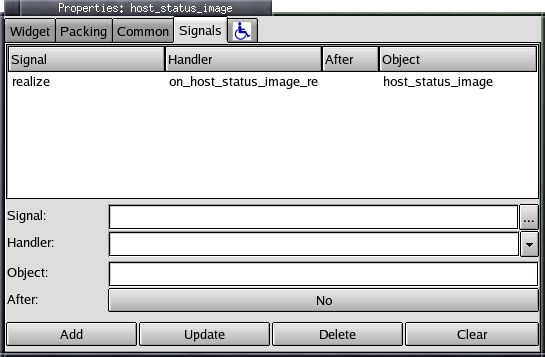
Figure 5. The State icon needs a realize callback to get the name of the widget so we can update it at runtime.
The Favorites buttons are plus signs. Glade and GTK+ call these Add icons. These buttons have a single callback attached to their click signal. The callback adds the current artist or channel to the appropriate list of favorites. The menu bar at the top of the main window was created using Glade's built-in Menu Editor. The editor has many options, but for this project I used only the Label, Name and Handler options, the latter to define the function to be called when the menu item was selected.
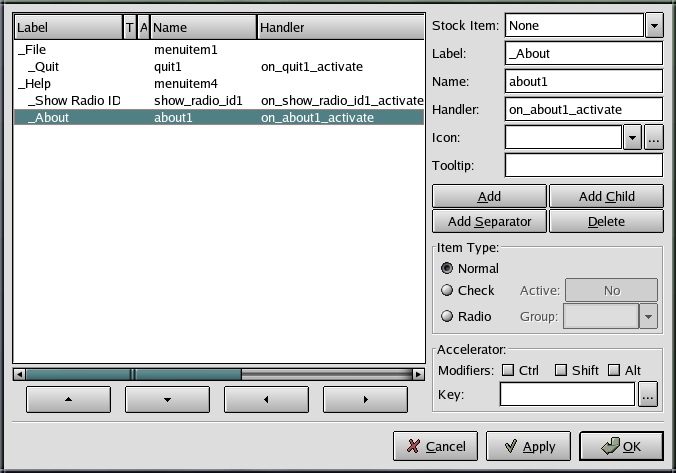
Figure 6. Glade's Menu Editor offers many options, but only Label, Name and Handler are necessary for our prototype.
A notebook widget provides access to the complete channel listings, as well as category, favorite and session-specific listings. All of these are provided through the CList widget. Glade fully supports this widget even though GTK+ prefers that new code use the newer and more complex Tree and List widget. I cover this controversial decision in more detail a little later.
Figure 7. Glade fully supports the CList widget, which is preferred over the Tree and List widget for simple list management.
Glade generates empty functions for callbacks, often referred to as stub functions. The stub functions make it possible to follow a simple process in prototype development: design the UI, generate code, write callbacks, test and repeat. I left most of the callback coding—aside from menu quit functions—until after the UI was complete. Later, I went back and filled in the callbacks. This methodology allowed me to experiment with the layout of the application before having to get involved too deeply with what that layout actually would do. Again, this is part of the whole goal of separating user-interface code from application code. By keeping these two pieces separate, I allow future changes to the UI to happen without serious impact on the core code. Callbacks are the glue between the UI and the application code because they map UI events to code that performs some action.
Callbacks have varying interfaces. Button click signals need callbacks that take the button widget ID and user data as input arguments. CList callbacks for the select-row signal, sent when a row is clicked on, get five arguments. Letting Glade generate them makes it possible to learn these varying interfaces quickly. In fact, because the API for callbacks is not well documented—at least documentation is not easy to find—letting Glade create these is the best way to learn callback syntax.
Filling in the callback code can be done directly in callbacks.c, but this C module will be dropped in the future when I move to libGlade. Instead, I usually pass parameters straight through to a similar function in utils.c that does the actual work. Despite this general rule, one important bit of code was put in callbacks.c: assigning widget IDs to global variables. Listing 1 shows how a global variable is used in a callback to save the ID of the Preferences dialog.
Listing 1. The Preferences dialog is created the first time it is requested, and the widget ID is saved in a global variable.
void
XRPreferences    (GtkButton       *button,
                  gpointer         user_data)
{

   /* If it hasn't been opened before, create
    * the dialog.
    */

   if ( XR_Preferences_Window == NULL )
   {
      XR_Preferences_Window = create_preferences();
      gtk_widget_realize(XR_Preferences_Window);
   }
   ...
}
Keeping track of individual widgets became necessary for multiple reasons. First, some icons change dynamically depending on varying states of the program. Second, many windows are displayed only temporarily and creating and destroying them is overkill. It's far easier to create them once and then simply hide and display them as needed. Finally, Glade-generated CLists need to be updated at runtime. The variables that hold the widget IDs are scoped only within the interface.c file, which means functions outside this Glade-generated file can't make changes easily to those widgets.
To solve this problem I set a realize signal for every widget I need access to at runtime. Glade lets you specify the name of the variable to be defined in interface.c. The callback associated with the realize signal is passed that variable value as the object parameter. In the callback, the value is saved in a global variable defined in xr.h, the single header file I created for this project. All globals are scoped using #ifdefs, with #defines specified at the top of the C module, as shown in the two code snippets of Listings 2 and 3.
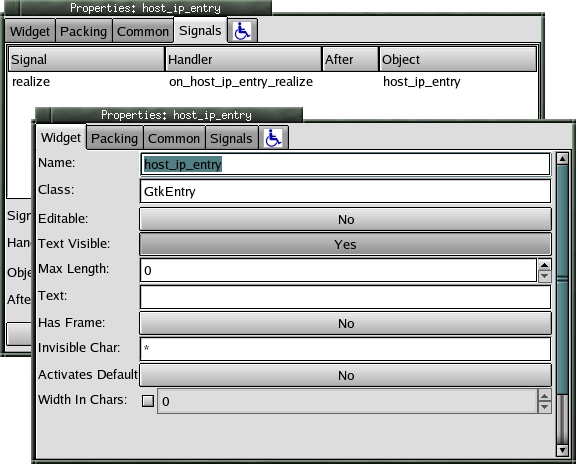
Figure 8. Realize signals are used to pass the widget ID to a callback that saves the ID in a global variable.
Listing 2. Global variables and functions are declared in xr.h.
code:
#ifdef XR_CB_C
GtkWidget *XR_Msg_Window = NULL;
GtkWidget *XR_Msg = NULL;
void XRUMsg();
void XRUInit();
#else
extern GtkWidget *XR_Msg_Window;
extern GtkWidget *XR_Msg;
extern void XRUMsg();
extern void XRUInit();
#endif
Listing 3. #defines make variables and functions properly accessible for C modules.
code:
#define XR_UTIL_C
#include <stdio.h>
#include <stdlib.h>
#include "xr.h"
...
One problem with this methodology is defining at what point a widget ID becomes available. The callback for the realize signal is called only right before the widget actually becomes visible. Sometimes you need access to that widget ID before this happens. Fortunately, this is solved easily. The widget is created in interface.c before the signal handlers are set up. A signal handler is a function that associates a callback with some event.
Because of this, the locally named variables all have valid values by the time a realize signal is configured. It therefore becomes possible to set multiple callbacks for a single widget, all of which are set to the realize signal for that widget, which saves the widget IDs of other widgets. For example, the main window widget for Ximba Radio has realize callbacks set for it that save the widget IDs of all the predefined CList widgets in the Channel Listing window; there are four such widgets. This is required because, initially, those CLists are not visible even after the main window is made visible, and I need to start updating the lists right away. If I didn't use the main window to save the widget IDs of the CLists, I wouldn't be able to start updating them with channel information until those lists were displayed at least once.
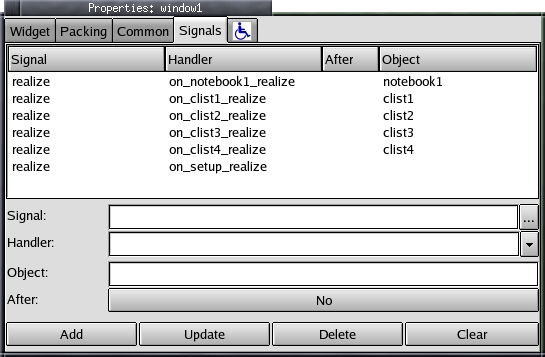
Figure 9. Right before the main window is displayed, the widget IDs of its CList subwindows are saved in global variables by multiple callbacks.
Dynamic changes to widgets also require saving the widget ID. One example of this is the state icon for Ximba Radio. To change the state icon I needed to use only GTK+ stock icons and save the widget ID of the Glade-generated GtkImage widget. When the user changes the program state—either by disconnecting from the dæmon or enabling or disabling the mute—the state icon is changed easily with a single GTK+ function call, as shown in Listing 4. The complete set of GTK+ stock icons is listed in the on-line GTK+ documentation.
Listing 4. This function changes the state icon to the connected state using what GTK+ calls the Apply icon.
code:
gtk_image_set_from_stock(GTK_IMAGE(XR_Status_Image),
   GTK_STOCK_APPLY,
   GTK_ICON_SIZE_BUTTON);
The use of global variables is not the only issue experienced developers might take with my methodology. Another is my choice of using a deprecated GTK+ widget: the CList, also known as the columned list widget. Deprecated implies that the widget, while still part of the current distribution, is no longer being developed actively and may be removed from the GTK+ distribution in the future.
The current replacement for the CList widget is the Tree and List widget. Ximba Radio requires list entries to be added and removed dynamically on a frequent basis. Neither the CList nor the Tree and List widget were helpful with this requirement. However, because the CList was designed specifically for handling lists and not expandable trees, I found it the less complex of the two choices. By definition, prototypes require getting an application up and running quickly with a standard or typical interface. CList support in Glade makes this possible without having to learn the complexities of the Tree and List widget. The trade-off will come later when I have to deal with the eventual disposition of the CList.
Ximba Radio makes heavy use of lists. All channel, category and favorites information is kept in columned lists. While the complete channel listings and the favorites are static lists that never go completely away, the category lists are dynamic. Users can enable or disable them from the display, making it easier to find stations based on their own preferences. To manage the dynamic nature of the category lists, I made use of GLib's doubly linked list, the GList. Few applications of any complexity can avoid the use of linked lists, and GLists are extremely easy to use. A one-way link list option exists, the GSList, but it costs little to have the two-way links in a GList, and reserving the option to travel in both directions in a list is worth any extra weight a GList might add.
Listing 5. These two functions write preference data to a file, traversing a GList to get category information.
code:
void
XRUSavePrefs()
{
   ...

   /* Write the preferences to it. */
   fprintf(fd, "hostname:%s\n", prefs.hostname);
   if ( prefs.daemondir )
      fprintf(fd, "daemondir:%s\n",prefs.daemondir);
   else
      fprintf(fd, "daemondir:\n");
   fprintf(fd, "favorites:%d\n",
      (int)prefs.enable_favorites);
   fprintf(fd, "channels:%d\n",
      (int)prefs.channel_windows);
   fprintf(fd, "performance:%d\n",
      prefs.performance);

   /* Run the list of categories and save them
    * and their states
    */

   g_list_foreach(prefs.categories,
      SavePrefsCategory, fd);

   ...
}

static void
SavePrefsCategory(
   CatEntryT   *catentry,
   FILE        *fd
)
{
   fprintf(fd, "category:%s:%d\n", catentry->name,
      catentry->state);
}
One other pitfall to avoid comes with testing your application if you use pixmaps. Ximba Radio uses a logo pixmap in several places. The pixmap is not found if you run the application from the default src directory unless you first do a complete build:
./configure --prefix=<install directory>
make
make install
This process copies over pixmaps to a pixmap directory under the install directory prefix. For example, if <install directory> is set to /usr/local/ximbaradio, the pixmaps are installed in /usr/local/ximbaradio/share/ximbaradio/pixmaps. Once installed, the compiled program finds the pixmaps correctly. If the pixmaps are updated, the make install step needs to be rerun. Switching to compiled logos—that is, making them part of the binary so relocation issues are not relevant—is possible with modifications to the support.c file. I've done this for previous applications, but the technique is beyond the scope of this article.
I managed to get the complete application written in approximately 30 hours of total work. Most of that was spent on core code. UI code was completed in perhaps ten hours of total work. The application matches the Windows UI in all major features and the Preferences are easy to manage. The UI code is independent of the core code, although some dependency on the callbacks.c file still is present.
Development of Ximba Radio continues. Plans include adding audio control options and a GStreamer-based reflector. The reflector, Ximba Radio and OpenXM will combine to allow remote access to PC-based XM Radio satellite service.
Glade 3 is under development, and it's expected that the code generation feature will be removed. Because this upcoming release has been long in development and its release does not appear to be close to the horizon, working with generated code remains a viable option for Glade-built prototypes for the near future. That said, prototype development does remain fast and painless with GTK+ and Glade.
Michael J. Hammel is a software engineer and author living in Houston, Texas, with his wife, Brinda, and daughter, Ryann. An avid runner and tennis player, who loves his dogs Reba and Bailey as much as he loves his computer, Michael spends his spare time nursing aging knees, cleaning up torn sofa cushions and asking himself why he doesn't have any spare time. His Web site is graphics-muse.com, and he can be reached at mjhammel@graphics-muse.org.
