
Scientific Visualizations with POV-Ray
I am a meteorologist at Central Michigan University doing research with collaborators at the University of Illinois on the behavior of supercell thunderstorms, the long-lived rotating monsters that wreak havoc across the Great Plains of the United States every spring. My primary tool for studying the behavior of these fearsome storms is a numerical model called NCOMMAS, a computer application written in FORTRAN 90 that uses the equations of physics to emulate the three-dimensional state of the atmosphere over time. This model produces an immense amount of data over the course of a four-hour thunderstorm simulation, on the order of 200GB, even when using a lossy compressed history file format. One of the great challenges I face in my research is finding ways to visualize this data in a way that provides scientific insight into the physical nature of the simulated storm.
One way to visualize 3-D data is to use a raytracer, a computer application that simulates the behavior of light interacting with virtual objects in three dimensions to create a bitmapped image (Figure 1). This bitmapped image can be displayed on a computer screen and/or saved to disk in an image format such as PPM or TIFF. The Persistence of Vision Raytracer, POV-Ray for short, is a popular open-source raytracer that caught my attention while I was working on my doctoral thesis at the University of Wisconsin in the mid-1990s. At the time, I was looking for software to visualize my 3-D model data of microbursts, severe downdrafts that sometimes descend from thunderstorm clouds. Being accustomed to the shared-source nature of the academic world and being a poor grad student, I was looking for free software distributed in source code form that I could download and modify to fit my own specific needs. POV-Ray was the logical choice for me then, and it continues to suit my needs today in creating raytraced representations of my research data.

Figure 1. An aerial view of the whole supercell thunderstorm cloud from a distance of about 30 kilometers, rendered with POV-Ray.
Rendering scientific data isn't the task for which POV-Ray was designed, however, and few researchers are using POV-Ray for rendering scientific data. Other raytracing packages geared toward the researcher doing work with numerical models exist, but they are proprietary and expensive. In this article, I outline the process of modifying POV-Ray so that isosurfaces of 3-D scientific data can be rendered natively.
Although POV-Ray is distributed in binary form for Linux, Mac OS and Microsoft Windows, you need to obtain the source code in order to apply patches and make further customizations. I am using the latest version of POV-Ray available as of this writing, version 3.5. You need to select the Unix/Linux/Generic Source Code option from the POV-Ray download page. In addition, you need to obtain Ryouichi Suzuki's Density File extension patch (see the on-line Resources), which actually is a Zip file containing replacement source code for a handful of the POV-Ray files. The file pov35dfjs.zip should be unpacked in the povray-3.50c/src directory, where 13 files will be overwritten.
POV-Ray works by reading a scene description file that contains all of the information necessary to create a bitmapped image. POV-Ray has its own scene description language, which is well documented on the POV-Ray Web site. If you never have used a raytracer before, I recommend familiarizing yourself with raytracer basics and POV-Ray's scene description file before making modifications to the source.
Items rendered in POV-Ray are called objects. Examples of objects include Box, Sphere, Torus and Plane. The user specifies where objects exist in the scene, what parameters to use in creating the objects, what color to make the objects, lighting parameters and so forth. These specifications are made in a scene description file, sometimes called a pov file because of the .pov suffix, which is a plain-text file parsed by POV-Ray at runtime.
One versatile object is the isosurface, a 3-D shape whose surface represents points where a function's value is constant. The constant value of the function is chosen by the user. POV-Ray contains many predefined objects that actually could be represented as isosurfaces. For instance, the following section from a scene description file would render a gray sphere with a radius of 0.7 units, centered at the origin, which is Cartesian gridpoint (0,0,0):
sphere
{
    <0,0,0>, 0.7
    pigment {rgb .5}
}
The same object could be rendered as an isosurface object in the following way:
#declare R = 0.7
isosurface
{
    function {x*x + y*y + z*z - R*R}
    pigment {rgb .5}
}
This works because the mathematical formula describing a sphere of radius R is:
x2 + y2 + z2 - R2 = 0
This versatility of the isosurface object makes it the object of choice for my thunderstorm images.
In the sphere example, a mathematical function was used to calculate the isosurface value. My thunderstorm numerical model data cannot be represented as a mathematical function; instead, it is represented as three-dimensional floating-point arrays containing model variables such as temperature, wind speed and cloud concentration at each grid location (Figure 2).
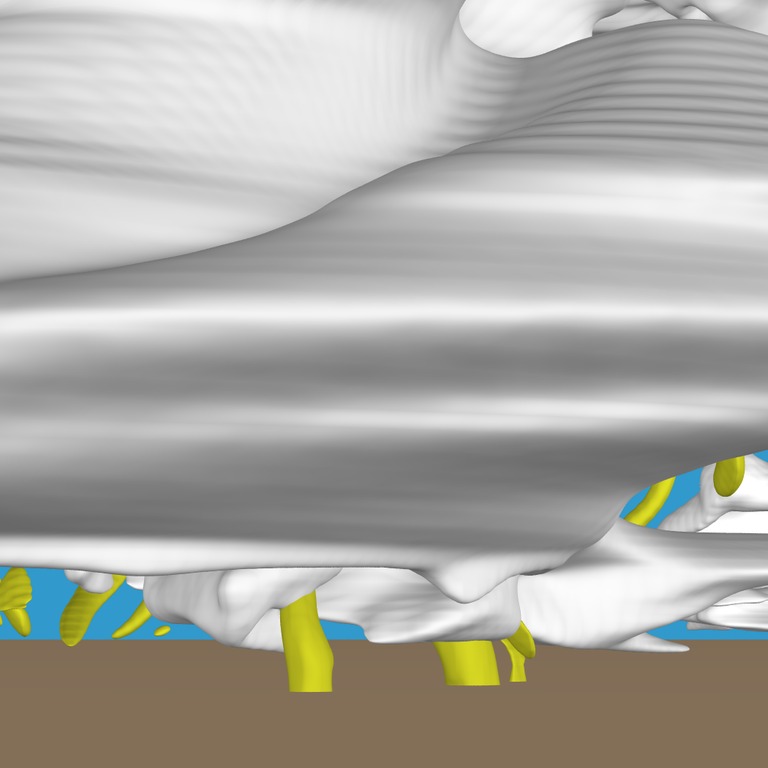
Figure 2. An example of multiple isosurfaces, focusing on a region of the supercell called the wall cloud. The yellow isosurfaces in the foreground, which are located below the wall cloud, represent where tornado-like swirling motion is occurring.
POV-Ray 3.5 has a feature called a density file that allows for the mapping of functions represented as gridpoint values. The POV-Ray documentation describes a density file as follows: “The density_file pattern is a 3-D bitmap pattern that occupies a unit cube from location <0,0,0> to <1,1,1>. The data file is a raw binary file format created for POV-Ray called df3 format.”
Density files can be used as functions passed as an argument to the isosurface object. Here is an example of a density file being used for isosurface rendering:
#declare DENSFUNC=function
{
    pattern
    {
        density_file df3 "cloud.df3"
        interpolate 1
    }
}
isosurface {function { 0.1 - DENSFUNC(x,y,z) }
In the above example, an isosurface with value 0.1 would be created from the cloud.df3 file using a trilinear interpolation scheme (more on interpolation below).
The density file format is strict, and the data values are represented as 8-bit data (unsigned short integers ranging from 0 to 255) scaled internally to range from 0.0 to 1.0. Because my thunderstorm data is 32-bit floating-point data, it is not feasible to use the density file format with the stock POV-Ray 3.5.
Enter Ryouichi Suzuki, who has been providing POV-Ray with unofficial add-on code since 1996. He provided the first patches to POV-Ray 3.0, which introduced the isosurface object, now a standard object in version 3.5. Suzuki's code, contained in the Zip file referenced above, contains routines that expand the functionality of POV-Ray density files, including the option of rendering floating-point density file data.
When using density files as functions one must consider that although a mathematical function is a continuous expression—it is defined for any floating-point value of x, y and z spatial coordinates—a density file is a discrete set of data referenced by integer array indices. Interpolation must be done for referencing space in between gridpoints when rendering a scene. The two interpolation methods available are trilinear and tricubic spline. Trilinear interpolation is fast but usually does not produce as smooth an interpolation as does tricubic spline interpolation.
After patching the POV-Ray 3.5 code with Suzuki's density file code, you can render floating-point isosurfaces if you adhere to the df3 format or Suzuki's extended format. In my case, I had hundreds of gigabytes of HDF (hierarchical data format) model data, which is designed specifically for numerical models. Because I am interested in not only producing a few isosurface images but making animations from hundreds, sometimes thousands, of these images, writing an HDF to df3 converter for each of these files was not a viable option. Hence, I started looking closely at the POV-Ray routines that handle density file data with the hope that I could modify the code to read HDF data.
It was important to me that the modifications I made to POV-Ray would not cause a loss of functionality or break compatibility with the unpatched version. I achieved this goal by adding some new objects, referenced in the scene description file, that could be parsed and rendered by my patched version, while leaving all other objects alone.
The main piece of code I modified is found in pattern.cpp, which contains the Read_Density_File routine. This routine, as you might have guessed, reads density file data into a three-dimensional array. Using this routine as a template, I created a new routine, Read_Hdf_File, to read my history file data into POV-Ray. This is where most of the modification of the POV-Ray code needs to be made to adhere to your own data format. An abbreviated version of Read_Hdf_file is shown in Listing 1.
Listing 1. Abbreviated Read_Hdf_File Listing from pattern.cpp
void Read_Hdf_File (DENSITY_FILE * df)
{
    Locate_Density_File(df->Data->Name);
    df->Data->Type = 1; //floating point data
    Open_HDF_File(df->Data->Name);
    //povray needs array dimensions
    Read_HDF_File_Geometry(nx,ny,nz);
    df->Data->Sx = nx;
    df->Data->Sy = ny;
    df->Data->Sz = nz;
    //this array will contain density file data
    Allocate_Memory(mapF,nx,ny,nz);
    //read variable into mapF array
    Get_HDF_File_Data(Var,mapF,nx,ny,nz);
    //density file pointer now points to model data
    df->Data->DensityF = mapF;
}
The function of Read_Hdf_file is to read HDF floating-point data into mapF, a 3-D array of floats, where it now is ready to be manipulated as a density file. I wrote a separate piece of code called history.c, which contains all of the HDF I/O routines referenced in pattern.cpp. Your data file format will require its own format-specific code to read your 3-D data into POV-Ray.
A few more files were modified in order for POV-Ray to recognize the new HDF file format natively and to allow for the rendering of more than one model variable per scene. Table 1 contains a list of the files modified and a brief description of what was done to each file.
Table 1. A listing of modified files to accommodate model data into POV-Ray and a brief description of what was done.
| File | Modification |
|---|---|
| pattern.cp | Get_HDF_File_Data routine added, which reads model data into memory. |
| pattern.h | Add declaration of Read_Hdf_File. |
| parstxtr.cpp | Add case statement block for HDF_TOKEN. |
| tokenize.cpp | Add HDF_TOKEN to Reserved_Words array. |
| frame.h | Add char *Var1 to Density_file_Data_Struct structure. |
| parse.h | Add HDF_TOKEN to TOKEN_IDS. |
The HDF file format allows for more than one variable to be stored in each file, unlike the density_file format. In my case, each HDF file is a snapshot of the model state at a given time and contains 12 3-D variables per file. It often is illustrative to look at multiple variables, such as cloud, rain, hail and snow, together in one scene. I achieved this by creating a new token representing the HDF file format, called HDF_TOKEN (distinct from DF3_TOKEN representing the original df3 format), and added a new character array called Var to the structure Density_file_Data_Struct. Var is assigned in the scene description file and is passed as an argument to the HDF routines to specify what model variable to select. In order to parse the variable name (represented as a character string), I added an additional case statement to the Parse_PatternFunction routine in parstxtr.cpp (Listing 2). Notice the addition of Parse_Comma and Parse_C_String, which grab the variable to be read.
Listing 2. The HDF_TOKEN case requires extra parsing to allow for the specification of which variable to raytrace. This code snippet is found in the Parse_PatternFunction routine in parstxtr.cpp.
EXPECT
  CASE (DF3_TOKEN)
    New->Vals.Density_File->Data->Name =
        Parse_C_String(true);
    Read_Density_File(New->Vals.Density_File);
    EXIT
  END_CASE
  CASE (HDF_TOKEN)
    New->Vals.Density_File->Data->Name =
        Parse_C_String(true);
    Parse_Comma();
    New->Vals.Density_File->Data->Var =
        Parse_C_String(true);
    Read_Hdf_File(New->Vals.Density_File);
    EXIT
  END_CASE
All of the pieces are now in place to construct a scene description file to be interpreted by POV-Ray. I used the example found on Suzuki's density file extension Web page as a template and modified it to fit my needs. Listing 3 contains the full scene description file used to render an isosurface of cloud concentration with a sky-blue background and a tiled surface, shown in Figure 1. Starting at the top, the #version statement is required in order for this unofficial version of POV-Ray to function. The following nine #declare statements specify the Cartesian coordinates that bound the box containing the isosurface, as well as scaling factors.
Listing 3. cloud.pov
#version unofficial dfe 3.5;
#include "colors.inc"

#declare x0 = 0.0;
#declare x1 = 700.0;
#declare y0 = 0.0;
#declare y1 = 600.0;
#declare z0 = 0.0;
#declare z1 = 80;

#declare scalex = (x1-x0+1);
#declare scaley = (y1-y0+1);
#declare scalez = (z1-z0+1);

#declare R = 0.7;
#declare G = 0.7;
#declare B = 0.7;

#declare AMBIENT    = 0.5;
#declare DIFFUSE    = 1.1;
#declare SPECULAR   = 0.3;
#declare ROUGHNESS  = 0.01;
#declare BRILLIANCE = 1.0;

camera {
    up           <0,0,1>
    sky          <0,0,1>
    right        <3.0,0,0>
    direction    <1.0,0,0>
    location     <420,70,70>
    look_at      <370,300,90>
}

light_source {<100,100,100> color Gray25 shadowless}
light_source {<400,200,30> color Gray20 }
light_source {<1000,-500,150> color Gray25 }
light_source {<-400,-500,150> color Gray25 }

#declare QCFUNC = function { pattern{
    density_file hdf "supercell.ck10990.hdf","QC"
    interpolate 2 //tricubic spline
    frequency 0
scale <scalex,scaley,scalez> } }

#macro QCISOSFC(iso,trans)
isosurface{ function{ -QCFUNC(x,y,z) }
threshold -iso
max_gradient 0.0002
contained_by{box{<x0,y0,z0>,<x1,y1,z1>}}
texture{ pigment{color rgbt<R,G,B,trans>}
finish{ambient AMBIENT diffuse DIFFUSE
    specular SPECULAR roughness ROUGHNESS
    brilliance BRILLIANCE}  }
no_shadow
}
#end

QCISOSFC(0.0002,0.0) // render cloud

box { <x0,y0,z0> <x1,y1,z0> // tiles 5km square
pigment {checker color NewTan,
    color .90*NewTan scale 50}
finish {ambient 0.5 diffuse 0.5} }

background {SkyBlue} // what else?
Continuing through the scene description file, the color and finish parameters are declared, and the camera and lighting parameters are set. The lines that follow contain the important bits for creating the isosurface. QCFUNC is declared as a function that uses the HDF file supercell.ck10990.hdf as a source of data; it chooses the variable QC (representing cloud concentration) within the file to render. Tricubic spline interpolation is chosen, and the entire domain is scaled so that all spatial indices, such as camera location and light location, coincide with array index values of the data. By default, POV-Ray's domain ranges from 0.0 to 1.0 in all three directions.
I created a macro called QCISOSFC, which takes as arguments the value of the isosurface I wanted to render and the level of transparency of the isosurface. Transparency is a useful isosurface property when rendering two isosurfaces where one exists inside another. For example, it is useful to render a transparent cloud that contains an isosurface of hail concentration, because hail often is contained within a thunderstorm cloud. QCFUNC, defined above, is selected as the isosurface function to render. The chosen isosurface binds a volume of cloud concentration greater than the chosen isosurface value of 0.0002.
The max_gradient parameter basically tells POV-Ray how much work it needs to do to find the isosurface. Technically, it tells POV-Ray what maximum gradient (largest change over distance) the function representing the isosurface data contains in the vicinity of the chosen isosurface. It is a number that must be chosen carefully. Too low a value produces an isosurface with holes or one that does not render at all; too large a value causes POV-Ray to run for a much longer time than is necessary. Some experimentation is required to find an appropriate value for max_gradient. I chose a value of 0.0002, which may seem small; however, cloud concentration ranges from 0.0 to about 0.01. POV-Ray warns you after rendering an isosurface with too large or small a value of max_gradient and suggests a value it deems appropriate after rendering.
In order to compile with your changes, you may need to make some minor modifications to src/Makefile, which is generated once you run configure from the top-level POV-Ray directory. This is the case if you are using external libraries for your history file reading routines or if you've written a separate piece of code to handle file I/O.
Once compiled, you can invoke POV-Ray from the command line. The following command would read from cloud.pov and create a 600×400 anti-aliased PPM file, displaying to the screen as it rendered:
/home/orf/povray-3.50c-orf/src/povray +D \
Input_File_Name=cloud Width=600 Height=400 \
Antialias=on Output_File_Type=P
Once your data has rendered successfully with POV-Ray, you have POV-Ray's extensive set of configurable options to choose from to render your scene exactly the way you want. If you have data that changes over time, making animations is straightforward and rewarding. I have written Python scripts to invoke an instance of POV-Ray on each of the processors on my small renderfarm, where each processor works concurrently on a different model time. The resulting PPM files then are joined together to make animations, using mjpegtools. See my research page for some animations. I also have created stereo images and animations for display on our department's GeoWall system. Stereo pair generation is trivial with POV-Ray and truly can give you a whole new perspective on your data. Getting POV-Ray to work with my model data has opened the door to many exciting possibilities for me, and I hope that it will for you, too.
Resources for this article: /article/7754.
Leigh Orf is an Assistant Professor of Atmospheric Science at Central Michigan University and a long-time Linux user. His research interests include making realistic simulations and visualizations of thunderstorms using massively parallel Linux clusters. When not working, he enjoys brewing his own beer, communicating via ham radio, playing the saxophone and going on camping trips with his wife, Annie. He can be reached at leigh.orf@cmich.edu.



