
AML's M7100 Wireless Linux Terminal
Product Information.
Vendor: American Microsystems, Ltd.
URL: www.amltd.com
Price: $1,795 US
The Good.
Custom Linux kernel.
Durability.
Built-in 802.11b.
The Bad.
Default telnet for communication.
Weight.
Soft keypad.
Although we use the phrase “world domination” somewhat tongue-in-cheek, the growing scope of devices and applications controlled by Linux might make this philosophy a quiet though no less real possibility. Designed for nearly any business task requiring barcode scanning, the AML M7100 is a wireless Linux terminal from American Microsystems, Ltd. By utilizing open-source tools, the M7100 could provide a robust and cost-effective means for businesses large and small to track inventory. In its own way, the device opens new inroads for Linux to the infrastructure of commerce, the business back end that's a critical tool for management in commerce on any scale.
The M7100 is built around a custom Linux kernel and the widely used Intel StrongARM processor, coupled with 16MB of RAM and 4MB of ROM. This is the same processor found in such devices as the Sharp Zaurus and Yopy Linux-based PDAs. Those devices utilize the StrongARM in 400MHz configurations, while the M7100 processor is a bit slower at 133MHz. Given the purpose-built nature of the device, the slower processor clearly is not a drawback. The M7100 is intended to gather and transmit data to a centralized application.
Weighing in at 16 ounces with a rechargeable battery, the M7100 is built as much for durability as for portability. The weight is due in large part to the device's rugged casing, an enclosure that's been drop-tested onto concrete from up to four feet and survived. This device is designed for use in such locations as warehouses, stockrooms and loading docks, where it could be destroyed easily in a single gravity mishap. To further counteract the weight issue, there's a non-removable nylon wrist strap that's large enough to fit around even my oafish hands.
The M7100 has an internal 802.11b wireless card. The card is functional out of the box, hunting for and connecting to the nearest available open access point without further configuration. Configuration options, including the 802.11b Wireless Equivalent Privacy (WEP) and static or DHCP addressing, are available from a menu.
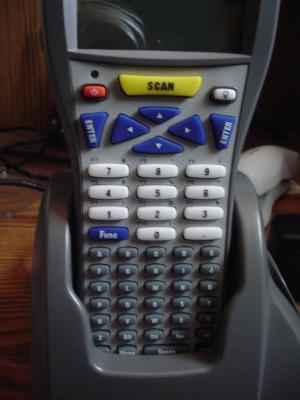
Figure 1. The 55-key keypad features big number keys and alphabetical letters.
The screen and keypad of the M7100 also reflect the rugged business nature of the device. The screen is a 160×160 backlit LCD, and the 55-key alphanumeric keypad comprises the bulk of the device's front face. The keys are not arranged in the typical QWERTY configuration but alphabetically for the letters, with a block of larger number keys above. Directly above the numeric keys is a four-direction cluster of arrow keys straddled on either side by Enter buttons. Finally, just below the display are small power and backlight buttons surrounding a large and highly visible scan key. This key activates the Long Range Laser scanner for five seconds, allowing plenty of time to capture one barcode and move on to the next. The five-second feature also provides a measure of battery conservation, preventing the unnecessary power drain that would result from firing the laser continuously. With a complement of fully customizable function keys, the keypad is suited to nearly any purpose. The layout also lends itself to use by either right- or left-handed operators. Although the buttons feel a bit soft, they do provide enough tactile response to help prevent manual data entry errors.
The M7100 ships with a docking cradle that doubles as both an in-unit battery charger and a data-transfer dock. The cradle contains an additional slot intended to charge a spare battery, and bright LED lights on the front face signal power, as well as when main and spare batteries are charging. Power connects to the back of the cradle between single USB and RS-232 serial ports. These ports provide ample interfaces for connecting the cradle to a desktop or server. They also provide hard-line alternatives to Wi-Fi for transferring data from the terminal unit to a centralized location.
AML provides a pair of software-loaded CD-ROM discs. One disc contains the CommandLink software, a Microsoft Windows-based tool for data transfer and manipulation. According to the technical support staff at AML, however, the software merely is provided in case the customer doesn't have an existing communication and data-transfer package in place.
The real value in the software resides on the second disc. This disc contains a full API and configuration tools. Detailed documentation and a step-by-step HOWTO for configuring and compiling the StrongARM tools allow in-house developers to create business-specific applications with relative ease. For smaller companies or those with small development budgets, several compatible packages exist that communicate openly with the M7100. These include the TrackWare Application Engine, a GUI builder for creating applications to transform and interpret the data received from the device. In general, though, AML expects that its customers are sending their barcode data to legacy applications. The tools provided in the default configuration are focused specifically on data transfer.
I initially was a bit baffled as to how to test the M7100. Then, as I started to look around my cozy laundry-room office, I realized how ubiquitous the barcode has become in the past few decades. Linux distribution boxes, books, CDs, soda cans and old issues of Linux Journal all had barcodes that were scanned easily with the M7100—and that was just my office. The laser on the M7100 picks up the barcodes much more easily and quickly than other scanners. It also picks up labels from a considerably farther distance than others. I was able to scan the barcode on my Dinty Moore stew cans from as far as three feet.
The M7100 provides the capability to transfer this scanned data almost immediately, by way of a telnet session with the server. This session opens as soon as a wireless connection is discovered, communicating with a server defined in the network settings. Multiple servers may be defined in this setting, with simultaneous telnet sessions opened to each server if so desired. The device also fully supports FTP for both uploading and downloading data.
For as easily as the M7100 connects to a designated server on the network, the telnet connection does seem to be a downside. Call me paranoid but, given the security issues inherent in telnet, I'd much rather see this device connect using a more secure protocol such as SSH. The device clearly is intended for use on an internal network, but I find no comfort in using a clear-text protocol on a wireless LAN. Fortunately, AML works with individual customers at no additional cost to provide SSH-based data-transfer capabilities for the M7100.
Overall, AML's M7100 is a strong device, forging new territory for Linux in the warehouses of commerce. It's a well designed tool, achieving the proper balance of mission-specific features and cost. It's rugged yet easy to use. And, although a bit heavy to carry for an eight-hour day, the device includes a rugged wrist strap that should minimize the arm strain. The AML M7100 is available only through resellers.
Tony Steidler-Dennison is a freelance PHP/MySQL developer and open-source author. He spends his summers leaning into the two-lane curves of Iowa's back roads. He also contributes to and maintains three blogs: the Linux-focused “uptime” (uptime.steidler.net), the personal and political blog “Frankly, I'd Rather Not” (steidler.net) and the running tech narrative “The CodeMode Chronicles” (steidler.net/codemode). He carries on multiple simultaneous electronic conversations at steidler@gmail.com.
