
Gentoo for All the Unusual Reasons
I have a confession to make. I use Gentoo Linux. My colleagues at the various Linux User Group meetings I attend think I'm nuts. Everyone knows that Gentoo is a source-based Linux distribution. Gentoo's reputation (in large measure pushed by the people who develop the distribution) is that it's for people who want super crazy optimizations, and it really is suitable only for those who use desktops. In truth, Gentoo is ideal for a whole bunch of other, unexpected, reasons. Much to my surprise, people actually are using Gentoo in production environments for these very reasons.
Because there is binary compatibility across all the descendants of the original i386 processor, the other Linux distributions (not to mention everyone writing software for Microsoft Windows) can ship prepackaged binary versions of their software compiled for the generic i386 platform and take advantage of the fact that it'll work everywhere. The other side of this is that these distributions are unable to take advantage of any new optimizations your fancy CPU might offer, which is a pity.
Gentoo is a built-from-source distribution; however, you are able to specify compiler flags to be used when building software for your system. GCC in particular allows one to specify the kind of CPU on which the code will run. By specifying the processor type, such as Intel Pentium III or AMD Athlon Thunderbird, the compiler is able to generate processor-specific code that, in theory, results in better, faster machine code.
Is a Gentoo system faster? Anecdotal evidence is mixed. It seems that a Gentoo system runs somewhat faster than an identically configured system running one of the more popular distributions. But, any minor performance advantage is squandered completely if the system is not installed, configured and tuned correctly. Because many of us don't know how to do that, and because Gentoo offers so much latitude to do your own thing, it's easy to lose the benefits of slightly faster programs if you do something silly.
So, from a speed perspective, it really doesn't matter whether you use a build-it-from-source distribution or a binary-package distribution. If improved speed is not a reason to use Gentoo, why would you want this built-from-source thing?
People get annoyed at their computers for a variety of reasons. The one we focus on here is the newer version problem, and modern operating systems run into it in two ways. The first way is when users need a toolkit, utility or other item that is not included in the distribution. As a result, the users need to roll it themselves. The second way is when a newer version of an application or tool is available than what is included in the prepackaged distribution.
A key issue is at play in both of these scenarios: ease of operation. Does the operating system help you with the challenges that administering a system presents? Much to my surprise, Gentoo Linux turns out to be really good in this regard.
With Gentoo, one installs new packages by downloading sources and then compiling them. You want a piece of software? No problem—issue the instruction, and a little while later, it's installed. It's the same user experience as with Debian.
Gentoo really shines, however, when a user needs a newer version of a piece of software. Let's say I'm using the bluefish HTML editor, for example, and a bug is annoying me. A newer version of bluefish might be available in Portage, Gentoo's software package management system, so I might be able to ask for the upgrade. Gentoo has a handy command called etcat that can determine what's available:
# etcat versions bluefish
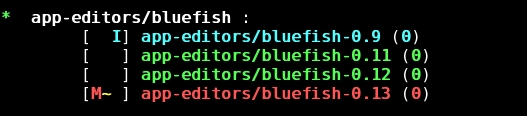
Figure 1. You can check for available versions of bluefish with the etcat utility.
etcat tells me I have version 0.9 of bluefish installed, and now version 0.12 is available. From reading the bluefish Web site, I know the problem is fixed in version 0.12, so I definitely want the upgrade.
The emerge command tells what will happen if I do upgrade:
# emerge --pretend bluefish
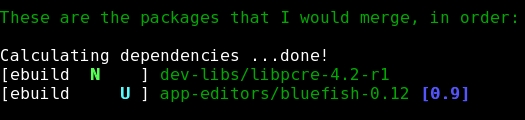
Figure 2. Use emerge --pretend to check the dependencies of a program you want to install.
Apparently, this version of bluefish needs a library called libpcre. Portage has shown me that in addition to doing an upgrade of bluefish, it's going to bring in libpcre as well. So, off we go:
# emerge bluefish
First Portage downloads, builds and installs libpcre, and then it does the same for bluefish. Four minutes later, I have my upgrade. Pretty easy.
You might have noticed that it didn't say it was going to install version 0.13. That's because, at present, version 0.13 is masked, which is why it showed up in red. In this scenario, 0.13 just came out, and there's now an ebuild for it. The ebuild, though, still is being tested to see that the software actually installs and that there's nothing blatantly wrong with it. If I had really needed it, I could have overridden Portage and told it to bring in 0.13. Likewise, I could have picked version 0.11 if I'd had a reason to do so. This flexibility is one of Gentoo's greatest strengths.
A trickier situation occurs when I need to install a piece of software the system doesn't provide. One of the significant reasons various distributions established package management tools was to have a single, unified view of what is installed on the system. For each piece of software, be it a basic system tool, a core library, a server program or a user application, a package is made. As each package is installed on your system, the OS records what files are put where and that the package is installed. That way, other software that depends on these packages can be installed, knowing that their prerequisite pieces are in place.
But what happens if you install a newer version of software and don't have a package appropriate to your OS? You typically go though the same build steps that the person who built the package did, except you probably do one of the following two things:
Install it in some private place, perhaps /usr/local/bin, and then go to the effort of making sure your program is being run, not the older one.
Blindly install your software in the root filesystem, hoping you don't clobber anything on the way and praying that nothing in the future overwrites the programs and files you have installed.
Think about that for a minute. Doesn't having to worry about these things strike you as a bit silly? After all, isn't that what the package management system is supposed to prevent?
The question I'm posing isn't “does the ability to make packages exist”, because the answer to that is “yes across the board”, nor am I asking “can you create your own packages”. Rather, I want to know how easy is it to do so.
Let's say you've got the OS-provided copy of bogofilter and an .rpm for version 0.16.1. Suddenly, the authors of bogofilter discovered a silly but serious error has crept in and release 0.16.2 shortly thereafter.
The problem is you're stuck with waiting for your distribution to release a new version of the .rpm, .deb, .pkg and so on, which could take a long while, leaving you in the position of wanting to roll your own. That's where the trouble creeps in. Conceptually, creating your own new .rpm or .deb package is easy. “Just use the existing 0.16.1 package as a prototype.” But for most people, that is, anyone not at wizard level and sometimes not even then, it's actually rather tough to do. You have to:
Download the package description or somehow extract it from the existing package file.
Manually download the new version of the upstream .tar.gz (or whatever) source and unpack it.
Transplant the build descriptions (in the case of Debian into the new upstream sources) and maybe even patch against those sources.
You might have to modify the build script to instruct it about the new version.
Actually try to create the package. This involves compiling it, which probably also requires you to install a large number of -dev packages you hadn't previously known about.
Then you install and test.
All of this is doable, but there's a fairly steep learning curve (especially for newbies) in getting the skills needed here. More to the point, it's a lot of work that you'd rather not do.
Conceptually no different from the process outlined above, building packages on a Gentoo system is easier. The magical part is package description files in Gentoo, ebuilds, follow a simple format. They're basically shell scripts (ebuilds are covered later in this article). Along the way, you specify from where to get the source tarball. When you build, Portage downloads the source and then proceeds to unpack and compile it. Because they're shell scripts, they can use shell variables to great effect. In particular, they take the version number by parsing the ebuild filename and putting it in a variable the script can use.
In our bogofilter example above, the package file (called bogofilter-0.16.1.ebuild) contains a line like this:
SRC_URI="http://sourceforge.net/downloads/bogofilter-${PV}.tar.gz"
When you go to build and install bogofilter, Portage sets $PV to be 0.16.1 based on the filename and fetches the appropriate .tar.gz. It then unpacks it and proceeds to ./configure; make; make install and then build the package as instructed. To create an ebuild script for the new version you want, 0.16.2, do this:
# cd /usr/portage/net-mail/
# cp bogofilter-0.16.1.ebuild bogofilter-0.16.2.ebuild
# ebuild bogofilter-0.16.2.ebuild digest
Assuming that nothing in the package description, unpacking instructions and so forth, needs to be updated, that's all you have to do.
There's a touch more to keep abreast of. For example, you probably would do the above action in a private copy of the /usr/portage tree so you don't lose your changes when the primary tree updates. Portage explicitly supports this; look in the description of the PORTAGE_OVERLAY variable in the on-line documentation or right in /etc/make.conf to learn how to tell Portage where your custom ebuilds are. Now you can tell Portage to # emerge bogofilter
and you have your new version.
Gentoo has copies of the source tarballs required for all of its various packages on its mirrors around the world. Normally, Portage gets the source from one of them. If, however, you're building something that isn't in Gentoo's mirrors, no problem. Portage simply reaches out to the original upstream download site.
Portage uses md5sums to ensure that you get uncorrupted downloads. That's what the third command above (ebuild ... digest) is for; it downloads the source and then computes the md5sum for you. Because you're the one doing the version bump, it's up to you to make sure you actually have an uncorrupted download. Therefore, you should probably do ebuild ... unpack first to get the download, make sure it's okay, then do the digest command.
Finally, if you want a software package your OS doesn't provide, you have to write your own. With Gentoo, writing a custom .ebuild is easy.
Gentoo's package descriptions are written in bash. The various instructions go in functions that are called by Portage along the way. The major ones are:
pkg_setup()
src_unpack()
src_compile()
src_install()
pkg_preinst()
pkg_postinst()
and they are called in order. To tell Portage how to build your software, write functions for each of the steps, proceeding each with a bit of information, such as the SRC_URI discussed previously.
To compile your sources, you might use:
src_compile () {
        ./configure --prefix=/usr
        make
}
The amazing thing about these shell scripts is they can provide sensible defaults by overloading functions. In fact, the default for src_compile() is pretty much what I showed above, which is perfect for many packages. In fact, you could write an ebuild that relies on the defaults and has no custom functions defined at all.
Sometime you might want to ./configure a package differently depending on what sort of system you have. Portage has an environment variable called USE, set in /etc/make.conf and overrideable on the command line, that contains tokens you can use to describe and customize your system. Say you've got a package that can be told to build differently depending on whether you want, say, X Window System support or IPv6 support. Your src_compile() function might look something like this:
src_compile () {
        use X    && conf="${conf} --with-x"
        use ipv6 || conf="${conf} --without-ipv6"

        ./configure --prefix=/usr ${conf}
        make
}
You can see various features of shell scripting being used. In this example, if your system has X on it, this package is told to go ahead and build in X support. If it's a server, and you don't need any of that, your software is built without that extra overhead. The USE variables be can overridden on the command line, so you have even more precise control if you need it.
src_unpack() works the same. If you don't include one, Portage plows ahead, untars the source tarball in the default place, changes directories and sets the working directory environment variable, $WORKDIR accordingly. On the other hand, if something unusual has to happen—say, a patch is applied— you then can write a simple unpack function yourself:
src_unpack () {
        unpack ${A}
        epatch ${FILESDIR}/fixit.patch

}
I conclude with a full example. I had a client that exclusively used ssh.com's implementation of the SSH2 protocol. So, I needed to install it on a number of machines. See Listing 1.
An ebuild starts by setting a number of environment variables, including:
SLOT: typically used for libraries. When an ebuild author knows multiple versions of the same packages can be installed on a system at the same time, he or she can assign a slot number to distinguish them. On one of my systems I have Berkeley DB version 1.85 (SLOT 1), version 3.2.9 (SLOT 3), version 4.0.14 (SLOT 4) and even version 4.1.25_p1 (SLOT 4.1). Plenty of software is out there that was written to use the older APIs; there's no reason they shouldn't be able to be installed. If a newer version in the 4.0 series is released as stable, say version 4.0.17, as long as it stays in SLOT 4 my system offers me the upgrade from 4.0.14, without removing the other versions installed. Admittedly, Berkeley DB is one of the more complicated examples out there, but it demonstrates the power behind Gentoo's slot implementation. Most ebuilds don't need any of this and say SLOT=“0”.
KEYWORDS: where you indicate support for different architectures. In the example, I've shown that this ebuild is known as working and stable on x86 series platforms. The ~ in ~ppc means that it's masked. I know previous versions build on PowerPC systems, but I don't have one handy to test with, so others may want to take caution before deciding to install this version. In the official Portage tree, an ebuild like this stays in this state for a few weeks until people using PowerPCs are able to test the ebuild. After several positive reports, the ebuild would be unmasked.
DEPEND, RDEPEND: where dependencies are listed. It's a fairly complete grammar and particular versions of necessary packages can be listed. The most common modifiers are >=, which indicates that at least that version must be installed, usually because of an API that our program depends on; and !, used to show that this package conflicts with the presence of another. Both cannot be installed at the same time.
RDEPEND: runtime dependencies, things that have to be installed to use the package. DEPEND are dependencies to build it in the first place; the difference shows up only when you're installing binary packages built elsewhere.
RESTRICT: various fine-grained controls of Portage's features are possible. In this case, because this is an ebuild I cooked up myself, I use nomirror to tell emerge not to bother looking in Gentoo's family of mirrors. This doesn't actually imply that I can't use a mirror provided by the upstream authors. In fact, if you look at SRC_URI, you'll see that I've listed a mirror close to me where I know I should be able to get the .tar.gz I need.
Then, we proceed to overloading the various functions that control how the package is built. The src_compile() function is the interesting bit. I've taken the example above and fleshed it out a bit. You can see that some options are controlled by USE variables, while others we specify, such as where we want the configuration files to go. We don't really need the die failure messages, but they illustrate how we have full semantics and the power of a shell script available.
Finally, in the src_install() function, we could have relied on the default, but on my system, files in /etc/init.d don't have .rc appended to them. More important, this is intended to replace OpenSSH on the target systems where this ebuild is deployed. Therefore, I wanted to be clear that the RC script was different from the one that OpenSSH put in place.
Portage provides a rich library of helper functions that simplify the execution of common tasks. We take advantage of one to say where we want the RC script to go and to see that it is marked executable. You now place the ebuild into your local overlay of the Portage tree and tell emerge to do its thing.
This example only scratches the surface. For more details, see www.gentoo.org/proj/en/devrel/handbook/handbook.xml?part=2&chap=1#doc_chap2, the output of emerge --help and the man pages for ebuild(1) and ebuild(5) on any Gentoo system.
Listing 1. ssh2-3.2.9.1.ebuild
DESCRIPTION="ssh.com's implementation of SSH2"
SRC_URI="
ftp://mirror.aarnet.edu.au/pub/ssh/ssh-${PV}.tar.gz
ftp://ftp.ssh.com/pub/ssh/ssh-${PV}.tar.gz"
HOMEPAGE="http://www.ssh.com/products"

SLOT="0"
LICENCE="free-noncomm"
KEYWORDS="x86 ~ppc"

RDEPEND="virtual/glibc
        !net-misc/openssh
        >=sys-libs/zlib-1.1.4"

DEPEND="${RDEPEND}
        dev-lang/perl
        >=sys-apps/sed-4"

PROVIDE="virtual/ssh"
IUSE="X ipv6"

RESTRICT="nomirror"

# we're calling the package ssh2; the source
# tarballs are all ssh-x.y.z So, we have to
# overwrite S to specify the actual name of the
# directory as unpacked

S="${WORKDIR}/ssh-${PV}"

# probably could have relied on the default here

src_unpack() {
    unpack ${A}
}

# Of the large number of configure options that
# is offered, we offer customization of
# whether X windows and IPv6 support are
# compiled in.

src_compile() {
    local conf

    use X    && conf="${conf} --with-x"
    use ipv6 || conf="${conf} --without-ipv6"

    ./configure ${conf} --host="${CHOST}" \
        --prefix="/usr" \
        --with-ssh-agent1-compat \
        --with-etcdir="/etc/ssh2" \
             || die "configuration failed"

    make || die "compile failed"
}

# again, almost the default pattern, but
# we want to change the name of the rc script

src_install() {
    make DESTDIR=${D} install

    exeinto /etc/init.d
    newexe ${FILESDIR}/sshd2.rc sshd2
}
Consider these problems happening not only on a single desktop, but in the context of a production platform of dozens of servers or thousands of workstations. Frankly, there aren't many operating systems out there that give you much help here. There's an entire body of literature on the subject of infrastructure management. Sadly, a great deal of ad hoc deployment still occurs. Although many vendors have tools that help you build a series of systems the first time, the task of maintaining them over time is left to the individual site to handle. The newer version problem isn't about single machines, it's about entire networks of them.
So how does Gentoo stack up in production environments? Here's another surprise for you from the source-based distribution: Portage can be told to build binary packages. This allows you to have one machine over in the corner doing all the compilation work. Then, the packages can be shared and used by all your target machines, instead of them having to build the packages themselves. You might be tempted to say “isn't that what the other Linux distributions do?” The difference is selecting the right mix of packages is a site decision, and the newer version problem definitely is a site burden to deal with. Gentoo gives local systems teams the tools to deal with solving these version issues themselves.
By using a local build server you can concentrate horsepower and version management effectively, yet still have room for local customization. Staging environments are easy to set up. Then, once you're happy with the set of versions you've tested, you simply make a snapshot of those binary packages and share them out to your rank-and-file machines. Recent versions of Portage include built-in support for fetching binary packages you've created from local file servers, so all of this works right out of the box.
Create your own package or privately version-bump an existing one—the newer version problem comes up all the time. The more mainstream package management tools, although mature, require a much greater level of effort to accomplish these tasks. Conceptually, though, the tasks are trivial. Quite to my surprise, because they don't advertise this aspect, the design of Gentoo's tools makes it easy to do these tasks yourself.
The author would like to thank Stephen White from the University of Adelaide and Andrea Barisani from the University of Trieste for having helped develop the ideas here as they relate to production use of Gentoo. They also kindly reviewed the article, as did Pia Smith of Linux Australia, Jeff Waugh of GNOME, Craige McWhirter of the Sydney Linux Users Group and Wade Mealing of the Gentoo Server Project.
Andrew Cowie runs Operational Dynamics (www.operationaldynamics.com), an operations and infrastructure engineering consultancy. He helps organizations get value from their technology by focusing on people and the processes around people, which probably is why he's so obsessed with finding easier ways to do things. You can reach him at andrew@operationaldynamics.com or as AfC on irc.freenode.net.

