
Using Webmin—By the Book
Managing Linux Systems with Webmin: System Administration and Module Development by Jamie Cameron

Prentice Hall PTR, 2003
ISBN: 0131408828
$44.99 US
When it comes to Linux and UNIX, I'm not into convenience. Doing it all by hand or with a script, if the task is repetitive, always has been a better choice. Traditionally, I've been leery of GUIs that automate tasks. If you ever have experienced System Administration Manager (SAM) under HP-UX, you know what I mean. In general it works okay, but it has bitten back enough times to make me consider alternatives that offer a greater degree of reliability and consistency. My experience with open source and Linux has been mostly positive so far, and this fact has made me more receptive to trying things I otherwise might not have bothered with, such as Webmin.
Before installing Webmin, I read a couple of chapters in Managing Linux Systems with Webmin to get a feel for it, and then proceeded to check out the webmin.com Web site. The Web site is not merely the obvious place to start; it also is well documented and provided me everything I needed to know in getting started. I followed all the steps from installation to initial login. It seemed too easy.
Once I logged in I was presented with a number of icons that represent the management subsystems (Figure 1).
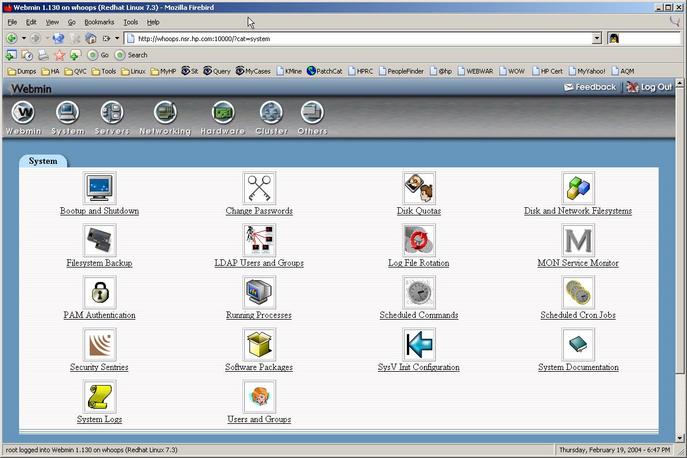
Figure 1. The System module contains a rich sysadmin task environment.
Eighty-plus modules are present in Webmin, and they vary in complexity. As with anything, it is a good idea to start with baby steps and then move on, but the first thing one should do upon entering the new environment is to secure it.
I was able to log in as root after the initial installation of Webmin, and this generates a certain amount of paranoia on my part. If you have put Webmin on a server, you should secure it, and this is where the book may come in handy. Chapter 3 walks the reader through a few steps to secure the box, but one is better advised to become familiar with Webmin configuration and access, topics covered in Chapters 51 and 52.
I've opted not to secure my machine as best I can, but that doesn't mean I don't want to know who was logged on when and why. By default, root's actions are logged, so if you have several folks using root, you can look at what they did. In Figure 2, one can see from the IP addresses that the root user was logged in from different clients.
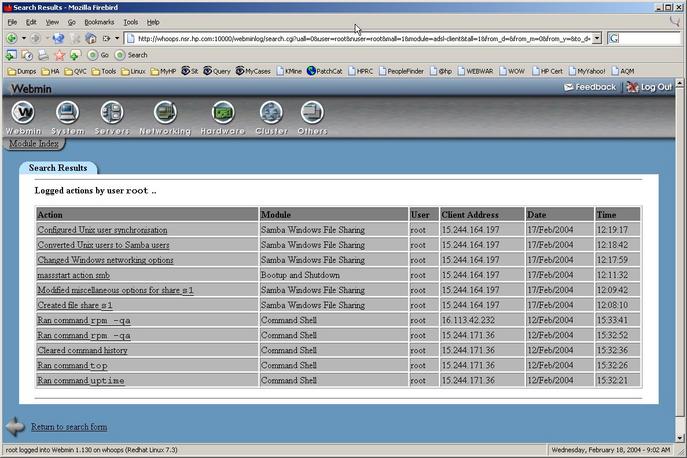
Figure 2. The logs clearly show what root has been doing and from where.
Modules is a topic larger than what I can cover in the scope of this article, but I mention a few of the modules so we can sample the span of Webmin. The first of these modules after the Webmin (configuration) one is the System module. The first of the subsystems to look at is Bootup and Shutdown. The page should display Actions, Start At Boot and Description columns. This enables you to quickly disable services. For example, I typically disable sendmail by starting on this test box, unless I have a specific need for messaging. You should notice a red No in the Start At Boot column (Figure 3).

Figure 3. The list of services to start is long and varied.
Farther on down is vncserver, which is enabled to run at boot time. If I were to change this, I would check the box at left and then click on vncserver.
With that, a new page would load that displays, in editable form, the vncserver startup script (Figure 4). This page allows for stopping, starting, restarting, setting boot time start and editing the file. Once you save or delete the action, you return to the Bootup and Shutdown page.

Figure 4. Editing and testing services from within Webmin is straightforward and easy.
Jumping to another module, Hardware, and then to the Grub Boot Loader subsystem, I easily am able to set the boot kernel of choice and the delay I want. This is an easy task, one that could have been done equally as easily from the command line, but the GUI conveys more information in an intuitive manner than does text. If the GUI is reliable, it is desirable as a tool.
Many of the subsystems are fairly intuitive, and it will be easy for the user to grasp and use them immediately, but some are complicated. The book comes in handy in navigating modules such as Apache, but it assumes that you already understand the applications.
A fair question to ask is whether the benefits of Webmin are worth the learning curve to use it. This would depend on the support environment in which you are working. Webmin certainly is a convenient tool and a time-saver, but it is not a substitute for understanding the inner workings of the OS. Will I continue to use it and learn more about it? Yes.
The book initially reminded me of a college textbook when I first picked it up. At 700+ pages there is a lot of information here and it is geared toward a serious user. It exhaustively covers the modules and walks you through what you need to know. I would recommend it to anyone who plans to use Webmin as a management tool.
Frank Conley is a UNIX/Linux Support Engineer and former system administrator. He has been toying with Linux since 1995, and long ago had the good sense to not see Linux as a toy, but as a very useful tool that he enjoys working with.
