
Rapid Application Development with Python and Glade
Writing GUI programs involves two basic steps. First, you need to write the code to create the interface, with elements, such as menus, and widgets, such as buttons, labels and entry fields. You then need to write the code that executes when events occur, such as when a button is pressed or a menu item is selected. When the program runs, it enters an event loop that repeatedly waits for an event and then calls the event handler, also known as a callback function, that was defined for that event. For example, you write a function to be called when a button is pressed. Writing code to display the widgets, defining the functions to be called when events occur and connecting each event to the specific function is a tedious process to do by hand.
For many widget sets, programs exist to lay out the GUI visually. Damon Chaplin wrote the Glade program to allow users to create an interface visually using the GTK/GNOME widgets and also to specify which functions to call when events occur. Glade stores the layout of the widgets and the callbacks as an XML file. Glade also generates a C or C++ program that contains all the calls to create the widgets in the specified layout, connect the callbacks and define empty functions for each callback. However, Glade does not create Python code. The GladeGen program I wrote generates Python code based on the Glade XML file.
If you change your GUI using Glade, you need Glade to output the new C/C++ code to create the GUI. This can be annoying, especially if you have modified the code that creates the GUI. James Henstridge wrote libglade to alleviate the need to hard code the GUI-generating code in your program. James also started and helps maintain the GTK/GNOME Python bindings, a Python module that provides access to GTK/GNOME C functions. With libglade, your program does not contain code to create the interface. Instead, libglade parses the XML file when your program is run and creates the interface on the fly at runtime. Thus, whenever you change your GUI using Glade, you do not need to change the code that creates the interface.
I prefer using Python except in cases of code containing a lot of computation where speed is crucial. Python's high-level data structures and interpretative environment make it quick to develop, modify and maintain code. The September 2003 issue of Linux Journal contains an introductory article on PyGTK and Glade (see the on-line Resources section) that readers unfamiliar with Gtk and Glade will find helpful.
The motivation for GladeGen was a patient database/accounting system I was writing for the optometric/optical offices where my wife works. Before my wife started working with them, they were using a Microsoft Access database system someone had written. That person had moved out of state, and the office wanted a new system. They talked to other optical offices around town to find out what software was being used. People at each office complained about the software; the systems were buggy and expensive. I convinced the owner of my wife's office that I could write a custom system during the summer for about the same cost as other new software, and that it would do exactly what they needed it to do. But, he had to let me use Linux.
The end result is a Python/GTK program that uses PostgreSQL as the back-end database to store all of the data. This allows all of the searching and tabulating to be done by SQL commands. The Python code provides the layer of code that communicates between the PostgreSQL database and GTK interface. Both GTK and PostgreSQL are written in C, so they run fast. The Python code is more than fast enough on modern processors for handling the communication between GTK and PostgreSQL. The PyGTK front end and PostgreSQL database allow the client front end to access any database server so they can run the front-end GUI on multiple computers and access the database server. The client/server setup allows them to run the front-end GUI and access the PostgreSQL server at other locations over the Internet through an SSH-encrypted connection. It also allows me to have remote access from home when users have questions about the system.
The program has more than 40 windows, including those for entering patient information, frame/lens purchases, contacts, reconciling insurance payments and entering and tracking the frame inventory. I decided to use Glade to create each window, and because I wanted to use Python, I needed to write my own software to automate code creation for each window. The result is GladeGen.
The code I have written automates the task of creating Python code to create the interface, connect the callback functions, provide access to the widgets and create empty callback functions based on the Glade XML file. Using this software, the steps for creating a GUI program are 1) use Glade to make the interface visually and save the XML file, 2) run GladeGen to generate the code and 3) write the code for the callbacks.
The code GladeGen creates contains all the code to run the application and display your interface, along with empty callback functions. It also allows you to use Glade to modify the interface. When you rerun GladeGen, it regenerates the application code with any additional callbacks and new widgets, without changing or modifying any of the existing code.
Here, I demonstrate how to use GladeGen by creating a math quiz program. The complete program is available from the Linux Journal FTP site (see Resources). GladeGen works with the GTK 2.x widget set and the corresponding version of Glade, which on Red Hat systems is named glade-2. If you are familiar with the GTK widgets, Glade is fairly intuitive to use. If not, you should familiarize yourself with the various container widgets, including table and horizontal/vertical box.
Using glade-2, I created the first version of the interface. I started with a GtkWindow and added a GtkVBox. I placed two GtkFrame widgets in the vertical box and a GtkTable in each frame. All the other widgets are placed in the two table widgets. I used GtkSpinButton widgets to allow the user to select the number of digits and operators in the problem. GtkCheckButton widgets are used to indicate which operators should be included in the problem. GtkEntry widgets are used for the problem, the answer and information on the number of correct/incorrect problems answered. The other widgets are GtkLabel and GtkButton widgets.
I saved the Glade file as mathflash.glade. Glade does not ask if you want to save your file, so you need to remember to save it before quitting if you make any changes to your interface. See Figure 1 for a screenshot of the interface and Glade. It shows the reset_button is configured to call the function on_reset_button_clicked when the button is clicked.
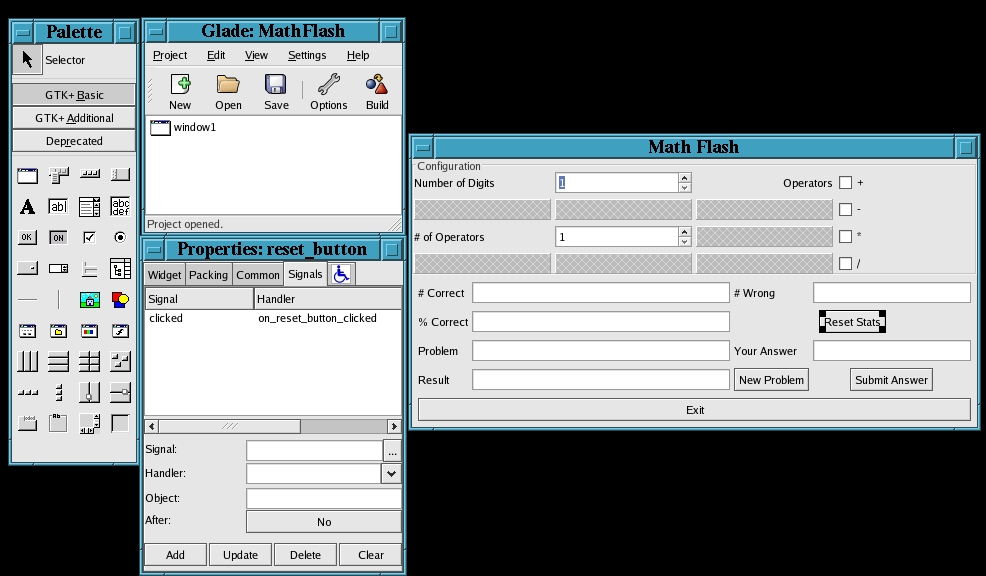
Figure 1. Setting the Callback for a Button in Glade
Glade allows you to give each widget a name or provides a default name. For the widgets we need to interact with, such as buttons and data entry widgets, I provided names that match their intended uses. With Glade, you also specify the signals you want to connect to callback functions. As mentioned above, using Glade, I specified that on_reset_button should be called when the reset_button is clicked.
Next, I used GladeGen to produce template code for the application using the command GladeGen.py mathflash.glade MathFlash MathFlash. The command-line arguments are the name of the Glade XML file, the name of the Python file/module to create and the name of the class to create in that file/module. The resulting MathFlash.py file can be found in Listing 1. The MathFlash class subclasses a GladeWindow class, the class that uses libglade to connect all the callbacks listed in the handlers variable. It also creates a dictionary, self.widgets, that maps each widget name in the widget_list variable to the corresponding GtkWidget instance. The GladeWindow subclass provides default show and hide methods so that the template code can be run immediately to view the interface before you start writing the callbacks.
Listing 1. GladeGen produced this Python code from the XML file created in Glade.
#!/usr/bin/env python

#--------------------------------------------
# MathFlash.py
# Dave Reed
# 02/28/2004
#--------------------------------------------

import sys

from GladeWindow import *

#--------------------------------------------

class MathFlash(GladeWindow):

    #----------------------------------------

    def __init__(self):

        ''' '''

        self.init()

    #----------------------------------------

    def init(self):

        filename = 'mathflash.glade'

        widget_list = [
            'window1',
            'plus_check',
            'minus_check',
            'multiply_check',
            'divide_check',
            'digits_spin',
            'operators_spin',
            'correct_entry',
            'wrong_entry',
            'pct_entry',
            'problem_entry',
            'answer_entry',
            'submit_button',
            'reset_button',
            'exit_button',
            'new_button',
            'result_entry',
            ]

        handlers = [
            'on_operator_check_toggled',
            'on_submit_button_clicked',
            'on_reset_button_clicked',
            'on_exit_button_clicked',
            'on_new_button_clicked',
            ]

        top_window = 'window1'
        GladeWindow.__init__(self, filename,
                             top_window, widget_list,
                             handlers)

    #----------------------------------------

    def on_operator_check_toggled(self, *args):
        pass

    def on_submit_button_clicked(self, *args):
        pass

    def on_reset_button_clicked(self, *args):
        pass

    def on_exit_button_clicked(self, *args):
        pass

    def on_new_button_clicked(self, *args):
        pass

#----------------------------------------

def main(argv):

    w = MathFlash()
    w.show()
    gtk.main()

#----------------------------------------

if __name__ == '__main__':
    main(sys.argv)
The GladeGenConfig.py file allows customizations to specify the program author, the widget types you want put in the self.widgets dictionary and how the created Python code file should look. In the GladeGenConfig.py file provided, the widget types GtkWindow, GtkButton, GtkSpinButton, GtkCheckButton, GtkEntry, GtkCombo and GtkTextView are listed. It rarely is necessary to access a GtkLabel widget and the container widgets, so I have not included them in the include_widget_types list in GladeGenConfig.
The created MathFlash.py file contains methods for each of the callback functions with the Python no-op statement pass. The method is declared with the self parameter and *args for a variable length parameter list. In Python, *args allow the function/method to be passed as many parameters as the caller wants, and they are received in the calling function as a tuple. Most of the callbacks are passed the widget that the event occurred in and sometimes additional parameters specific to the event. The API reference available on the GTK Web site shows the exact parameters for each callback (see Resources). Now, we need to add code to the callbacks and any other code the program needs. For this program, about 60 additional lines of Python code result in the final MathFlash.py file. An experienced Glade user and Python programmer should be able to create the entire program from scratch in less than 30 minutes. For more complicated programs, the Model/View/Controller design pattern could be used. The code GladeGen produces would play the role of the controller.
Let's examine the callback on_submit_button_clicked to understand the details of how to use the PyGTK code GladeGen produces. Here is the Python code I wrote:
def on_submit_button_clicked(self, *args):

    prob = self.widgets['problem_entry'].get_text()
    ans = eval(prob)
    user = int(self.widgets['answer_entry'].get_text())
    self.total += 1
    if ans == user:
        self.correct += 1
        self.widgets['result_entry'].set_text('Correct')
    else:
        self.widgets['result_entry'].set_text(
            'Wrong, the answer is %d' % ans)
    self.show_results()
The C GTK API contains the function G_CONST_RETURN gchar* gtk_entry_get_text(GtkEntry *entry). Because Python is an object-oriented language, the bindings are set up as methods for the class. For the Python bindings, the gtk_ and widget name prefixes are removed from the name of the function and called with a Python instance of that widget. This same pattern applies to all of the GTK functions. Using the self.widgets instance, the corresponding Python call becomes self.widgets['problem_entry'].get_text(), where problem_entry is the name for the entry widget in the Glade XML file.
I then used the Python eval function to determine the answer to the problem. This is much simpler than writing my own parser to evaluate the expression. The usual rule that multiplication and division have a higher precedence than addition and subtraction applies. Use of the eval function can be a security issue if you allow the user to enter the string that is evaluated, but in this case our program is producing the string that is evaluated, so we do not need to worry about it.
If you modify the Glade XML file, you can rerun GladeGen and it will add any new callback methods without overwriting or losing any code you have written other than the init method, which you should never modify. GladeGen produces a new init method each time you run it. The init method contains the names of the widgets and callbacks, so anytime the Glade file is updated, it needs to be reproduced. In my case, I later added a button to reset the stats. When I reran GladeGen, it added an empty on_reset_button_clicked method and provided a new init method that listed the reset_button widget and on_reset_button_clicked callback. Because I am using libglade to create the interface at runtime, no additional modifications are necessary.
GladeGen first determines whether the specified module/file exists; if not, it creates a basic file with author information and a class definition. GladeGen then parses the Glade XML file and finds a list of widgets and handlers. Python provides the inspect module that allows a program to determine what functions, classes and methods an existing Python module contains and which lines correspond to each. GladeGen uses the inspect module to determine which callbacks have been written already so that they are not replaced with an empty callback method. GladeGen adds any new callbacks to the bottom of the class definition. The inspect module also allows GladeGen to determine which lines contain the init method and to replace them with a new init method containing all the widgets and handlers in the latest Glade XML file.
Python supports both the standard DOM and SAX interfaces for parsing XML files. The SAX interface is an event-driven model in which the user sets up functions to be called as XML tags are processed. The DOM interface reads the entire XML file into memory and provides functions for traversing the XML hierarchy and retrieving the information. For GladeGen, we wanted to extract only certain information from the XML file, so the DOM interface is simpler to use. Also, the size of a Glade XML file is small enough that reading the entire file into memory and generating the Python representation of it should not require a large amount of memory. Using the DOM interface, the get_xml method in the GladeGen class extracts the widget names and handler names from a Glade XML file using about 30 lines of Python code.
Glade and GladeGen automate much of the tedious, repetitive work that goes into creating graphical programs by removing the need to write code to create and store widgets and set up the callback functions. This allows for rapid application development of Python/GNOME/GTK applications. The finished Math Flash is shown in Figure 2. The GladeGen software can run on any system that supports Python and GTK, including Linux, UNIX, Mac OS X and Microsoft Windows.
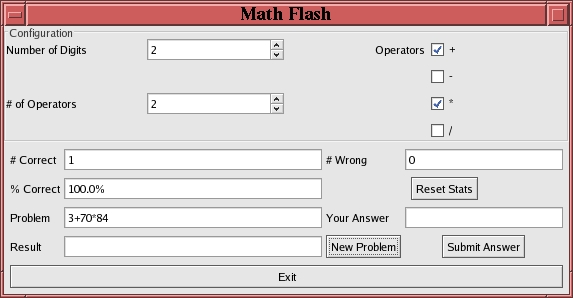
Figure 2. Math Flash
A number of features could be added to this system. Instead of using the generic *args parameter for the created callback functions, the parameters could be specified explicitly, based on the widget and callback prototype. I also plan to add a graphical front end to the program for configuring the options in the GladeGenConfig.py file. The GladeGen software is released under the GPL. If anyone is interested in modifying/extending it, please let the author know.
Thanks to one of my students, Jeremiah Schilens, who worked on an earlier version of this project with me.
Resources for this article: /article/7558.
David Reed lives in Columbus, Ohio with his wife and two dogs. He has worked with UNIX systems since 1991 and Linux since 1997. He holds a PhD in volumetric graphics from The Ohio State University and currently teaches computer science at Capital University. Capital uses a mixture of Python, C++ and Java throughout its CS curriculum. David can be reached at dreed@capital.edu.

