
Paranoid Penguin - Application Proxying with Zorp, Part II
In my last column, I sang the praises of application-layer proxy firewalls and introduced Balazs Scheidler's Zorp firewall suite, available in both commercial and free-of-charge versions. This column continues where we left off, discussing basic Zorp configuration for a simple inside-DMZ-outside scenario. We are going to configure only a couple of services, but this should be enough to help prospective Zorp users begin building their own intelligent firewall systems.
To review, application-layer proxies broker rather than merely pass the traffic that flows through them. For example, when a user on one network initiates an HTTP session on the other side of a proxying firewall, the firewall intercepts and breaks the connection, acting both as the server (from the client's viewpoint) and as the client (from the destination server's standpoint).
Zorp uses transparent proxies, which means that users behind a Zorp firewall need not be aware that the firewall is there; they may target foreign addresses and hostnames without configuring their software to communicate with the proxy. This is an important mitigator against the ugly fact that proxies are inherently more complicated than other kinds of firewalls. With Zorp, all the complexity is in the back end, resulting in much happier end users.
But that doesn't mean Zorp is painful for its administrators, either. I'd rate its complexity as being higher than iptables but lower than sendmail.cf. So without further ado, let's configure ourselves a Zorp firewall.
This article assumes that, per my last column, you've successfully patched your Linux 2.4 kernel and your iptables binary to support the TPROXY module (see www.balabit.com/products/oss/tproxy). It also assumes you have compiled and/or installed packages for libzorpll, zorp and zorp-modules; source code and deb packages are available at www.balabit.com/products/zorp_gpl. My examples further assume you're running Zorp GPL version 2.0, though the examples should apply equally to Zorp Pro 2.0. Zorp Pro has some proxy modules not included with Zorp GPL, but the modules common to both behave the same.
Zorp supports many more than three interfaces per firewall, but the most common firewall architecture nowadays is the three-homed-host architecture shown in Figure 1. This is the architecture I cover here.
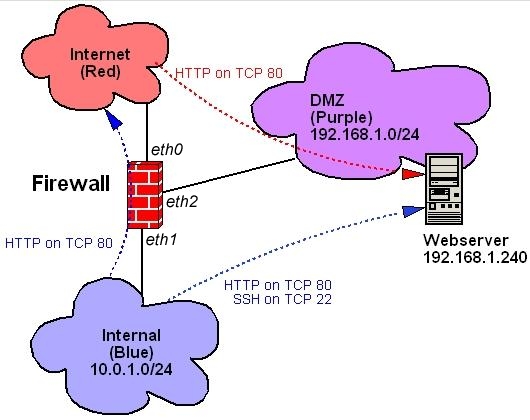
Figure 1. Example Architecture
Similarly, as you can see in Figure 1, we've got only three data flows: HTTP from the Internet to a DMZed Web server; HTTP from the internal network to the Internet; and HTTP and SSH from the internal network to the DMZ. Absent are things like IMAP, NNTP, FTP and other services that even simple setups commonly use. If you understand how to configure Zorp to accommodate these, though, you should be able to figure out others. I do, however, discuss DNS and SMTP, even though I omitted them from Figure 1.
The first thing we need to do doesn't directly involve Zorp but rather the TPROXY kernel module. In transparent proxying, TPROXY needs a dummy network interface to bind to whenever it splits a data flow in two. This needs to be an interface whose IP address is neither Internet-routable nor associated with any network connected to the firewall.
Linux 2.4 kernels compile with support for dummy network interfaces by default. You should have one, unless you intentionally compiled your kernel without dummy driver support. If so, compile a new kernel with dummy support. All you need to do for TPROXY's purposes, therefore, is explicitly configure dummy0 with a nonroutable and unused address. In Debian, you should add the following lines to /etc/networking/interfaces:
auto dummy0
iface dummy0 inet static
      address 1.2.3.4
      netmask 255.255.255.255
Other distributions handle network configuration differently—Red Hat and SuSE use ifcfg- files in /etc/sysconfig/network—but hopefully you get the picture. Notice the 32-bit network mask: I repeat, this address must not belong to a real network.
You may be wondering, isn't this article about Zorp and not iptables? Yes, but Zorp runs in conjunction with iptables, not in place of it. TPROXY, in fact, is specifically a Netfilter patch. To use TPROXY, we need to configure it with the iptables command, as we do for the rest of Netfilter. (Netfilter is the proper name for Linux 2.4's firewall code—iptables is its front-end command.)
In addition, it's recommended that you run certain services, namely DNS and SMTP, on the firewall as self-contained proxies. If you do, you need to use iptables to configure your firewall to accept those connections directly. For example, BIND v9 supports split-horizon DNS, in which external clients are served from different zone files than are internal clients. Similarly, Postfix is easy to configure to act as a relay on behalf of internal hosts, but strictly as a local deliverer when dealing with external hosts. It makes sense to run such proxy-like services on a firewall, as long as you configure them extremely carefully.
If you're new to Netfilter/iptables, what follows may make little sense, and space doesn't permit me to explain it all in detail. Zorp is, after all, an advanced tool. In a nutshell, what we're going to do with iptables is run all packets through some simple checks against spoofed IP addresses. We then are going to intercept packets that need to be proxied transparently and process them in custom chains rather than by using the normal FORWARD chain. Technically, nothing is forwarded. Finally, we pass some packets that are destined for the firewall itself.
Zorp Pro includes a group of scripts collectively called iptables-utils, which simplify iptables management for Zorp. A free version of iptables-utils for Zorp GPL 2.0 is available at www.balabit.com/downloads/zorp/zorp-os/pool/i/iptables-utils. I highly recommend iptables-utils, as it makes it much easier to test a new iptables configuration before actually committing it.
Because it uses a syntax that I don't have space here to explain, the following example is instead a conventional iptables startup script. Here are the most important parts of such a script. First should come rules for the special tproxy table that the TPROXY module adds to Netfilter (Listing 1). This is where we define a custom proxy chain for each of our networks: PRblue for proxied connections initiated from our internal network; PRpurple for proxied connections initiated from our DMZ (none, in this scenario); and PRred for proxied connections originating from the Internet.
Listing 1. TPROXY Rules
iptables -t tproxy -P PREROUTING ACCEPT
iptables -t tproxy -A PREROUTING -i eth1 -j PRblue
iptables -t tproxy -A PREROUTING -i eth2 -j PRpurple
iptables -t tproxy -A PREROUTING -i eth0 -j PRred

iptables -t tproxy -P OUTPUT ACCEPT

iptables -t tproxy -N PRblue
iptables -t tproxy -A PRblue -p tcp --dport 80 \
  -j TPROXY --on-port 50080
iptables -t tproxy -A PRblue -p tcp --dport 22 \
  ! -d firewall.example.net -j TPROXY --on-port 50022

iptables -t tproxy -N PRpurple

iptables -t tproxy -N PRred
iptables -t tproxy -A PRred -p tcp --dport 80 \
  -j TPROXY --on-port 50080
Several things are worth pointing out in Listing 1. First, notice that the tproxy table contains its own PREROUTING and OUTPUT output chains. In Zorp, we use the tproxy/PREROUTING chain to route packets to the proper custom proxy chain (PRblue), based on the interface each packet enters. As with any custom iptables chain, if a packet passes through one of these without matching a rule, it's sent back to the line immediately following the rule that sent the packet to the custom chain. This is why custom chains don't have default targets.
In the PRblue chain, we've got two rules, one for each type of transaction allowed to originate from the internal network. All outbound HTTP material is proxied, that is, handed to a proxy process listening on port 50080. But in the SSH rule, we tell Netfilter to proxy all outbound SSH traffic unless it's destined for the firewall itself. Although Figure 1 doesn't show such a data flow (Blue→SSH→firewall), we need it in order to administer the firewall. This flow also requires a rule in the regular filter table's INPUT chain. In this example scenario, our DMZed Web server isn't permitted to initiate any connections itself, so we've created a PRpurple chain without actually populating it.
Now we move on to the regular filter table, this is the Netfilter table most of us are used to dealing with—it's the default when you omit the -t option with iptables. Listing 2 shows our example firewall's filter table's INPUT rules.
Listing 2. Filter Table INPUT Chain
iptables -P INPUT DROP
iptables -A INPUT -j noise
iptables -A INPUT -j spoof
iptables -A INPUT -m tproxy -j ACCEPT
iptables -A INPUT -m state \
  --state ESTABLISHED,RELATED -j ACCEPT
iptables -A INPUT -i lo -j ACCEPT
iptables -A INPUT -i eth1 -j LOblue
iptables -A INPUT -i eth0 -j LOred
iptables -A INPUT -i eth2 -j LOpurple
iptables -A INPUT -j LOG --log-prefix "INPUT DROP: "
iptables -A INPUT -j DROP
The first few lines check packets against some custom chains that check for spoofed IP addresses; if they pass those checks, they continue down the INPUT chain. Packets generated by the TPROXY module itself are accepted, as are packets belonging to established allowed transactions and loopback packets (lines 4–6, respectively). Next, as with the tproxy table's PREROUTING chain, we route packets to custom chains based on ingress interface. This time, the custom chains are for packets with local destinations, as opposed to proxied ones, so I've named them LOblue and so forth. Next come our filter table's custom chains (Listing 3).
Listing 3. Custom Chains in the Filter Table
iptables -N LOblue
iptables -A LOblue -p tcp --dport 22 --syn -j ACCEPT
iptables -A LOblue -p udp --dport 53 -j ACCEPT
iptables -A LOblue -p tcp --dport 25 --syn -j ACCEPT
iptables -A LOblue -j LOG --log-prefix "LOblue DROP: "
iptables -A LOblue -j DROP

iptables -N LOpurple
iptables -A LOpurple -p udp --dport 53 -j ACCEPT
iptables -A LOpurple -j LOG \
  --log-prefix "LOpurple DROP: "
iptables -A LOpurple -j DROP

iptables -N LOred
iptables -A LOred -p udp -s upstream.dns.server \
  -sport 53 -j ACCEPT
iptables -A LOred -p tcp --dport 25 --syn -j ACCEPT
iptables -A LOred -j LOG --log-prefix "LOred DROP: "
iptables -A LOred -j DROP

iptables -N noise
iptables -A noise -p udp --dport 137:139 -j DROP
iptables -A noise -j RETURN

iptables -N spoof
iptables -A spoof -i lo -j RETURN
iptables -A spoof ! -i lo -s 127.0.0.0/8 -j spoofdrop
iptables -A spoof -i eth1 ! -s 10.0.1.0/24 \
  -j spoofdrop
iptables -A spoof ! -i eth1 -s 10.0.1.0/24 \
  -j spoofdrop
iptables -A spoof -i eth2 ! -s 192.168.1.0/24 \
  -j spoofdrop
iptables -A spoof ! -i eth2 -s 192.168.1.0/24 \
  -j spoofdrop
iptables -A spoof -j RETURN

iptables -N spoofdrop
iptables -A spoofdrop -j LOG \
  --log-prefix "Spoofed packet: "
iptables -A spoofdrop -j DROP
The first three of these custom chains are the most important: LOblue, LOpurple and LOred tell Netfilter how to process packets destined for the firewall itself, based on in which interface the packets arrive. In LOblue, we're accepting DNS queries, SSH connections and SMTP connections. In LOpurple, we're accepting only DNS queries. And in LOred, we're accepting DNS replies from our ISP's DNS server (upstream.dns.server) and SMTP connections. The last three of these custom chains are the simplest: noise filters NETBIOS packets, those notorious clutterers of Linux firewall logs; spoof filters for packets with obviously spoofed, that is, impossible, source IP addresses; and spoofdrop logs and drops packets caught by the spoof chain.
Listing 4 shows the remainder of our example iptables script, an essentially empty FORWARD chain with a default DROP policy and an empty OUTPUT chain with a default ACCEPT chain. Again, this is a proxying firewall, so it won't forward anything. You may be uneasy with the default ACCEPT policy for firewall-originated packets, but this is both necessary and safe on a Zorp firewall.
Listing 4. The Filter Table's FORWARD and OUTPUT Chains
iptables -P FORWARD DROP
iptables -A FORWARD -j LOG \
  --log-prefix "FORWARD DROP: "
iptables -A FORWARD -j DROP

iptables -P OUTPUT ACCEPT
Finally, we come to actual Zorp configuration files. These are stored in /etc/zorp, and the first one we tackle is instances.conf, which defines and controls Zorp's instances. Usually, the rule of thumb is to define one instance per network zone, so in our example scenario we have, you guessed it, one instance each for our red, purple and blue zones. Listing 5 shows what such an instances.conf file would look like.
Listing 5. instances.conf
blue -v3 -p /etc/zorp/policy.py \
  --autobind-ip 1.2.3.4
purple -v3 -p /etc/zorp/policy.py \
  --autobind-ip 1.2.3.4
red -v3 -p /etc/zorp/policy.py \
  --autobind-ip 1.2.3.4
The first field in each line is the name of the instance. This is user-definable, but we need to refer to it verbatim in the Zorp configuration file proper, policy.py. Speaking of which, you may use separate configuration files for each instance if you wish, or you may configure multiple zones within a single file. Regardless, the -p option in instances.conf tells Zorp which file to use for each instance.
The -v parameter sets log message verbosity: 3 is the medium setting, and 5 is useful for debugging. This parameter controls only Zorp-generated log messages and has no effect whatsoever on Netfilter/iptables logging. Finally, each line ends with an --autobind-ip setting that determines to which dummy IP Zorp should bind TPROXY when proxying connections. This IP address can and should be shared between all instances. This address, obviously, should be the one you set earlier (see Configuring a Dummy Interface, above).
Your iptables script determines how packets get routed to proxies, and /etc/zorp/instances.conf determines how Zorp starts up. But to tell Zorp's proxies how to behave, you need to set up /etc/zorp/policy.py, or whatever you called the configuration file(s) referenced in instances.conf—policy.py is conventional but not mandatory. This policy file contains two parts. The first part is a global section in which zones are defined based on network addresses and allowed services. The second part is a service-instance definition section in which each instance listed in instances.conf is defined based on which services originate in each and in which those services are mapped to application proxies.
Listing 6 shows a complete global section from our example policy.py. It begins with some import sections, in which essential Python functions are included. Next come our zone definitions. If you set up instances.conf to run one Zorp instance per zone, your zone names here can be similar to or even the same as your instance names. In Listing 6 I've chosen different names in order to illustrate that technically, zone names are distinct from instance names.
Listing 6. policy.py, Part I (Global Settings)
from Zorp.Core import *
from Zorp.Plug import *
from Zorp.Http import *

InetZone("bluezone", "10.0.1.0/24",
   outbound_services=["blue_http", "blue_ssh"],

InetZone("purplezone", "192.168.1.0/24",
   inbound_services=["blue_http", "blue_ssh",
                     "red_http"])

InetZone("redzone", "0.0.0.0/0",
   outbound_services=["red_http"],
   inbound_services=["*"])

InetZone("localzone", "127.0.0.0/8",
   inbound_services=["*"])

# end global section
In each zone definition, you can see a network address that corresponds to those in Figure 1 and specifications of which services are allowed. These service names are user-definable and fleshed out in the subsequent service-instance definitions. The important thing to understand about these statements is that inbound and outbound is relative to the zone/network, not to the firewall.
Figure 2 shows what the internal-to-Internet HTTP data flow looks like as a proxied connection. In this illustration, we see this data flow exists both as an outbound connection out of the Internal (blue) zone and an inbound connection to the Internet (red) zone. This is borne out in the respective bluezone and redzone definitions in Listing 6. It's also important to use the same service name in both zone definitions that a given data flow traverses (blue_http in the case of Figure 2 and Listing 6).
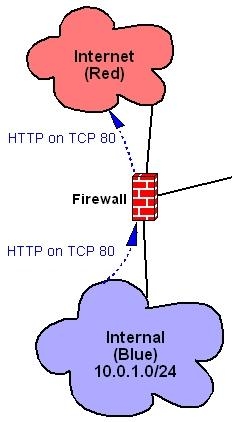
Figure 2. An HTTP Transaction Outbound from Blue, Inbound to Red
The last point to make about Listing 6 is the * wild card signifies all defined services. This is narrower than it might seem; * includes only those services defined in policy.py's service-instance definitions, not all possible services. Remember, Zorp processes only those packets that Netfilter and TPROXY send to it. If a given zone is to allow no outbound or inbound services, the inbound_services or outbound_services parameter may be either omitted or set to [] (empty brackets).
Listing 7 shows our policy.py file's service-instance definitions. The first line of each definition must reference an instance name specified in instances.conf, and the following lines in the definition must be indented because these rules are processed by Python, which is precise about indentation. The definition can't be empty: if no services originate in a given instance, the token pass may be used, as with the purple() instance definition in Listing 7.
Listing 7. policy.py, Part II (Instance Definitions)
def blue():
    Service("blue_http", HttpProxy,
            router=TransparentRouter())
    Service("blue_ssh", PlugProxy,
            router=TransparentRouter())
    Listener(SockAddrInet('10.0.1.254', 50080),
             "blue_http")
    Listener(SockAddrInet('10.0.1.254', 50022),
             "blue_ssh")

def purple():
    pass

def red():
    Service("red_http", HttpProxy,
router=DirectedRouter(SockAddrInet('192.168.1.242', 80),
forge_addr=TRUE))
    Listener(SockAddrInet('169.254.1.254', 50080),
             "red_http")
Otherwise, the definition should consist of one or more Service lines, specifying a service name referenced in one or more zone definitions, and a Zorp proxy module, either a built-in proxy included in the global import statements or defined in a custom class. The last field in a Service line is a router, which specifies where proxied packets should be sent. You can see in Listing 7 that for the red_http service, we've used the forge_addr=TRUE option to pass the source IPs of Web clients intact from the Internet to our Web server. Without this option, all Web traffic hitting the DMZ appears to originate from the firewall itself.
Although in Listing 7 we're using only the HttpProxy and the PlugProxy (a general-service UDP and TCP proxy that copies application data verbatim), Zorp GPL also has proxies for FTP, whois, SSL, telnet and finger. As I mentioned before, you also can create custom classes to alter or augment these proxies. It's easy to create, for example, an HTTP proxy that performs URL filtering or an SSL proxy stacked on an HTTP proxy so HTTPS traffic can be proxied intelligently. Unfortunately, these are advanced topics I can't cover here; fortunately, all of Zorp's Python proxy modules are heavily commented.
The TransparentRouter referenced in Listing 7 simply proxies the packets to the destination IP and port specified by the client. But in the red instance's red_http service, we see that a DirectedRouter, which requires a mandatory destination IP and port, may be specified instead.
Each Service line in a service-instance definition must have a corresponding Listener line. This line tells Zorp to which local (firewall) IP address and port the service should be bound. It may seem counterintuitive that the ports specified in Listing 7's Listener statements are high ports: 50080 instead of 80 and 50022 instead of 22. But remember, each proxy receives its packets from the kernel through Netfilter, not directly from clients. Accordingly, these high ports must correspond to those specified in your tproxy table Netfilter rules (Listing 1).
I mentioned that unlike HttpProxy, which is a fully application-aware proxy that enforces all relevant Internet RFCs for proper HTTP behavior, PlugProxy is a general-service proxy (GSP). Using PlugProxy still gives better protection than does packet filtering on its own, because the very act of proxying, even without application intelligence, insulates your systems from low-level attacks that Netfilter may not catch on its own.
And with that, we've scratched the dense surface of Zorp GPL. This is by far the most complex tool I've covered in these pages, but I think you'll find Zorp to be well worth the time you invest in learning how to use it.
Resources
The English-language home for Balabit, creators of Zorp: www.balabit.com.
The root download directory for ZorpOS contains some tools that make using Zorp GPL much easier, including iptables-utils, a TPROXY-enabled Linux kernel and iptables command. In fact, these are the free parts of the Debian distribution included with Zorp Pro, which is why everything in ZorpOS is in the form of Debian packages. If you aren't a Debian user, everything you want is in the subdirectories of pool; at the top of each package's subdirectory are tar.gz files containing source code. If you are a Debian user, you can use the URL as an apt-get source: www.balabit.com/downloads/zorp/zorp-os.
The Zorp Users' Mailing List is an amazingly quick and easy way to get help using Zorp, whether Pro or GPL. This URL is the site for subscribing to it or browsing its archives. Note that Balabit is a Hungarian company and its engineers (and some of the most helpful Zorp users) operate in the CET (GMT+1) time zone: https://lists.balabit.hu/mailman/listinfo/zorp.
Mick Bauer, CISSP, is Linux Journal's security editor and an IS security consultant in Minneapolis, Minnesota. He's the author of Building Secure Servers With Linux (O'Reilly & Associates, 2002).

