
Linux on Linksys Wi-Fi Routers
Wireless networking has become a mass-market technology, and the price of 802.11 or Wi-Fi gear has fallen to commodity levels. Several thousand competitors with virtually identical products now are vying for your Wi-Fi dollars. In this kind of competitive space it is natural for manufacturers to seek the lowest cost alternatives. Their choice? Linux, of course.
Linux has become the premium OS for inexpensive, feature-packed wireless networking. Linksys, one of the major wireless players, turned to Linux for its 802.11g next-generation Wi-Fi devices. When Cisco bought Linksys in early 2003, it inherited both the Linux devices and an emerging feud over the unreleased GPL source code. After several months of lobbying by open-source enthusiasts, Cisco relented and released the source.
The Linksys WRT54G product (Figure 1) is especially interesting due to its low price and internal hardware. The WRT54G contains a four-port Ethernet hub, an Ethernet WAN port, support for the new high-speed 54MB/s 802.11g wireless protocol and backward compatibility with older 802.11b devices.
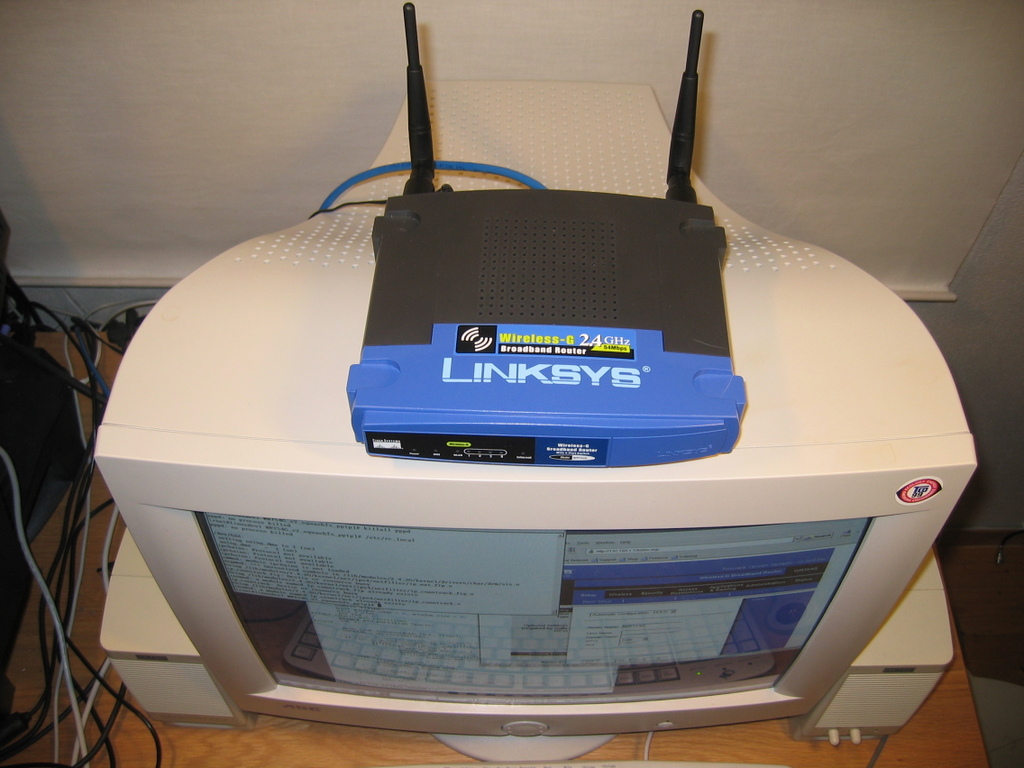
Figure 1. For under $100 US, the Linksys WRT54G is a capable Linux platform with 16MB of RAM, a 125MHz processor and support for 802.11b and g.
But what the WRT54G lacks is what makes it interesting. Under the hood the unit sports a 125MHz MIPS processor with 16MB of RAM. This is more than enough horsepower to run some serious applications, so why not add some?
The latest source on the Linksys site is about 145MB in size and contains a complete toolchain for MIPS cross development (see “The Linksys WRT54G Source Tree” sidebar).
Follow the instructions for creating symlink and PATH additions in the README file in the WRT54G/src subdirectory. Then cd to the router subdirectory and run make menuconfig. Keep the standard options for your first build, and click through to create your configuration files. cd up one level to the WRT54G/src directory and type make. That's all there is to it. A file called code.bin is created in the WRT54G/image directory containing a compressed cramfs filesystem and a Linux 2.4.20 kernel.
Now comes the scary part—how do you get this new firmware on to your Linksys? There are two methods, by tftp or through the Web-based firmware upgrade interface. I suggest you use the Web upgrade for your first try.
Surf to your Linksys box—the default address is 192.168.1.1—and log in. Select Firmware Upgrade from the Administration menu and upload your code.bin file. The router now restarts. Congratulations, you have just modded your Linksys box.
The existence of Linux on the WRT54G was discovered through a bug in the ping utility in the Diagnostics menu. Firmware versions prior to 1.42.2 allowed arbitrary code to be run from the ping window if surrounded by back-ticks. If you have a box with the older firmware, try typing `ls -l /` in the ping window's IP address field. Voilà—a listing of the root directory magically appears.
The ping hack allows curious folks to explore their boxes without modifying the source. But exploring by way of the ping window is slow and tedious. What we really need is a shell on the box.
By expanding the ping hack in the source code, a custom firmware image can be created with the full power of a Linux shell over the Web interface. See the on-line Resources section URLs on how to create the command shell.
But why stop there? The default firmware's cramfs filesystem leaves 200K of Flash memory free. There is room for many useful applications, such as telnet or Secure Shell or perhaps even a VPN client or server.
One useful command supplied by Linksys in binary form only is wl. The wl command contains several dozen internal commands that control wireless settings, including the popular power adjustment setting. Typing wl with no parameters produces a complete list of its capabilities.
The default power setting on the WRT54G is 28 milliwatts, and this setting cannot be changed externally. But by using the ping hack or a shell, you can change this with wl, using the txpwr subcommand and a number between 1 and 84 milliwatts. This number raises or lowers the default power setting until the next reboot.
Increasing the power setting or replacing the stock antennas may increase your radio output and violate local laws. If you replace the stock antennas and lower the power setting, your unit's range can be extended significantly while remaining within legal radio power limits.
The WRT54G supports two external antennas and automatically balances between them depending on which received the last active packet. When adding a more powerful external antenna, this is not the setup that you want. You need to force the unit to choose the high power antenna every time. This is done with wl txant for receiving and wl antdiv for sending. A 0 parameter forces the left antenna coupling and a 1 forces the right, as you face the front panel.
One enterprising individual ported the entire OpenSSH toolchain to the Linksys box. Unfortunately, the size of the OpenSSH binary means that many standard Linksys functions must be removed to make room. Plus, the resulting RAM requirements are at the limits of available memory. What is needed is an SSH server with a small memory footprint, and the Dropbear server fits the bill nicely. Matt Johnson designed the Dropbear SSH dæmon specifically to run in memory-constrained systems such as the Linksys.
The standard Linksys Linux implementation lacks many of the normal files needed for multiuser Linux systems. Two of these—passwd and groups in the /etc directory—are required by the vast majority of Linux applications. In order to run the Dropbear server, we need to add these files to the Flash build.
By creating a passwd file with a root entry and no password and a matching groups file, we can make Dropbear almost happy enough to run. These files are copied to the /etc directory of the Flash image and are read-only on the Linksys.
When running, Dropbear also needs to access a private key that is used for SSH handshaking and authentication, as well as a known_hosts file containing the public keys of approved client machines. Generating the private key with the dropbearkey program is a snap, but storing it on the Linksys is a bit trickier.
The WRT54G contains a hash map of key name and value pairs located in nonvolatile storage called nvram. The bundled nvram utility and API allows us to read and write to this memory area. The Dropbear private key and our public key ID from id_rsa.pub in our home .ssh directory are stored in nvram and copied to /var in the RAM disk on system start.
We compile Dropbear with support for key-file authorization and now have a secure way to log in to the Linksys. If you need password login, the Dropbear code can be patched to read the system password from nvram and to add the ability for password logins as well.
After adding such utilities as SSH and telnetd, you soon find your Linksys firmware image bumping the limits of the Flash storage space on the device. What you need is a filesystem with better compression than cramfs offers, one that is compatible with the Linksys Linux kernel.
The default cramfs filesystem compresses data in 4K blocks, but compressing on 4K boundaries limits the compression ratios that can be achieved. If we could find a filesystem that compressed larger blocks of data but mapped correctly to the page size in the OS, we would be able to put far more data and applications in the firmware.
Phillip Lougher's squashfs filesystem compresses in 32K blocks and is compatible with the 2.4 and 2.6 kernels. If we could move the Linksys firmware from cramfs to squashfs, we might have enough room for a VPN client and server in the system.
The Linksys kernel is a customized 2.4.20 source tree modified by Broadcom. Broadcom is a leading 802.11g chip maker and is responsible for the CPU and radio chips in the WRT54G. The squashfs tar file contains patches for the 2.4.20 through 2.4.22 kernels. Unfortunately, none of these applies cleanly to the Broadcom kernel tree, so a bit of hand editing is necessary. The patch with the fewest errors is the 2.4.22 version, which misses only one hunk when applied. By reading the patch file and finding the missing hunk, you can patch the missing code manually. You also can find a WRT54G-specific squashfs patch on the Sveasoft Web site.
The Linksys WRT54G Source Tree
When you unpack the GPL source from Linksys, a directory structure is created below the main WRT54G subdirectory. Here is an explanation of the important parts.
The main tarball directory is /WRT54G. The main Makefile lives in /release/src. After unpacking the source, read the README file here for instructions on how to compile it.
All of the applications packaged with the Linksys unit are built from /release/src/router. If you want to add applications, do it here and modify the Makefile in this directory. This Linux kernel source tree has been modified by Broadcom, the manufacturer of the wireless chips and CPU in the WRT54G. Add your kernel modifications or patches here, /release/src/linux/linux.
You need to create a symlink from /opt to the brcm directory here, /tools/brcm. Two of the subdirectories under brcm must be added to your PATH. See the README file above for more information.
Patches and updated source code can be downloaded from Sveasoft. See Resources for more information.
The next step is to edit the Broadcom kernel startup code and add a check for squashfs. The do_mount.c file contains nearly identical code and can be used as a guide when patching the startup.c file in the arch/mips/brcm-boards/bcm947xx subdirectory.
After patching the kernel, the router Makefile must be patched to generate a squashfs image and the Linux kernel configuration must be set to include squashfs support.
This is well worth the effort, however. On recompile you should find some 500K free bytes, compared to the stock cramfs filesystem.
The standard WRT54G is a wireless access point (AP). This means that it can talk to wireless clients but not to other wireless access points. The ability to link it to other access points using the Wireless Distribution System (WDS) or to act as a wireless client is available using the wl command.
The Wireless Distribution System is an IEEE specification that allows wireless access points to be chained together in a wide area network. Although there is some performance penalty for doing this, the end result is an extended wireless network with a much greater range than is available using single APs.
In order to link two APs together using WDS, their respective MAC addresses must be known. Log in to each box and run the command wl wds [Mac Addr], using the MAC address of the opposite machine's wireless interface. A new device called wds0.2 then appears on each box and can be assigned an IP address. Once the IP addresses are assigned and routing is set up between the two boxes, you are able to ping one from the other.
Each WDS link results in data traffic doubling within the network. Because 802.11g is half duplex, this halves the network throughput. If the APs are operating at 54MB/s, this is not much of a performance hit if you keep the links to three or fewer.
A simpler form of bridging is to set up one box as a client and have it link to an access point. This is known as an Ethernet bridge, and several products exist specifically for this purpose.
Client mode must be selected in the Linux kernel build menu and compiled in the kernel. Once done, the kernel is built with a Broadcom binary-only module that includes support for both AP and client modes. The command wl ap 0 sets the box to client mode, and wl join [SSID] links it to an access point. If you set routing in the client using the access point's IP address as the default gateway, the client automatically routes to the access point and your bridge becomes active. Multiple AP and client pairs can be set up as an alternative to the WDS method described above.
Linux has worked its way into everything from supercomputers to embedded systems, including the Linksys. The move to Linux is the result of a highest performance vs. lowest cost equation in a highly competitive market. Many similar wireless routers, such as the Belkin F5D7230-4, the Buffalotech WBR-G54 and the ASUS WL-300g and WL-500g, all use Linux in their firmware, and the list expands daily. Unfortunately, none of these companies has complied with GPL requirements and released the source code. Legal issues aside, these products will lag far behind the Linksys open-source products in capabilities and features for some time to come.
Linksys firmware builds containing amazing new features and capabilities appear daily. At the time of this writing, firmware builds for the Linksys WRT54G with support for VPNs, power adjustment, antenna select, client and WDS mode, bandwidth management and a whole lot more are available from multiple sources. The Internet combined with open-source code can change a small SOHO wireless router into a powerful multifunctional device.
One word of caution: using experimental firmware could kill your box and probably violates the Linksys warranty. If you are a casual user and need home or small office access to a wireless network, this definitely is not for you. Use the official Linksys firmware builds instead.
If, however, you are willing to risk your box and experiment with its potential, you may find it is capable of much more than the specifications listed on the product packaging—thanks to the power of Linux and open-source development.
Resources for this article: /article/7609.
James Ewing (james.ewing@sveasoft.com) has been an entrepreneur and software developer for more than 20 years. Originally from California, he moved to Sweden a decade ago and now balances his time between a wife and two children and practicing his authentic rendition of the Swedish chef on the Muppet show.

