
GNU Radio: Tools for Exploring the Radio Frequency Spectrum
Software radio is the technique of getting code as close to the antenna as possible. It turns radio hardware problems into software problems. The fundamental characteristic of software radio is that software defines the transmitted waveforms, and software demodulates the received waveforms. This is in contrast to most radios in which the processing is done with either analog circuitry or analog circuitry combined with digital chips. GNU Radio is a free software toolkit for building software radios.
Software radio is a revolution in radio design due to its ability to create radios that change on the fly, creating new choices for users. At the baseline, software radios can do pretty much anything a traditional radio can do. The exciting part is the flexibility that software provides you. Instead of a bunch of fixed function gadgets, in the next few years we'll see a move to universal communication devices. Imagine a device that can morph into a cell phone and get you connectivity using GPRS, 802.11 Wi-Fi, 802.16 WiMax, a satellite hookup or the emerging standard of the day. You could determine your location using GPS, GLONASS or both.
Perhaps most exciting of all is the potential to build decentralized communication systems. If you look at today's systems, the vast majority are infrastructure-based. Broadcast radio and TV provide a one-way channel, are tightly regulated and the content is controlled by a handful of organizations. Cell phones are a great convenience, but the features your phone supports are determined by the operator's interests, not yours.
A centralized system limits the rate of innovation. We could take some lessons from the Internet and push the smarts out to the edges. Instead of cell phones being second-class citizens, usable only if infrastructure is in place and limited to the capabilities determined worthwhile by the operator, we could build smarter devices. These user-owned devices would generate the network. They'd create a mesh among themselves, negotiate for backhaul and be free to evolve new solutions, features and applications.
Figure 1 shows a typical block diagram for a software radio. To understand the software part of the radio, we first need to understand a bit about the associated hardware. Examining the receive path in Figure 1, we see an antenna, a mysterious RF front end, an analog-to-digital converter (ADC) and a bunch of code. The analog-to-digital converter is the bridge between the physical world of continuous analog signals and the world of discrete digital samples manipulated by software.
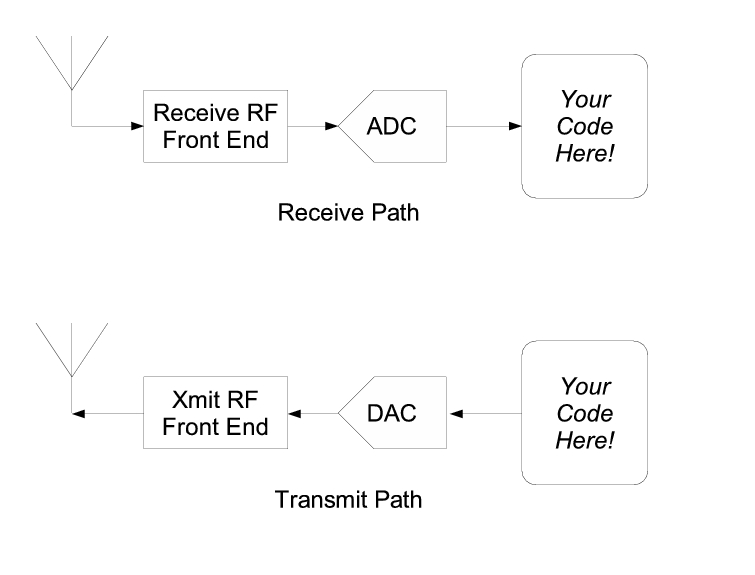
Figure 1. Typical Software Radio Block Diagram
ADCs have two primary characteristics, sampling rate and dynamic range. Sampling rate is the number of times per second that the ADC measures the analog signal. Dynamic range refers to the difference between the smallest and largest signal that can be distinguished; it's a function of the number of bits in the ADC's digital output and the design of the converter. For example, an 8-bit converter at most can represent 256 (28) signal levels, while a 16-bit converter represents up to 65,536 levels. Generally speaking, device physics and cost impose trade-offs between the sample rate and dynamic range.
Before we dive into the software, we need to talk about a bit of theory. In 1927, a Swedish-born physicist and electrical engineer named Harry Nyquist determined that to avoid aliasing when converting from analog to digital, the ADC sampling frequency must be at least twice the bandwidth of the signal of interest. Aliasing is what makes the wagon wheels look like they're going backward in the old westerns: the sampling rate of the movie camera is not fast enough to represent the position of the spokes unambiguously.
Assuming we're dealing with low pass signals—signals where the bandwidth of interest goes from 0 to fMAX, the Nyquist criterion states that our sampling frequency needs to be at least 2 * fMAX. But if our ADC runs at 20MHz, how can we listen to broadcast FM radio at 92.1MHz? The answer is the RF front end. The receive RF front end translates a range of frequencies appearing at its input to a lower range at its output. For example, we could imagine an RF front end that translated the signals occurring in the 90–100MHz range down to the 0–10MHz range.
Mostly, we can treat the RF front end as a black box with a single control, the center of the input range that's to be translated. As a concrete example, a cable modem tuner module that we've employed successfully has the following characteristics. It translates a 6MHz chunk of the spectrum centered between about 50MHz and 800MHz down to an output range centered at 5.75MHz. The center frequency of the output range is called the intermediate frequency, or IF.
In the simplest-thing-that-possibly-could-work category, the RF front end may be eliminated altogether. One GNU Radio experimenter has listened to AM and shortwave broadcasts by connecting a 100-foot piece of wire directly to his 20M sample/sec ADC.
GNU Radio provides a library of signal processing primitives and the glue to tie it all together. The programmer builds a radio by creating a graph (as in graph theory) where the nodes are signal processing primitives and the edges represent the data flow between them. The signal processing primitives are implemented in C++. Conceptually, primitives process infinite streams of data flowing from their input ports to their output ports. Primitives' attributes include the number of input and output ports they have as well as the type of data that flows through each. The most frequently used types are short, float and complex.
Some primitives have only output ports or input ports. These serve as data sources and sinks in the graph. There are sources that read from a file or ADC, and sinks that write to a file, digital-to-analog converter (DAC) or graphical display. About 100 primitives come with GNU Radio. Writing new primitives is not difficult.
Graphs can be constructed and run in C++, but the easy way to glue everything together is with Python. Listing 1 is the “Hello World” of GNU Radio. It generates two sine waves and outputs them to the sound card, one on the left channel, one on the right.
Listing 1. Hello World (Dial Tone Output)
#!/usr/bin/env python

from GnuRadio import *

def build_graph ():
    sampling_freq = 32000
    ampl = 8192

    fg = gr_FlowGraph ()

    src0 = GrSigSourceS (
        sampling_freq, GR_SIN_WAVE, 350, ampl)

    src1 = GrSigSourceS (
        sampling_freq, GR_SIN_WAVE, 440, ampl)

    sink = GrAudioSinkS ()

    fg.connect (src0, sink)
    fg.connect (src1, sink)

    return fg

if __name__ == '__main__':
    fg = build_graph ()
    fg.start ()        # fork thread(s) and return
    raw_input ('Press Enter to quit: ')
    fg.stop ()
We start by creating a flow graph to hold the primitives and connections between them. The two sine waves are generated by the GrSigSourceS calls. The S suffix indicates that the source produces shorts. One sine wave is at 350Hz, and the other is at 440Hz. Together, they sound like the US dial tone.
GrAudioSinkS is a sink that writes its input to the sound card. It takes one or two streams of shorts as its input. We connect the three primitives together using the connect method of the flow graph. Once the graph is built, we start it. Calling start forks one or more threads to run the computation described by the graph and returns control immediately to the caller. In this case, we simply wait for any keystroke.
Listing 2 shows a somewhat simplified but complete broadcast FM receiver. It includes control of the RF front end and all required signal processing. This example uses an RF front end built from a cable modem tuner and a 20M sample/sec analog-to-digital converter.
Listing 2. Simple Broadcast FM Receiver
#!/usr/bin/env python

# simple broadcast FM receiver

from GnuRadio import *

#
# return a gr_FlowGraph
#
def build_graph (IF_freq):
    input_rate = 20e6

    CFIR_decimate = 125
    RFIR_decimate = 5
    fm_demod_gain = 2200

    quad_rate = input_rate / CFIR_decimate
    audio_rate = quad_rate / RFIR_decimate

    volume = 1.0

    src = GrHighSpeedADCSourceS (input_rate)

    # compute FIR filter taps for channel selection
    channel_coeffs = \
      gr_firdes.low_pass (
        1.0,          # gain
        input_rate,   # sampling rate
        250e3,        # low pass cutoff freq
        8*100e3,      # width of trans. band
        gr_firdes.WIN_HAMMING)

    # input: short; output: complex
    chan_filter = \
      GrFreqXlatingFIRfilterSCF (CFIR_decimate,
                                 channel_coeffs,
                                 IF_freq)
    # input: complex; output: float
    fm_demod = \
      GrQuadratureDemodCF (volume * fm_demod_gain)

    # compute FIR filter taps for audio filter
    width_of_transition_band = audio_rate / 32
    audio_coeffs = \
      gr_firdes.low_pass (
        1.0,            # gain
        quad_rate,      # sampling rate
        audio_rate/2 - width_of_transition_band,
        width_of_transition_band,
        gr_firdes.WIN_HAMMING)

    # input: float; output: short
    audio_filter = \
      GrFIRfilterFSF (RFIR_decimate, audio_coeffs)

    final_sink = GrAudioSinkS ()

    fg = gr_FlowGraph ()

    fg.connect (src, chan_filter)
    fg.connect (chan_filter, fm_demod)
    fg.connect (fm_demod, audio_filter)
    fg.connect (audio_filter, final_sink)

    return fg

if __name__ == '__main__':

    # connect to RF front end
    rf_front_end = microtune_eval_board ()
    if not rf_front_end.board_present_p ():
        raise IOError, 'RF front end not found'

    # set gain and radio station frequency
    rf_front_end.set_AGC (300)
    rf_front_end.set_RF_freq (100.1e6)

    IF_freq = rf_front_end.get_output_freq ()
    fg = build_graph (IF_freq)
    fg.start ()        # fork thread(s) and return
    raw_input ('Press Enter to quit: ')
    fg.stop ()
Like the Hello World example, we build a graph, connect the primitives together and start it. In this case, our source is the high-speed ADC, GrHighSpeedADC. We follow it with GrFreqXlatingFIRfilterSCF, a finite impulse response (FIR) filter that selects the FM station we're looking for and translates it to baseband (0Hz, DC). With the 20M sample/sec converter and cable modem tuner, we're really grabbing something in the neighborhood of a 6MHz chunk of the spectrum. This single chunk may contain ten or more FM stations, and GrFreqXlatingFIRfilterSCF allows us to select the one we want. In this case, we select the one at the exact center of the IF of the RF front end (5.75MHz). The output of GrFreqXlatingFIRfilterSCF is a stream of complex samples at 160,000 samples/second. We feed the complex baseband signal into GrQuadratureDemodCF, the block that does the actual FM demodulation. GrQuadratureDemodCF works by subtracting the angle of each adjacent complex sample, effectively differentiating the frequency. The output of GrQuadratureDemodCF contains the left-plus-right FM mono audio signal, the stereo pilot tone at 19kHz, the left-minus-right stereo information centered at 38kHz and any other sub-carriers above that. For this simplified receiver, we finish off by low pass filtering and decimating the stream, keeping only the left-plus-right audio information, and send that to the sound card at 32,000 samples/sec. See the GNU Radio Wiki for discussions and tutorials on signal processing.
Graphical interfaces for GNU Radio applications are built in Python. Interfaces may be built using any toolkit you can access from Python; we recommend wxPython to maximize cross-platform portability. GNU Radio provides primitives that use interprocess communication to transfer chunks of data from the real-time C++ flow graph to Python-land.
GNU Radio is reasonably hardware-independent. Today's commodity multi-gigahertz, super-scalar CPUs with single-cycle floating-point units mean that serious digital signal processing is possible on the desktop. A 2GHz Pentium or Athlon can evaluate 2 billion floating-point FIR taps/s. We now can build, virtually all in software, communication systems unthinkable only a few years ago.
Your computational requirements depend on what you're trying to do, but generally speaking, a 1 or 2GHz machine with at least 256MB of RAM should suffice. You also need some way to connect the analog world to your computer. Low-cost options include built-in sound cards and audiophile quality 96kHz, 24-bit, add-in cards. With either of these options, you are limited to processing relatively narrow band signals and need to use some kind of narrow-band RF front end.
Another possible solution is an off-the-shelf, high-speed PCI analog-to-digital board. These are available in the 20M sample/sec range, but they are expensive, about the cost of a complete PC. For these high-speed boards, cable modem tuners make reasonable RF front ends.
The preferred solution is the Universal Software Radio Peripheral (USRP). Figure 2 shows the block diagram of the USRP. The brainchild of Matt Ettus, the USRP is an extremely flexible USB device that connects your PC to the RF world. The USRP consists of a small motherboard containing up to four 12-bit 64M sample/sec ADCs, four 14-bit, 128M sample/sec DACs, a million gate-field programmable gate array (FPGA) and a programmable USB 2.0 controller. Each fully populated USRP motherboard supports four daughterboards, two for receive and two for transmit. RF front ends are implemented on the daughterboards. A variety of daughterboards is available to handle different frequency bands. For amateur radio use, low-power daughterboards are available that receive and transmit in the 440MHz band and the 1.24GHz band. A receive-only daughterboard based on a cable modem tuner is available that covers the range from 50MHz to 800MHz. Daughterboards are designed to be easy to prototype by hand in order to facilitate experimentation.
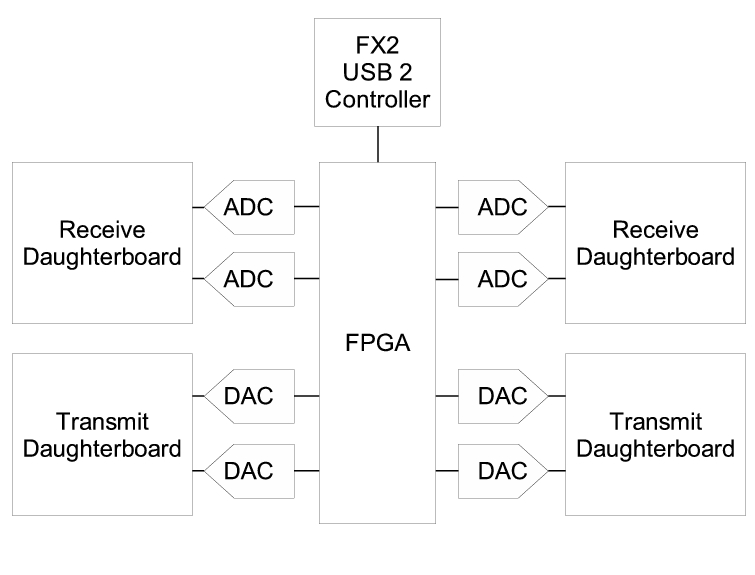
Figure 2. Universal Software Radio Peripheral (USRP)
The flexibility of the USRP comes from the two programmable components on the board and their interaction with the host-side library. To get a feel for the USRP, let's look at its boot sequence. The USRP itself contains no ROM-based firmware, merely a few bytes that specify the vendor ID (VID), product ID (PID) and revision. When the USRP is plugged in to the USB for the first time, the host-side library sees an unconfigured USRP. It can tell it's unconfigured by reading the VID, PID and revision. The first thing the library code does is download the 8051 code that defines the behavior of the USB peripheral controller. When this code boots, the USRP simulates a USB disconnect and reconnect. When it reconnects, the host sees a different device: the VID, PID and revision are different. The firmware now running defines the USB endpoints, interfaces and command handlers. One of the commands the USB controller now understands is load the FPGA. The library code, after seeing the USRP reconnect as the new device, goes to the next stage of the boot process and downloads the FPGA configuration bitstream.
FPGAs are generic hardware chips whose behavior is determined by the configuration bitstream that's loaded into them. You can think of the bitstream as object code. The bitstream is the output of compiling a high-level description of the design. In our case, the design is coded in the Verilog hardware description language. This is source code and, like the rest of the code in GNU Radio, is licensed under the GNU General Public License.
An FPGA is like a small, massively parallel computer that you design to do exactly what you want. Programming the FPGA takes a bit of skill, and mistakes can fry the board permanently. That said, we provide a standard configuration that is useful for a wide variety of applications.
Using a good USB host controller, the USRP can sustain 32MB/sec across the USB. The USB is half-duplex. Based on your needs, you partition the 32MB/sec between the transmit and the receive directions. In the receive direction, the standard configuration allows you to select the part or parts of the digitized spectrum you're interested in, translate them to baseband and decimate as required. This is exactly equivalent to what's happening in the RF front end, only now we're doing it on digitized samples. The block of code that performs this function is called a digital down converter (Figure 3). One advantage of performing this function in the digital domain is we can change the center frequency instantaneously, which is handy for frequency hopping spread spectrum systems.
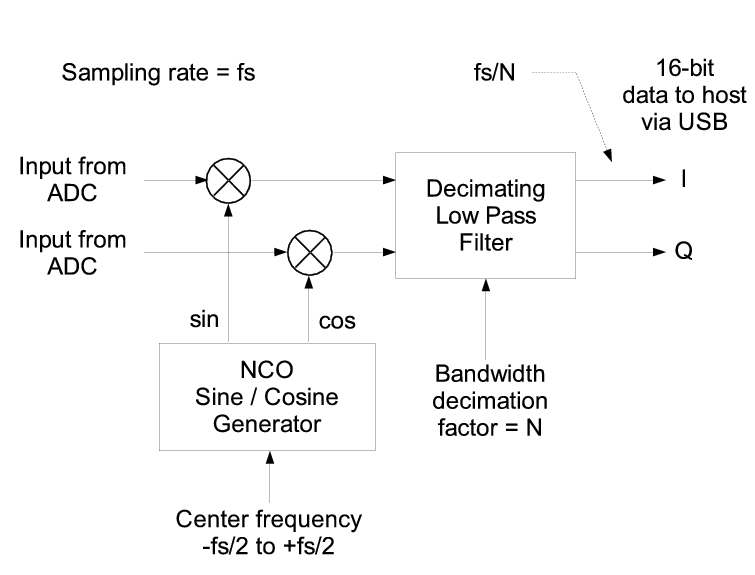
Figure 3. Digital Down Converter Block Diagram
In the transmit direction, the exact inverse is performed. The FPGA contains multiple instances of the digital up and down converters. These instances can be connected to the same or different ADCs, depending on your needs. We don't have room here to cover all the theory behind them; see the GNU Radio Wiki for more information.
In addition to the examples discussed above, GNU Radio comes with a complete HDTV transmitter and receiver, a spectrum analyzer, an oscilloscope, concurrent multichannel receiver and an ever-growing collection of modulators and demodulators.
Projects under investigation or in progress include:
A TiVo equivalent for radio, capable of recording multiple stations simultaneously.
A passive radar system that takes advantage of broadcast TV for its signal source. For those of you with old TVs hooked to antennas, think about the flutter you see when airplanes fly over.
Radio astronomy.
TETRA transceiver.
Digital Radio Mundial (DRM).
Software GPS.
Distributed sensor networks.
Distributed measurement of spectrum utilization.
Amateur radio transceivers.
Ad hoc mesh networks.
RFID detector/reader.
Multiple input multiple output (MIMO) processing.
Every revolution has its political issues. Free software for building radios is troublesome to some people. In the US, we've run into opposition from the Motion Picture Association of America and its attempt with the Broadcast Flag to restrict the kinds of receivers that can be built for over-the-air digital TV.
The US Federal Communications Commission has issued a Notice of Proposed Rule Making (NPRM) concerning “Cognitive Radio Technologies and Software Defined Radios”. Several troublesome issues are raised in the NPRM, including restricting the sale of high-speed digital-to-analog converters, requirements for digital signatures or similar methods to keep unauthorized software out of software radio hardware and new restrictions on radios built for the amateur radio market.
Software radio is an exciting field, and GNU Radio provides the tools to start exploring. A deep understanding of software radio requires knowledge from many domains. We're doing our best to lower the barriers to entry.
Resources for this article: /article/7497.
Eric Blossom is the founder of the GNU Radio Project. Prior to his involvement with software radio, he spent many years in the secure phone business. When he's not hacking software radio, you're likely to find him practicing yoga or jujutsu. He can be reached at eb@comsec.com.

