
Xandros Desktop 2.0 Deluxe
Product Information.
Manufacturer: Xandros, Inc.
URL: www.xandros.com
Price: Xandros Desktop 2.0 Standard—$39.95 US; Xandros Desktop 2.0 Deluxe—$89.00 US; Xandros Desktop 2.0 Business—$129.95 US
The Good.
Default set of applications.
VNC and terminal services clients.
Multimedia support.
The Bad.
Latest CrossOver breaks older applications.
No direct support for CrossOver Office.
No backup application installed by default.
This review marks my second run at Xandros Desktop. I have been using version 1.0 for some time, but when I heard Xandros was releasing version 2.0, I had to take a look at it. Three versions of Xandros Desktop 2.0 are available, the Standard, Deluxe and Business editions. For this review I focus on the Deluxe edition.
Installation was quick and easy; a fresh install can take as few as four clicks if you accept the default settings. The install wizard found my existing copy of Xandros Desktop 1.0 and gave me the option to upgrade it to 2.0. It kept my existing partitions and users intact. Individual user preferences were saved in the users' home directories, where they are easy to restore. It would have been better, however, if all user preferences had been detected and updated intact.
After the initial installation, a First Run wizard walks users through setting up their personal preferences. Users can change any of these preferences at any time by using the control centre or the First Run wizard icon found in the system section of the Launch menu. Right-clicking on the desktop opens the display properties, which makes changing the display settings easy.
Xandros 2.0's list of built-in applications is extensive. The Standard and Deluxe editions both come complete with OpenOffice.org 1.1.0. The Business edition includes StarOffice. Both the Deluxe and Business editions include CodeWeaver's CrossOver Office 2.1, an essential tool if you need to run Microsoft Windows applications. All versions include Mozilla, KDE's KMail, Adobe Acrobat Reader and a plethora of other applications. In addition, a second CD accompanies the Deluxe and Business editions that includes tons of additional applications, games and other utilities.
The big change for version 2.0 is the focus on multimedia. Xandros now supports drag-and-drop CD burning. You can create data or music CDs right from the file manager. There also is built-in support for digital cameras and scanners.
I tried all three of these new multimedia features, with great success. Although most CD-R/RW drives these days are IDE/ATAPI-compatible, my old SCSI CD-RW was detected and functional at first boot. The SCSI scanner was added to the system after installation, and the Hardware Detection wizard found my scanner and added it to the list of hardware with absolutely no problem. Even more amazing, absolutely no configuration was required. I was presented with a selection window where all scanning devices detected on the system are listed and chose which one I wanted to use. Having only one scanner, I really didn't have any options; I was given only one choice. When I clicked the Preview Scan button and my scanner started humming, I indeed was impressed.
I next tried connecting my digital camera to the USB port. I bought a new digital camera less than a month before doing this review, so it was not on the list of cameras Digikam supports. The Xandros user manual explains how to deal with this, though, and I was able to set up Digikam to access my camera in no time.
Two other applications I found extremely useful were VNC, which Xandros calls Remote Desktop Sharing (Figure 1), and the Terminal Services Client. The latter is not installed by default but is available from the Xandros Networks. I find both of these applications indispensable and use them on a daily basis in my work as a network administrator.
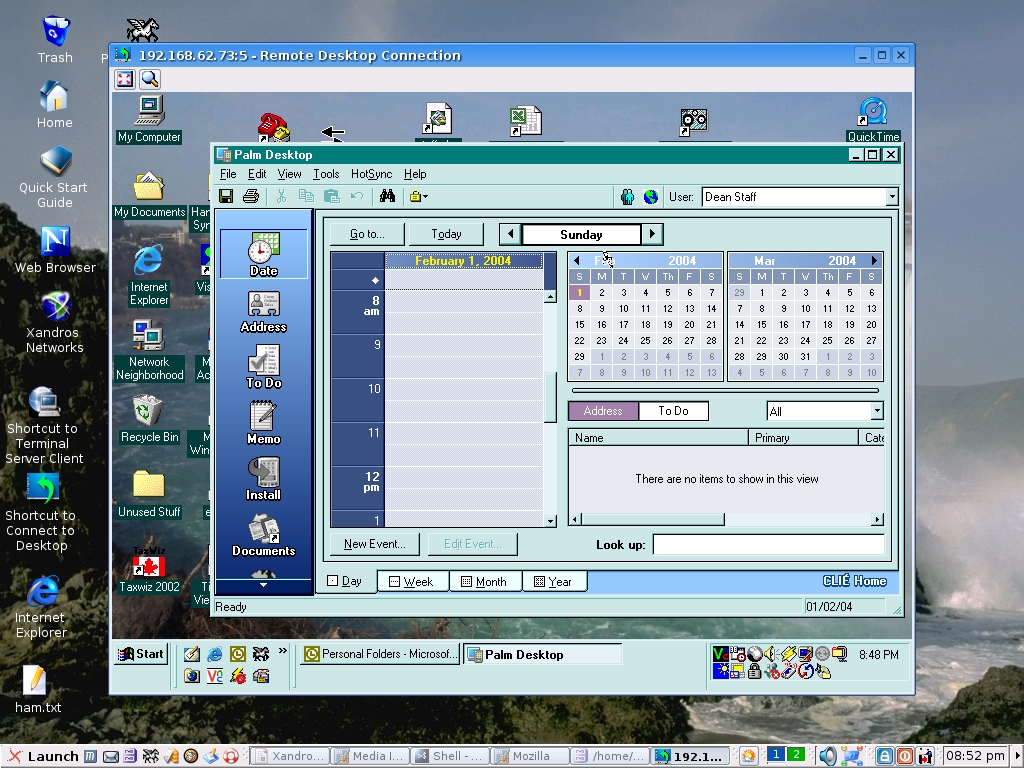
Figure 1. VNC makes it easy to use a Microsoft Windows desktop remotely.
Noticeably absent in the default installed application is a backup utility. One is available on Xandros Networks, but it seems to be difficult to configure. It certainly did not like my ARCHIVE DDS1 tape drive, and the only mention of backups in the user manual is a backup to CD.
One of the biggest changes I had to get used to was the absence of the previous version's update package manager. I was a little disappointed to see it not included, because I had become rather accustomed to it. Xandros now uses Xandros Networks exclusively. It works very well, but it takes a little getting used to. It's a bit like using a cross between Microsoft's Windows Updates and dselect on steroids. It's a browser-like GUI offering the options for a single-button update or individually selected package installation.
I spoke to Erich Forler of Xandros, and he told me that the Xandros Network subscription included with Xandros Desktop does not expire. The reason behind this, he said, is because Xandros wants to make sure that all users have access to all the latest security and bug fixes, as well as upgrades to any free software. There is a paid subscription service available, or will be shortly, that will allow a subscriber to download the latest enhancements for proprietary packages before they are released in the next version.

Figure 2. Xandros Networks is a powerful utility for adding and upgrading software.
As much as I liked the older Xandros Update, I have to admit I really like the one-button “apply all available updates from Xandros” option. It does not matter which package source you select, this button overrides it and checks a preconfigured URL for updates. One other difference between the the older Xandros Update and the newer Xandros Networks is it is much easier to add a custom package source. Simply type the URL the same way you would if you were editing /etc/apt/sources.list.
I was not as impressed by the newer version of CrossOver Office in Xandros 2.0. I was holding onto one Microsoft Windows application, Pegasus Mail for Windows, which I have been using for nearly a decade. I had great success running it previously under WINE and then CrossOver Office on Xandros 1.0. CrossOver Office 2.1, however, breaks Pegasus Mail. It still installs, and I still can send and receive e-mail, but the message window formating is messed up, and it is now unstable and crashes constantly. The fact that the version of Pegasus did not change, only the version of the OS and CrossOver, leads me to believe the issue is not Pegasus Mail. I tried going through Xandros support, but they offer support for only the officially supported applications.
I experienced one other disappointment. After all the hassles of not being able to run Pegasus any longer, I started using Ximian Evolution, which Xandros has available for free download from the Xandros Shop portion of Xandros Network. I discovered, however, that the GNOME conduits required to sync with a PalmOS device are not installed with Ximian, nor are they available on the Xandros Network. Xandros support was kind enough to point me to an outdated how-to for Xandros 1 and Ximian Evolution 1.2, but it did not work with Xandros Desktop 2 and Ximian Evolution 1.4.
One of Xandros Desktop's strongest features is its ability to integrate with an existing network. I personally run a small network that has some Microsoft Windows fileshares and a shared printer on it. Xandros Desktop can map the fileshare as folders under the user's home directory. It also has no problem using the shared printers from another workstation or server on the network. Xandros Desktop also uses SAMBA to share its resources with Microsoft Windows workstations without any problems.
Overall, I have to say this is the most user-friendly Linux distribution I have ever used. The Business edition promises the ability to authenticate users to a Windows Primary Domain Controller or Active Directory domain and offers SAP and Citrix clients. The Deluxe edition is ideal for home or small-business users in a workgroup environment or for people who don't need to authenticate to a Windows server. At $89 US, the Deluxe edition is a steal. I also have to say that even someone raised on a Windows platform would feel at home on a PC running Xandros Desktop 2.0. Better support for CrossOver Office and other third-party applications on the official update site is needed, but Xandros Desktop 2.0 still is my desktop environment and Linux distribution of choice.
Dean Staff is a network administrator for the IT Department, Inc., in Ottawa, Ontario Canada, where he lives with his wife and two children. He has been using Linux for about five years. His particular interest in Linux is as a desktop replacement for Windows and as an e-mail server.
