
Arkeia 5.2 Network Backup
Product Information.
Vendor: Arkeia
URL: www.arkeia.com
Price: $590–$1,190 US for three to seven computers; larger systems may range up to $20,000 US depending on configuration.
The Good.
Multiple platform.
Centrally scheduled backups.
Hot-backup plugins.
Browseable index of all tapes.
Good documentation.
The Bad.
Non-standard GUI.
Disappearing error messages.
Incomplete context-sensitive help.
We haven't checked on Arkeia since April 1999 (/article/3166), so we thought we'd take another look and see how this software is coming along.
Arkeia Network Backup is a heterogeneous network client/server backup solution using a Linux or UNIX backup server. Client system backup software is available for Linux, as well as a variety of UNIX and UNIX-like OSes, including Mac OS X and Microsoft Windows 98, ME, NT, 2003 and XP.
Plugins are available for hot backup of applications including Oracle, Microsoft Exchange, Lotus Notes, IBM DB2 and MySQL.
Supported backup media include popular SCSI tape drives, libraries and autoloaders.
Arkeia Disaster Recovery, a separate product not reviewed here, provides bare-metal recovery for backed-up Linux clients and servers. Both Network Backup and Disaster Recovery are available for free 30-day demos. A third product, Arkeia Lite, suitable for backing up one Linux server and two desktop systems, is available at no charge.
We reviewed Arkeia 5.2.7 Network Backup, downloaded from www.arkeia.com, along with PDF documentation. The Linux version supports Debian GNU/Linux 2.2 and 3.0, Mandrake 7.2–9.2, Red Hat 6.0–9.0, Slackware 8.0 and SuSE 7.1–9.0.
The documentation, downloaded as a PDF, had about 500 pages of material, enough to be a little intimidating. The shortest document was the Quick Start Guide. I began there.
My bench system's distribution of the day was Debian 3.0. The Debian installation for Arkeia came as a .tar.gz file, not as a Debian package. I unpacked this, cd'd to the top-level directory and then ran install, accepting all defaults.
Next I started xarkeia. Its futuristic design, as shown in Figure 1, takes some getting used to.
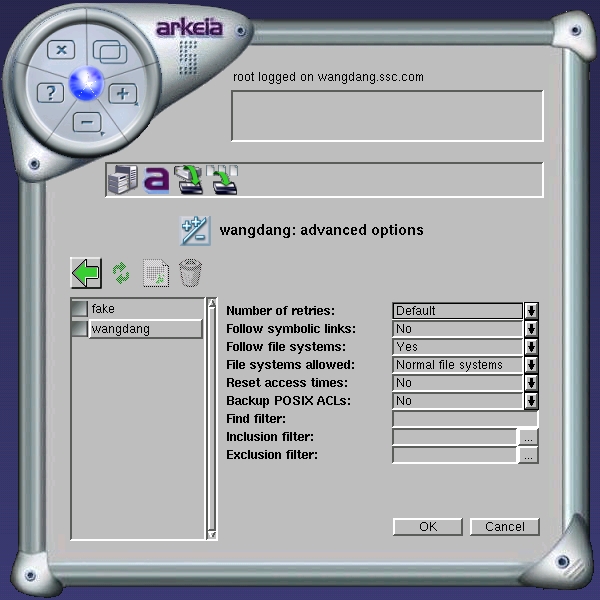
Figure 1. Option screen from the Savepacks Menu showing icons, in the bar above advanced options, for navigating back up to the root menu.
Continuing with the Guide's instructions, I set a password for the Arkeia root user and configured and ran a dummy backup. As long as I followed the directions carefully, all went as indicated. At one point I did something out of sequence, attempting to start a backup prior to configuring any tapes. The backup stalled, and I was unable to configure tapes or to abort the backup using the GUI or anything else I knew to do at the time. A note on the support Web site elicited an e-mail response within a half hour, telling me to stop and restart a dæmon. I was then able to proceed. The dummy backup ran without further incident, and initial installation was complete. Arkeia was ready to configure real backups.
Arkeia organizes things using a database where the administrator sets up:
Tape drives.
Drivepacks: groups of similar tape drives.
Tapes: each with its own label and history information.
Tape pools: groups of similar tapes.
Savepacks: groups of files and directories backed up together.
Backups: a backup uses one drivepack to store one savepack in tapes from one tape pool.
Users: a variety of user roles are available, allowing the work of managing backups at a large site to be delegated.
Servers: one installation may extend across multiple backup servers.
Clients: multiple client systems are accommodated per server.
Backups are controlled and scheduled from the backup server. Backups can be manual or automatic, called Periodic by Arkeia. They also can be complete or incremental, an arrangement by which files that have not changed since a baseline are not backed up. Incremental backups are scheduled in a multilevel fashion, with the baseline for a given level being the previous lower-level backup. Backup level is the same for all files in a given periodic backup.
You can schedule any backup to put multiple backups on one tape, filling the tape, or you can start a new tape.
A savepack contains items to be backed up, such as files, databases and directories. One savepack can contain items from multiple hosts. An item can be backed up using a plugin, such as the one for MySQL.
Libraries, stackers and so on have special management interfaces under Arkeia but are configured as sets of drives enrolled in drivepacks. From the point of view of managing a backup itself within Arkeia, there's not much difference between a library and any other collection of drives.
Arkeia can be managed through a GUI client program, xarkeia, or by means of a set of command-line clients. The actual work is done by dæmons reached through these clients. Many system administrators may find the GUI easier to use for routine operations and configuration.
The xarkeia GUI was written from scratch on top of X, using no Motif, Qt, GTK or any other third-party GUI libraries. The appearance is distinct and different, and although it requires some getting used to, was easy to use after only a little practice. The window decoration buttons you might be used to seeing along the top bar aren't there; they are replaced by a circle of buttons in the upper-left corner. I missed the ability to move an instance of xarkeia from one virtual desktop to another.
xarkeia has an error message panel near the top that was a source of some annoyance. It featured error messages that vanished too quickly for careful reading.
Context-sensitive help is provided from a Help button in the button circle. Based on an unscientific sampling, I found meaningful help messages in only about half of the screens. There is room for some improvement here. Experienced system administrators should not shy away from reading manuals, however, and I found the Arkeia User's Guide to be complete and comprehensive.
I was unable to discover much by way of customization available for the GUI. The colors and fonts it comes with are, as far as I can tell, the ones you will live with.
Other than that, I had no problems with xarkeia. Among the many features I liked was what they called their function path bar. If you use many applications having multiple levels of menus, you're no doubt all too used to clicking back, back and so on until you climb back out to the top-level menu. xarkeia's function path bar, as shown in Figure 1, stacks the icons you've used as you descend to the lower levels of a menu tree. Clicking an icon in this bar can take you back out through multiple menu levels with only a single mouse click.
The Arkeia User's Manual is the next stop after finishing the Quick Start Guide. At 330 pages, there's a lot of reading there. I opened the User's Manual using xpdf and continued on to configure some real backups using an Exabyte VXA drive. The drive was detected and configured easily. A new drivepack was defined, several tapes entered and labeled and enrolled in a pool. The tape labeling dialog could have used an eject button. I already had a savepack set up from the Quick Start Guide exercises, so I ran an interactive backup and then configured a periodic one to run several times, allowing me time to add and delete files in between.
Within the Restoration menu, files can be selected by filename search or by file tree browser. The “Invalid regular expression!” popup I got when I clicked Search puzzled me, until I read the related section of the User Manual, which pointed out that I had to check some boxes in the search screen as well as enter search words into adjacent text boxes. “You must check at least one checkbox” would have been more helpful.
Restoration offered many options with respect to where to restore, ownership, access rights, overwrite of existing files, verifying backed-up files and so on. After selecting files using the backup browser, I started restoration only to be told “Please insert tape Monthly22” in one tape drive. After a little bit of guessing I was able to initiate restoration.
Arkeia maintains on-line tape index, history and configuration information that it uses when it is time to restore. This index makes it possible to browse the backed-up date on-line for easy restoration. The downside, as always with such an arrangement, is that there is a point of failure: loss of the on-line index.
This index is kept in the Arkeia installation directory, by default /opt/arkeia, in the server/dbase subdirectory. In the event of disaster, it can be reconstructed from the tapes by use of provided utilities. Every backup tape must be fed through, which can be a lengthy and laborious process. The fact that index rebuilding is supported at all is a good thing. I've used backup products with on-line indexes but no way to rebuild them from tape. Having a way to rebuild these if need be is good; however, it is better to avoid being in a place where this is needed.
Arkeia Disaster Recovery provides facilities to handle this situation, accommodating bare-metal restore of the backup server or any of the client systems direct from tape. For the prudent but more adventurous administrator, who might want to restore using a standard installation method, followed by bringing in backed-up data files from tape, Arkeia Support advises me that an up-to-date copy of the arkeia install directory kept in a safe location, augmented by snapshots of the server/dbase directory taken after each backup, should suffice to allow a restore even following a loss of the backup server. Always test your restoration procedure. Your results may vary.
The product accommodates tape duplication to use, for example, if you want to keep both on-site and off-site copies of backup tapes.
The command-line clients, covered partly in the ending chapters of the User's Guide, partly in the 137-page Command Line Interface Manual, permit you to manage Arkeia through a command-line interface and let you access this software by way of your own scripts. Some sample scripts are provided.
I like this product. The GUI takes a little getting used to, and the fit and finish is rough in some places. The design shows careful thought about what a backup manager needs. Cross-platform support is good. The command-line clients ensure that you're not stuck with a closed-in GUI that won't let you get beyond what the GUI provides. The Quick Start Guide offers a painless introduction to the software, and the other two manuals pick up nicely where it leaves off. Free 30-day evaluation support was quick and courteous.
Dan Wilder is technical manager at Specialized Systems Consultants, Inc.

