
Cooking with Linux - The Customer Is Always Served
Web-based intelligence, François, is the theme of this issue. As I planned the menu for today, I was caught by the sheer number of possibilities that term brought to mind. You too, mon ami? True, it could be Web-based artificial intelligence programs, but I was thinking of simpler things. Encyclopedias, business-to-business resources, dictionaries, new sites, search engines and even electronic mail. Yes, François, I agree with you. With so much spam these days, the intelligence in e-mail is becoming questionable. Nevertheless, e-mail still is an indispensable tool for modern communication. Consider that closely tied to e-mail, groupware solutions continue to grow, and you can begin to understand why I chose today's menu.
We must continue this later, François, for our guests have arrived. Bonjour, mes amis, and welcome to Chez Marcel, the Linux world's finest restaurant and finest wine cellar. Please sit and make yourselves comfortable. François will fetch the wine immédiatement. To the wine cellar, François, south wing. Something Spanish is in order—the Bierzo Corullín 2000 is a perfect choice for today's menu.
Right before you arrived, François and I were discussing Web-based intelligence. From a business perspective, I tend to think that the kind of intelligence that matters most is entirely customer-related. Without customers, there is no business. Consequently, a great deal of energy goes into systems that help in the management of customer relationships. This is where CRM (customer relationship management) software comes into play. This type of software gathers all sorts of customer information from the obvious contact details to sales, marketing and support. With that information, companies can assign tasks or reminders related to each customer's need. This could be calling back on a specific product, supporting a request, dealing with a complaint, setting up a meeting date or anything related to your relationship with a particular customer. CRM systems run the gamut from very simple to highly complex, corporate-wide, data-mining behemoths. Prices vary as well from no or little cost to hundreds of thousands of dollars. That figure alone should give you an idea of the importance businesses place on customer relationships.
Here in our Linux kitchen, with the help of open-source programmers, we can sample a number of CRM systems while spending nothing more than a little time.
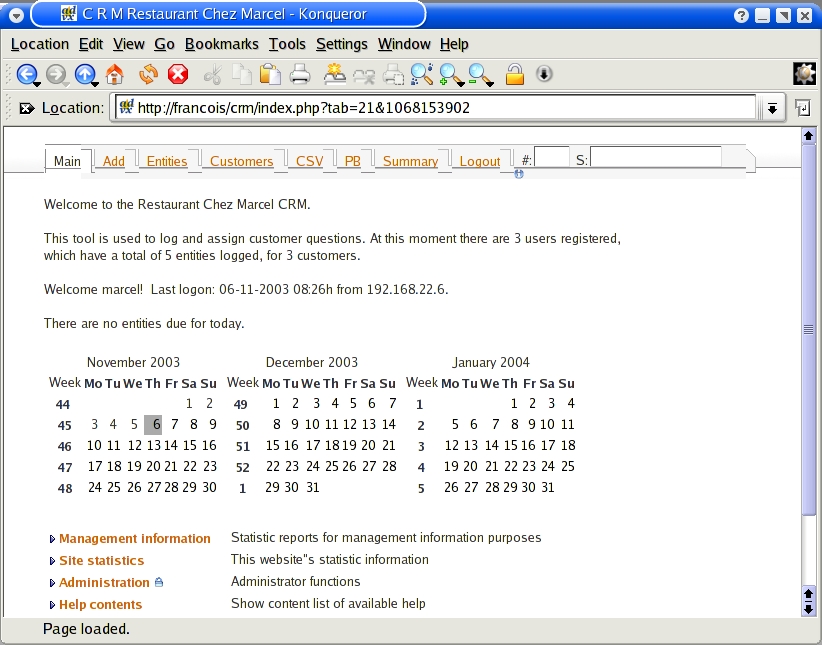
Figure 1. CRM-ctt's main screen offers admin and configuration options.
The first CRM package I would like to look at is called CRM customer tracking system (CRM-ctt). Its basic Web-based interface might make you look elsewhere because it appears so simple—I confess I almost did the same thing. Hidden underneath this simplicity, however, is a capable CRM system. With options for multiple users, multiple languages, extensive customizations, security, prioritization, e-mail notification and PDF reporting, CRM-ctt starts to look rather impressive (Figure 1). Pick up a copy of the program at crm-ctt.sourceforge.net.
To get the system up and running, you need a running Apache server, with PHP and MySQL support. If you want graphical support for CRM-ctt, you also need to have the php-gd package installed. The installation procedure takes a few steps, but it is not complicated. Extract the package into your Web server's document root. You also may want to change the name of the directory at this point:
cd /var/www/html
tar -xzvf crm-1.9.2-19102003.tar.gz
mv crm-1.9.2-19102003 crm
Before you continue, change the ownership of the CRM directory to that of your Web server's user and group. In my case, that meant running chown -R apache.apache crm.
Let's move on to the actual configuration of the software. Start by pointing your browser to the location where the application is installed (something like http://www.webserver.dom/crm). You then are led through a number of setup screens, the last of which involves the creation of your company repository. From here, follow the steps—enter your name, the name and e-mail address of the administrator and your chosen admin password. There are four Web-based steps in all.
The final step in the installation procedure is to write out the configuration file. The suggested method here is to change the permissions on the header.inc.php file temporarily:
cd /var/www/html/crm
chmod 777 header.in.php
Return to your installation page and click Try Now. If all goes well, you should be presented with a successful completion message. You also can choose to generate the file and copy it manually to the directory where CRM is installed. Once you have completed this step, change the permission of the header file from 777 back to 755. Now, go to the bottom of the page. Click the highlighting where it says “When done, point your browser here”, and you are taken to the main login screen. Log in with your admin user name and password.
A system like this isn't particularly useful without customer information, so start adding. Click the Customers tab, then click Add a customer on the screen that follows. Repeat this for all of your customers. Once you have customer data entered, you can create Entities against those customers. An entity is anything you have to do for that customer, whether it is a pending order, an open trouble ticket, a friendly follow-up call or a note to send flowers on someone's birthday. CRM-ctt even can send you an e-mail to remind you of those things. As you explore CRM-ctt, you'll find great reporting features, including a one-click export to PDF option for quick, professional reports.
Because CRM can remind employees of people they need to contact and when, you also should add an entry to cron so it can send these e-mail notifications. What's interesting here is the server doing the mail-outs can be a machine other than the one running CRM-ctt. Although I show you only one entry (for 8:00 am), you could have the notify process run as often as you deem necessary for your organization. The yourCRONpwd in the following example is set in the Administration menu on CRM-ctt's main page, under Change global system's values.
# CRM Alarm date manager
0 8 * * * wget http://www.webserver.dom/crm/
↪duedate-notify-cron.php?password=yourCRONpwd
↪\&reposnr=XXX 1> /dev/null 2> /dev/null
As an administrator, you can add other accounts so you can delegate tasks to other members of your organization. From the administration screen, you also can generate management reports for your entire customer base, another task that can be exported to PDF reports. To help you along, CRM-ctt includes an on-line manual.
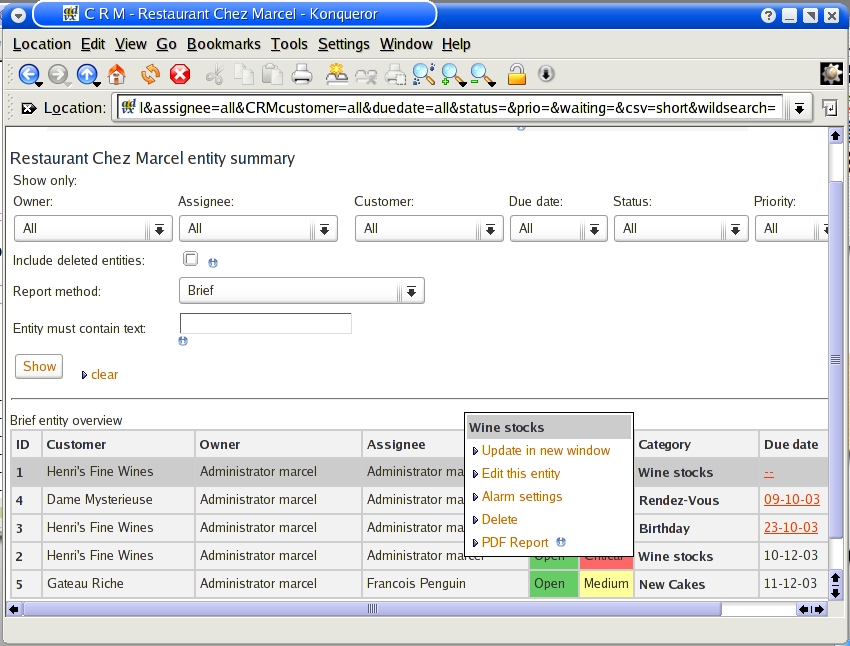
Figure 2. CRM-ctt provides easy reporting and one-click PDF exporting.
Many CRM packages are available for Linux, and all of them track customer relationships as the core of what they do. If you look closely, though, you might think that CRM packages look a lot like some of the new Web-based groupware suites. And you might be right. Many of the ideas behind a good CRM system also exist in a good groupware system. What sets groupware apart is the scope of the Web-based intelligence it provides and the collaborative possibilities it opens. Groupware suites can include centralized electronic mail, calendars, address books, discussion forums, call tracking and any number of other applications. One Web-based groupware suite that I think is well worth checking into is eGroupWare.
eGroupWare is a GPL suite with an open-source API, so applications can be created and added to the system easily. Among the applications included are e-mail, calendaring, an infolog for tracking customer calls and setting up to-do lists, a trouble ticket system, forums, personal and corporate address books, a knowledge base, a wiki documentation system and more. There's also a site manager feature, so individual users can create and deploy their own Web sites. eGroupWare does all this while sporting a slick-looking business-ready face (Figure 3). At the time of this writing (early November 2003), eGroupWare was about two weeks away from its 1.0 release.
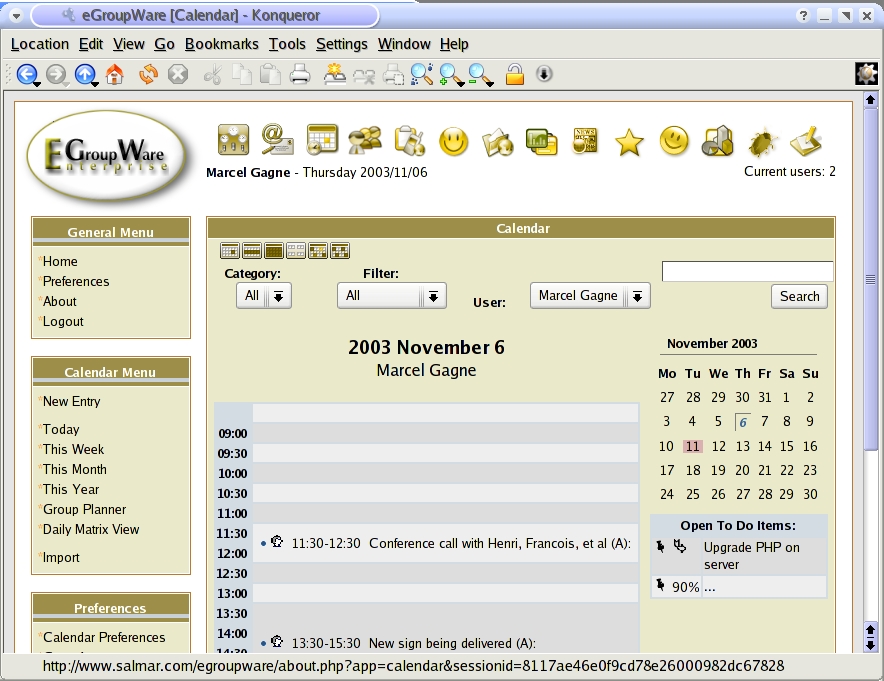
Figure 3. eGroupWare offers a calendar, trouble ticket system and management for user Web sites.
eGroupWare supports the two most popular open-source database formats, MySQL and PostgreSQL. In my test, I chose to run it with PostgreSQL, but both formats are easy to set up. To get in on the eGroupWare action, download the package from www.egroupware.org. Tarballs and binary packages both are available.
To install from the tarred and gzipped bundle, extract the package into your Web server's document root. For instance, a default Apache installation should have document root at /usr/local/apache/htdocs, whereas an RPM-based install (such as Red Hat) often has it at /var/www/html:
cd /var/www/html
tar -xzvf eGroupWare-relnum.tar.gz
This step creates a directory called egroupware. Change the permissions on this directory tree like this:
chown -R apache.apache egroupware
Assuming a PostgreSQL installation, your next step is to create a PostgreSQL user to access the database. Do this by switching to your postgres user:
$ su - postgres
$ createuser egroupware
Shall the new user be allowed to create
databases? (y/n) y
Shall the new user be allowed to create more new
users? (y/n) n
CREATE USER
When asked whether this user is allowed to create other databases, say yes. When asked whether this user can create other users, choose no. All that's left to do is create a database for eGroupWare. Still logged in as the postgres user, type the following:
$ createdb -U egroupware egroupware_db
CREATE DATABASE
If you don't like the idea of calling it egroupware, you could use basically any name you want for the database or modify the name slightly, as I did above. After this, you are done with the command-line work, so fire up your browser and finalize eGroupWare's settings. Open up Mozilla, Konqueror or any JavaScript-enabled browser and point your Web server to http://yourwebserver/egroupware/setup.
On this screen, enter the relevant information for your setup to create your header configuration file (header.inc.php). If you changed your DB user from egroupware to something else, make sure you identify it here. The same holds true for the database name. You also should assign a header password and an administration password. The header password lets you modify or recreate the configuration file you are building now.
When you are finished, you are taken to the setup/header login screen. You already have created the header file, so chances are you do not wish to do it all over again, non? Your concern now is the actual eGroupWare setup. Before we move to this step, I have noticed that many of you have emptied your glasses. François, if you would kindly do the honor of refilling them—merci.
Once you have logged in using the admin password, the setup checks to see if your database has been created properly and if the appropriate user ID defined in the header creation step is used. If everything has gone well up to this point, you should be at Step 1 of the local configuration. Click Install to create the application tables and install the eGroupWare suite of applications. The system chugs along for a couple of minutes while it does this.
When everything has been completed, check the browser's screen to make sure no error messages have been reported, and click the Recheck my Installation button. If all has gone well, you can go on to Step 2 and create your admin account. The option also exists to create three demo accounts, but you do not have to do this. Step 3 lets you define the default language to be used, and Step 4 is for individual application management. From this dialogue, you can specify whether you want all the applications (this is the default) or only some of them. When you log out from here, your installation is complete.
Now it's time to start doing things with eGroupWare; begin by logging in with your admin account. This most likely means pointing your browser to http://your.server.dom/egroupware. Along the top of the screen, you should see a number of icons representing the various groupware services. To the left, menus appear based on the functions of the current application, although a smaller menu with Home, Preferences, About and Logout always is there. The look and feel can be modified to suit your personal tastes by clicking Preferences and making adjustments.
If you are the administrator, you can make changes for the entire organization. You even can force some defaults and prevent users from changing them, a useful feature for the corporate administrator. User accounts can be created with predefined applications delivered to their specific login based on groups. For instance, the support group may need access to the trouble ticket system (Figure 4). Using this group-based approach provides a consistent set of tools for your users. Create your groups first, decide what applications they need to access and create your users based on those groups.

Figure 4. Entering a Trouble Ticket in eGroupWare
In terms of the future and ongoing support, eGroupWare has an active community of users and developers. Several mailing lists and an IRC channel are available, should you find yourself needing answers to your questions.
Mon Dieu! We are running out of time once again. Space and time do not permit me to cover anything else in detail today, but many excellent packages out there are worthy of your consideration. Although we all enjoy cooking with Linux, I humbly suggest that our customer/restaurateur relationship needs no software to manage it. Instead, I shall continue providing you comfortable chairs at your favorite table, and François shall keep your glasses filled. Sometimes, simpler is better. François, if you would do the honors, please. Until next time, mes amis, let us all drink to one another's health. A votre santé Bon appétit!
Resources
CRM-ctt: crm-ctt.sourceforge.net
eGroupWare: www.egroupware.org
Marcel's Wine Page: www.marcelgagne.com/wine.html
Marcel Gagné (mggagne@salmar.com) lives in Mississauga, Ontario. He is the author of the newly published Moving to Linux: Kiss the Blue Screen of Death Goodbye! (ISBN 0-321-15998-5) from Addison Wesley. His first book is the highly acclaimed Linux System Administration: A User's Guide (ISBN 0-201-71934-7). In real life, he is president of Salmar Consulting, Inc., a systems integration and network consulting firm.

