
Open-Source Bug Tracking with Bugzilla
Bug Tracking Systems (BTS) have their origin in software development, but they can serve as important and useful tools in every team environment. For this reason the names Issue Tracker or Ticket System have become more appropriate.
BTS may function as a central point of communication for any team. They can increase the productivity and accountability of each employee dramatically by providing a documented work flow and allowing for positive feedback on good performance. They usually reduce downtime and production costs while increasing efficiency and, most importantly, customer satisfaction.
The open-source project Bugzilla, for example, provides an easy to use, easy to maintain and cost effective solution with a rich feature set that easily can compete with its proprietary counterparts. Bugzilla's Web interface allows cross-platform use while the XML and e-mail interfaces enable automatic error reporting. Not only can the automatic error reporting be included in the development of a new product, but it also can be integrated easily into an existing product.
This article provides an overview of how introducing Bugzilla can help your team work together and communicate more efficiently. Bugzilla uses the term bug, so I will stay with this notation throughout the article, but don't forget, it's not only about bugs, You can use Bugzilla for any task you need to track.
Bug trackers aid the whole product life-cycle. In the case of software development environments, this usually consists of software design, implementation and testing. From testing, the work flow takes it course either back to design or on to implementation for bug fixing. In the best of all worlds, at some point an error-free product leaves this cycle and gets shipped to a customer. In all other worlds, the customer is part of the development cycle and submits bugs.
Everyone in the team needs to effectively keep track of upcoming issues. Designers and developers need to be notified about new bugs and reminded of existing ones. Managers need a means to distribute upcoming bugs to the right developer and quickly acquire the status of the project. Integrators and testers need to know which issues already have been resolved and therefore require consideration in the next build and test cycle. Customers want to be able to rapidly report bugs and receive an update of their status, while help desk operators need to be able to respond quickly to such customer demands.
Most companies come to the point where they start to track those issues by way of e-mail or spreadsheet lists—some even use sticky notes. At some point, the number of issues outgrows these approaches and the number of forgotten or unresolved issues demands a better solution. Let's follow one of those teams on their path to introducing Bugzilla as its in-house BTS.
As with every software product, the introduction of a BTS in an existing work flow requires initial thought and planning. The goal is for all participants to accept and use the new system, meaning that its introduction should have only a positive impact on their daily work.

Figure 1. The Bugzilla title page: choose New in the footer to report a bug quickly.
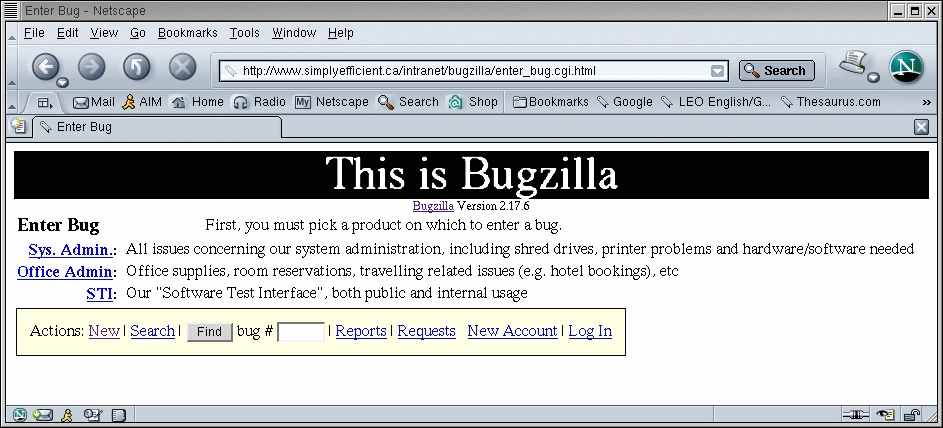
Figure 2. Every bug belongs to a Product, which is subdivided into Components.
As with most BTS, bugs in Bugzilla concern a component, which belongs to a product. A bug also may have a version and a milestone attached. Before introducing the new system, thought must be put into how its structure fits in to your daily work flow. All possible upcoming issues in your work flow should have a set place, including problems with Bugzilla itself. It often makes sense to include even trivial organizational issues that can have a large impact on development. If having sufficient blank CDs in your office is critical, you may include a shortage as a bug in Bugzilla.
Products are the main category and usually represent actual shipping products or services. You also should have a number of special products that reflect your internal work groups, like System Administration or Office Supplies.
Components are sub-sections of a product. Among others, a software product may have GUI and Database components. Your special product, system administration, may have the components Intranet Web Site, Shared Drive and Printers, to mention a few. Each component has at least one designated user that receives the error reports. Naturally you want to ensure that the workload is distributed evenly.
Versions refer to the version of your product where the bug occurred, while milestones represent target times for a bug to be fixed by. This does not necessarily need to be a date; it can be something like “When boss returns from holiday”.
Simplicity is the key to an easy-to-use system. Bugzilla comes set up with extensive lists of operating systems, priorities a bug can have and states a bug can be in. It is important for an efficient work flow that you adapt these to your specific needs. This is true especially for priorities, which Bugzilla calls Severities. I know no environment that requires as many priority levels as come with Bugzilla originally. Usually no more than three severities are needed: high (or showstopper) for major bugs that cause production stops or block other people from completing their work, medium for most normal bugs and low for minor issues such as typos. Any more than these cause confusion.
Similar rules apply to the state that a bug can be in. The states should reflect your normal work flow, not the other way around. A standard set of states may include New, Accepted, In Progress/Open, Resolved, Not a Bug and Tested/Completed.
These are all simple tasks, but thinking about them initially and communicating them with your teams in the early stages of rollout prevents confusion and guarantees a smooth introduction of the new tool.
To install Bugzilla, get the latest version from bugzilla.org. Although version 2.16.3 is declared as the latest stable release, I have found no problems with the many 2.17.4 installations we have running. This newer release also has many interesting extra features. You also need Perl 5.6 or higher, a running MySQL Database, minimum version 3.23.41. With a little manual tweaking, databases such as Oracle and Postgres also work well. Finally, you need a running Web server—Apache, of course, is recommended.
The installation process is pretty straightforward. After installing a number of Perl libraries and setting up a database user dedicated to Bugzilla, the installation basically consists of copying the contents of the tarball to your Web space and running the checksetup.pl script located in the main Bugzilla directory. This magic script sets up the vitals, including the administrative user and access permissions. It also creates a file named localconfig. This file's contents are self-explanatory and include, for example, the database connection settings. Be sure to install the Perl packages that are declared optional and a package called dot (part of GraphViz). These extra packages allow for enhanced graph and reporting capabilities.
While you are at it, include the collectstats.pl script, which allows for the nifty bug history graphs in your crontab. After running checksetup.pl again, you are able to access a fully functional Bugzilla in your Web browser. In the footer of the start page you should find a link entitled Edit parameters. Run through the settings on this page and set them as appropriate.
The most important settings include:
maintainer: the e-mail address of the person responsible for maintaining this Bugzilla installation. The address need not be that of a valid Bugzilla account.
urlbase: defines the fully qualified domain name and Web server path to your Bugzilla installation.
whinedays: set to the number of days you want to allow a bug to remain in either the NEW or REOPENED state before notifying the responsible party that he or she has untouched new bugs. If you do not plan on using this feature, simply do not set up the whining cronjob described in the installation instructions above, or set this value to 0.
commenton*: each of these fields allow you to dictate which changes can pass without comment and which must be commented upon by the changer. Usually it makes sense to allow users to add themselves to the CC list, accept bugs and change the Status Whiteboard without adding comments about the reasons for the change, yet require that most other changes come with an explanation.
Users can create their own user accounts by clicking the New Account link at the bottom of each page, assuming they aren't logged in already. However, should you wish to create user accounts ahead of time, here is how you do it. After logging in, click the Users link at the footer of the query page and then click Add a new user. Fill out the form and click on Submit. Make sure to restrict your user's rights to reasonable access levels.

Figure 3. For instant access, new users can sign up easily and get their password by e-mail.
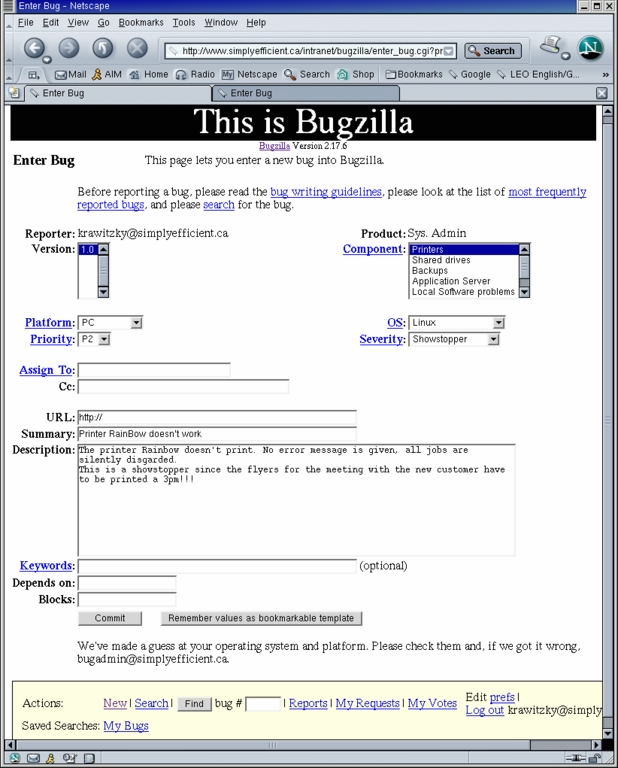
Figure 4. There should be clear guidelines in your teams as to how to report a bug properly. This includes giving as much information as possible to track down problems efficiently.
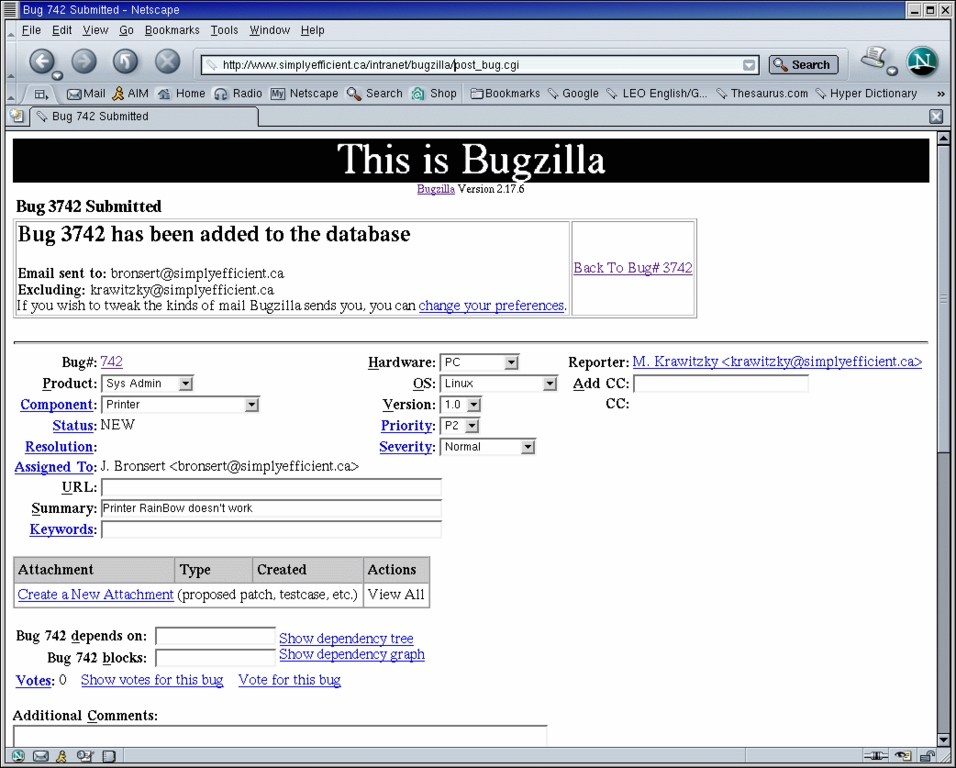
Figure 5. Each person involved with the issue automatically receives an e-mail notification on new bugs.

Figure 6. Processing of the issue is reflected by changes in its status in combination with meaningful comments.
In addition to adding users for each member of the team, you also may want to create an anonymous user. This can be useful for allowing external persons, such as customers using your Web site, to submit a bug without the added overhead of creating a new user account. Now is also a good time to set up your products and related components, as discussed earlier. Don't forget to insert meaningful descriptions and assign the right person to each component.
The last step is to set up the correct lists of used operating systems, bug states and priorities for the system. All of these settings can be altered and improved upon later without problems or downtime, but try to prepare as much as possible now to avoid confusion among the users and improve the smooth integration of Bugzilla in your work flow.
At this point Bugzilla is ready to go and ready to provide you with real help. Once the system is set up, dealing with issues is as easy and straightforward as filling out a form and clicking the submit button. Bugs are submitted and the system reports to the responsible people—reminders included in case it takes too long. The person responsible either accepts responsibility for the issue by changing its state or forwards it to someone else. Either way, at some point the issue is processed and hopefully resolved, which is reflected by various state changes.
Each state change results in a notification to each person dealing with the issue. A unique bug_id and a sophisticated query page allow everyone to stay up-to-date on bugs of interest. As can be expected, the query page allows for quick execution of standard queries, such as Show me all of my open bugs. This outstanding query page also facilitates extremely complex queries, something that cannot be said about all of Bugzilla's commercial counterparts. Only a few mouse-clicks are required for such queries as “Show me all bugs in our e-commerce Web site, in the shopping cart component, submitted by Alice between December 1 and December 24 with an attachment containing the phrase 'resolve after Christmas rush'”.
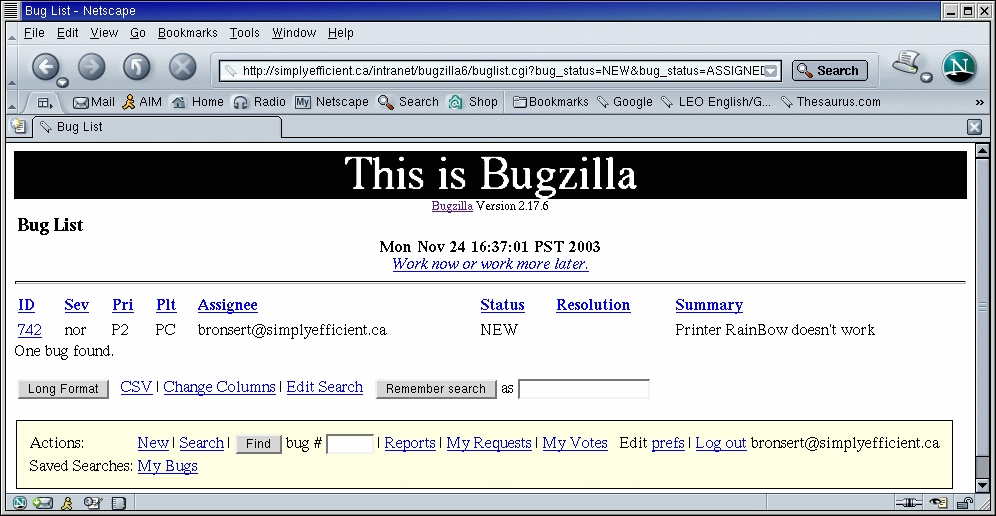
Figure 7. Simple queries, such as “all my open bugs”, are available by way of links in the footer.
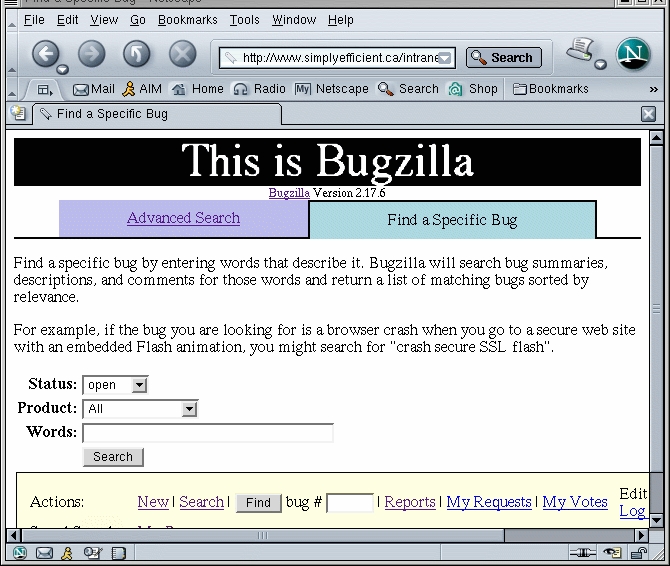
Figure 8. Quickly locating a single bug using full-text search.
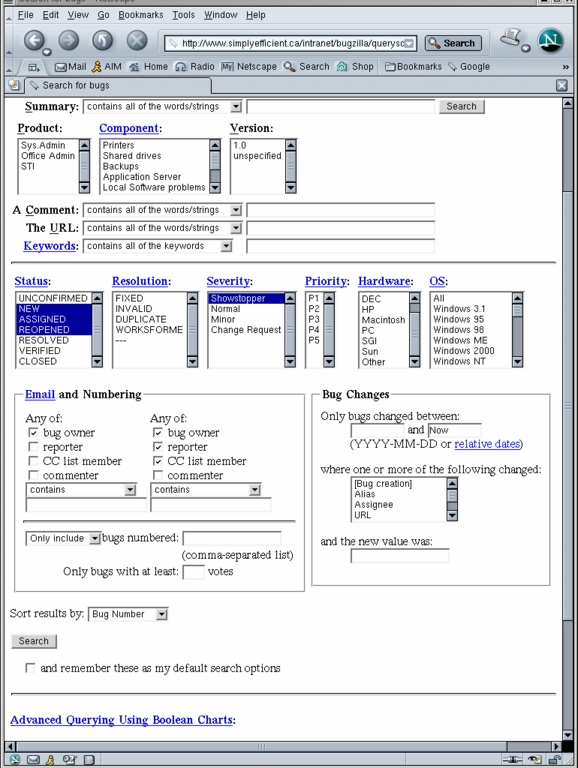
Figure 9. Complex queries for whole sets of bugs can be stored for future re-use.
It's a lot of fun working with a system like Bugzilla. To increase its use even further, it is necessary that each member of your team be conscious about the fact that a BTS reflects the state of health of your products. Sometimes when you are swamped it's tempting to close a minor bug by saying “works for me”. This always backfires at the least desirable moment, so it is important to create an environment where bugs are reported with a maximum set of information, allowing the developer to effectively pin it down. In the best of all worlds, this means a description on how to reproduce the bug. Every major state change also must be documented with a meaningful comment. “Fixed bug” is not a meaningful comment. A short description of what exactly caused the bug and how it was fixed (where appropriate) helps not only the integration team but also the team leads to find ways to prevent frequently appearing bugs. Make use of the fantastic Bugzilla features like inter-bug dependencies. These show that one bug can be fixed only if some other bug is fixed first, which allows for easy identification of bottlenecks. Remember, it's all about teamwork.
An important function of a BTS is to reflect the current development state of a product as well as its changes over time. Not only does this give valuable information about your team's workload, but it also helps in identifying endangered milestones or deadlines. Information about the time it took to fix certain issues in the past offers valuable information on how much time you can expect similar projects to take in the future. Last but not least, a high number of upcoming issues in a certain area highlights areas of your work flow that could use some attention for the purpose of improvement.
Not only does Bugzilla supply you with a sophisticated query page, but both table-based (one, two and three dimensional) and graphical representations (line, bar and pie charts) of the current project state are available too. Reports can be generated in a extremely flexible way by assigning values to the diagram or table axes, (for example, product for the horizontal and State for the vertical axis) and setting filter options for the bugs, dictating which should be considered in the diagram. Reports can be exported to a text file, thus providing an interface to spreadsheet or word-processing programs.
The development of your product can be monitored by bug status or by resolution of bugs over time. The data for this type of diagram is accumulated automatically in the background while Bugzilla is running, so time-consuming queries are not required.
In addition to the built-in reporting tools, custom-made SQL queries on the Bugzilla database allow for easy access to the bug data in creating custom reporting. By way of such queries, third-party reporting software likewise can make use of the Bugzilla database.
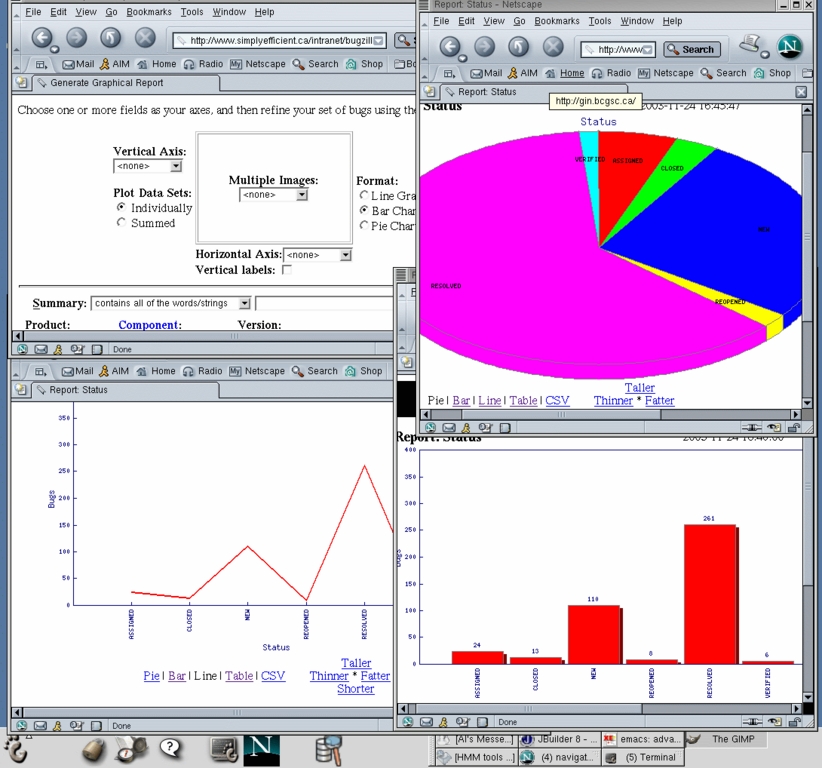
Figure 10. In addition to textual reports, Bugzilla comes with advanced charting functionality.
As you can see, Bug Tracking Systems like Bugzilla can help to organize and structure your team's entire work flow. Their use definitely is not limited to software development environments. If you want to try Bugzilla, a demo installation can be accessed at landfill.bugzilla.org.
Juanita Lohmeyer and Maik Hassel usually are busy with their Vancouver-based company, Simply Efficient, testing software or providing various IT services for their customers. Thanks to the massive use of high quality open-source products, they have some free time left to breathe either thin air on top of mountains or compressed air under the ocean around Vancouver. They can be reached at info@simplyefficient.ca.

