
The Linux-Based Recording Studio
I grew up using keyboards. Cold-war grey TRS-80s, green-screened Apple IIs, IBM clones, 8088s, 286s, PC-DOS, then Windows (missing the command line) and finally UNIX command lines. Later, the recording bug bit me and took me away from the command line and into studios. I still was a PC guy, but there never was a reason to bring a computer into the studio. Affordable hard drives and memory were too small for audio, sound cards were junk and processors were too slow.
Then, Linux came along. Sure, I had to wait for hard drives to get bigger and chip speeds to increase, but even after that, proprietary software still was way out of reach. So I upgraded my studio, learning a lot about Linux along the way. Here, I share a bit of what I did in my studio and explain how you might start a Linux-based studio. General information about Linux audio and recording is vast, so I refer you to further resources where appropriate (see the on-line Resources section).
Like anything, what you need to buy for your studio and how you set it up is determined by a few key decisions, especially when it comes to studio hardware. The hardware is easy as 3.1415. Anything that runs Linux can run Linux audio applications, but bear the following in mind:
Audio uses 5MB per track minute at CD quality (44.1KHz, 16 bit), meaning a three-minute song recorded in stereo takes up 30MB on the hard drive. Multitracking uses more than two tracks. A typical project of 24 tracks that is three-minutes long would use 360MB, not including captured audio being used.
Slight upgrades to things like RAM size and CD-ROM speed are nice if you have older equipment. A CD writer is your friend, too, as you might have guessed.
Some bad video cards introduce noise into the sound card.
Drivers in Linux are sometimes hard to come by, so read and ask around before buying hardware, especially sound cards.
Acquiring software is almost as easy. Latency needs to be low, so the kernel needs a bit of a tweak in the form of a low-latency patch. The hard drive needs to be tuned correctly too. This subject is more than I can cover here, but check out the Resources on the Web for other readings. Also, keep a dual-boot system with Microsoft Windows for troubleshooting. You may need to test hardware on another operating system to narrow a problem to a Linux driver, or you may have tasks, such as upgrading firmware, that need to be done on a Windows box.
Now that we've got the box, it's time to decide what studio hardware we need. I like to think of the signal flow for a given project, and that tells me what I need. Figure 1 shows the basic concept of where a signal goes in a recording project. Also take a look at Figures 2 and 3; 2 is a wiring scheme for a simple studio and 3 shows my studio's scheme. I begin with the lynchpin, which actually is a couple of rungs down on the signal chain.
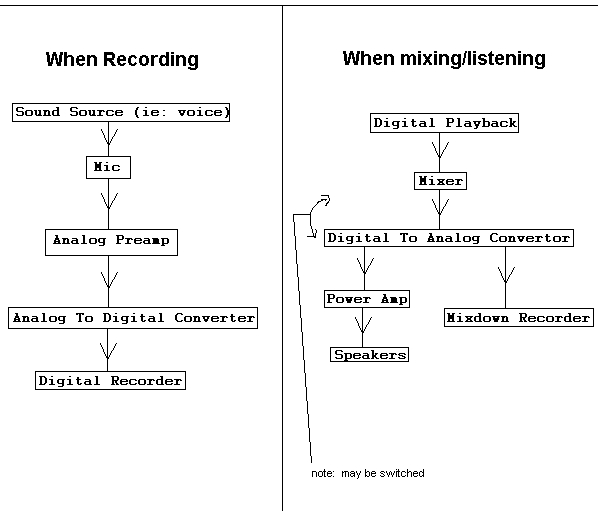
Figure 1. Basic Recording Signal Flow for a Simple Project
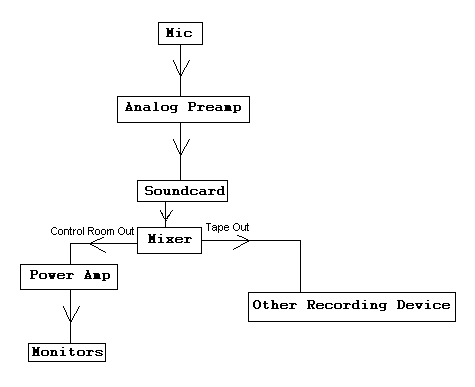
Figure 2. A Simple One-Way Signal Flow in the Studio
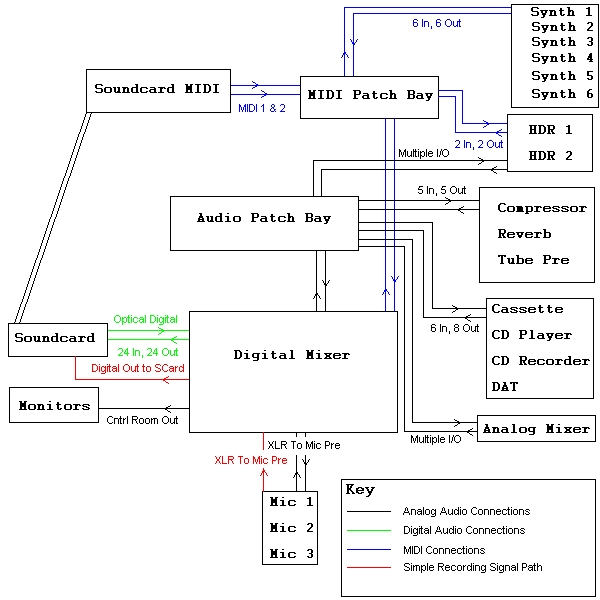
Figure 3. The Author's Studio
The key to digital recording is analog-to-digital and digital-to-analog converters (ADCs and DACs). In other words, you need to get sound in to and out of your computer. In both directions, you have some decisions to make.
ADC must be done in order to record. This happens in the sound card, in a digital mixer or in a standalone ADC.
Getting sound out (DAC) consists of two parts, listening (or monitoring—more on that below) and mixing. When mixing, you might never convert back to analog. You might mix digitally inside or outside the computer, saving a mix as a .wav file or transferring digitally to a digital recorder. The thing to understand here is that at some point before you can hear it, a DAC must happen. If you've done everything digitally, make a CD and play it in your car, that's where the DAC has happened.
As you can imagine, your choices are endless. You conceivably could choose any combination, such as converting analog to digital with the sound card while converting digital to analog outside, or vice versa. It's a bit easier, though, to pick one place to do all your conversions, either in the sound card or somewhere else. If you simplify it this way, your decision comes down to whether to have an external mixer.
In the simplest configuration, say if you were using a consumer sound card with only one stereo output, you'd mix entirely in the computer and not think much about the ADC and DAC being done in the sound card. You would then have no external mixer (see the Preamps section below).
If you do have an external mixer, you're either using an analog mixer or a digital mixer. In either case, you need a professional sound card that can separate channels, as opposed to a consumer card that outputs only one stereo mix, requiring you to mix inside the computer.
If using an analog mixer, your DAC and ADC happen in your sound card. Therefore, you need a sound card or sound card/breakout box that has analog inputs and outputs, such as RME's PCI cardbus and Multiface combination card. There is a nice primer on this card on the LJ Web site (see the on-line Resources).
If you choose a digital mixer, your DAC and ADC happens in the mixer itself. You therefore need a sound card that has digital inputs and outputs that are compatible with your mixer. In my case, this is RME's HDSP 9652.
Many digital mixers have built-in effects and processing, including reverb, compression and noise gates, as do many software packages. Few analog mixers offer such features, so if you're doing traditional analog mixing, you might spend more on outboard effects and processing. There still are plenty of reasons to use these tools if you've got the money, but on a budget, I recommend a digital mixer.
A few questions to ask about potential sound cards:
Is it noisy?
Does it have the ability to record while playing back (duplex mode)?
How many channels can it play back at once?
How many channels can it record at once?
What kind of physical I/O ports does it have?
Does it have built-in MIDI?
Is there a Linux driver for it?
If you're recording acoustic sources, such as voice or drums, you need microphones. Your budget and what you're recording influence your decisions here. For example, if you have a medium to large budget and need to record an acoustic guitar and singer, I might recommend two AKG 414s (about $1,000 US each). If you need to record pristine vocal tracks and have a large budget, I might recommend one Neumann U87 (about $3,000 US). Or, maybe you have a small budget but still need to record vocals and an electric guitar amp. Then I might go with a pair of Shure SM58s, about $100 US each. Of course, if you never record acoustic sources and only use synths plugged in directly, you don't need microphones or preamps.
The signal from a microphone needs to be amplified before it is loud enough to record or broadcast properly. If you plug a computer microphone in to the microphone input of a consumer sound card, you're using a preamp, and you should get a loud enough signal. If you try plugging in to the line input, you barely get anything. Professional sound cards don't have 1/8" microphone inputs and assume you have outboard preamps.
The question is whether to use standalone preamps or the preamps built into a mixer. For most, the preamps in almost any mixer are sufficient. The only reasons not to use the mixer's preamps are if you don't have a mixer, you need more at once than your mixer has or you have aesthetic reasons to use a standalone.
The need for preamps is a good case for having an external mixer, because having a professional sound card with multiple analog inputs, no mixer and a bunch of outboard preamps usually is more costly and less flexible than having a mixer.
To listen, you can use anything you please, from computer speakers to headphones to a home stereo speaker/amp combination to studio reference monitors. There is, however, a distinction between speakers and monitors. A speaker is designed to enhance the sound of a recording, and a monitor is designed to give an accurate, uncolored representation. If you want to do accurate work, you need monitors.
Studio monitors come in a variety of flavors. The major thing you need to know is whether a set is powered. If it isn't, you need a power amp, just as if you were using a set of home stereo speakers. Replacing your regular speakers with studio monitors and connecting to your existing amp is easy.
The Linux box is your digital recorder. The decision to make here concerns software. Literally hundreds of open-source audio applications are available for Linux, from hard-disk recorders to MIDI sequencers to MP3 encoders. I don't have room to talk about them all, so I focus on my main studio tool, Ardour. (See the Where to Start section of the Resources page on the Web for more information on finding software.)
You can Google your way to most software, but there are some great package resources out there. I'm on Red Hat, so I use Planet CCRMA. The Planet is a project at Stanford's Center for Computer Research in Music and Acoustics, maintained by a knowledgeable guy named Fernando. Not only does Nando maintain Red Hat RPMs of most audio and video applications, drivers, utilities and even custom kernels, he has an extensive guide for installing kernels, ALSA sound drivers and software, as well as for tweaking your machine's performance. I highly recommend reading through the Planet, even if you're not using Red Hat. There are other similar resources for different distributions.
To quote the Ardour home page, “Ardour is a multichannel hard-disk recorder (HDR) and digital audio workstation (DAW). It is capable of simultaneous recording of 24 or more channels of 32-bit audio at 48KHz....” Ardour needs a 2.4 or later low-latency kernel, 0.9 series or later ALSA sound drivers and JACK (Jack Audio Connection Kit). It also needs a window manager because it doesn't run from the command line like many other Linux audio applications. I run Ardour from Fluxbox and sometimes KDE, but most managers should work.
Ardour should be fine with any sound card supported by ALSA. Part of why I use the HDSP is because Ardour was written with RME's cards in mind. Ardour looks and acts a lot like Pro Tools from Digidesign.
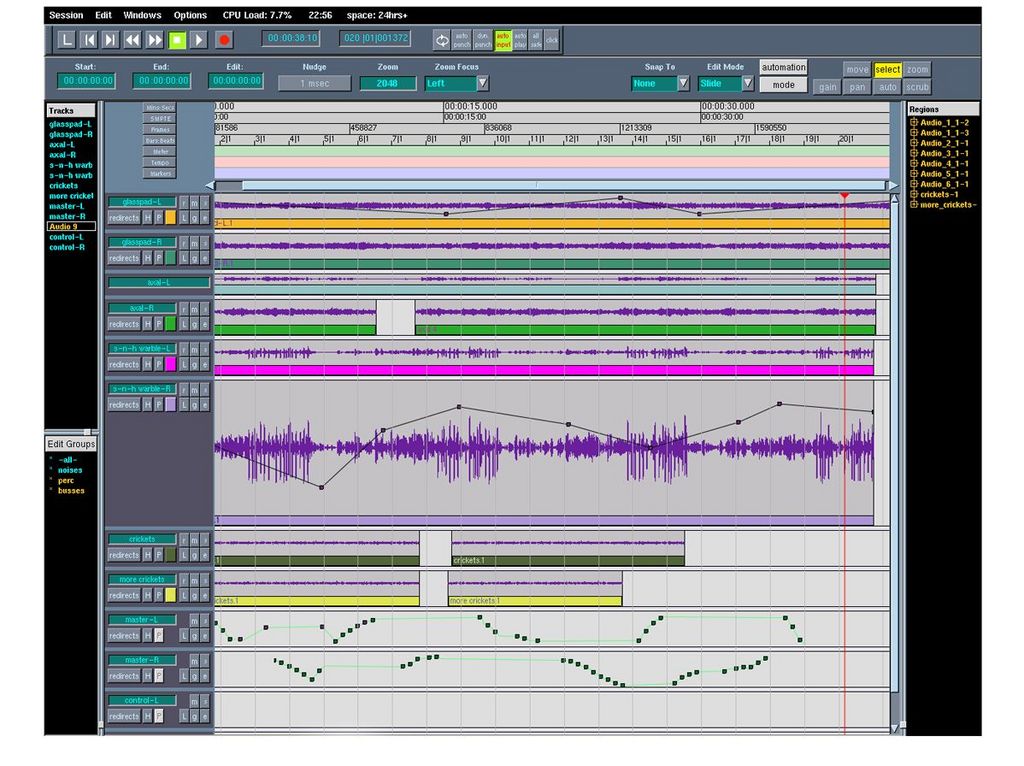
Figure 4. The Ardour Edit Window
Starting Ardour is a matter of starting JACK and then starting Ardour while JACK runs. It's best to run these as the superuser, because only root is allowed to invoke real-time priority. A generic start command for JACK would be:
jackd -d alsa -d hw:0
This starts the JACK server using ALSA as its device, and the default sound card as ALSA's device. See the JACK User Documentation to learn more about command-line options for JACK.
Like Pro Tools, Ardour is very powerful. You can create as many audio tracks as your hardware can handle, record tracks, mix internally, apply plugins and route them any way you and your sound card can imagine. A typical session for me might see 20 Ardour tracks routed to 20 separate card outputs, and eight more tracks submixed within Ardour and sent to two more channels of output, all mixed on my digital mixer. It's relatively easy to do this. I simply click on the Out button, toward the bottom of each track in the mix window (Figure 5), and choose an output channel from a pop-up list.
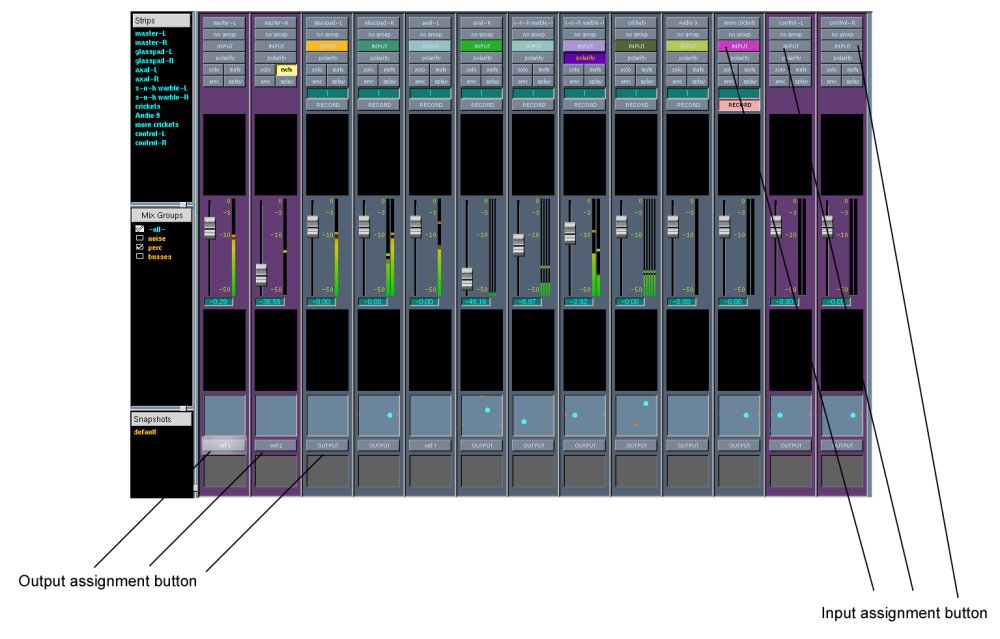
Figure 5. The Ardour mix window lets you select the input, output and level for each channel.
Another option is mixing totally within Ardour and exporting the session as a .wav file. The mix window has graphical faders, exactly like Pro Tools, as well as plugins and automation. Automation is as simple as clicking arec, moving your settings, then unclicking arec and clicking aplay to play back the automation.
As you can see, using Ardour is as straightforward as any professional DAW, which isn't totally straightforward, but it doesn't take long to learn. Because it's in beta, the manual is forthcoming, although a read through the Pro Tools manual should provide a good idea of how it works. There also are some good HOWTOs on-line (see Resources). At the time of this writing, Ardour is at 0.9beta8-1. It's important to keep this in mind, save often and don't be alarmed by the occasional crash. You can help get it to version 1 by reporting bugs (see Resources).
Studios consist of some combination of control room, recording space and isolation rooms. If you've got the space, you can have all of them; if not, you may be limited to only your control room. Figure 6 is a typical studio floor plan; Figure 7 is my studio's floor plan.

Figure 6. A typical studio floor plan includes isolation (ISO) booths separate from the main recording space, but it can be simpler.
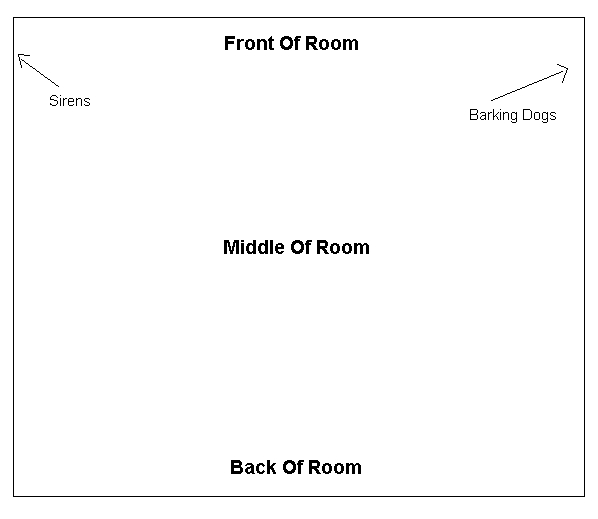
Figure 7. The Author's Super-Fabulous, Ultra-Creative Studio Floor Plan
Some people get expensive rigs, put them in an office and call it a professional studio, which is far from the truth. The best thing you can do to improve your recordings, better than buying $5,000 US microphones, better even than 77-string custom guitars made by Beelzebub himself, is improve your studio's acoustics. There are two areas to consider, recording space and listening environment. It's easy to be off the mark with your recording space and easier still to be dead wrong in your listening space.
You should find some information about bass traps, no parallel surface rule, diffusion, absorption, isolation, flutter echo, reverb times and the like on the Resources page on the Web. Then you can start deciding things like where to place furniture and acoustic material, finding a good room that's not a hallway next to a jackhammer and so on.
Good studio practice is more than a computer and its fancy open-source applications. For example, don't forget to take tracks outside of the computer's domain. You may want to use a tube preamp, a classic reverb or an outboard compressor. Experiment, don't be afraid to fuse the old with the new and admit when your software isn't giving you what you really want. A drum machine never can replace a drummer.
You also want to be wise about your cabling and general studio maintenance. Keep audio cables away from AC cables, cross them only at right angles when absolutely necessary and keep your connections clean. See the Resources page on the Web for some general recording information that should be helpful.
There you have it, the fusion of computer geek and recording nerd. You're now a few steps closer to your Linux-based studio. When you need help, check out the Mailing Lists on the Resources page. Good luck, and raise your glass to some ingenious open-source records appearing in stores everywhere.
Resources for this article: /article/7457.
Aaron Trumm started recording pause loop tape hip-hop at 14. He has since released seven albums and countless side projects. He created and still owns NQuit Records, and he formed the Techno/Classical/Poetry Project Third Option, which includes his classical piano improvisation and poems, as well as poetry from Tamara Nicholl, who was the first ever female Albuquerque City Poetry Slam Champion. Aaron was also the tenth-ranked slam poet in the US in 2002 and has competed at the National Poetry Slam four times.


