
Clusters for Nothing and Nodes for Free
At Quantum Magnetics we do contract R&D. We often need to design silicon chips, simulate electromagnetic systems and analyze masses of data from field tests. When a single set of regression tests started taking longer than a working day to perform, coauthor Alex Perry found himself wondering how to get short-term access to a cluster. We describe here the sequence of steps that enabled us to set up an OpenMosix cluster with little effort and without having to purchase anything.
Each productivity increase justified putting time into the next step of bringing up the company-wide cluster. We omit details here that are provided in the instructions and FAQs for each project (see the on-line Resources section), partly because things will have changed by the time the article goes to print and partly for brevity.
The simplest applications to run on a cluster are command-line based and run as multiple instances on one computer. Applications don't have to be written specifically for Linux, because they could use WINE or another portability layer. If multiple instances are not possible, much more time has to be put into providing a virtual machine abstraction layer. It is worth checking your specific application before putting any effort into building a cluster to see whether it is capable of benefitting from an OpenMosix-based cluster.
Most of our logic code is written in Verilog partly because, as the joke goes, we can't type fast enough to use VHDL. Mainly, though, our reason is that a broader range of tools is available in Verilog. We use several closed-source place-and-route tools under Microsoft Windows, the runtime of which is tiny, so putting these on the cluster is not worth the effort. For simulation, we have both open- and closed-source options. It is convenient to use the graphical tools (all closed-source, unfortunately) that have IDE source-level debuggers when trying to track down a bug, but these either don't like clusters or have a hefty licensing price tag when running on a cluster. We use Icarus Verilog for non-interactive simulations, as regression testing is more than 99% of the total simulation workload. We like it because multiple simulators can run in parallel; each simulator is a single Linux process; the tool has its own public regression suite; the developers are helpful and responsive; and the syntax parser is paranoid and accurate.
The paranoia of the syntax parser flags a lot of problems for us. Many parsers simply select one interpretation of ambiguously written source, leading to incorrect behaviour that is effectively a bug. In contrast, Icarus immediately complains about ambiguities, and after we've made the tiny rewrite, the synthesized chip suddenly starts working the way that it was intended.
The developers for Icarus, by responding rapidly to bug reports and patches, enhance the value of the simulator in our work. We update from CVS to benefit from those almost-immediate source changes. In addition, it is much easier to standardize one virtual machine (the cluster) than to manage the versions on the individual workstations.
We run all our proprietary simulation tests immediately before and after a new version of Icarus is retrieved from CVS. About once a year, the simulation results are different, so we submit a bug report that localizes the problem to a test case outside our proprietary work. In this way, all our proprietary work acts as an additional regression suite for the Icarus Project without us having to make it available to our competitors. It also ensures that any official release of Icarus is useful to us.
Listing 1. Extract from a chip design project Makefile showing how regression happens. The %.txt reference data is generated automatically using C and AWK.
TESTS = test1 test2 test3 test4
.PHONY:default
default: $(TESTS:%=%.log)
        -hostname -f
        -cat $(TESTS:%=%.log)

%: %.vl
        iverilog -o$* $<
%.vl: %.v
        ./Makefile.sh $^ > $@
test1.vl: source5.v source7.v

%.log: Makefile %.txt %.out
        ls --full-time $*.out > $@
        diff -b -C2 $*.txt $*.out >> $@
        echo "... PASS ..." >> $@

.PRECIOUS: %.out %.txt
%.out: %
        time ./$* > $@
.PHONY: %.batch batch
%.batch: %
        echo "make $*.log" | batch -m
batch%: $(TESTS)
        echo "make -l $*.5" | batch -m
The shell script Makefile.sh ensures that Icarus and the Makefile always agree on what source files are being used to build the simulation:
#! /bin/bash
echo -n "// "; date
for item in $*; do
    echo "\`include \"$item\""; done
In our engineering design work, we use make, as shown in Listing 1, to automate test execution and to manage all the Verilog source files, the reference implementation in C, validated test data, the pool of regression tests and all the simulation results.
Without the cluster, between six and ten hours were needed to complete all the dependencies that resulted from a minor change to a source file. Logic simulation usually is about a factor of a million slower than real life, so the regression simulates only about 20 milliseconds of time. The tests have to be selected carefully, because the board can run for as long as 30 seconds per use (about a year of simulation).
The most valuable part of the work is the data and all the intermediate states of the work in progress, because any damage here sets you back days even if you have backups and external version control checkpoints. A RAID array of 1 or 5 is the usual protection. One computer, not one of the fastest ones, should have at least two hard drives on distinct controllers. It is worth making sure that each drive has a small swap partition so the kernel can use all the swaps and do some load balancing.
Turn on the kernel-space NFS server and configure /etc/exports from the point of view of securing the data storage from damage. When the NFS is under heavy load, user-space programs have to be swapped to make space for additional disk cache. Consider having a runlevel that could be deferred to disable all the services that wake up periodically for minor purposes.
We're using an existing dual-Athlon MP machine with over a terabyte of storage and running Debian stable as our NFS server. The system is overkill for the cluster; we originally built it to archive field test data and then stream the data to multiple clients for analysis. No X server is used, because the cooling fans make so much noise that nobody wants the machine sitting next to his or her desk.
Using make batch2 on a dual-processor machine reduced our runtime by about 40%, with one of the processors being idle near the end of the run. The total runtime was between four and six hours of clock time. This can be improved, even without a cluster, by distributing the work across many machines using OpenSSH with public key authentication. The Linux Journal article (“Eleven SSH Tricks” by Daniel R. Allen, August 2003) explained how to configure this powerful package to avoid endless streams of password prompts while simultaneously enhancing network security.
Listing 2. This runs simulations in parallel on many computers. The runtime is consistent but can be inefficient.
#! /bin/bash
for pair in host1/test1 host2/test2 \
            host2/test3 host5/test4
do test=`basename $pair`
   make $test
   ssh `dirname $pair` vvpstdin \
       < $test > $test.out &
done
wait; make
The Icarus simulation engine vvp cannot load from standard input, so we use this vvpstdin script:
#! /bin/bash
F=/tmp/`basename $0`.tmp.$$
cat > $F
/usr/local/bin/vvp $F
exec rm $F
The machines sharing the work usually come to have different performance capabilities. It is important to match the relative runtimes of the various tests against individual processor speeds, remembering SMP, so all of the tests finish at about the same time. We found it best to optimize the mapping manually in a script like the one shown in Listing 2.
By using SSH to two dual-Athlon MP machines, one Pentium III laptop and five Pentium II desktops, we reduced runtime to a fairly consistent two hours.
If everyone is running the same version of the same distribution, it probably is sufficient to install the prepackaged binaries of OpenMosix. Thereby, you have the workload migration available without any effort. Always use the autoconfiguration option instead of specifying the list of nodes manually, because the cluster grows in later stages.
We use several different distributions in the office, so we downloaded a pristine 2.4.20 kernel tarball, the matching OpenMosix patch and the source of user-space tools to the NFS fileserver. After making careful notes of the configuration settings to keep all the machines in step, we followed the instructions on the OpenMosix Web site. Because it takes our time and effort to recompile and reinstall kernels, we modified only four computers needed to cluster seven processors. This is slightly less capable than the ten processors achieved through SSH. Even so, the worst-case runtime stayed almost identical, because the migration did the load balancing slightly better than our hand-optimized script could achieve. Because Alex could use make -j and let OpenMosix assign the work, all incremental workloads completed faster and did not need the full two hours.
OpenMosix tries to be fair and have all programs run at the same speed by putting more work on the faster computers. This is not optimal for the logic simulation workload, however, as we usually know the relative runtimes. In this case, a short script (not included here) helpfully monitors the contents of /proc. The script periodically looks for process pairs with a big ratio in their expected runtimes but whose node assignments are not providing a corresponding execution speed ratio. The script uses its knowledge of prior runs to request a migration to gain a long-term benefit hidden from OpenMosix. Such a script is not needed if, for your application, the runtimes of all processes are similar.
Usually, plenty of spare older computers can be found hiding in corners. Put an X server on one of them that is configured to be a terminal into the xdm service on the fast computers. With this machine, you can shut down the X servers on the fast computers and release their processor and memory resources back into the important workload. Alex's desktop computer, a 400MHz Pentium II, already had its X server indirecting over xdm's chooser. David's work keeps him roaming the building and relying on VNC, so he already was using Xvnc. Only Hoke needed to make minor changes to configuration files.
Next, install LTSP on one computer and set up all the other old computers to use diskless boots to become terminals too. Doing so eliminates the administration of all those operating systems. You now should have enough terminal stations that all your team members are using terminals, and all the fast compute nodes can stay in the stripped runlevel and be as efficient as possible. It doesn't take long to get those two features working, and an excellent time to work on this is whenever you're waiting on the running jobs.
There is no need to get the DHCP and TFTP components of LTSP working. Put the kernel on a floppy, together with SysLinux configured to trigger the non-boot DHCP, and mount the NFS root filesystem. Then, use that one floppy to do the one-time boot of the terminals. Reboots are needed infrequently, so the slowness of the floppy is fine.
Once the cluster and LTSP are both functional, we simply combine them. The short script shown in Listing 3 uses the NBI tools to put the patched kernel into /ltsp/i386/boot. Our DHCP server's filename parameter is a soft link, so we can change the LTSP kernel rapidly while testing upgrades. After copying the user-space tools into the client filesystem and renaming the init script as rc.openmosix, we add the few lines in Listing 4 to the LTSP startup script. Slower computers have MOSIX=N in the LTSP configuration file because they would not contribute much performance to the cluster.
One line in /ltsp/i386/etc/inittab:
ca:12345:ctrlaltdel:/sbin/ctrlaltdel
calls a copy of Debian's shutdown binary using the script shown in Listing 5. This ensures that Ctrl-Alt-Del forces a clean disconnect from the cluster before rebooting.
Listing 3. This /ltsp/i386/usr/src/netkernels copies kernels from the build tree to the TFTP directory.
#! /bin/bash
for vsn in 2.4.20 2.4.21
do pushd linux-$vsn; make bzImage; popd
   s=linux-$vsn/arch/i386/boot/bzImage
   d=../../boot/vmlinuznbi-$vsn
   mknbi-linux --ip=dhcp \
      --append "root=/dev/nfs" $s >$d
done
Listing 4. These few lines are appended to the LTSP startup script /ltsp/i386/etc/rc.local.
MOSIX=`get_cfg MOSIX Y`
if [ "$MOSIX" = "Y" ]; then
  echo 1 > /proc/hpc/admin/lstay
  AUTODISC=1 /etc/rc.openmosix start
fi
Listing 5. New Shutdown Script
#! /bin/bash
prefix="Control Alt Del detected: "
echo "$prefix OpenMosix"
/etc/rc.openmosix stop
echo "$prefix ShutDown"
/sbin/shutdown -r -n now
echo "$prefix failed (give up)"
Once you are confident that the LTSP-OpenMosix kernel is stable and not going to be changed, you can hand out floppies with the new kernel. The LTSP users won't see a difference, but your compute workload will.
If you would like to maintain the option of changing the kernel without having to hunt around the company to find all the old floppies, now is a good time to get the DHCP network boot working. The LTSP documentation describes how to configure Linux or UNIX servers, but our implementation was running on Microsoft Windows. David, who administers our Windows-based DNS and DHCP servers, set up Netboot in DHCP (Figure 1).
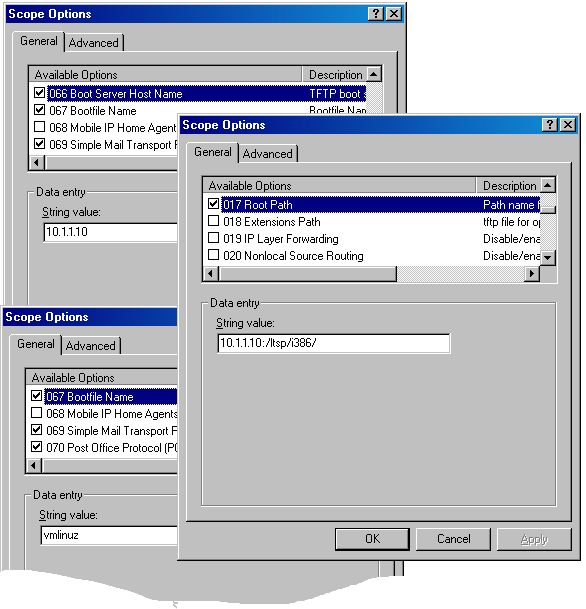
Figure 1. The three scope entries needed on a Windows DHCP server. Notice that the root path has the trailing slash workaround.
Microsoft DHCP appends a null to the NFSROOT, as discussed in LTSP mailing lists, so you need a soft link:
ln -s /ltsp/i386 /ltsp/i386/000
Listing 6. This /ltsp/i386/usr/src/bootfloppy makes a floppy network boot for several models of network card.
#! /bin/bash
if test "$EUID" != "0"; then exec sudo $0; fi

# Configuration options
L="eepro100 rtl8029 rtl8139 tulip 3c905c-tpo"
E=etherboot-5.0.10/src
item=3c905c-t

F=${0}.img
M=$F.mnt
C=$M/syslinux.cfg
CC=$M/toc.txt

# Create the virtual bootable floppy disk
dd if=/dev/zero of=$F bs=1024 count=1440
mkdir -p $M; mkdosfs $F; syslinux $F
mount -t vfat -o loop $F $M

# Populate the floppy with configuration files
cat <<END >$CC
This floppy image is at http://ltsp$F
The bootloaders are built using $E
If you don't have a $item, you need to type
in the card name below. If your network card is
not listed, please notify $USER@qm.com To change the
default permanently, you need to edit the
file `basename $C`
END

cat <<END > $C
display `basename $CC`
prompt 1
timeout 100
default $item
END

# Now add the bootable images
for item in $L
do	T=bin32/$item.lzlilo
	pushd $E; make $T; popd
	item=${item:0:8}
	cp $E/$T $M/$item
	echo >>$CC "     $item"
done
flip -m $C
flip -m $CC

# Release the floppy disk
df $M; umount $M; rmdir $M
For years, our LTSP deployment has been providing multiple X stations to various engineering computers, and we never needed a central application server. The script shown in Listing 6 builds a floppy image for use with all computers. The user simply specifies the network card model.
With this infrastructure, any cluster user can stroll through the buildings with one of those floppies and reboot idle machines into the cluster until sufficient resources are available to run workloads efficiently. For logic simulation, Alex simply adds machines until there are more fast computers in the cluster than slow tests in the suite, so the regression never takes longer than 16 minutes. With that efficiency boost, he rapidly finished the design. Without running mtop, you'd never notice OpenMosix migrating compute-bound processes into the cluster. Meanwhile, others are using the network for different projects.
Quantum Magnetics has about 100 employees, so our cluster is limited to around 100 nodes, as a few people have more than one computer. We're setting things up so that machines spend nights in the cluster and days as normal user workstations. They reboot at least twice every day and check a configuration directory to decide whether to boot from the network or from the hard drive.
The BIOS must be configured to try the PXE boot before the hard drive. The DHCP servers distinguish between EtherBoot and PXE boot requests, with the latter receiving the boot filename for PXELINUX. There are two directories of configuration files, one for day and one for evening, and a small cron job to switch between them. The daytime boot chains to the master boot record on the hard drive, and the evening boot chains to the PXE version of EtherBoot.
The LTSP configuration file indicates which machines have to reboot on weekday mornings and causes the ctrlaltdel script to run. If a user comes to work early, simply pressing Ctrl-Alt-Del brings the machine back into daytime mode as soon as possible.
Remote Windows administration is used to force workstations to log off after inactivity in the evening and then reboot once. If either of the two network boot stages fail, the machine starts Windows and does not join the cluster.
Once your on-demand cluster is running smoothly, resist the temptation to increase it by purchasing a lot of desktop computers you don't otherwise need. The use of LTSP with desktop computers is cost effective only because you already paid for them. There is no financial outlay to acquire them, install them or maintain them when any of their components fail. Dedicated multiprocessor rackmount computers are easily the cheapest way to add processing power to a cluster. By omitting the unnecessary peripherals, they also save money, power, cooling and some failures.
OpenMosix or Mosix offer a quick and easy way to get cluster benefits, but the kernel is making migration decisions in real time. It is inherently less efficient than using explicit workload management with processes dedicated to individual nodes and communicating using MPI. Because you can support both Mosix and MPI within the same cluster, you may want to add job control and MPI libraries to the LTSP client filesystem. Applications that are cluster-aware take advantage of MPI and achieve the ultimate performance available. The other applications always gain partial benefits from Mosix.
On a dual-MPI/Mosix cluster, users have the incentive to migrate to MPI applications. The load balancing algorithms of Mosix always give priority to a local MPI process over a migrated Mosix process, so cluster-unaware applications run more slowly. We haven't started using MPI yet, because none of our critical engineering applications would benefit from it enough to justify the effort needed to establish it.
Our next step in supporting QM's logic simulation needs is to use co-simulation, in which a regression test runs in real time on programmable logic chips. The testing speed is impressive too, because it eliminates the factor of a million speed ratio of simulation. Allowing for the co-simulation support logic, which also has to be placed in the programmable chip, about 10% of the logic can be tested at once. Therefore, each chip can execute tests as fast as a 50,000-node cluster.
No changes to the Linux and cluster configuration are necessary, but open-source tools are critical to keeping the process simple. Every test has to be processed by the place-and-route tools before execution, the test benches have to be written in a special way and a new level of data organization tracks all work in progress.
LTSP runs well within a Windows network and makes it easy to deploy software temporarily across the whole company without modifying the hard drives. Deploying Icarus on the OpenMosix cluster saved months of development time and ensured a more reliable product. The flexibility of open-source components increased our productivity, and the availability of our cluster enhances our corporate capabilities.
Resources for this article: /article/7553.
Dr Alexander Perry (alex.perry@qm.com) is principal engineer at Quantum Magnetics in San Diego, California.
Hoke Trammell (hoke.trammell@qm.com) is a staff scientist for Electromagnetic Sensing at Quantum Magnetics.
David Haynes (david.haynes@qm.com) is corporate Network Administrator at Quantum Magnetics.

