
Kernel Korner - What's New in the 2.6 Scheduler?
As work began on the 2.5 Linux kernel tree back in December 2001, there was a lot of talk in the community about scaling. Linux had begun to appear in some of the roles traditionally filled by larger servers, and several vendors were offering versions of Linux suitable for symmetric multi-processing (SMP). Although commercial interest in that area seemed to be growing, there also was a growing realization that even SMP Linux wasn't scaling as well as it should. If, say, two single-processor desktop machines could outperform a single four-processor machine, who'd want to use (or buy) the four-way?
One of the first areas of the kernel that required attention was the scheduler. It became apparent that as the load and the number of CPUs increased, the scheduler worked harder and harder and ended up taking more and more time away from the processes it was scheduling. In the worst case, nearly the entire system was consumed trying to decide what to run next.
When we speak of the Linux scheduler, we're not referring to a specific task that handles all the scheduling. Rather, each task itself does a little bit of the scheduling each time it acquires or yields the processor, by calling a scheduler function within the kernel. So when we speak about the scheduler doing this or that, we really mean the scheduler function and its related routines in the context of some other task.
The original 2.4 scheduler was quite simple. All tasks on the system were already on a global list called tasklist, and these were assigned a goodness rating. Goodness was determined by:
How many clock ticks you might have left: when a task is given the processor, the task is allocated a certain amount of time to use it before that task is interrupted involuntarily and replaced by another task. If it gives up the processor voluntarily—to wait for I/O, for example—then the task's generosity would be rewarded by being at a higher priority to regain the processor once the I/O job was complete.
CPU affinity: by using another system call, it is possible to advise the scheduler that you wish to remain on a particular processor, even if another processor should free up first.
Nice or user-set priority: if the user is root, it's possible for the user to increase or decrease the priority of a task within a fairly substantial range.
Whether the task was a real-time task: a task that has been designated a real-time task has a higher priority than all tasks that are not real time.
So when a processor came free, the 2.4 scheduler would examine the tasklist, looking for the task with the highest goodness, and select that task for running next. Figure 1 demonstrates how the 2.4 scheduler worked. The tasklist was the runqueue, and because it wasn't ordered in any helpful way, each iteration of the scheduler would examine the tasklist completely, looking for the best candidate for the idle processor. In the case of multiple processors, it was a matter of chance if you ended up on the same processor twice in a row, even if you were the only runnable task.
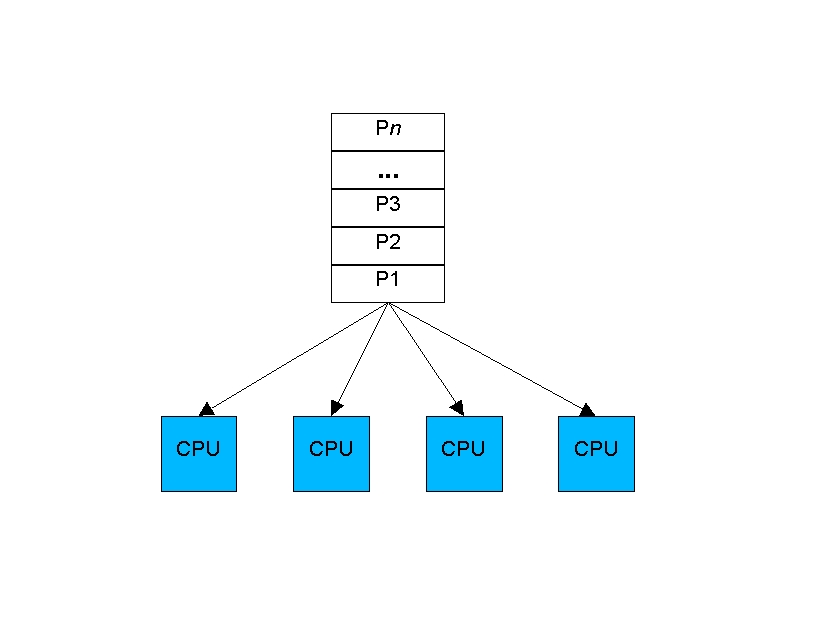
Figure 1. The 2.4 scheduler was shared among processors and wasn't ordered in any helpful way.
This model had the advantage of being quite simple to implement and fairly simple to debug. The tasklist was guarded by a single read/write spinlock. This allowed multiple tasks to examine it in parallel while still providing the mechanism for obtaining exclusive access for the comparatively rare event of changing it.
Unfortunately, these same features also were the model's disadvantages. Instrumentation of the then-current 2.4 scheduler began to zero-in on the problem: the single read/write spinlock tended to become a point of contention on both busy systems and systems with four or more CPUs. Only a single queue was used for all processors, and it had to be examined completely for each reschedule. As the system got busier, the tasklist got longer; the linear search for the best task took longer as well. As a result, having decided which process to run, you waited longer to acquire the lock exclusively to remove that task from the runnable list and mark it running. If the wait was long enough, several processors might choose the same process only to learn that it already had been given to a different processor. The other processors then would have to go back to the linear search and find another task. As the system got busier, the scheduler consumed more CPU time, to the point where scheduling processes took more time than did running them. Changes needed to be made so that a loaded system didn't schedule itself into a standstill.
Thus, the stage was set for the introduction of the O(1) scheduler in 2.6, which boasts that the time to select the best task and get it on a processor is constant, regardless of the load on the system or the number of CPUs for which it is scheduling. Instead of one queue for the whole system, one active queue is created for each of the 140 possible priorities for each CPU. As tasks gain or lose priority, they are dropped into the appropriate queue on the processor on which they'd last run. It is now a trivial matter to find the highest priority task for a particular processor. A bitmap indicates which queues are not empty, and the individual queues are FIFO lists. Therefore, you can execute an efficient find-first-bit instruction over a set of 32-bit bitmaps and then take the first task off the indicated queue every time.
As tasks complete their timeslices, they go into a set of 140 parallel queues per processor, named the expired queues. When the active queue is empty, a simple pointer assignment can cause the expired queue to become the active queue again, making turnaround quite efficient.
It's not possible to draw the 140 queues now present for each CPU without resorting to mere dots. But, Figure 2 offers an approximation and drives home the major difference between the 2.4 and the 2.6 schedulers. Except on a heavily loaded system, most queues are empty. Those that are not empty have their best selection at the head of the queue, so searching for the next task to run has become easy.
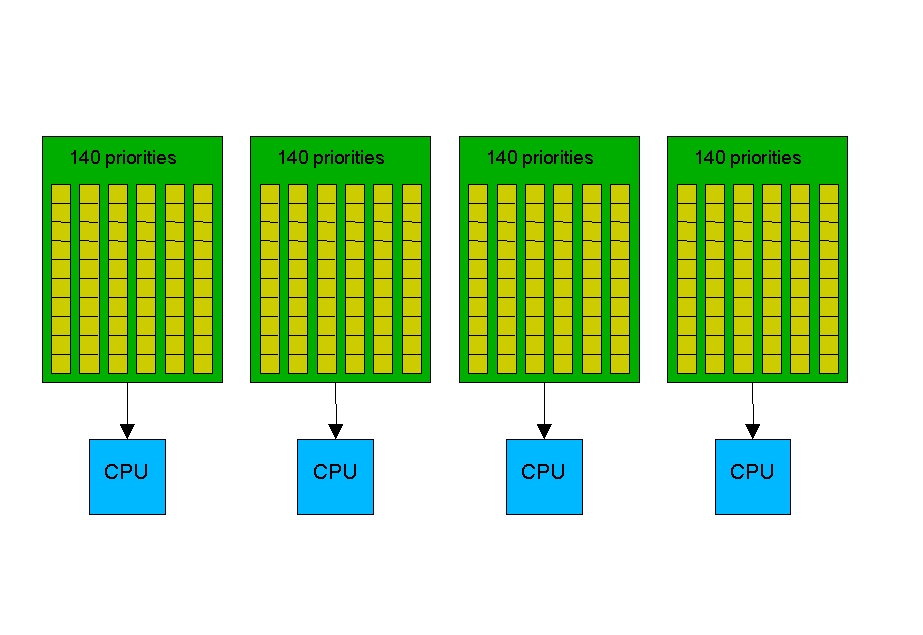
Figure 2. The 2.6 scheduler has 140 queues per processor, making it easy to search for the next runnable task.
There's one shortcoming of this 2.6 method. Once a task lands on a processor, it might use up its timeslice and get put back on a prioritized queue for rerunning—but how might it ever end up on another processor? In fact, if all the tasks on one processor exit, might not one processor stand idle while another round-robins three, ten or several dozen other tasks? To address this basic issue, the 2.6 scheduler must, on occasion, see if cross-CPU balancing is needed. It also is a requirement now because, as mentioned previously, it's possible for one CPU to be busy while another sits idle. Waiting to balance queues until tasks are about to complete their timeslices tends to leave CPUs idle too long. Instead, 2.5 and 2.6 leverage the process accounting, which is driven from clock ticks, to inspect the queues regularly. Every 200ms a processor checks to see if any other processor is out of balance and needs to be balanced with that processor. If the processor is idle, it checks every 1ms so as to get started on a real task as soon as possible.
This is not to say that the scheduler is fixed now and all work on it has stopped. Some workloads and architectures provide some interesting scenarios that the scheduler still doesn't deal with well.
The goals of a successful scheduler can be stated simply, even if they always can't be attained simply.
Minimize the time spent scheduling, so as to maximize the time spent executing.
On multiple CPUs, keep the load spread around so it is easier to share the processors fairly.
Provide good response to interactive programs.
In addition, the philosophy of the Linux scheduler is that it should be mostly right all of the time rather than perfect much of the time. Even though different workloads exhibit different behaviors and place different stresses on the system, the scheduler should be sufficiently general and robust so that all workloads are handled at least adequately, without additional tuning being necessary.
Most of the scheduler tweaking in 2.6 has been done in an attempt to improve interactive response. Originally, this was interactive in the traditional sense of dragging windows across a monitor or typing on a keyboard. An interactive task was meant to define a task that utilized a lot of human interaction. But it gradually has been expanded to mean “tasks that should receive high priority upon waking up from self-imposed sleeps”. This includes the previous set of tasks but also now includes tasks for which a delay is noticeable by humans, such as delays in music players. Because this is a subjective evaluation, it might never be resolved to everyone's satisfaction. General agreement from testers, however, is the situation is better now with the 2.6 scheduler.
Imagine two tasks spending a lot of time communicating with each other over a pipe or bit of shared memory. Some evidence exists that they might do better if they were on the same processor, even if that means leaving another idle. If one sends a message to the other and then waits for a reply, both tend to alternate being runnable with small overlaps where they are both runnable. In other words, they don't collide often. The big savings comes from having the processor cache pre-warmed with the data in the pipe so it doesn't need to be fetched and copied again to a different processor's cache. Although processor speeds have been increased, memory and bus speeds have not kept pace. It's becoming increasingly painful to have to retrieve data that used to be cached.
Moving a task that uses little memory affects a processor differently from moving a task that uses a great deal of memory. However, either the large or small task may be the correct choice depending on the circumstances. If you move a task that uses a lot of memory away from a processor, leaving behind many small tasks that don't use much memory, each of those tasks may find a higher percentage of their memory in cache each time they run. On the other hand, moving that large task to another processor that has large tasks may now cause all the tasks to start with a cold cache and negatively affect the performance of both it and its new neighbors. Current code does not take process size into account at all.
For much the same reason as process affinity, there might be times when it pays to overload a processor with tasks if those tasks are making heavy use of a particular device. Web servers, for instance, often have multiple network cards but not enough to have one for each CPU. Congregating those tasks on processors where the network data is arriving might prove quite advantageous. Determining which tasks are likely to use which devices is currently neither obvious nor easy.
Shell scripts can cause an explosive number of short-lived tasks, especially if they don't or can't use built-in functions for string or number manipulations. Although one could argue these are poorly coded scripts, they nevertheless have demonstrated that the scheduler can be too slow in balancing queues on SMP machines. Workloads with similar behavior also would suffer.
Imagine a program that divides the work into six equal pieces, all of which ideally finish at the same time. Unfortunately, on a four-processor machine, two processors tend to take two tasks and two tend to take one task, and things stay that way. Unless the scheduler makes an effort to spread the pain around, two jobs finish more quickly than the other four because they have no competition on their processor. On the other hand, in most job mixes, moving those odd jobs around still leaves two tasks on each of two processors.
NUMA (non-uniform memory access) presents some interesting characteristics to worry about. In a NUMA system, it may be much more expensive to get memory from over there, near another processor, than from here, near this processor. It's not sufficient to have an idle processor; you need one that is both idle and not too expensive to migrate to. For instance, it might be bad to migrate a task if most of the task's resources reside at the current location. It even might be so bad that it's better to leave it on a busy processor than to move it to an idle one with a cold cache.
Hyperthreading introduces yet another complexity. In hyperthreading, two processors share cores that overlap in a hardware-dependent way. Because of this interdependency, jobs running on one processor can affect the speed of a job running on the other processor. Although nobody would ever expect a box with four hyperthreading processors to equal a full eight-processor machine, exactly what to expect varies a great deal by workload. The only sure thing is it should not yield less performance.
The 2.6 scheduler offers some strong improvements over the 2.4 scheduler. It scales better on larger machines for most workloads without giving up the performance demanded by the one- and two-processor users that make up much of the Linux market. Recent changes allow the scheduler to handle kernel builds smoothly at the same time as it plays your favorite songs. The 2.6 kernel is available now to adventurous souls at www.kernel.org. Full distributions from Linux vendors that utilize 2.6 kernels will lag as vendors complete their own testing and add their own support features; you should contact your favorite vendor directly for release information.
Rick Lindsley has worked with UNIX and Linux for 20 years. He's currently working on Linux scheduler improvements in IBM's Linux Technology Center and can be reached at ricklind@us.ibm.com.

